sketchucation logo sketchucation
    • 登入
    Oops, your profile's looking a bit empty! To help us tailor your experience, please fill in key details like your SketchUp version, skill level, operating system, and more. Update and save your info on your profile page today!
    🔌 Smart Spline | Fluid way to handle splines for furniture design and complex structures. Download

    WrapR 1.1 Beta Trial

    已排程 已置頂 已鎖定 已移動 Extensions & Applications Discussions
    extensions
    32 貼文 9 Posters 12.0k 瀏覽 9 Watching
    正在載入更多貼文
    • 從舊到新
    • 從新到舊
    • 最多點贊
    回覆
    • 在新貼文中回覆
    登入後回覆
    此主題已被刪除。只有擁有主題管理權限的使用者可以查看。
    • Rich O BrienR 離線
      Rich O Brien Moderator
      最後由 編輯

      Hi,

      We've updated WrapR to v1.1 with many fixes and new features...

      Link Preview Image
      UV Mapping for SketchUp

      WrapR for SketchUp is a UV mapping extension for SketchUp models

      favicon

      (wrap-r.com)

      This new version has better visual clues when manipulating UV shells, better texture support and bug fixes.

      You can download the free trial above by requesting access.

      The documentation should be ready next week and video tutorials.

      Download the free D'oh Book for SketchUp 📖

      1 條回覆 最後回覆 回覆 引用 0
      • Bob JamesB 離線
        Bob James
        最後由 編輯

        Is this 3 Apr version different from:

        31 Mar version 1.1.0

        Looks the same

        wrapr new.PNG

        i7-4930K 3.4Ghz, 2x GTX780 6GB, 32GB DDR3-1600 ECC, OCZ Vertex 4 500GB, WD Black 3TB, 32TB NAS, 4x 27" Monitors, SpaceMouse Pro, X-keys XK-60

        1 條回覆 最後回覆 回覆 引用 0
        • Rich O BrienR 離線
          Rich O Brien Moderator
          最後由 編輯

          If you got the email we sent out on friday then you are using the latest

          Download the free D'oh Book for SketchUp 📖

          1 條回覆 最後回覆 回覆 引用 0
          • R 離線
            rv1974
            最後由 編輯

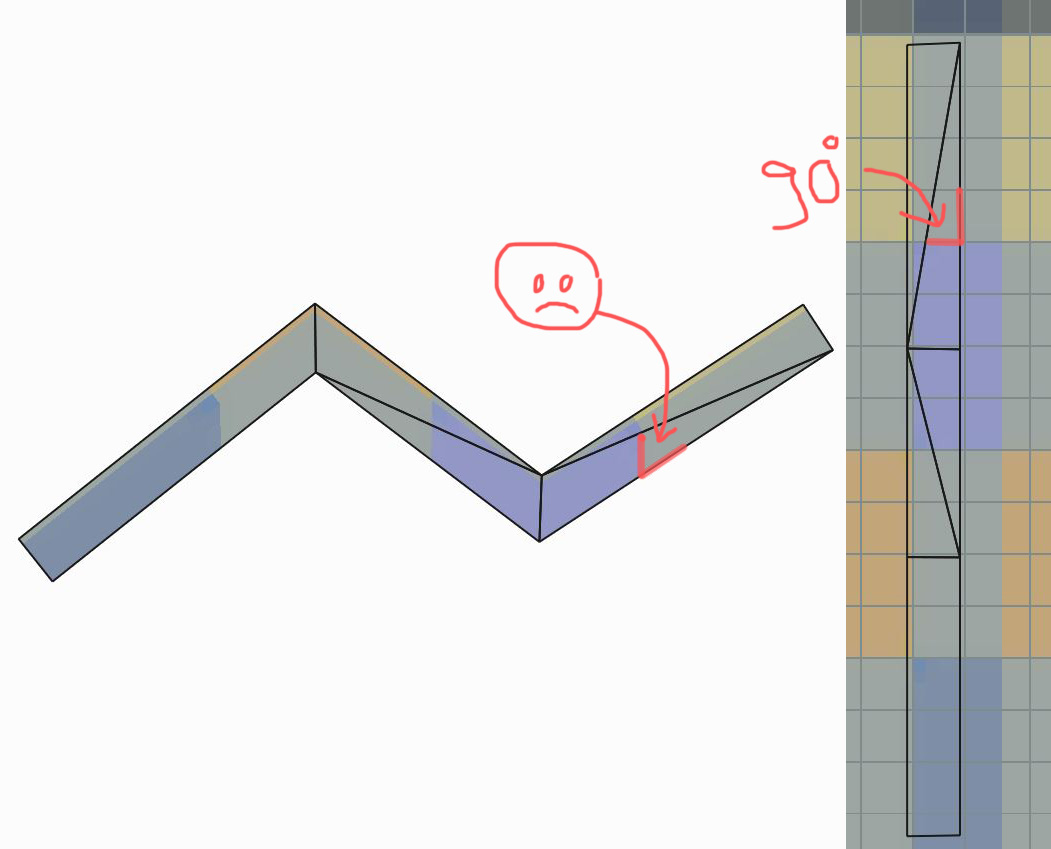
            Thank you very much for sorting the lefty's mouse bug out! Hope in next release Wrap-r will learn to pick up the right (=close to original) map size.

            Theoretically speaking (please see attached) do you see the solution for this issue (diagonals breaking perpendicular patterns)? may be some kind of spline unwrap?

            Capture.JPG

            1 條回覆 最後回覆 回覆 引用 0
            • Rich O BrienR 離線
              Rich O Brien Moderator
              最後由 編輯

              @rv1974 said:

              Hope in next release Wrap-r will learn to pick up the right (=close to original) map size.

              Theoretically speaking (please see attached) do you see the solution for this issue (diagonals breaking perpendicular patterns)? some kind of spline unwrap?

              Are you referring to the textures angle between the triangles?

              To maintain a straight line either side you would need a Projection method. Which is planned.

              Can you share that file here? So I can play too 😛

              Download the free D'oh Book for SketchUp 📖

              1 條回覆 最後回覆 回覆 引用 0
              • R 離線
                rv1974
                最後由 編輯

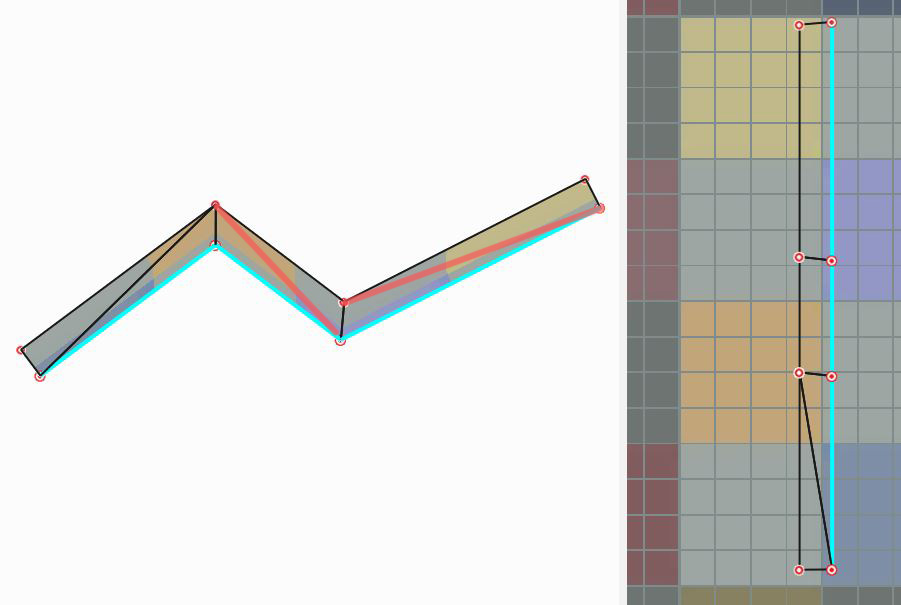
                My most most primitive example added. Notice that Wrap-r skips some diagonals for some reason (don't know whether its good\bad\neutral thing). And it keeps scaling maps up.
                P.S. So happy to hear projection method is on the way! Hope it will be released simultaneously with Retopo plug-in in near future!

                Untitledjjj.skp


                Capture222.JPG

                1 條回覆 最後回覆 回覆 引用 0
                • Rich O BrienR 離線
                  Rich O Brien Moderator
                  最後由 編輯

                  @rv1974 said:

                  Notice that Wrap-r skips some diagonals for some reason (don't know whether its good\bad\neutral thing). And it keeps scaling maps up.

                  OK, I see the issue.

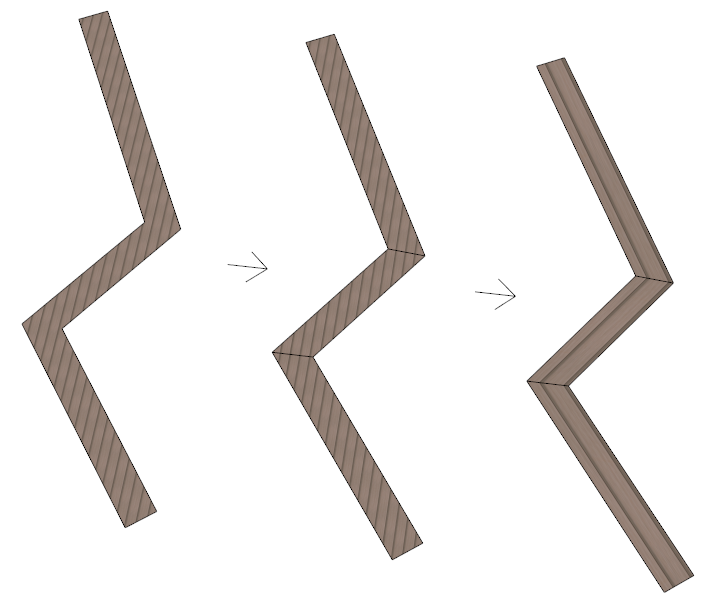
                  Your mesh has all internal edge set to Smooth, Soft, Cast Shadows off. So this is not a true quad face. When you fix that then WrapR can read the faces as Quads...
                  screen-grab_016.png

                  Turn off Live Unwrap when you are straightening UVs to make the process easier.

                  Download the free D'oh Book for SketchUp 📖

                  1 條回覆 最後回覆 回覆 引用 0
                  • O 離線
                    oalexis
                    最後由 編輯

                    I'm having a bit of trouble. I UV'd most of my model then saved and said yes to continue, and when it reloaded the model, it was back to its default state. Am I doing something wrong? Also how do you install the plugin to work inside of sketchup? Thanks

                    1 條回覆 最後回覆 回覆 引用 0
                    • R 離線
                      rv1974
                      最後由 編輯

                      Right click menu: 'Reload from Wrap-R'.

                      1 條回覆 最後回覆 回覆 引用 0
                      • JQLJ 離線
                        JQL
                        最後由 編輯

                        Yup we would benefit a lot with an auto reload on sketchup side. Undo would return the mesh to original state.

                        www.casca.pt
                        Visit us on facebook!

                        1 條回覆 最後回覆 回覆 引用 0
                        • Rich O BrienR 離線
                          Rich O Brien Moderator
                          最後由 編輯

                          @jql said:

                          we would benefit a lot with an auto reload on sketchup side

                          what is the big benefit?

                          Download the free D'oh Book for SketchUp 📖

                          1 條回覆 最後回覆 回覆 引用 0
                          • JQLJ 離線
                            JQL
                            最後由 編輯

                            Not having to right click reload, allows for faster workflows:
                            1 - Mark seams on Component#1; Component#2; Component#3; Component#4...;
                            2 - Send to wrapr, assume auto unwrap, save and close.
                            3 - Reload happens automatically;
                            4 - Repeat step two for each component;

                            I intend on using wrapr for such things like multiple windows or doors, or multiple beams in a roof. It's a tedious workflow and any step you could provide to easen the burden would be welcome. That right-click is one such step.

                            I also like when I use sketchup to send a texture to my image editor and it's automatically switched on SU when I save it there. It's not much, but always causes a nice impression on me.

                            www.casca.pt
                            Visit us on facebook!

                            1 條回覆 最後回覆 回覆 引用 0
                            • O 離線
                              oalexis
                              最後由 編輯

                              @rv1974 said:

                              Right click menu: 'Reload from Wrap-R'.

                              There is no right click menu within the wrapr application that I'm aware of. I did all the cuts and unwrapping in the standalone wrapr application. The save button says it saves and then gives you the option to continue working and it reloads the mesh, but it reloads the original without any of the changes to the UV map.

                              As a separate problem the pluging within sketchup does not seem to install for me. Using the rubyinstaller.exe in the folder brings up an empty list of components to select from and says install components.

                              1 條回覆 最後回覆 回覆 引用 0
                              • Rich O BrienR 離線
                                Rich O Brien Moderator
                                最後由 編輯

                                What version of SketchUp do you use?

                                Download the free D'oh Book for SketchUp 📖

                                1 條回覆 最後回覆 回覆 引用 0
                                • G 離線
                                  Gábor
                                  最後由 編輯

                                  @oalexis said:

                                  As a separate problem the pluging within sketchup does not seem to install for me. Using the rubyinstaller.exe in the folder brings up an empty list of components to select from and says install components.

                                  Could you please send me a screenshot how the rubyinstaller.exe shows up when you start it separately? Also: Do you get any error messages when you start it up?

                                  1 條回覆 最後回覆 回覆 引用 0
                                  • O 離線
                                    oalexis
                                    最後由 編輯

                                    @rich o brien said:

                                    What version of SketchUp do you use?

                                    I had an older version installed, that was the problem so I updated to the latest version and the plugin installed. Now, however after making the cuts in sketchup, and sending it to wrapr it doesn't automatically open wrapr. It creates the component then does nothing and if I try to open the file manually in wrapr it tells me it can't open files with components, so then if I delete the component it opens but doesn't keep any of the cuts I made within sketchup.

                                    1 條回覆 最後回覆 回覆 引用 0
                                    • G 離線
                                      Gábor
                                      最後由 編輯

                                      @oalexis said:

                                      ....and sending it to wrapr it doesn't automatically open wrapr.

                                      Please open the ruby console before sending to Wrap-R. Are there any error messages when you try to send?

                                      1 條回覆 最後回覆 回覆 引用 0
                                      • O 離線
                                        oalexis
                                        最後由 編輯

                                        @gábor said:

                                        @oalexis said:

                                        ....and sending it to wrapr it doesn't automatically open wrapr.

                                        Please open the ruby console before sending to Wrap-R. Are there any error messages when you try to send?

                                        It comes up with this error.

                                        Error; #<TypeError; no implicit conversion of nil into String>
                                        c;/users/oalexis/appdata/roaming/sketchup/sketchup 2017/sketchup/plugins/wrapr/wrapr-loader.rbs;156;in `exist?'
                                        c;/users/oalexis/appdata/roaming/sketchup/sketchup 2017/sketchup/plugins/wrapr/wrapr-loader.rbs;156;in `run'
                                        c;/users/oalexis/appdata/roaming/sketchup/sketchup 2017/sketchup/plugins/wrapr/wrapr_run.rbs;28;in `block in <module;Loader>'
                                        SketchUp;1;in `call'
                                        
                                        
                                        1 條回覆 最後回覆 回覆 引用 0
                                        • G 離線
                                          Gábor
                                          最後由 編輯

                                          @oalexis said:

                                          It comes up with this error.

                                          Thank you very much for the information. Soon we will be out with a fix for the problem. Just one more question: Did you change the default install path of Wrap-R when you installed it?

                                          Sent from my SM-G935F using Tapatalk

                                          1 條回覆 最後回覆 回覆 引用 0
                                          • G 離線
                                            Gábor
                                            最後由 編輯

                                            Wrap-R 1.1.3 Beta is available now and can be downloaded from the link:
                                            https://s3.amazonaws.com/wrapr-download/WrapR-installer_1_1_3.exe

                                            Changes since 1.1.1:

                                            • Several error fixes including the problem with the plugin spotted by @oalexis
                                            • Now the unwrapped SketchUp model can be saved as ".obj" or ".dae" file as well
                                            • The installer will not require to remove previous install, it will simply overwrite the previous install files.

                                            1 條回覆 最後回覆 回覆 引用 0
                                            • 1
                                            • 2
                                            • 1 / 2
                                            • 第一個貼文
                                              最後的貼文
                                            Buy SketchPlus
                                            Buy SUbD
                                            Buy WrapR
                                            Buy eBook
                                            Buy Modelur
                                            Buy Vertex Tools
                                            Buy SketchCuisine
                                            Buy FormFonts

                                            Advertisement



