sketchucation logo sketchucation
    • 登入
    Oops, your profile's looking a bit empty! To help us tailor your experience, please fill in key details like your SketchUp version, skill level, operating system, and more. Update and save your info on your profile page today!
    🔌 Smart Spline | Fluid way to handle splines for furniture design and complex structures. Download

    Medeek Wall Plugin

    已排程 已置頂 已鎖定 已移動 Plugins
    1.5k 貼文 27 Posters 1.1m 瀏覽 26 Watching
    正在載入更多貼文
    • 從舊到新
    • 從新到舊
    • 最多點贊
    回覆
    • 在新貼文中回覆
    登入後回覆
    此主題已被刪除。只有擁有主題管理權限的使用者可以查看。
    • medeekM 離線
      medeek
      最後由 編輯

      Version 3.0.9 - 01.05.2023

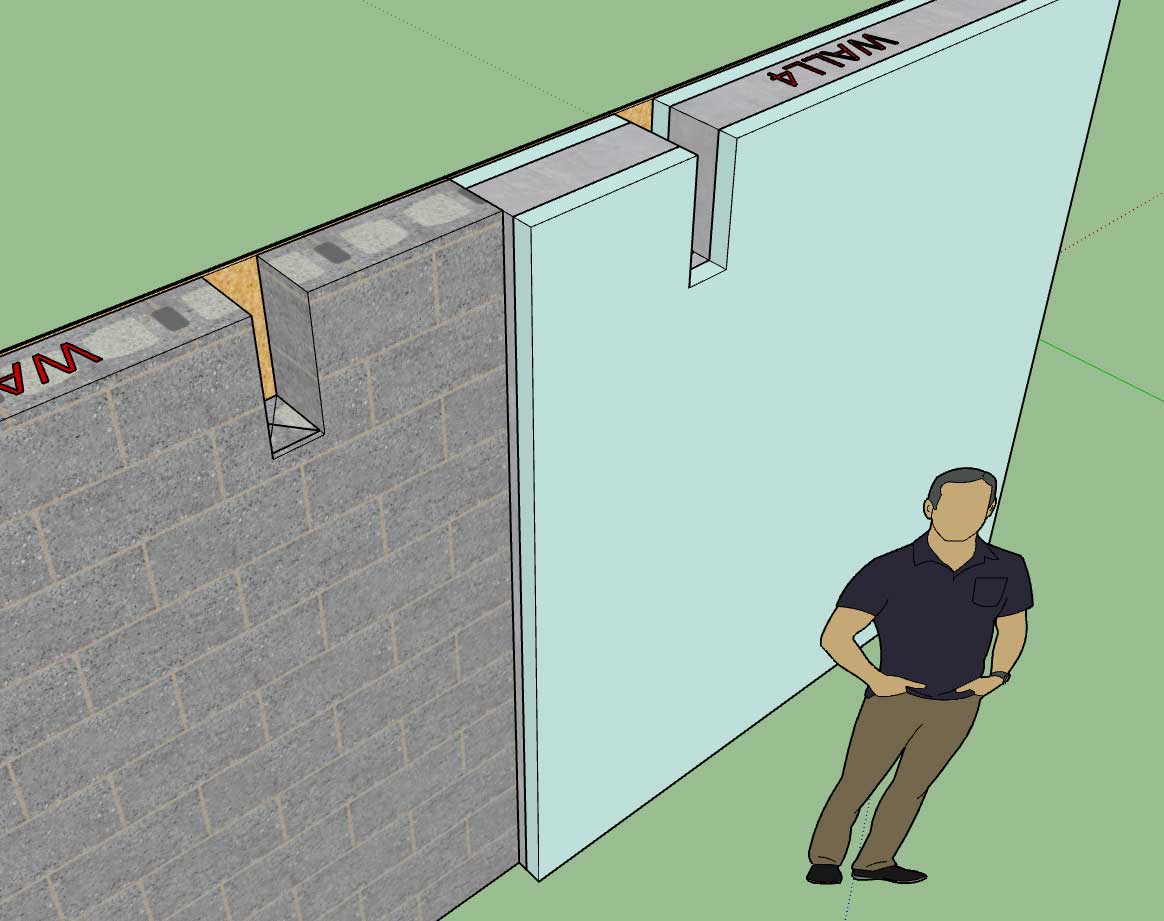
      • Enabled beam pockets (in-wall columns) for CMU, CMU Core and ICF walls.
      • Fixed a bug within the plan view auto-dimensioning module having to do with in-wall columns.
      • Fixed a minor typo in the Draw menu for in-wall columns.
      http://design.medeek.com/resources/wallplugin/images5/wall_su683_800.jpg

      Nathaniel P. Wilkerson PE
      Medeek Engineering Inc
      design.medeek.com

      1 條回覆 最後回覆 回覆 引用 0
      • gullfoG 離線
        gullfo
        最後由 編輯

        any thoughts on exterior parging / waterproofing like a partial thin surface (stucco, poly, etc) added on the exterior side above grade and below grade contact? fancy would be terrain following (approximated) versus a set level per wall.

        e.g.
        https://www.amvicsystem.com/products/icf/waterproofing-and-parging/
        https://www.parge.ca/services/
        https://solidacon.com/parging-over-icf/

        Glenn

        http://www.runnel.com

        1 條回覆 最後回覆 回覆 引用 0
        • medeekM 離線
          medeek
          最後由 編輯

          Version 3.1.0 - 01.11.2023

          • Enabled layer control integration with the Medeek Project extension.
          • Moved the Medeek Estimating module to the Medeek Project extension.
          • Moved the Medeek Documents module to the Medeek Project extension.

          Nathaniel P. Wilkerson PE
          Medeek Engineering Inc
          design.medeek.com

          1 條回覆 最後回覆 回覆 引用 0
          • medeekM 離線
            medeek
            最後由 編輯

            Version 3.1.1 - 01.19.2023

            • Fixed a bug with ICF Walls.
            • Fixed a type in the HTML of the General tab of the Global Settings.

            Tutorial 32 - Auto-Dimensioning (9:31 min.)

            Tutorial 33 - ICF Walls (5:51 min.)

            Nathaniel P. Wilkerson PE
            Medeek Engineering Inc
            design.medeek.com

            1 條回覆 最後回覆 回覆 引用 0
            • medeekM 離線
              medeek
              最後由 編輯

              Tutorial 34 - Modifying Openings (7:19 min.)

              Nathaniel P. Wilkerson PE
              Medeek Engineering Inc
              design.medeek.com

              1 條回覆 最後回覆 回覆 引用 0
              • medeekM 離線
                medeek
                最後由 編輯

                Version 3.1.2 - 02.05.2023

                • Fixed a bug with metric templates that propagated from Version 3.0.8.
                • Fixed a specific bug with auto-loading wall presets.

                ! ATTENTION !
                Critical bug fix, especially for metric templates. I highly recommend upgrading to Version 3.1.2 if you have installed Version 3.0.8 or later.

                The auto-load bug has to do with enabling the auto-load preset option in the Global Settings and then subsequently deleting the preset that was selected as the default auto-load preset.

                Nathaniel P. Wilkerson PE
                Medeek Engineering Inc
                design.medeek.com

                1 條回覆 最後回覆 回覆 引用 0
                • medeekM 離線
                  medeek
                  最後由 編輯

                  Version 3.1.2b - 02.07.2023

                  • Fixed a minor bug with the Wall Selector Matrix (Gable, Shed and Hip walls).

                  This bug was due to some consolidation and general house cleaning I did with the code a few cycles back. Even when a gable wall was selected it would automatically revert to a rectangular wall. I just noticed this yesterday but the bug probably has been around for at least a month.

                  Nathaniel P. Wilkerson PE
                  Medeek Engineering Inc
                  design.medeek.com

                  1 條回覆 最後回覆 回覆 引用 0
                  • medeekM 離線
                    medeek
                    最後由 編輯

                    Version 3.1.3 - 02.16.2023

                    • Fixed a bug with door presets within the Edit Door menu.

                    Nathaniel P. Wilkerson PE
                    Medeek Engineering Inc
                    design.medeek.com

                    1 條回覆 最後回覆 回覆 引用 0
                    • medeekM 離線
                      medeek
                      最後由 編輯

                      Version 3.1.4 - 03.12.2023

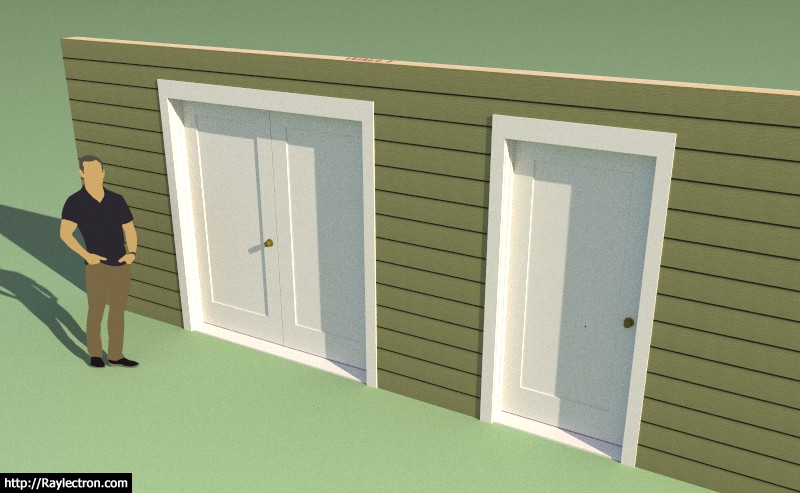
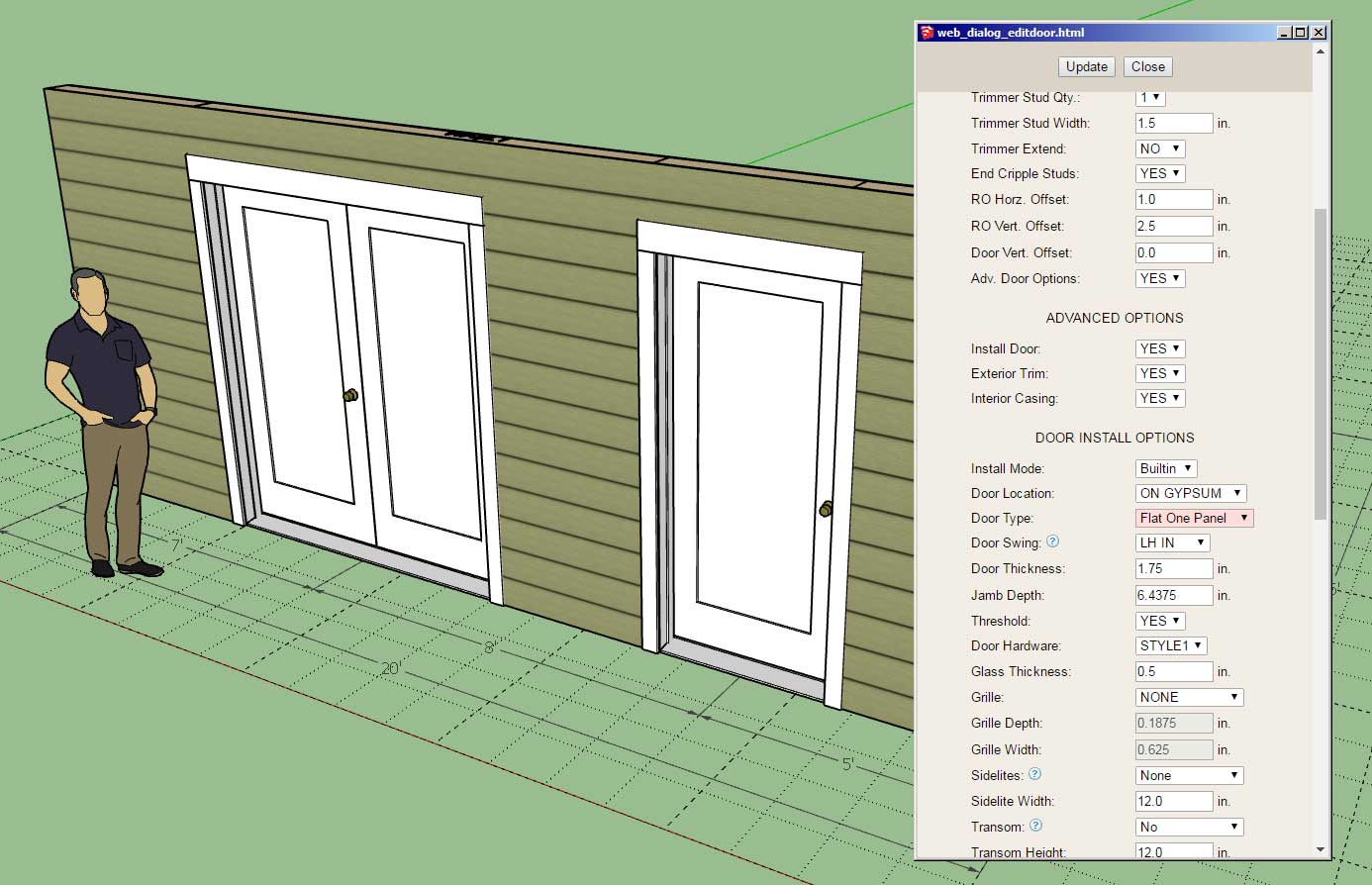
                      • Added the following door types: flat one panel (single and double).
                      http://design.medeek.com/resources/wallplugin/images5/wall_su688_800.jpg

                      http://design.medeek.com/resources/wallplugin/images5/wall_su689_800.jpg

                      This update per customer request.

                      Nathaniel P. Wilkerson PE
                      Medeek Engineering Inc
                      design.medeek.com

                      1 條回覆 最後回覆 回覆 引用 0
                      • medeekM 離線
                        medeek
                        最後由 編輯

                        Version 3.1.5 - 03.17.2023

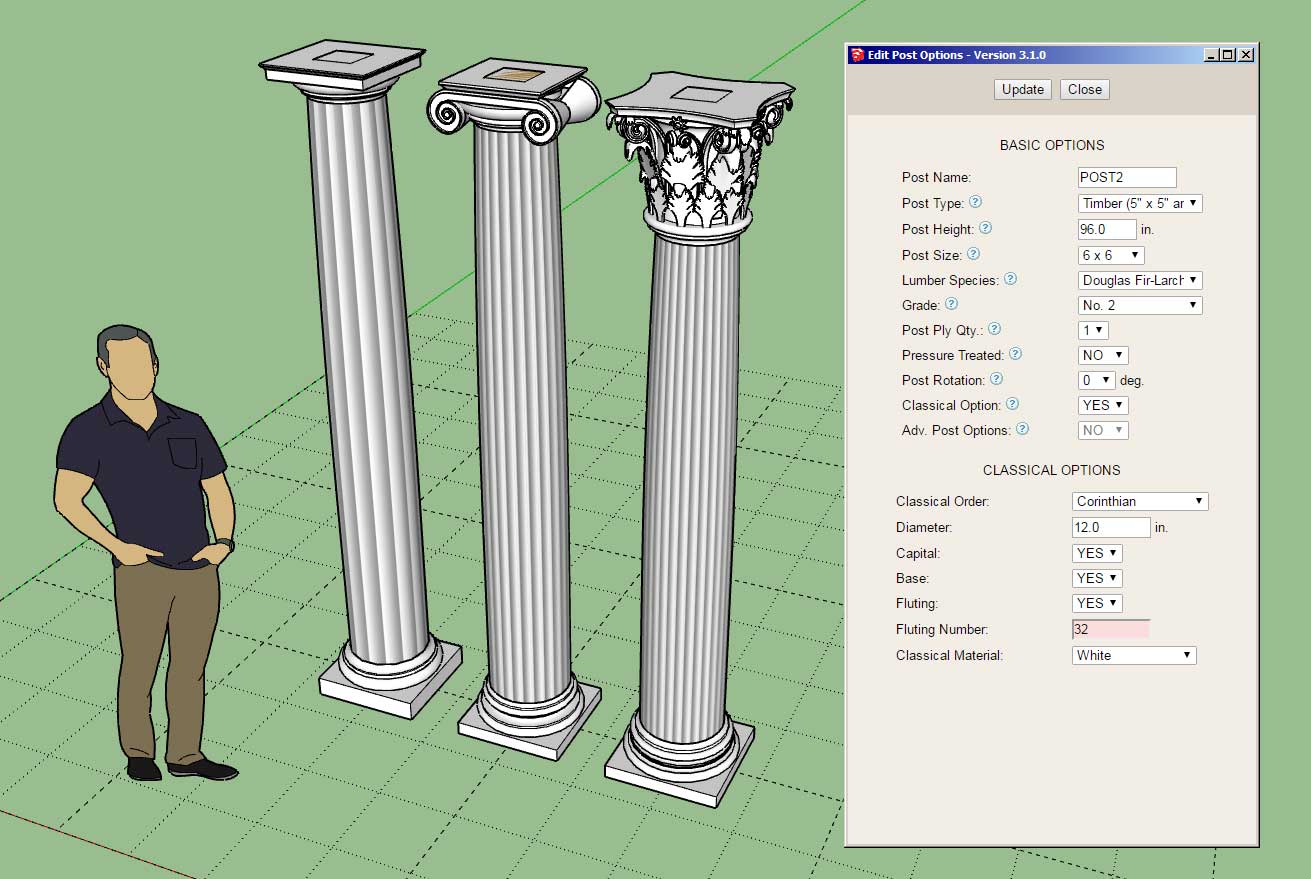
                        • Added a fluting number parameter for classical columns.
                        http://design.medeek.com/resources/wallplugin/images5/wall_su690_800.jpg

                        Really wasn't wanting to dig into this right now but after a quick inspection of my code I realized it would only take me a few minutes to add in this additional parameter so that one could fine tune the look of the fluting of classical columns.

                        This update per customer request.

                        Nathaniel P. Wilkerson PE
                        Medeek Engineering Inc
                        design.medeek.com

                        1 條回覆 最後回覆 回覆 引用 0
                        • medeekM 離線
                          medeek
                          最後由 編輯

                          I thought I would circle back to inclined walls since I had some questions on shed dormers over the weekend.

                          I’ve updated the wall menus to include these new parameters now I just need to create the boolean logic to modify the wall geometry accordingly:

                          https://global.discourse-cdn.com/sketchup/original/3X/8/b/8be454deea2b952430a9d172ee1523e55a7b0112.jpeg

                          This feature should give the user the flexibility to modify rectangular, hip, shed or gable walls as needed when an inclined bottom plate is required.

                          Nathaniel P. Wilkerson PE
                          Medeek Engineering Inc
                          design.medeek.com

                          1 條回覆 最後回覆 回覆 引用 0
                          • medeekM 離線
                            medeek
                            最後由 編輯

                            Version 3.1.6 - 03.26.2023

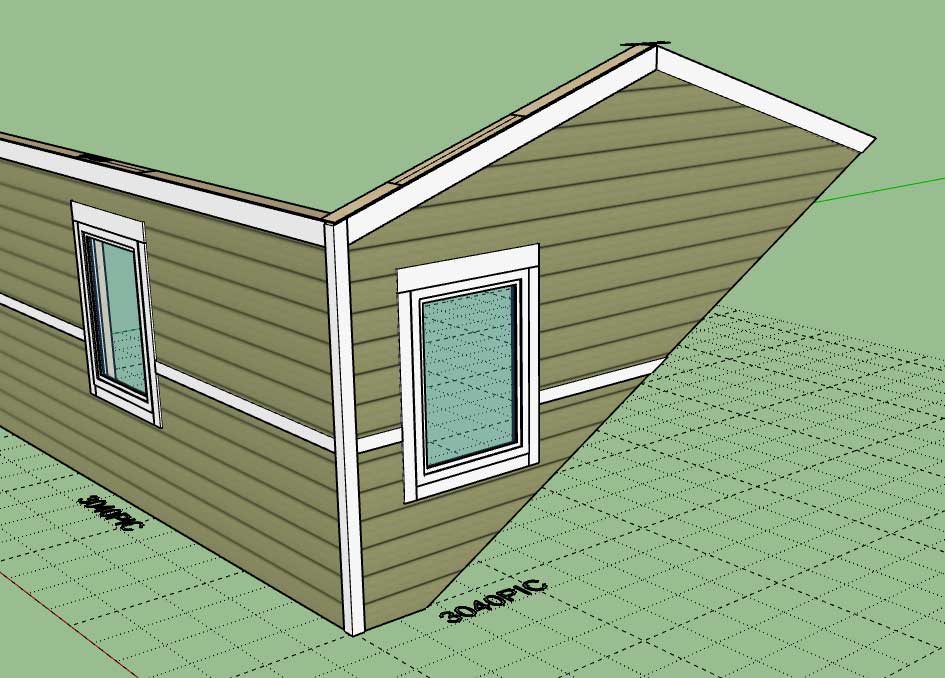
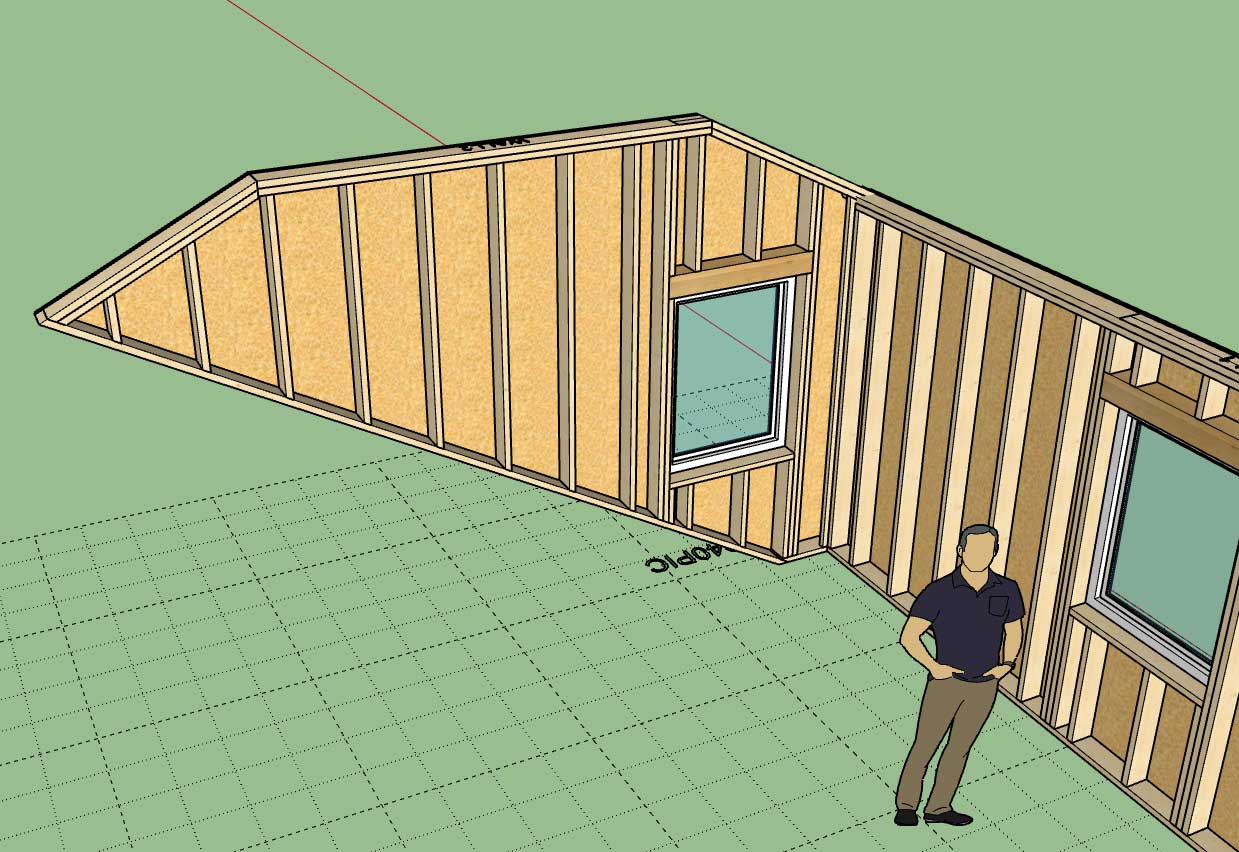
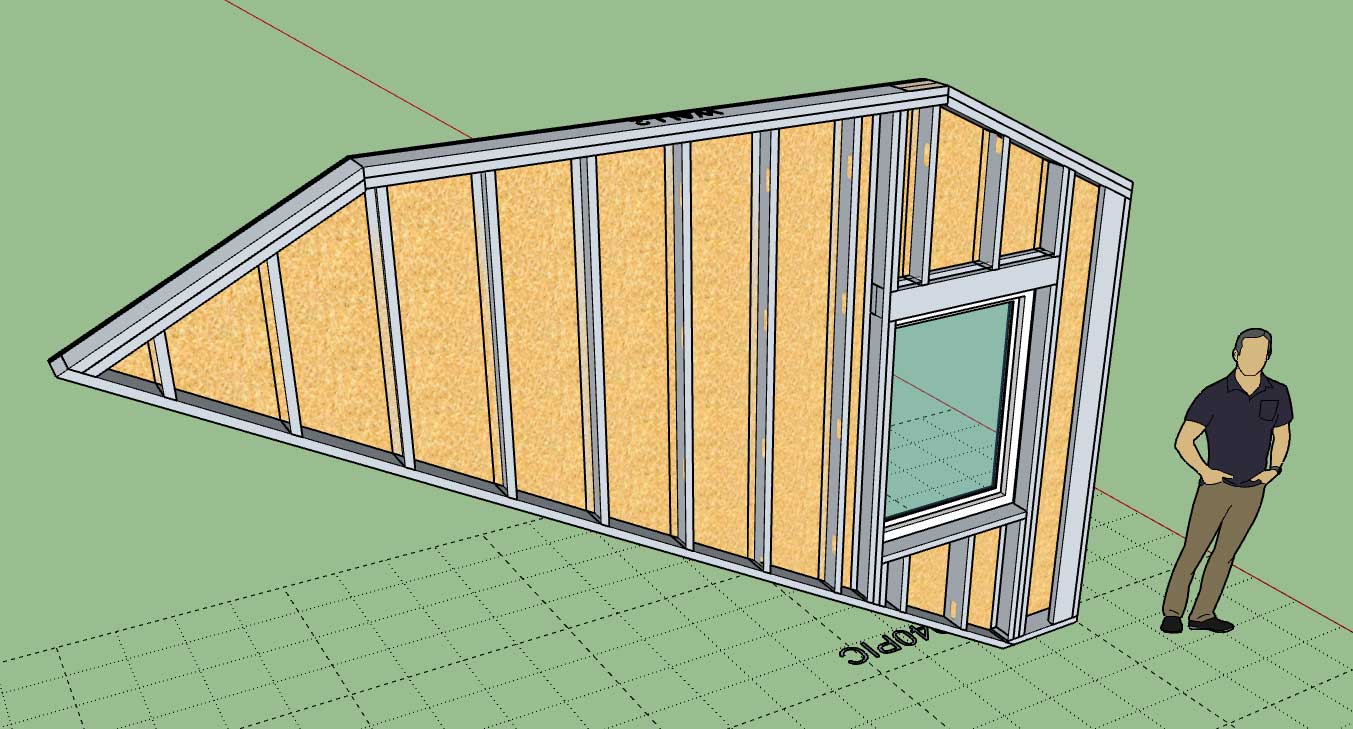
                            • Added inclined walls for all wall types: rectangular, shed, gable and hip.
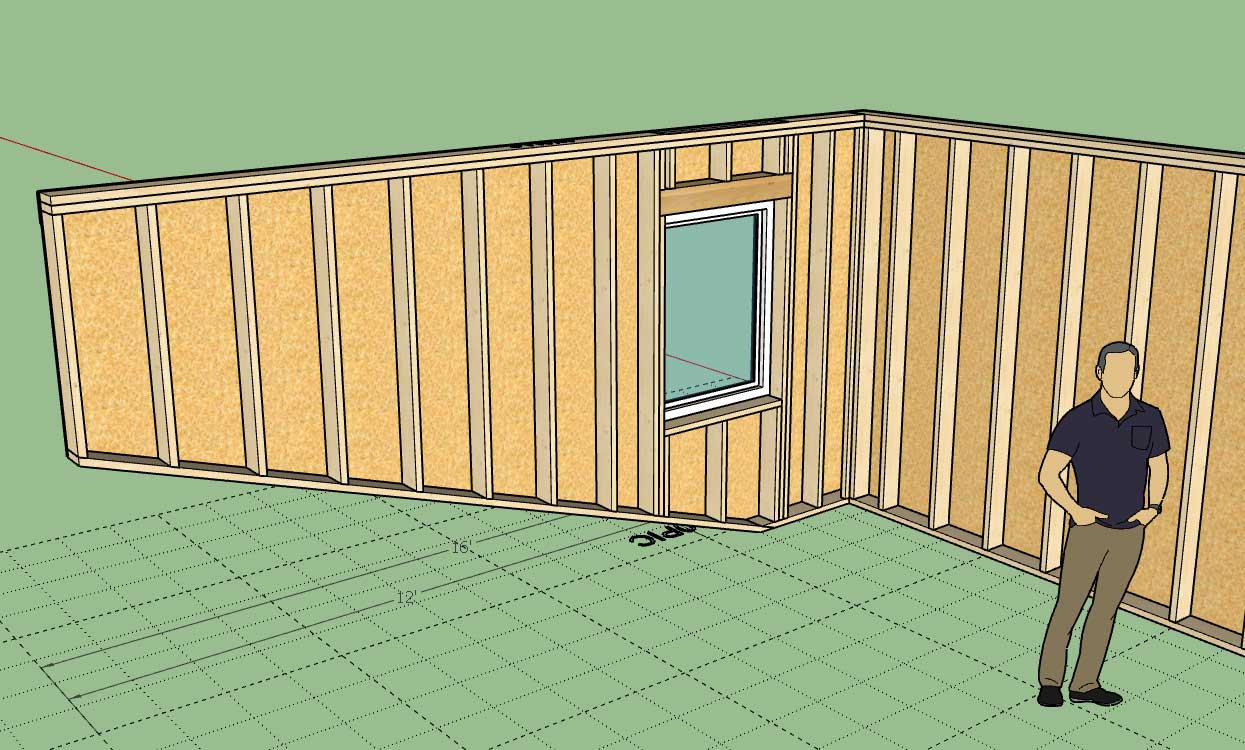
                            http://design.medeek.com/resources/wallplugin/images5/wall_su693_800.jpg

                            http://design.medeek.com/resources/wallplugin/images5/wall_su694_800.jpg

                            http://design.medeek.com/resources/wallplugin/images5/wall_su695_800.jpg

                            http://design.medeek.com/resources/wallplugin/images5/wall_su696_800.jpg

                            This new feature can also be used on CMU, ICF and CMU CORE walls.

                            Nathaniel P. Wilkerson PE
                            Medeek Engineering Inc
                            design.medeek.com

                            1 條回覆 最後回覆 回覆 引用 0
                            • medeekM 離線
                              medeek
                              最後由 編輯

                              Version 3.1.7 - 06.12.2023

                              • Reorganized the window draw and edit menus to include an annotations section.
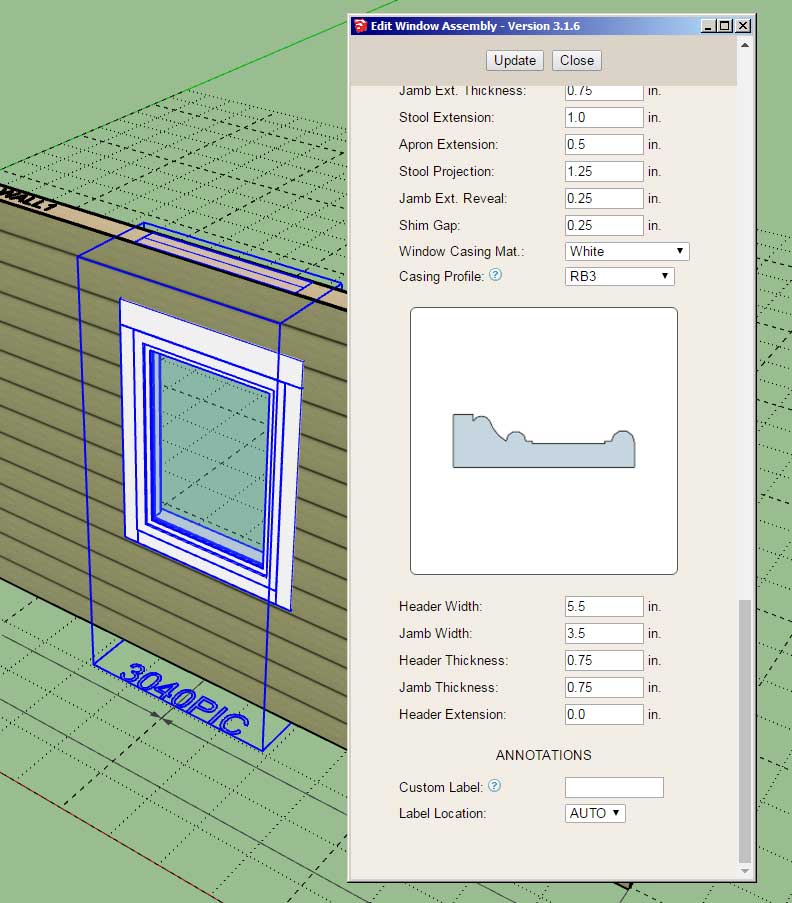
                              http://design.medeek.com/resources/wallplugin/images5/wall_su697_800.jpg

                              This is a fairly minor update however I felt it necessary so that consistency is maintained with the Door menus.

                              Nathaniel P. Wilkerson PE
                              Medeek Engineering Inc
                              design.medeek.com

                              1 條回覆 最後回覆 回覆 引用 0
                              • medeekM 離線
                                medeek
                                最後由 編輯

                                Version 1.3.4b - 06.15.2023

                                • Enabled all other electrical fixtures for "component" walls.

                                Nathaniel P. Wilkerson PE
                                Medeek Engineering Inc
                                design.medeek.com

                                1 條回覆 最後回覆 回覆 引用 0
                                • medeekM 離線
                                  medeek
                                  最後由 編輯

                                  Tutorial 35 - Inclined Walls (15:10 min.)

                                  The model used in the tutorial can be found here:

                                  Link Preview Image
                                  3D Warehouse

                                  3D Warehouse is a website of searchable, pre-made 3D models that works seamlessly with SketchUp.

                                  favicon

                                  (3dwarehouse.sketchup.com)

                                  Nathaniel P. Wilkerson PE
                                  Medeek Engineering Inc
                                  design.medeek.com

                                  1 條回覆 最後回覆 回覆 引用 0
                                  • medeekM 離線
                                    medeek
                                    最後由 編輯

                                    Version 3.1.8 - 06.27.2023

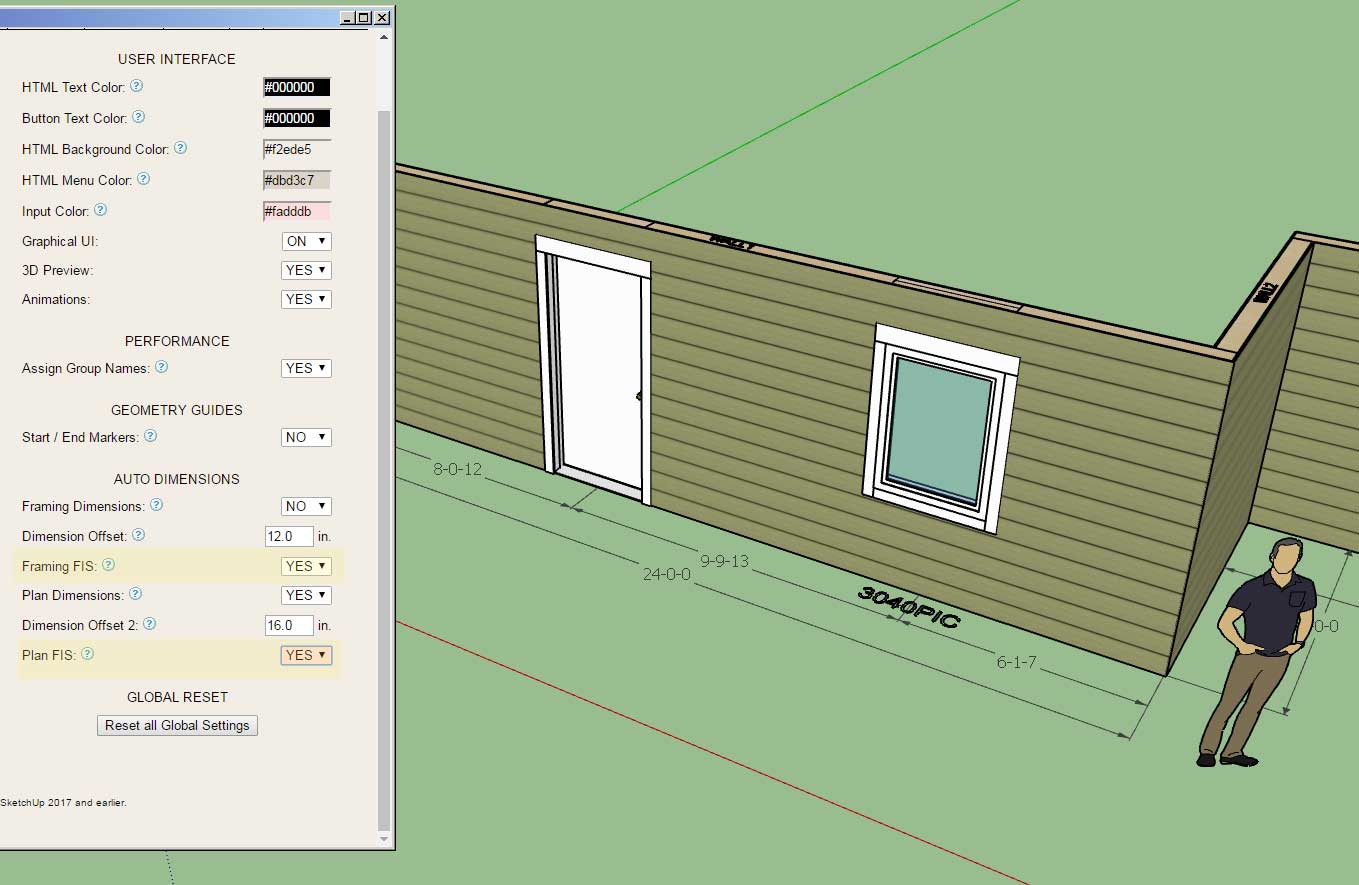
                                    • Enabled FIS notation for framing (elevation view) dimensions for rectangular walls.
                                    • Enabled FIS notation for plan view dimensions for all walls.
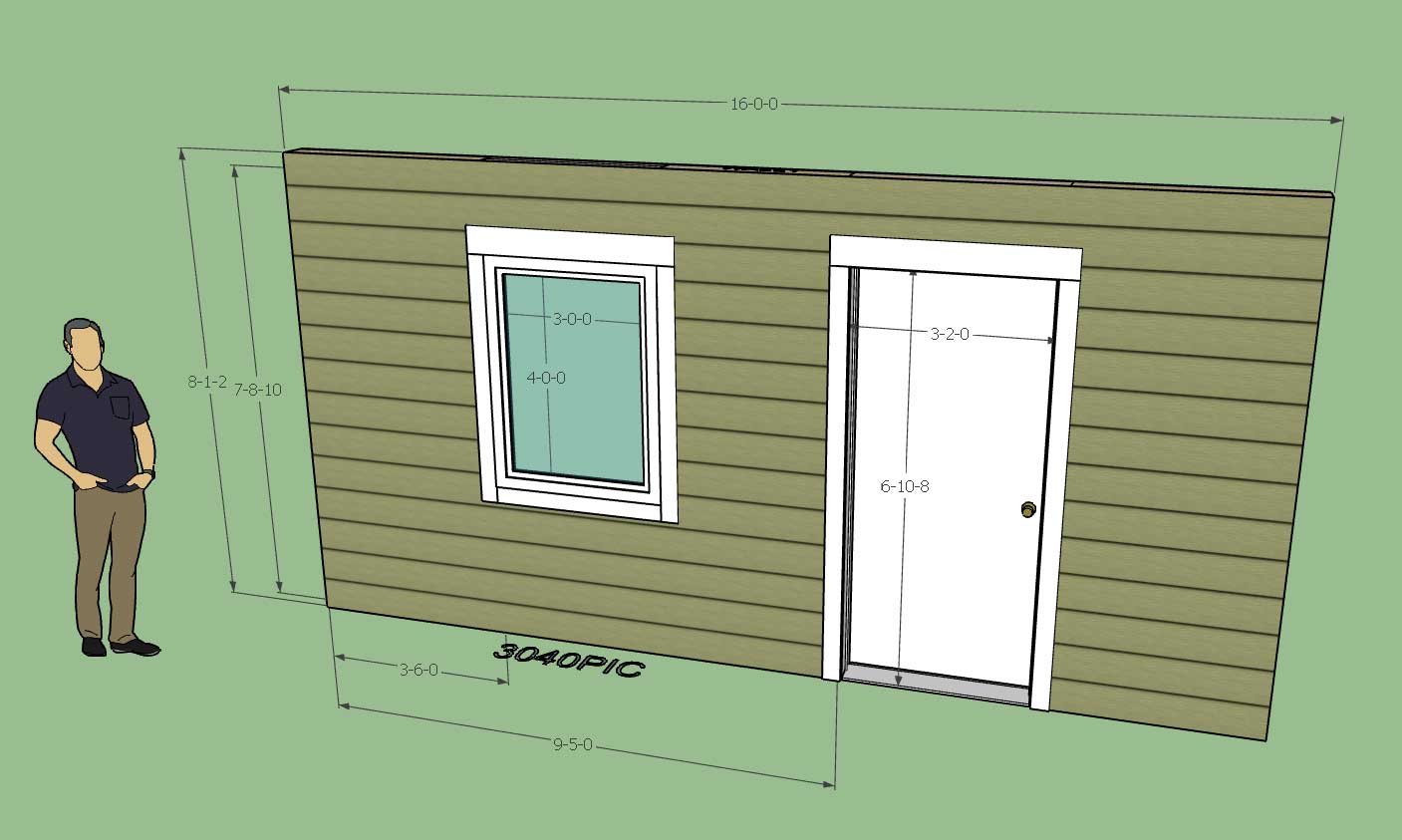
                                    http://design.medeek.com/resources/wallplugin/images5/wall_su700_800.jpg

                                    http://design.medeek.com/resources/wallplugin/images5/wall_su699_800.jpg

                                    FIS stands for Feet-Inches-Sixteenths, a common notation method used in the truss industry. This update per customer request.

                                    Nathaniel P. Wilkerson PE
                                    Medeek Engineering Inc
                                    design.medeek.com

                                    1 條回覆 最後回覆 回覆 引用 0
                                    • medeekM 離線
                                      medeek
                                      最後由 編輯

                                      Version 3.1.9 - 07.12.2023

                                      • Added an "Edit Dimension" tool to the Medeek Wall Tools toolbar (editing of plan dimension only).
                                      • Enabled editing of plan dimensions for all wall types (door, window, garage, wall length).
                                      • Fixed a bug with plan dimensions (in 2D Mode).

                                      Note that this new tool can only be used to edit "plan" dimensions. Framing dimensions are currently not editable. This update was per customer request.
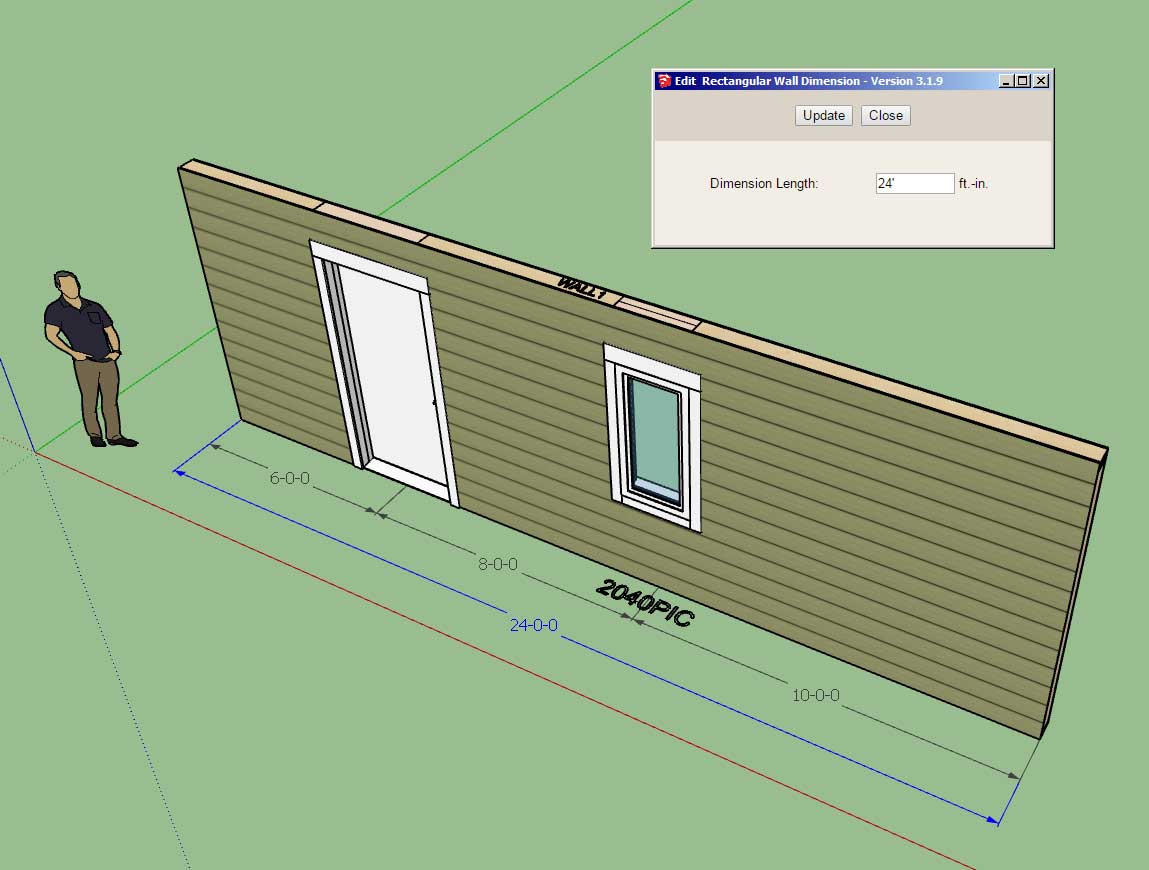

                                      http://design.medeek.com/resources/wallplugin/images5/wall_su704_800.jpg

                                      http://design.medeek.com/resources/images/wall_tools_su_menu_active.jpg

                                      Nathaniel P. Wilkerson PE
                                      Medeek Engineering Inc
                                      design.medeek.com

                                      1 條回覆 最後回覆 回覆 引用 0
                                      • medeekM 離線
                                        medeek
                                        最後由 編輯

                                        Tutorial 36 - Editing Dimensions (7:55 min.)

                                        Nathaniel P. Wilkerson PE
                                        Medeek Engineering Inc
                                        design.medeek.com

                                        1 條回覆 最後回覆 回覆 引用 0
                                        • medeekM 離線
                                          medeek
                                          最後由 編輯

                                          Version 3.2.0 - 07.15.2023

                                          • Enabled editing of plan dimensions for tee intersections of all wall types.
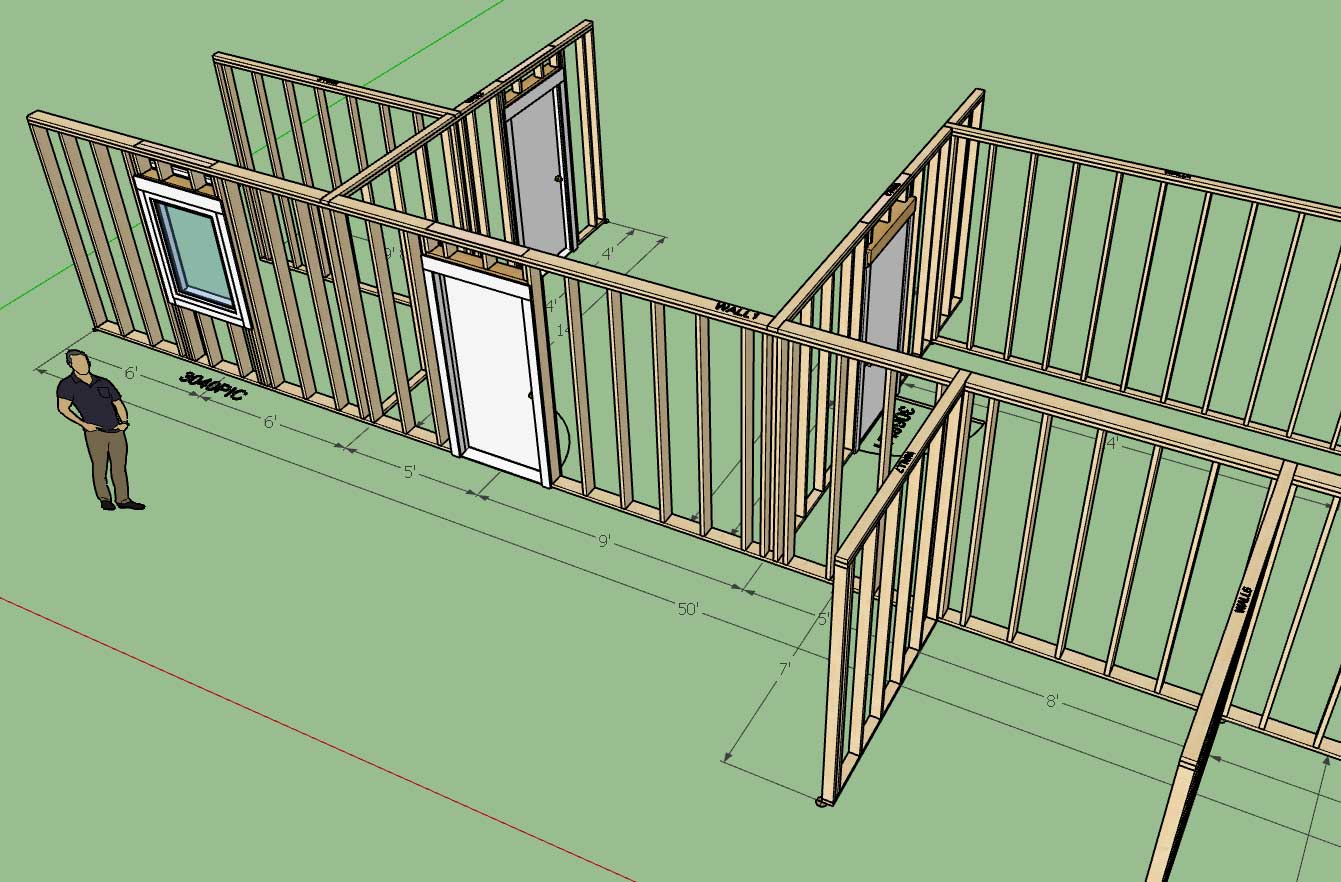
                                          http://design.medeek.com/resources/wallplugin/images5/wall_su705_800.jpg

                                          When you modify the dimension of a tee intersection it actually invokes the plugin's "move wall" tool behind the scenes, which then moves the target wall as well as adjusts any connected walls and finally it regens the primary wall. A lot going on here.

                                          Larry Belk specifically requested this feature, and I was considering it once I began making the dimensions interactive for windows and doors. To be perfectly honest I knew it would make things a bit more complicated and involved with dimensions and their editing, however I'm glad I've managed to check this box and it seems to be working as it should.

                                          This is actually a fairly substantial upgrade to the plugin and a increase in functionality and efficiency, I will probably make a new tutorial video explaining the details shortly.

                                          Nathaniel P. Wilkerson PE
                                          Medeek Engineering Inc
                                          design.medeek.com

                                          1 條回覆 最後回覆 回覆 引用 0
                                          • medeekM 離線
                                            medeek
                                            最後由 編輯

                                            Tutorial 37 - Moving Walls (16:03 min.)

                                            Nathaniel P. Wilkerson PE
                                            Medeek Engineering Inc
                                            design.medeek.com

                                            1 條回覆 最後回覆 回覆 引用 0
                                            • 1
                                            • 2
                                            • 68
                                            • 69
                                            • 70
                                            • 71
                                            • 72
                                            • 75
                                            • 76
                                            • 70 / 76
                                            • 第一個貼文
                                              最後的貼文
                                            Buy SketchPlus
                                            Buy SUbD
                                            Buy WrapR
                                            Buy eBook
                                            Buy Modelur
                                            Buy Vertex Tools
                                            Buy SketchCuisine
                                            Buy FormFonts

                                            Advertisement