New laptop not meeting my expectations
-
A while back I decided that I hadn't bought anything dumb for a while so I bought a new laptop (even tho my old laptop was performing perfectly well). Even dumber when you consider that I only use a laptop when I go out for coffee, maybe a couple of time a week.
Anyhow, I got a great deal on a brand new MSI GT80 Titan SLI-094.
Here are the pertinent specs --
Windows 8.1, Intel i7 4720HQ 2.6/3.6GHz, 16GB DDR3L SDRAM 1600 MHz, two NVIDIA Geforce GTX 965M - 4GB GDDR5 SDRAM (SLI).
Well, I figured that with two graphics cards it would handle even my largest models with ease. But for some reason when I try to work on a large model, when I try to move it around I get the following error msg
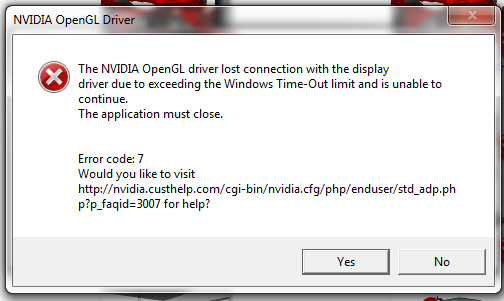
and then SU closes. These are models that my old laptop handles just fine, with a bit of lag when moving around the model but never crashing.
Thought maybe someone out there might have the same or similar laptop, and might know what's causing this.
I stopped using it several months ago because of this problem, but I would really like to keep it if I can find a solution (gonna double the RAM if do keep it). I love the 18.4 inch display, the full-size mechanical keyboard, the way you can remove a panel on top of the 10lb beast and have full access to the RAM and hard drives, just so much I really like about it - if only I could use it for my SU work.
Any suggestions?
If not, would anybody like to buy a laptop (works great with SU
-
There's a setting you can change in the Registry that sets when the GPU times out.
I experienced something the same with Substance Painter and this is their suggestion.
-
@rich o brien said:
There's a setting you can change in the Registry that sets when the GPU times out.
I experienced something the same with Substance Painter and this is their suggestion.
Thanks Rich, I'll give it a try. Out of curiousity, did you try this to fix your mentioned problem? Did it work?
-
It did where the GPU ran out of ram during computations. But I never hit this with SketchUp.
You should try SU2017 as its graphics engine is superior to SU2015.
But I find the newer transparency mode in 2017 to not be as forgiving for .png images.
-
I ran into this same thing a while back and the fix rich mentioned worked for me also. If i remember right, it was when i upgraded to windows 10...I think...I need a memory upgrade...
-
Well I finally got around to trying this fix
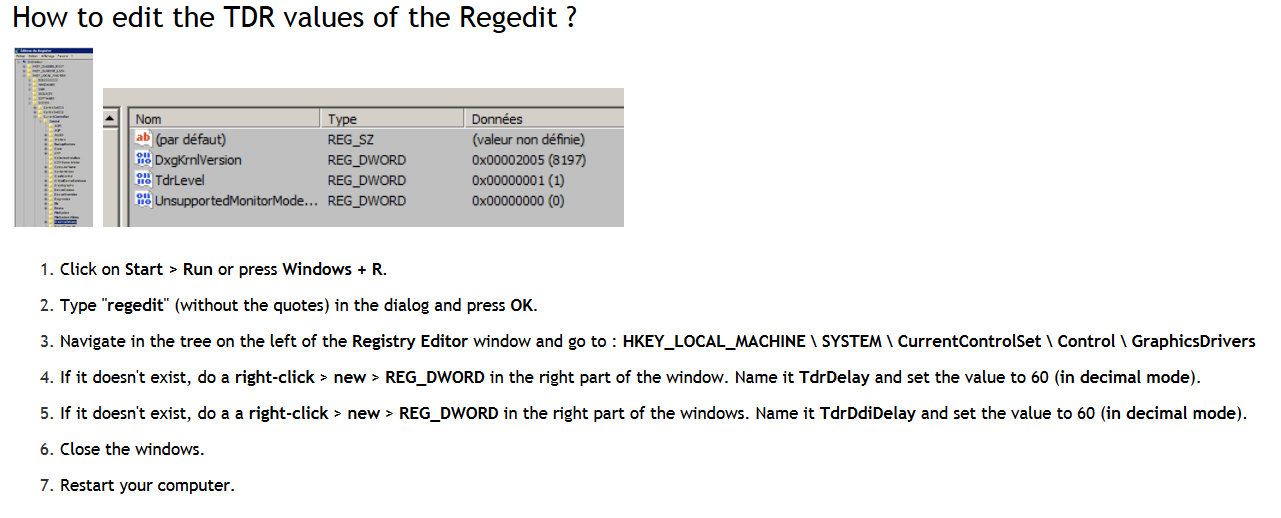
and it worked!Set my values at 60 and now even my largest model can be worked with no problems.
Unfortunately I had already reset the laptop back to the original factory settings in anticipation of selling it, which meant that I had to do all the updates again (a real pain in the butt), and copy almost 700GB worth of data over to it (including my 369GB Sketchup Stuff folder). Now I get to do all the fine-tuning (again). Fun time.
See what trouble you caused me, Rich?



Hello! It looks like you're interested in this conversation, but you don't have an account yet.
Getting fed up of having to scroll through the same posts each visit? When you register for an account, you'll always come back to exactly where you were before, and choose to be notified of new replies (either via email, or push notification). You'll also be able to save bookmarks and upvote posts to show your appreciation to other community members.
With your input, this post could be even better 💗
Register Login


Advertisement