[Tips] Animator Tips and Tricks
-
Waiting for a full user manual, this thread will cover some tips and tricks in Animator, which are not always obvious from the User Interface.
Save Strategy
Animator is a kind of application within Sketchup. Designing an animation is a long exercice, so you may stay long in Animator.
Animator provides a Save button. This saves the current animation data within the model (as attributes). A Save also creates a backup file, with the same name as the model and extension .animator. This is in case you exit abnormally.
By default, the model itself is not Saved in Sketchup however.
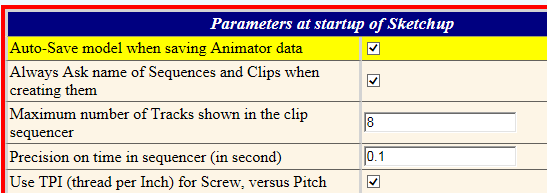
There is an AutoSave option available from the Default Parameters dialog box, to Save both Animator data and the Model.
Positioning the Sequencer and the Timeline in the viewport
The Sequencer is the rectangle containing the timeline and the tracks to position the sequences into clips.
Animator offers 2 types of configuration:- Left, Right, Top, Bottom for the position of the button palettes and sequencer in the viewport. These are the small green Arrows

- Horizontal or Vertical Sequencer, which is the elongated rectangle close to 0 seconds


Scrolling in the Sequencer with MouseWheel
When scrolling is relevant, you can use the MouseWheel to scroll- by Tracks if the mouse is located in the scroll bar for Tracks
- by Time whenever the mouse is located elsewhere within the Sequencer rectangle.
Clicks and Double-Clicks
-
whenever an animation is running a click in the viewport or timeline will pause it, with no other action
-
Button Launch Animation (green triangle):
-
a simple click will launch the animation from the current time in the timeline.* a double-click will launch the animation from the beginning, time = 0s
-
In the timeline:
-
a simple click will set the current time.* a double-click will launch the animation from the time clicked in the timeline, time = 0s
Undo - Redo in Animator
Because Animator is a plugin with long session (rather than just executing an action), forget about using the native Sketchup Undo / Redo button.
If you try to do it within Animator, the action will be neutralized (i.e. nothing will happen).
Instead, use the Undo / Rredo buttons which are managed by Animator for all modifications.

One small detail: Each Clip context has its own Undo / Redo stack. So if you open a clip, you can undo / redo actions only in the contexts of this opened clip. Going upward in the hierchy will activate the undo/redo stack of the parent clip.At Exit of Animator
Animator restores the position of all objects and the view in the state they were at the launch of Animator.
Note: When running Animator, a click on the Play and Edit icons in the Animator toolbar will beep to prevent relaunching Animator. However, if Animator is in error and exit accidentally, you can unlock this feature by double-clicking on the icons.Temporary exit to Sketchup
You can exit temporarily from Animator and go to Sketchup. There is a small "sketchup icon" in the button palette at the left.

This may be useful if you wish to take some measures in the context of the Animation at a given time, or do some modifications in objects contextually. Remember that if you exit Animator, you go back to the initial position of objects!.
Indeed, do not modify the position of objects already participating to an animation, or the hierarchy of groups / components for such objects.
In contrast, you can modify the flat geometry inside groups and components, as Animator only use Group and Component as a container.
You can use Sketchup native tools or any plugin.When you have finished in Sketchup, Click on the button "back to Animator", or click on any icon in the Animator toolbar. You will go back to Animator in the exact same context as wehn you temporarily left.
So maybe useful, but be careful!Disable and Remove elements in a Clip
- You can disable / enable an element or several elements at once in a clip by clicking on the buttons of its property panel, or by dragging it (or them) in the timeline.
A disabled element is just excluded from the Animation.

- You can remove one or several elements by clicking on the button (bin) or dragging it outside of the sequencer rectangle. If you did it wrongly, use Undo to restore it.

Positioners
There are two small icons in the Animator toolbar for the Positioner Function

- one marked with S, to Save the position of all objects and give it a name
- one marked with R, to Restore a previously saved Positioner
This function is actually independent from Animator, and you can use it in other contexts.
In Animator, you can assign a positioner to a Film, so that it's initial object positions are those of the Positioner, not the one at launch of Animator. This is also a safe way to keep things well positioned, especially in case of errors or wrong actions. Or a way to capture intermediate steps of an animation for later usage.
Click on the name of the Film. A dialog box appears:
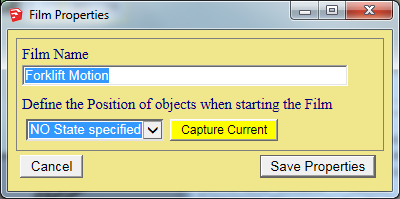
You can the either create a Positioner from the current position (button "Capture"), or assign an existing Positioner if already saved via the dropdown.
Maintenance
As a principle, Animator never 'deletes' objects. If you delete a clip or sequence from the timeline, it is simply marked as Deleted. This simply means that it won't be saved. However, you change freely your mind during the Animator session.
The management of all objects is done in a special section called Maintenance. This can be called by clicking on the dedicated button in the palette.

The dialog box appears.
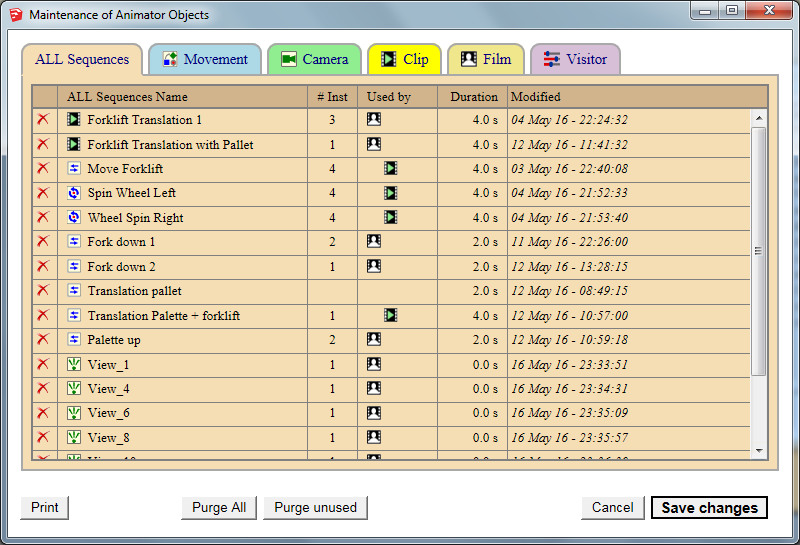
You can review all existing objects with some useful information:- Where it used. Small icons show you if it participates in a clip or Film. Hover the icon with the mouse and you will get the names of these clips and films.
- The number of instances of a sequence or clip. This is important to know, because it means every time you change it, you will potentially impact the animation in several places. As in Sketchup with Components, the benefit of re-usability means that you have to be constantly aware of what you did to control the scope of the modifications. As in Sketchup, Animator has a Make Unique function which can be used to cut inheritance.
You can delete a sequence or clip by clicking on the right-left red cross. again, this is just a mark for further deletion (i.e. not saving them).
- Left, Right, Top, Bottom for the position of the button palettes and sequencer in the viewport. These are the small green Arrows
-
Fredo
I was watching the tutorials and I saw what you did to create spinning wheels, can you please explain the sequence of voodoo you used to create this?
-
@solo said:
Fredo
I was watching the tutorials and I saw what you did to create spinning wheels, can you please explain the sequence of voodoo you used to create this?
[attachment=0:2j1s827p]<!-- ia0 -->wtf1..JPG<!-- ia0 -->[/attachment:2j1s827p]
 I had asked the same question.
In my car wash animation, I used a multiple of 360 degrees, adjust the duration of the sequence, and then used the repeat setting to control the wheels.
-
@solo said:
Fredo
I was watching the tutorials and I saw what you did to create spinning wheels, can you please explain the sequence of voodoo you used to create this?
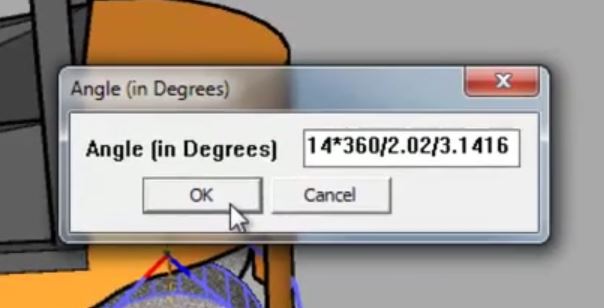
Say the diameter of the wheel is D (2.02 m), so the perimeter is Pi * D. This is the distance for a rotation of 360 degrees.
The offset of the forklift translation is 14 m. So you need 14 / (PI * D) rotation of 360 degree..This gives the formula for the angle: 14 * 360 / 2.02 / 3.1416
Fredo
-
smarty pants. I'm too old to learn these tricks.
-
Is there any way to work with section plane animation?
-
@wanniya said:
Is there any way to work with section plane animation?
This is coming in a new release tomorrow.
Fredo
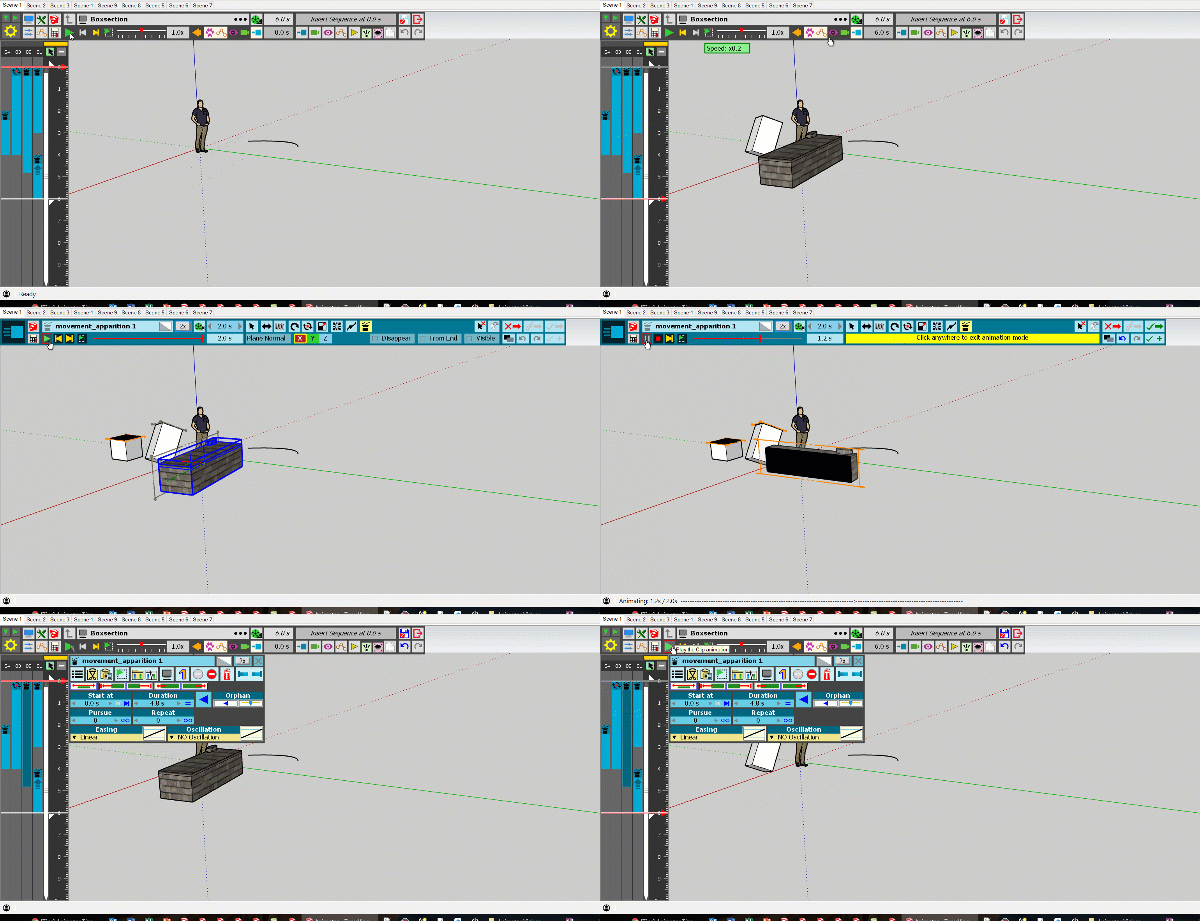
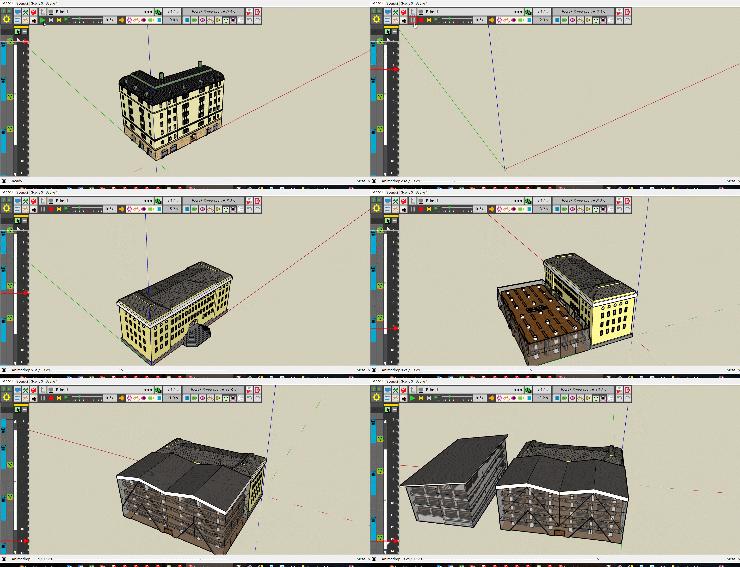
-
Useful for magician!

-
The picto is explicit
-
Can we add a Clip (or a movement) made in a previous session to the current session where an another is yet created ?
Say an object A (a Car) is on the screen and animated
A ball is an object B (a Ball animated) previously made in another session, can we add it to the car ? -
@pilou said:
Can we add a Clip (or a movement) made in a previous session to the current session where an another is yet created ?
Say an object A (a Car) is on the screen and animated
A ball is an object B (a Ball animated) previously made in another session, can we add it to the car ?Any animation piece (i.e. sequence) created within a model can be integrated into a film, knowing that you can have many films within the same model. Think of a Sequence as a Component Definition in Sketchup. You can create instances of a sequence and insert them in the time line, change some parameters like duration, easing, ... (like you can scale a component instance in Sketchup). All sequences created in the model are accessible from the Insert buttons (for Movement, Cameras, Visual Effects, ....):
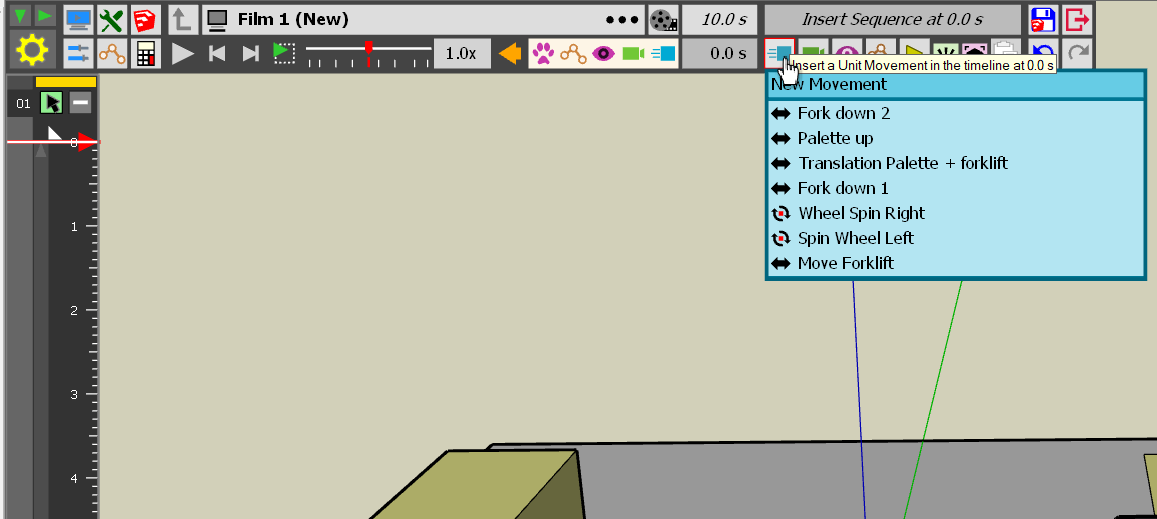
Note that you can also insert a full film
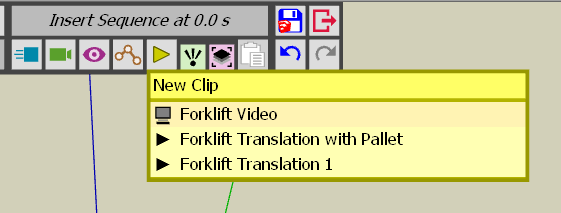
Fredo
-
I'm still using Thea 1.5, but I cannot get animator to work with Thea, it works perfect with straight SU output but nothing happens with Thea, at first it just rendered the 1st scene, now when I click 'render animation' it does nothing, what am I doing wrong?
-
@solo said:
I'm still using Thea 1.5, but I cannot get animator to work with Thea, it works perfect with straight SU output but nothing happens with Thea, at first it just rendered the 1st scene, now when I click 'render animation' it does nothing, what am I doing wrong?
Do you mean when you launch the rendering from Thea (not from Animator)?
Fredo
-
Hi,
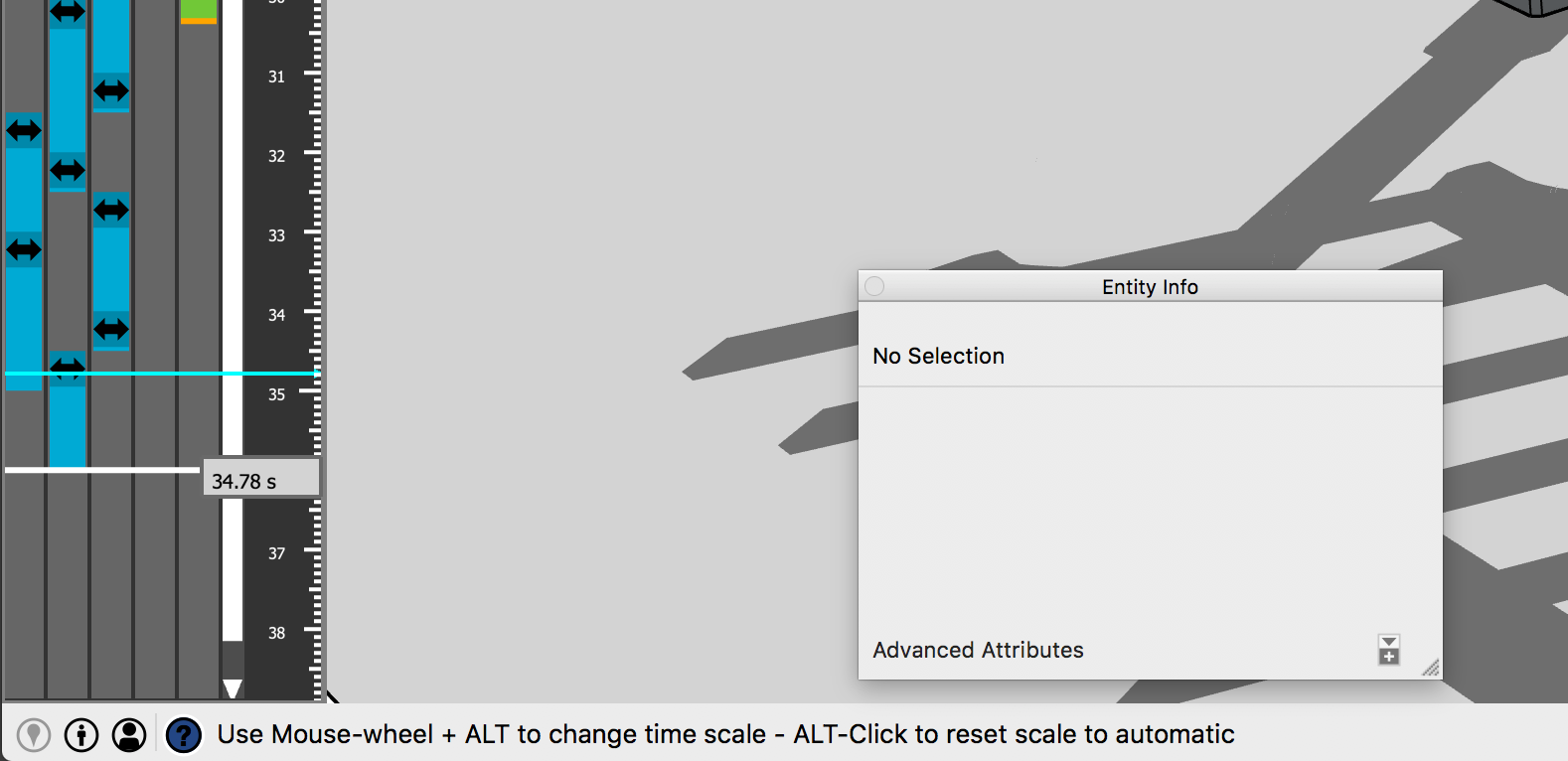
I am using a Mac and cannot change the scale of the timeline to zoom in. When I mouse over the scroll bar it says "Use Mouse-wheel +ALT to change scale"
The equivalent on the Mac is the "option" key. When I push the option key and touch scroll the Mac magic mouse it zooms the model and not the timeline.
Thanks
Kent
https://manabouttools.com
-
@manabouttools said:
Hi,
I am using a Mac and cannot change the scale of the timeline to zoom in. When I mouse over the scroll bar it says "Use Mouse-wheel +ALT to change scale"
The equivalent on the Mac is the "option" key. When I push the option key and touch scroll the Mac magic mouse it zooms the model and not the timeline.
Thanks
Kent
https://manabouttools.comI don't have a Mac to test.
Could you try with Command or Ctrl to see what happens.
Fredo
-
I tried as many combinations as possible. All just zoom the model.
Kent
-
@manabouttools said:
I tried as many combinations as possible. All just zoom the model.
Kent
Can you at least scroll the timeline (mousewheel, no modifier) and scroll the tracks (Ctrl + mousewheel), [assuming you have enough tracks) ?
-
I don't have enough tracks to test that. Will try tmrw.
-
I changed a clip to make it longer so it brought up the scroll bars. I am unable to scroll the timeline with the mouse wheel. It always zooms the model window.
Kent
-
Any keyboard shortcuts to zoom the timeline? Or any settings to key in a zoom value to get around this?
Thanks
Kent






Hello! It looks like you're interested in this conversation, but you don't have an account yet.
Getting fed up of having to scroll through the same posts each visit? When you register for an account, you'll always come back to exactly where you were before, and choose to be notified of new replies (either via email, or push notification). You'll also be able to save bookmarks and upvote posts to show your appreciation to other community members.
With your input, this post could be even better 💗
Register Login


Advertisement