sketchucation logo sketchucation
    • 登入
    Oops, your profile's looking a bit empty! To help us tailor your experience, please fill in key details like your SketchUp version, skill level, operating system, and more. Update and save your info on your profile page today!
    ⚠️ Important | Libfredo 15.6b introduces important bugfixes for Fredo's Extensions Update

    [Tutorial] Animator Quick Start

    已排程 已置頂 已鎖定 已移動 Animator Beta
    renderpluginsextensions
    134 貼文 39 Posters 752.5k 瀏覽 40 Watching
    正在載入更多貼文
    • 從舊到新
    • 從新到舊
    • 最多點贊
    回覆
    • 在新貼文中回覆
    登入後回覆
    此主題已被刪除。只有擁有主題管理權限的使用者可以查看。
    • M 離線
      Migmat
      最後由 編輯

      PROBLEM GENERATING VIDEO with ffmpg.exe INSKETCHUP 2013 (Works Animator for this versión?)

      1- Animator Beta Works OK
      2- Install ffmpeg.exe in LibFredo6 (disapear the red text to Find the ffmpeg.exe)
      3- Make a simple animation that Works fine in preview
      4- Try to generate a video with defaut parameters. Push the button "Test Image" and also work
      5- Push the button "Generate Video" and NOTHING HAPPENDS. Sketchup continues inside the animator plugin. I can exit and star again the plugin,but nothing happends.

      I instal the two versión of ffmpeg.exe, the last and the 3.2 (more stable).

      Thanks in advance

      1 條回覆 最後回覆 回覆 引用 0
      • fredo6F 離線
        fredo6
        最後由 編輯

        @Migmat
        Your problem may be independent of FFmpeg.

        When you generate the video, do you get the progress dialog box ?

        Can you open the Ruby console to see if there is an error displayed.

        Fredo

        1 條回覆 最後回覆 回覆 引用 0
        • M 離線
          Migmat
          最後由 編輯

          Thanks Fredo for your extraordinary plugin.

          I answer first and send more data next.

          a- When generate Video animation (sketchup2013)I dont get any progress dialog box

          b - Te rubi console says this error:

          SkETCHUP 2013 RUBI CONSOLE OUTPUT DURING ANIMATOR VIDEO CREATION


          ambient init nil nil
          ambient init nil nil
          Twilight declare nil
          :dimY => 806
          :beg_time => 0
          :date_modified => 1478294026.547
          :reverse => nil
          :movie_formats => {
          :mov => false
          :avi => true
          :mp4 => true
          } (:movie_formats)
          :speed_factor => 1.0
          :root_dir => "D:/DISEÑO_DIBUJOS_IMAGENES/SKETCHUP_2013/@_ Animaciones/ANIMATOR FREDO/Animator Videos"
          :rendering_method => :natural
          :movie_name => "Despegue avion"
          :filter => {
          } (:filter)
          :dimX => 1710
          :end_time => 2.0
          :movie_dir => "AnimatorPRU_1 - 09-Nov-2016 18-22-13"
          :dim_mode => "viewport"
          :frame_rate => 25
          Error: #<Errno::ENOENT: No such file or directory - D:/DISEÑO_DIBUJOS_IMAGENES/SKETCHUP_2013/@_ Animaciones/ANIMATOR FREDO/Animator Videos>
          (eval):944:in mkdir' (eval):944:in movie_create_folder'
          (eval):863:in movie_top_generate' (eval):1820:in movie_dialog_call_back'
          (eval):379:in call' (eval):379:in notify_result'
          (eval):442:in on_close' (eval):405:in dialog_create'
          (eval):454:in call' (eval):454:in j_onclose'
          (eval):197:in create_dialog' (eval):223:in call'
          (eval):223:in close' (eval):223:in close'
          (eval):453:in close_validate' (eval):1247:in param_dialog_callback'
          (eval):574:in call' (eval):574:in j_action'
          (eval):501:in j_callback' (eval):491:in j_dispatch'

          END OF OUTPUT


          Such directory efectively exist.

          MORE EXPERIMETS

          1- I installa Animator on Sketchup 2014 on the same PC

          2- Works perfectly. meke the animation and the final video without problems.

          Posible problem: we know that Sketchup 2013 and 2014 have quite differnt folder structure, firsly in the plugin placement.

          Could be related with this?

          thanks again.

          1 條回覆 最後回覆 回覆 引用 0
          • M 離線
            Migmat
            最後由 編輯

            This is a sample of my animation job with a very poor elaborated animation plugin.

            With your plugin I hope to get better results

            (Is the recreation of a traffic accident seen from two viewpoint)

            View From the car

            1 條回覆 最後回覆 回覆 引用 0
            • fredo6F 離線
              fredo6
              最後由 編輯

              @Migmat,

              1. In Sketchup 2013, there is no satisfactory support for non-ascii diretory or filename. So this may be the explanation. In Sketchup 2014, based on Ruby 2.0, non-ascii is fully supported.

              2. Your video is quite impressive. I don't know which plugin you used, but I would not qualify it of "very poor elaborated animation plugin".

              Fredo

              1 條回覆 最後回覆 回覆 引用 0
              • pilouP 離線
                pilou
                最後由 編輯

                Dead or alive ?

                Frenchy Pilou
                Is beautiful that please without concept!
                My Little site :)

                1 條回覆 最後回覆 回覆 引用 0
                • pilouP 離線
                  pilou
                  最後由 編輯

                  Dead or alive ? (the motor bike guy)

                  PS Animator has not a French version ?

                  Frenchy Pilou
                  Is beautiful that please without concept!
                  My Little site :)

                  1 條回覆 最後回覆 回覆 引用 0
                  • M 離線
                    Migmat
                    最後由 編輯

                    Thanks Fredo for your acclaration. Now I am using Sketchup 2014.

                    Fortunately alive!. Thanks again for your care.

                    You hare good coders but better persons.

                    Compared with your Animator plugin the used in my video is really poor(frame Animation). The animation that I did is only plenty of tricks, artisan job and posproduction in some videos.

                    Postproduction i a really important key in most films.

                    I advice HitFilm. A very unknown and ppwerful software for PostPro.

                    1 條回覆 最後回覆 回覆 引用 0
                    • M 離線
                      Migmat
                      最後由 編輯

                      First test of your amazing Animator plugin.

                      Is only a ten minutes of work animation that shows a minimun part of the power behind Animator.

                      1 條回覆 最後回覆 回覆 引用 0
                      • M 離線
                        Migmat
                        最後由 編輯

                        A Little example of mixing Sketchup with some PostPro of HitFilm.

                        And a funny/mini PostPro.
                        https://www.youtube.com/watch?v=jHjCyM1yKRE

                        Fredo Animator plus HitFilm could be very good.

                        1 條回覆 最後回覆 回覆 引用 0
                        • M 離線
                          M3one
                          最後由 編輯

                          Hi Fredo,

                          I've been working on an animation lately and it's almost finished. The last thing I want to do is to generate a video rendered with Twilight Render (free version) but I don't know how to do it. Please could you tell me how?

                          Thanks!

                          1 條回覆 最後回覆 回覆 引用 0
                          • ntxdaveN 離線
                            ntxdave
                            最後由 編輯

                            @m3one said:

                            Hi Fredo,

                            I've been working on an animation lately and it's almost finished. The last thing I want to do is to generate a video rendered with Twilight Render (free version) but I don't know how to do it. Please could you tell me how?

                            Thanks!

                            I am not Fredo but I can tell you that you must have the Pro version to create a rendered animation with Twilight.

                            Press F1...thank me later

                            1 條回覆 最後回覆 回覆 引用 0
                            • M 離線
                              M3one
                              最後由 編輯

                              @ntxdave said:

                              @m3one said:

                              Hi Fredo,

                              I've been working on an animation lately and it's almost finished. The last thing I want to do is to generate a video rendered with Twilight Render (free version) but I don't know how to do it. Please could you tell me how?

                              Thanks!

                              I am not Fredo but I can tell you that you must have the Pro version to create a rendered animation with Twilight.

                              😞 That's a pity

                              Is there anyway to generate a video clip with a decent render for free?

                              Thanks for your answer!

                              1 條回覆 最後回覆 回覆 引用 0
                              • fredo6F 離線
                                fredo6
                                最後由 編輯

                                Trajectory

                                Trajectory is a visual effect allowing to visualize the trajectory of selected points along the animation.

                                The resulting Trajectory curves are drawn in the viewport. You can then

                                • generate them as one or several groups in the Sketchup model
                                • export the coordinates in a CSV file

                                Since Trajectory is a visual effect, you can insert instances along the timeline and switch them on and off, so that you can visualize trajectory curves when desired.

                                Note: because the resolution of trajectory is dependent on the progression of the animation, it is a good idea to reduce the animation speed to generate smoother trajectory curves.

                                1 條回覆 最後回覆 回覆 引用 0
                                • pilouP 離線
                                  pilou
                                  最後由 編輯

                                  How is drawn the first curve without the object (s) ?
                                  Seems curves are resulting and not something to follow ?

                                  Frenchy Pilou
                                  Is beautiful that please without concept!
                                  My Little site :)

                                  1 條回覆 最後回覆 回覆 引用 0
                                  • fredo6F 離線
                                    fredo6
                                    最後由 編輯

                                    @pilou said:

                                    How is drawn the first curve without the object (s) ?
                                    Seems curves are resulting and not something to follow ?

                                    Trajectory curves reflect the movement of a given point on the solid. So they are always attached to an object.

                                    This feature has nothing to do with Movement along Path. This will come in the next release, when I finish the GUI for it.

                                    Actually, I initially designed the Trajectory visual effect for debugging purpose, in order to follow the movement of objects (since MovementAlongPath has to deal with offsetting).

                                    Fredo

                                    1 條回覆 最後回覆 回覆 引用 0
                                    • pilouP 離線
                                      pilou
                                      最後由 編輯

                                      Thanks for the precision! ☀

                                      Frenchy Pilou
                                      Is beautiful that please without concept!
                                      My Little site :)

                                      1 條回覆 最後回覆 回覆 引用 0
                                      • John SBJ 離線
                                        John SB
                                        最後由 編輯

                                        First, thank you for all you excellent plugins!

                                        I'm getting to know Animator and all was well until I started with cameras. Following your video, I tried to zoom out from the model. But when I capture the current camera view, the view jumps (either out or in) to a fixed distance from the model, so I can’t do the close-up view. The point of view of the camera(s) is preserved but not the distance. Panning and movement interpolation is also correct, but from the same fixed distance. Is there a setting in either Animator or SU that I'm missing?
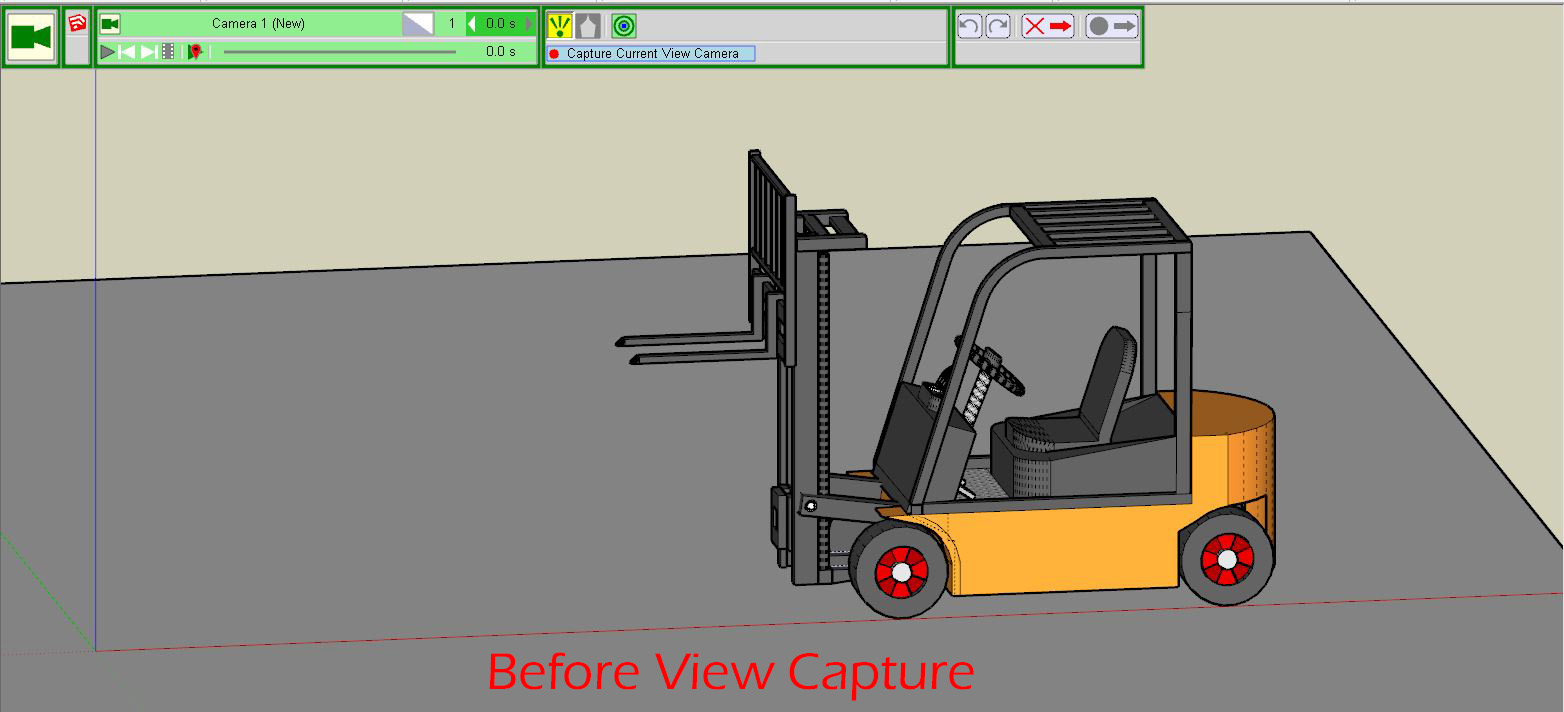
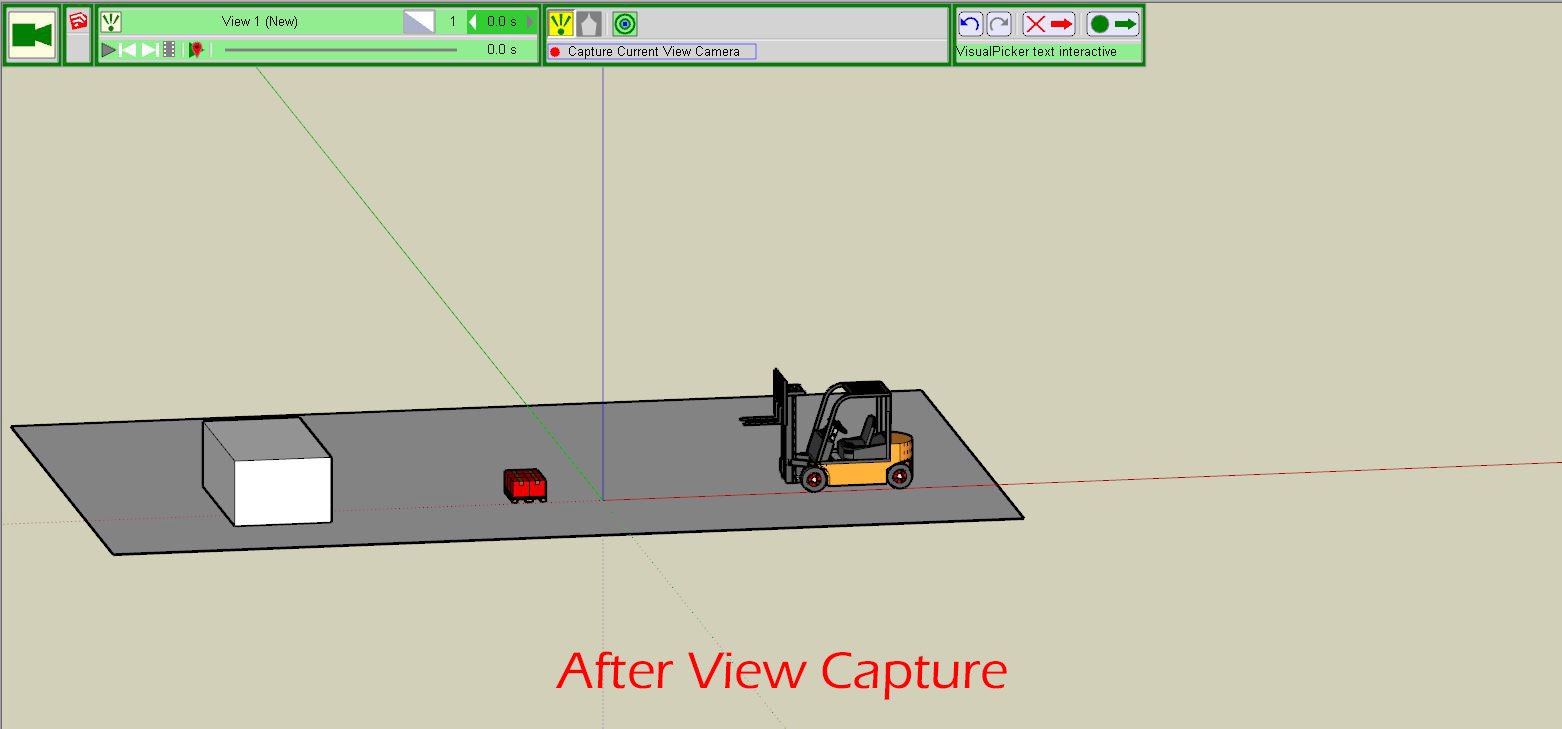
                                        Animator_Before View Capture.JPG


                                        Animator_After View Capture.JPG

                                        1 條回覆 最後回覆 回覆 引用 0
                                        • fredo6F 離線
                                          fredo6
                                          最後由 編輯

                                          Do you have already other views or visual effects in your timeline?

                                          The best is to post the model with your current animation, so that I have a look.

                                          There is a small issue with view capture, but related to object movement, not to zoom.

                                          Thanks

                                          Fredo

                                          1 條回覆 最後回覆 回覆 引用 0
                                          • John SBJ 離線
                                            John SB
                                            最後由 編輯

                                            JSB_Animator Test_BH-Gabelstapler.skpThanks for the reply. My version of the animation is attached. But, I've figured it out what dumb thing I did wrong. I had the model in parallel not perspective projection. Once in perspective, the cameras worked as expected.
                                            Thanks again for the help and for making SketchUp even more fun!
                                            JSB

                                            1 條回覆 最後回覆 回覆 引用 0
                                            • 1
                                            • 2
                                            • 3
                                            • 4
                                            • 5
                                            • 6
                                            • 7
                                            • 3 / 7
                                            • 第一個貼文
                                              最後的貼文
                                            Buy SketchPlus
                                            Buy SUbD
                                            Buy WrapR
                                            Buy eBook
                                            Buy Modelur
                                            Buy Vertex Tools
                                            Buy SketchCuisine
                                            Buy FormFonts

                                            Advertisement