[Plugin] Animator - v4.6a - 18 Dec 25




-
Yes there is an error as shown in your screenshot.
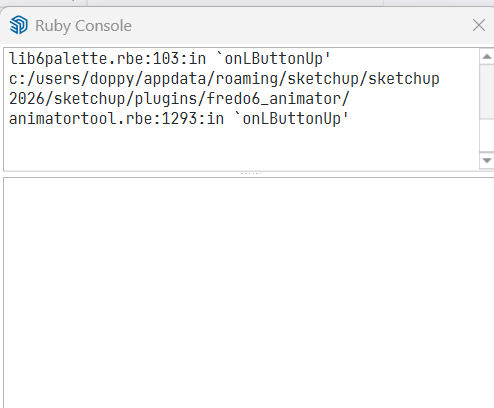
Simply, I miss the beginning of the error message.
By the way resize to lower part of the console to the minimum (one line). The upper part is for the display of messages.
-
Is this what you are looking for?
fredo6_animator/animatorpalette.rbe:820:in `block in palette_clip_name_duration_video' c:/users/doppy/appdata/roaming/sketchup/sketchup 2026/sketchup/plugins/fredo6_!libfredo6/body_lib6palette.rbe:4100:in `execute_button' c:/users/doppy/appdata/roaming/sketchup/sketchup 2026/sketchup/plugins/fredo6_!libfredo6/body_lib6palette.rbe:3854:in `onLButtonUp' c:/users/doppy/appdata/roaming/sketchup/sketchup 2026/sketchup/plugins/fredo6_!libfredo6/lib6palette.rbe:103:in `onLButtonUp' c:/users/doppy/appdata/roaming/sketchup/sketchup 2026/sketchup/plugins/fredo6_animator/animatortool.rbe:1293:in `onLButtonUp' -
Better but I need the top message starting by 'Error...'. This is where the error is stated.
-
@fredo6 said in [Plugin] Animator - v4.6a - 18 Dec 25:
Better but I need the top message starting by 'Error...'. This is where the error is stated.
OK, here it everything that is in the top box
#<NoMethodError: undefined method
custom_convert_id' for Traductor::ChromiumWdlg:Class> c:/users/doppy/appdata/roaming/sketchup/sketchup 2026/sketchup/plugins/fredo6_!libfredo6/body_lib6weblist.rbe:159:incid'
c:/users/doppy/appdata/roaming/sketchup/sketchup 2026/sketchup/plugins/fredo6_!libfredo6/body_lib6weblist.rbe:44:ininitialize__' c:/users/doppy/appdata/roaming/sketchup/sketchup 2026/sketchup/plugins/fredo6_!libfredo6/lib6weblist.rbe:33:ininitialize'
c:/users/doppy/appdata/roaming/sketchup/sketchup 2026/sketchup/plugins/fredo6_animator/animatorvideomanager.rbe:1666:innew' c:/users/doppy/appdata/roaming/sketchup/sketchup 2026/sketchup/plugins/fredo6_animator/animatorvideomanager.rbe:1666:injob_dialog_select_repair'
c:/users/doppy/appdata/roaming/sketchup/sketchup 2026/sketchup/plugins/fredo6_animator/animatorvideomanager.rbe:1641:injob_detect_repairing' c:/users/doppy/appdata/roaming/sketchup/sketchup 2026/sketchup/plugins/fredo6_animator/animatortool.rbe:2293:inmovie_clip_generation'
c:/users/doppy/appdata/roaming/sketchup/sketchup 2026/sketchup/plugins/fredo6_animator/animatorpalette.rbe:820:inblock in palette_clip_name_duration_video' c:/users/doppy/appdata/roaming/sketchup/sketchup 2026/sketchup/plugins/fredo6_!libfredo6/body_lib6palette.rbe:4100:inexecute_button'
c:/users/doppy/appdata/roaming/sketchup/sketchup 2026/sketchup/plugins/fredo6_!libfredo6/body_lib6palette.rbe:3854:inonLButtonUp' c:/users/doppy/appdata/roaming/sketchup/sketchup 2026/sketchup/plugins/fredo6_!libfredo6/lib6palette.rbe:103:inonLButtonUp'
c:/users/doppy/appdata/roaming/sketchup/sketchup 2026/sketchup/plugins/fredo6_animator/animatortool.rbe:1293:in `onLButtonUp' -
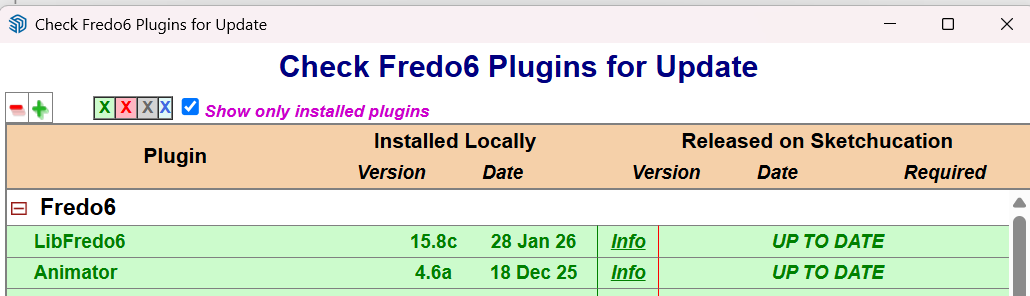
Which version of LibFredo6 do you have?
-
I thought I had the latest version. It says I am up to date. I will have to go to my laptop to find out. Where is the best place to check?
-
-
Menu Window > LibFredo6 Setting... > About
-
I have done some more testing, and there is something wrong with my file. In other files I can launch the movie generator.
So, tomorrow I will try to clean up the file and see if I can get things back on trach. I did look at the file earlier and something I did messed up the location of some objects in my animation. So, first I will get that cleaned up and then try one step at a time to see what is causing the problem. Big problem was that I made 4 other copies of the file and they are also messed up also. So, I will try to resolve/figure out what the problem is.
Hope I have not caused you any problems. I thought I was creating something with positive results, so I need to figure this all out and share with you what I figure out.
-
I am continuing to have problems. It seems like some files will allow me to generate a movie and some will not.
Hers is a file that "seems" to be OK and in Animator I can see everything, but when I try to generate the video, nothing happens.
3 Scene Animator.skpBTW: I tried both with clips for each section and without them and get the same result. Everything plays fine in Animator, but it will not let me generate a video.
I am beginning to wonder if I should just give up.
-
Can you report the Ruby error properly. Thanks.
-
Thank you so much for the update to LibFredo6 v15.8d.
I was about to give up but after updating to the LibFredo6 v15.8d I was able to generate the video.

In fact, I was also able to create a 2nd version of the model with everything done in clips. Again So, here are some videos I was able to create with the 2 versions of the file (one without clips and the other with clips).
Without clips:
3 Scene Animator.mp4

With Clips
3 Scene Animation With Clips.mp4

I hope this shows that you can have multiple animated scenes in a SU model and use Animator to "show them off".
-
 N ntxdave referenced this topic on
-
I think I finally resolved the issue that I was having with the cameras (not 100% the way I want) but I am not having a problem trying to generate a video. It stops every time at the same spot (I have tried about 10 time this morning). Here is a screen shot of where things stop:
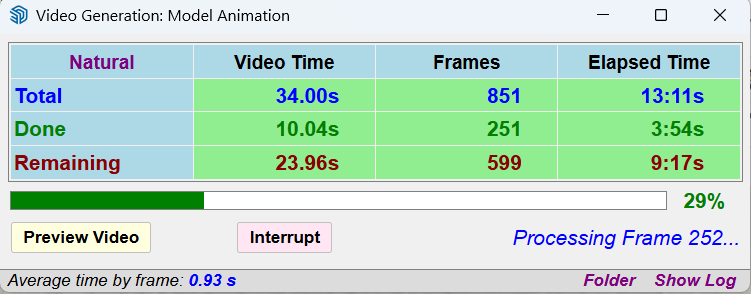
I would be happy to share the file, but it is too big to upload to this forum. If there is another way I can share with someone who is willing to take a look at it, just let me know and I will share it.
Press F1...thank me later
-
OK, I have installed a trial version of Drop Box and am trying to share the SketchUp file that I need for someone to look at and see if you can generate a video.
Here is a link to the file.SketchUp Animator file
-
@ntxdave
Could you leave the Ruby console open when generating the video.There might be an error worth reporting.
-
@fredo6 That is what I had in mind this morning. I will go do it now and see what happens and if there is anything in the Ruby Concols.
-
OK, when it got to the point like I posted before, the Ruby Console suddenly filled up and here is what was in the console:
#<TypeError: nil can't be coerced into Float>
c:/users/doppy/appdata/roaming/sketchup/sketchup 2026/sketchup/plugins/fredo6_!libfredo6/body_lib6camerainterpolator.rbe:192:in*' c:/users/doppy/appdata/roaming/sketchup/sketchup 2026/sketchup/plugins/fredo6_!libfredo6/body_lib6camerainterpolator.rbe:192:increate_final_camera'
c:/users/doppy/appdata/roaming/sketchup/sketchup 2026/sketchup/plugins/fredo6_!libfredo6/body_lib6camerainterpolator.rbe:342:ininterpolate' c:/users/doppy/appdata/roaming/sketchup/sketchup 2026/sketchup/plugins/fredo6_!libfredo6/body_lib6camerainterpolator.rbe:56:insucamera_interpolate'
c:/users/doppy/appdata/roaming/sketchup/sketchup 2026/sketchup/plugins/fredo6_!libfredo6/body_lib6viewpoint.rbe:372:insucamera_interpolate' c:/users/doppy/appdata/roaming/sketchup/sketchup 2026/sketchup/plugins/fredo6_!libfredo6/body_lib6viewpoint.rbe:283:inblend'
c:/users/doppy/appdata/roaming/sketchup/sketchup 2026/sketchup/plugins/fredo6_animator/animatoranimal.rbe:1582:inanimal_post_processing_visual_interpolation' c:/users/doppy/appdata/roaming/sketchup/sketchup 2026/sketchup/plugins/fredo6_animator/animatoranimal.rbe:1530:inanimal_post_processing_visual'
c:/users/doppy/appdata/roaming/sketchup/sketchup 2026/sketchup/plugins/fredo6_animator/animatoranimal.rbe:1602:inanimal_animate_finalize_execution' c:/users/doppy/appdata/roaming/sketchup/sketchup 2026/sketchup/plugins/fredo6_animator/animatoranimal.rbe:578:inanimal_animate_film'
c:/users/doppy/appdata/roaming/sketchup/sketchup 2026/sketchup/plugins/fredo6_animator/animatorclipmanager.rbe:1359:inclip_animate' c:/users/doppy/appdata/roaming/sketchup/sketchup 2026/sketchup/plugins/fredo6_animator/animatorclipmanager.rbe:1537:innotify_from_clip_animation'
c:/users/doppy/appdata/roaming/sketchup/sketchup 2026/sketchup/plugins/fredo6_!libfredo6/body_lib6animationengine.rbe:243:incall' c:/users/doppy/appdata/roaming/sketchup/sketchup 2026/sketchup/plugins/fredo6_!libfredo6/body_lib6animationengine.rbe:243:innotify_event'
c:/users/doppy/appdata/roaming/sketchup/sketchup 2026/sketchup/plugins/fredo6_!libfredo6/body_lib6animationengine.rbe:451:inperform' c:/users/doppy/appdata/roaming/sketchup/sketchup 2026/sketchup/plugins/fredo6_animator/animatorvideomanager.rbe:2183:inmovie_robot'
c:/users/doppy/appdata/roaming/sketchup/sketchup 2026/sketchup/plugins/fredo6_animator/animatorvideomanager.rbe:2241:in `block in movie_continue_after_frame'I am trying to create a link on Drop Box to share the file with you so that you can see what is going on.
BTW: A silly question is, where are the images stored while it is generating the video?
Never mind, I clicked on the Folder link and see where they are stored.
-
Here is a Drop Box link to the file so you can look at it and see what I am dong wrong that will not allow me to generate the video. Jesus Plaque SKP file
-
You need to provide more info. Does clicking the Generate Video button open the dialog?
If it does screenshot that dialog so we can see the settings.
Is FFmpeg properly linked?
Download the free D'oh Book for SketchUp 📖
-
@Rich-O-Brien If you look earlier in this thread you will see the screen shot of the dialog box when I am trying to create the video. You will also see that I posted the Ruby Console that popped up when the generation of the video stalled.
Did you download the skp file I posted a link to yesterday? If so, have you tried to generate a video? If you did, did you have any problem (i.e. did it stall for you)?
I was holping to hear something from Fredo6 today but have not heard anything so far.
I really would like to understand if I am doing something wrong, and if so, what it is.


Hello! It looks like you're interested in this conversation, but you don't have an account yet.
Getting fed up of having to scroll through the same posts each visit? When you register for an account, you'll always come back to exactly where you were before, and choose to be notified of new replies (either via email, or push notification). You'll also be able to save bookmarks and upvote posts to show your appreciation to other community members.
With your input, this post could be even better 💗
Register Login


Advertisement