sketchucation logo sketchucation
    • 登入
    Oops, your profile's looking a bit empty! To help us tailor your experience, please fill in key details like your SketchUp version, skill level, operating system, and more. Update and save your info on your profile page today!
    🔌 Smart Spline | Fluid way to handle splines for furniture design and complex structures. Download

    What if unwrapping sketchup models was kinda easy....

    已排程 已置頂 已鎖定 已移動 Plugins
    112 貼文 36 Posters 24.7k 瀏覽 36 Watching
    正在載入更多貼文
    • 從舊到新
    • 從新到舊
    • 最多點贊
    回覆
    • 在新貼文中回覆
    登入後回覆
    此主題已被刪除。只有擁有主題管理權限的使用者可以查看。
    • jiminy-billy-bobJ 離線
      jiminy-billy-bob
      最後由 編輯

      @rich o brien said:

      Export to Wrap-R

      So, I'm not sure I get it. Will it be a standalone tool, or an integrated extension?

      25% off Skatter for SketchUcation Premium Members

      1 條回覆 最後回覆 回覆 引用 0
      • PixeroP 離線
        Pixero
        最後由 編輯

        @thomthom
        I don't mean it as criticism. I am genuinely curious why so little has happened in SU since version 2015. It seems most was done to Layout that I hardly ever use.
        I kind of agree with you that the main focus should be to make SU a platform but there are areas that 3rd party developers have a hard time adding/fixing stuff.
        Better animation with easing is something that should have been added years ago.
        (Now finally Fredo is doing something in this area but I still think SU native animation sucks mostly because it only has linear interpolation that never looks good. A plugin like Lumen RT has a very simple to use animation that still looks good. )
        Built in support for quads would have been great and would have made texturing easier.
        (I really thought that was one of the reasons they hired you.)
        I also believe a better graphic engine with lights and shaders would benefit all SU users.
        Just to mention a few.

        1 條回覆 最後回覆 回覆 引用 0
        • Rich O BrienR 離線
          Rich O Brien Moderator
          最後由 編輯

          @jiminy-billy-bob said:

          @rich o brien said:

          Export to Wrap-R

          So, I'm not sure I get it. Will it be a standalone tool, or an integrated extension?

          See my previous reply to you. 😉

          Sent from my iPhone using Tapatalk

          Download the free D'oh Book for SketchUp 📖

          1 條回覆 最後回覆 回覆 引用 0
          • jiminy-billy-bobJ 離線
            jiminy-billy-bob
            最後由 編輯

            "We want to see Skatter here also"? 😄

            25% off Skatter for SketchUcation Premium Members

            1 條回覆 最後回覆 回覆 引用 0
            • BoxB 離線
              Box
              最後由 編輯

              One of the useful things in the Sketchup Community forum is the ability to 'Reply as linked topic" which means your reply becomes a new thread allowing the conversation to diverge somewhat without hijacking the original thread.

              1 條回覆 最後回覆 回覆 引用 0
              • FrederikF 離線
                Frederik
                最後由 編輯

                @pixero said:

                It seems most was done to Layout that I hardly ever use.

                If only it was so... 😐
                Unfortunately it's not...
                A few things has been added to LayOut, but although it's the most significant thing distinguishing SU between Pro and Make, there's too little that has been done...

                Cheers
                Kim Frederik

                1 條回覆 最後回覆 回覆 引用 0
                • C 離線
                  cuttingedge
                  最後由 編輯

                  We so desperately need this ...I first heard of UV unwrap in 2002, if im not mistaken. 14 years after it's but fair to expect something like this to come up to serve millions of SU loyal users.. I'll be most delighted to buy the extension.

                  1 條回覆 最後回覆 回覆 引用 0
                  • thomthomT 離線
                    thomthom
                    最後由 編輯

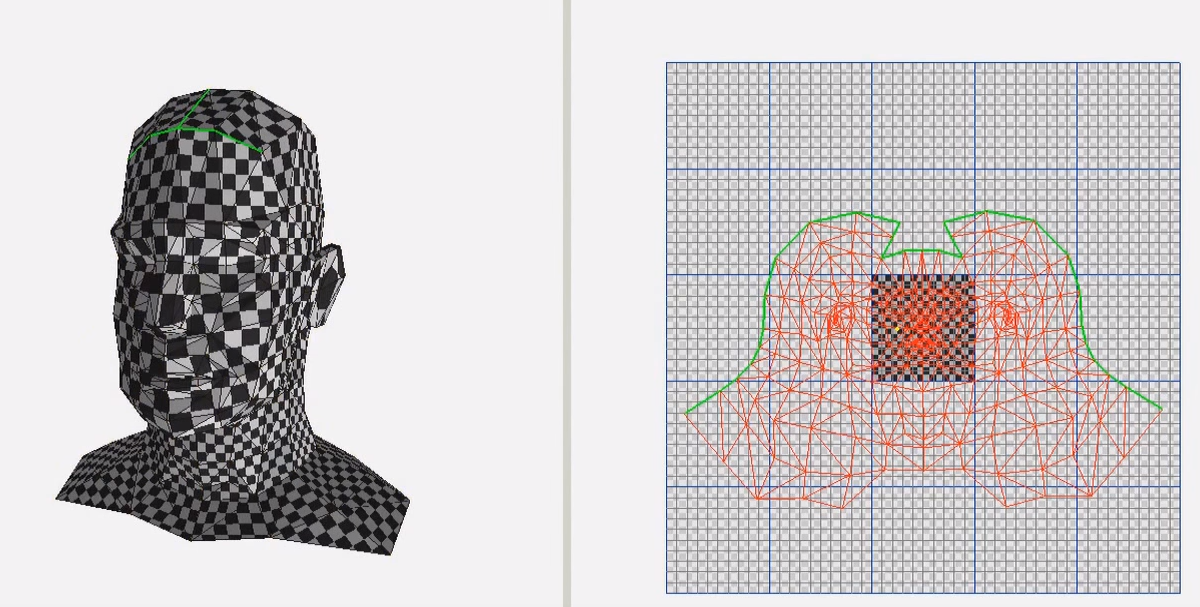
                    I noticed the size of the UV mapping was different from Wrap-R than what was imported:
                    2016-02-13_19h33_19.png

                    2016-02-13_19h33_31.png

                    Was that an artefact of alpha-software?
                    @kaas said:

                    If you're going to support fbx, maybe add the option for a 2nd UV channel as well? No use for it in SketchUp itself but for people who need a lightmap channel in Unreal that would be great.

                    How often do you have different UVs for the light channel - or other channel? Don't you normally have multiple channels matching their size and placement?

                    Thomas Thomassen — SketchUp Monkey & Coding addict
                    List of my plugins and link to the CookieWare fund

                    1 條回覆 最後回覆 回覆 引用 0
                    • K 離線
                      kaas
                      最後由 編輯

                      @thomthom said:

                      ...How often do you have different UVs for the light channel - or other channel? Don't you normally have multiple channels matching their size and placement?

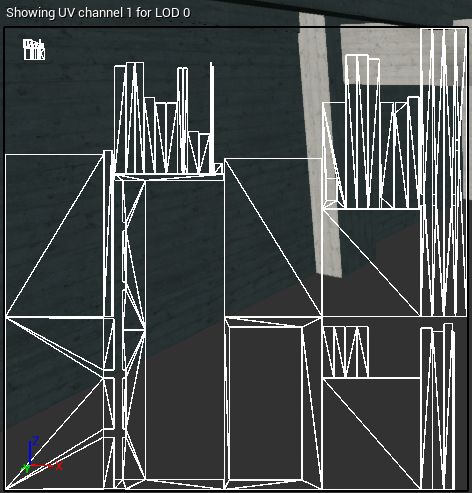
                      For gaming elements in general they are the same. For architecture though, the lightmap usually is totally different. The mapping coordinates for a tileable texture (brick, concrete etc) can have any value. The lightmap channel must have all uv's in the 0-1 space.

                      In the pic the lightmap uvs for a concrete structure: unwrapped in 0-1 space.

                      uvLightmap.jpg

                      1 條回覆 最後回覆 回覆 引用 0
                      • Rich O BrienR 離線
                        Rich O Brien Moderator
                        最後由 編輯

                        @thomthom said:

                        I noticed the size of the UV mapping was different from Wrap-R than what was imported

                        In SU I painted the default checker material. In WrapR when unwrapped it unwrapped within the texture space.

                        So the texture needs scaling in SU or in WrapR.

                        What you see in WrapR is not the texture you saw in SU.

                        Sent from my iPhone using Tapatalk

                        Download the free D'oh Book for SketchUp 📖

                        1 條回覆 最後回覆 回覆 引用 0
                        • JQLJ 離線
                          JQL
                          最後由 編輯

                          @rich o brien said:

                          What you see in WrapR is not the texture you saw in SU.

                          Sent from my iPhone using Tapatalk

                          But it will be... Right?

                          Will WrapR be able to convert a model that was mapped with tileable textures into a single texture?

                          Like the "combine textures" context menu feature but with multiplanar faces (and no image scale reduction)?

                          An atlas but only for selected component/group/mesh?

                          www.casca.pt
                          Visit us on facebook!

                          1 條回覆 最後回覆 回覆 引用 0
                          • ntxdaveN 離線
                            ntxdave
                            最後由 編輯

                            Another one of my silly questions. Can someone give me a practical definition of what UV is. I have looked it up in places like Wikipedia but, at least in the context of threads like this one, and do not think I "get it". Thus, why should I understand why UV unwrapping is a big deal?

                            To be honest, I have seen some examples and videos and I think I get what the issue is even though I do not fully appreciate what the term UV really means.

                            Press F1...thank me later

                            1 條回覆 最後回覆 回覆 引用 0
                            • tuna1957T 離線
                              tuna1957
                              最後由 編輯

                              great news ! will wait patiently in line with paypal in hand .

                              1 條回覆 最後回覆 回覆 引用 0
                              • thomthomT 離線
                                thomthom
                                最後由 編輯

                                @jql said:

                                @rich o brien said:

                                What you see in WrapR is not the texture you saw in SU.

                                Sent from my iPhone using Tapatalk

                                But it will be... Right?

                                Will WrapR be able to convert a model that was mapped with tileable textures into a single texture?

                                Like the "combine textures" context menu feature but with multiplanar faces (and no image scale reduction)?

                                An atlas but only for selected component/group/mesh?

                                That would be a great feature - fantastic for game development. People kept asking for that after I made the Cities Skylines extension.
                                I wonder how other tools allows this.
                                I'm guessing you'd need to UV unwrap the entire mesh first - then once it's all done you can do some sort of packing algorithm to put them all into one texture tile. Because I don't think you can combine the texture and then uv unwrap...

                                Thomas Thomassen — SketchUp Monkey & Coding addict
                                List of my plugins and link to the CookieWare fund

                                1 條回覆 最後回覆 回覆 引用 0
                                • FrederikF 離線
                                  Frederik
                                  最後由 編輯

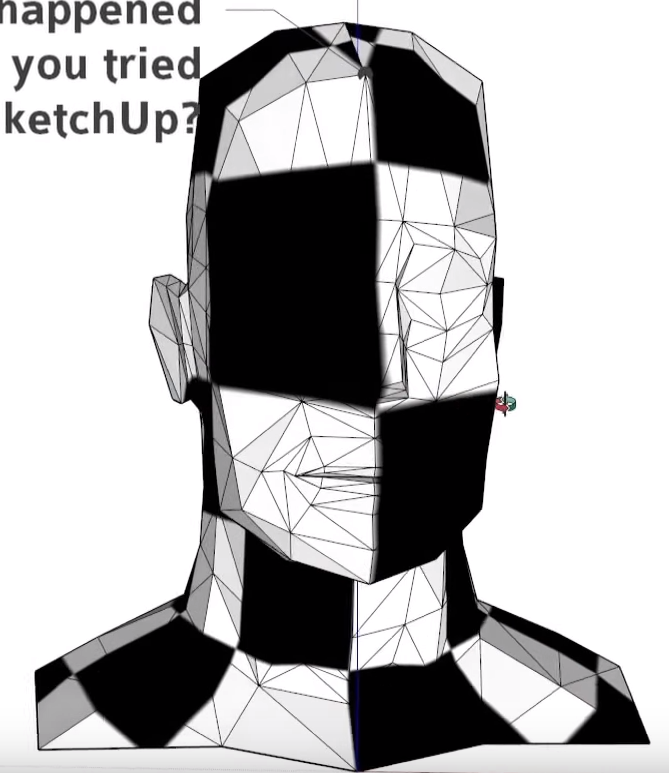
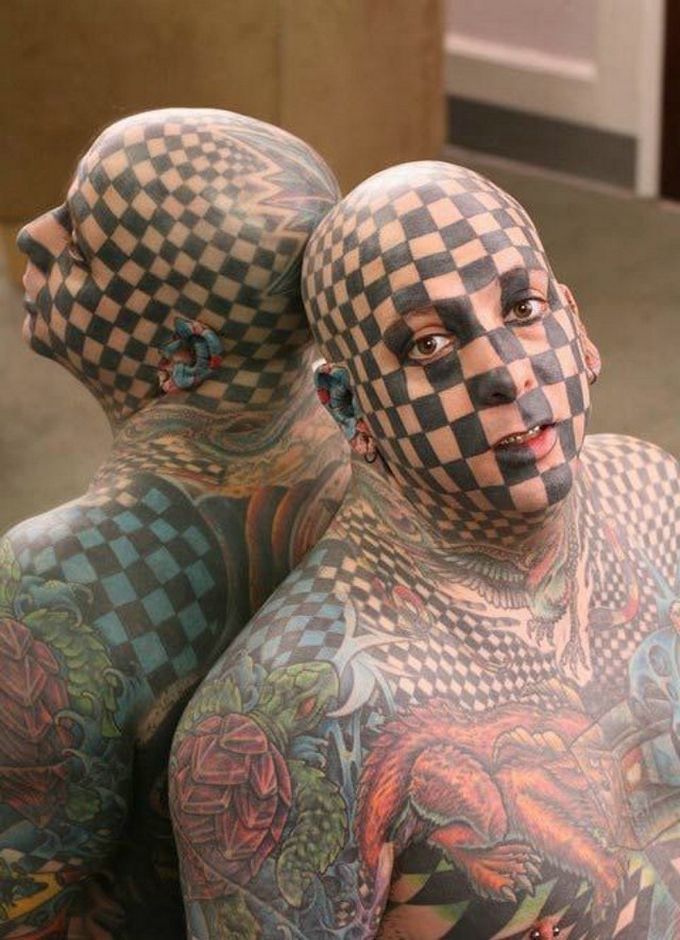
                                  It works great...


                                  Chess-face.jpg

                                  Cheers
                                  Kim Frederik

                                  1 條回覆 最後回覆 回覆 引用 0
                                  • thomthomT 離線
                                    thomthom
                                    最後由 編輯

                                    @ntxdave said:

                                    Another one of my silly questions. Can someone give me a practical definition of what UV is. I have looked it up in places like Wikipedia but, at least in the context of threads like this one, and do not think I "get it". Thus, why should I understand why UV unwrapping is a big deal?

                                    U and V are just common variable names such as X, Y and Z. It's convention.

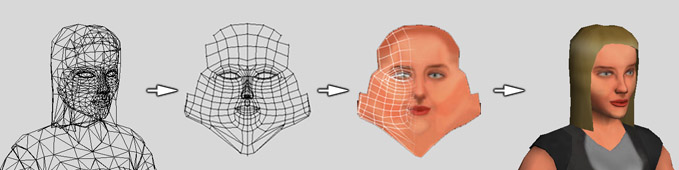
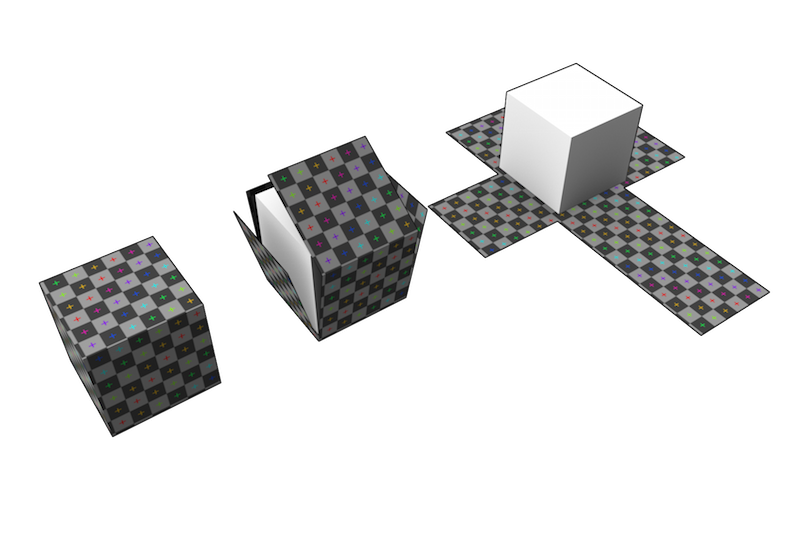
                                    When we talk about mapping a texture, which is a 2d bitmap to a 3d mesh we need to define where the texture will be place on each of the polygons in the 3d face. To do that we need to attach 2d coordinates to each of the 3d points.

                                    While X and Y can represent these 2d texture coordinates it gets confusing if we also use XYZ for the 3d points. So by arbitrary convention we usually refer to texture mapping coordinates as UV onto XYZ 3d mesh points.

                                    UV unwrapping is a big deal - or I'd rather say important, because it's required in being able to map a texture continuously across a mesh. You can imagine how you do gift wrapping; you take a 2d sheet of paper and wrap it around your object. If you force it you end up with wrinkles. Now imagine that you cannot make your paper overlap itself - you need to take a scissor and cut away pieces - but you want to make as few cuts as possible so that it looks nice and hide the seams.
                                    (Did that make any sense?)

                                    Cube_Representative_UV_Unwrapping.png


                                    Example94.jpg

                                    Thomas Thomassen — SketchUp Monkey & Coding addict
                                    List of my plugins and link to the CookieWare fund

                                    1 條回覆 最後回覆 回覆 引用 0
                                    • pilouP 離線
                                      pilou
                                      最後由 編輯

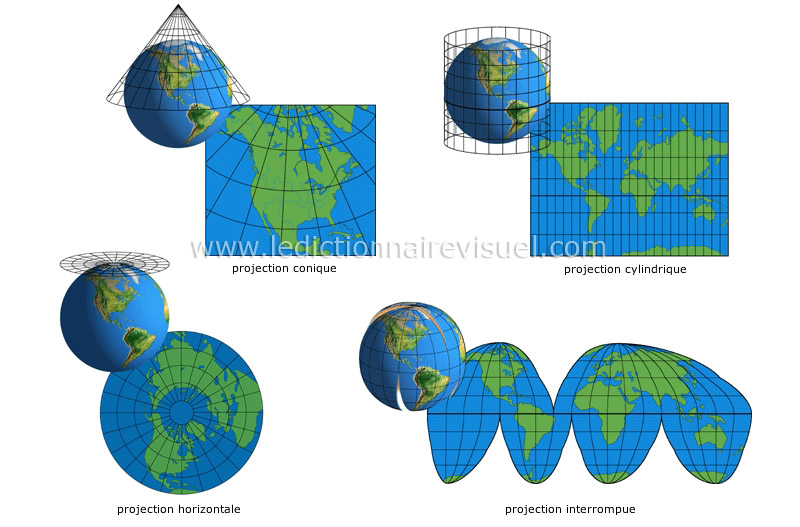
                                      These are also another UVs methods! 😉

                                      http://www.ikonet.com/fr/ledictionnairevisuel/images/qc/projections-cartographiques-100390.jpg

                                      Frenchy Pilou
                                      Is beautiful that please without concept!
                                      My Little site :)

                                      1 條回覆 最後回覆 回覆 引用 0
                                      • ntxdaveN 離線
                                        ntxdave
                                        最後由 編輯

                                        @ThomThom & @Pilou - Thanks for such good explanations. This is exactly what I thought I understood from my other reading but needed some confirmation.

                                        Now another question: How do you get the 2d texture to map? In particular when I look at the ThomThom's example of the face. How do you get the flat face texture that you are mapping to your mesh?

                                        Once again, I really appreciate you guys putting up with these elementary questions so those of us who are just getting started/trying to learn ask. I can see the whole importance of where this is headed and think it is going to play a big role in 3d modeling of all types in the future.

                                        Press F1...thank me later

                                        1 條回覆 最後回覆 回覆 引用 0
                                        • R 離線
                                          rv1974
                                          最後由 編輯

                                          I wish something suitable for fast texturing of 'conventional' architectural objects would eventually appear inside Sketchup:

                                          http://www.vg2max.spb.ru/polygonmap.htm

                                          1 條回覆 最後回覆 回覆 引用 0
                                          • P 離線
                                            Pherim
                                            最後由 編輯

                                            @rv1974 said:

                                            I wish something suitable for fast texturing of 'conventional' architectural objects would eventually appear inside Sketchup:

                                            Have you tried ThruPaint?

                                            Also, this unwrapping tool sure looks interesting. Just now I'm mostly working with ThruPaint and SketchUV, and the things I can't do directly in Sketchup I can do in Blender with the SketchUV import/export function, but your tool will be a nice addition.


                                            1 條回覆 最後回覆 回覆 引用 0
                                            • 1
                                            • 2
                                            • 3
                                            • 4
                                            • 5
                                            • 6
                                            • 6 / 6
                                            • 第一個貼文
                                              最後的貼文
                                            Buy SketchPlus
                                            Buy SUbD
                                            Buy WrapR
                                            Buy eBook
                                            Buy Modelur
                                            Buy Vertex Tools
                                            Buy SketchCuisine
                                            Buy FormFonts

                                            Advertisement