sketchucation logo sketchucation
    • 登入
    Oops, your profile's looking a bit empty! To help us tailor your experience, please fill in key details like your SketchUp version, skill level, operating system, and more. Update and save your info on your profile page today!
    🔌 Smart Spline | Fluid way to handle splines for furniture design and complex structures. Download

    SketchUp 2016 is here....

    已排程 已置頂 已鎖定 已移動 SketchUp Discussions
    sketchup
    162 貼文 59 Posters 32.7k 瀏覽 59 Watching
    正在載入更多貼文
    • 從舊到新
    • 從新到舊
    • 最多點贊
    回覆
    • 在新貼文中回覆
    登入後回覆
    此主題已被刪除。只有擁有主題管理權限的使用者可以查看。
    • david_hD 離線
      david_h
      最後由 編輯

      Yeah! what he said! 💚

      So.. .I didn't explain it well . .as I figured I wouldn't. All I meant was that if you have a structure of nested components--a nice feature for me would be to have a control on the visibility of said components when editing so that when instead of "hide rest of Model" you get can see all or some of the other components in the tree but not the rest of the model. For example . . if I have a component B in Model A I can work on Nested F component but maybe only see E or D not everything else?

      A>B>C>D>E>F

      There. That should make it much more clear right? 😒

      Now I feel bad cuz I hi=jacked this thread. I'll shuddup now.

      If I make it look easy...It is probably easy

      1 條回覆 最後回覆 回覆 引用 0
      • pmolsonP 離線
        pmolson
        最後由 編輯

        I have been using 2016 for a few days now, and I have no complaints.
        I do have a question though.

        Is there a way to dislodge the layers dialog box from the default Tray. I like the tray, especially with autohide enabled, but I would like to get the layers dialog out of there and float it wherever I want.

        I tend to have a lot of layers and the tray forces me to awkwardly scroll up and down to access.

        Thanks

        Paul

        1 條回覆 最後回覆 回覆 引用 0
        • K 離線
          kaas
          最後由 編輯

          @pmolson said:

          ..
          Is there a way to dislodge the layers dialog box from the default Tray. I like the tray, especially with autohide enabled, but I would like to get the layers dialog out of there and float it wherever I want...

          Create a new tray just for the layers and drag it off the docked position (double click).
          Window-manage trays-new etc

          1 條回覆 最後回覆 回覆 引用 0
          • pmolsonP 離線
            pmolson
            最後由 編輯

            Thank you!

            1 條回覆 最後回覆 回覆 引用 0
            • pmolsonP 離線
              pmolson
              最後由 編輯

              @kaas said:

              @pmolson said:

              ..
              Is there a way to dislodge the layers dialog box from the default Tray. I like the tray, especially with autohide enabled, but I would like to get the layers dialog out of there and float it wherever I want...

              Create a new tray just for the layers and drag it off the docked position (double click).
              Window-manage trays-new etc

              I created the new trays as you instructed and it worked great.

              A follow up questions if you don't mind.

              in the image below I am showing my newly created trays docked on the right side under the default tray.
              I like it because when I access the new trays I get a full length dialog box allowing me to see a nice long list of layers or components at a glance. or I can dislodge it and drag it onto another screen.

              When I opened a new drawing the new trays were not there. Are they really drawing file specific?
              is there a way to set them to be part of my standard template file?

              Thanks

              trays.JPG

              1 條回覆 最後回覆 回覆 引用 0
              • K 離線
                kaas
                最後由 編輯

                @pmolson said:

                ...When I opened a new drawing the new trays were not there. Are they really drawing file specific?is there a way to set them to be part of my standard template file?

                Strange, I just tested it and when I open a new session they are in the same position where I left them when I closed SketchUp.

                Not sure whats happening here. Maybe a rights-issue?

                1 條回覆 最後回覆 回覆 引用 0
                • JQLJ 離線
                  JQL
                  最後由 編輯

                  If you have two sessions open and close one that has the desired layout AND THEN close one that is incorrect, when you open sketchup the last one is the one saved, so it's the incorrect layout.

                  You should set things up with A SINGLE sketchup instance open and it should save correctly.

                  www.casca.pt
                  Visit us on facebook!

                  1 條回覆 最後回覆 回覆 引用 0
                  • pmolsonP 離線
                    pmolson
                    最後由 編輯

                    @jql said:

                    If you have two sessions open and close one that has the desired layout AND THEN close one that is incorrect, when you open sketchup the last one is the one saved, so it's the incorrect layout.

                    You should set things up with A SINGLE sketchup instance open and it should save correctly.

                    Worked like a charm.
                    Thanks!

                    1 條回覆 最後回覆 回覆 引用 0
                    • B 離線
                      bsfranza
                      最後由 編輯

                      hey guys, quick question - where can i set maxium texture size? before version 2016 there was unter windoe/model info/rendering the possibility to use max texture size!!

                      would be very nice if this was there in 2016 too - maybe it is but i cant find it:/

                      1 條回覆 最後回覆 回覆 引用 0
                      • cottyC 離線
                        cotty
                        最後由 編輯

                        It is (and was) here: preferences -> OpenGL

                        my SketchUp gallery

                        1 條回覆 最後回覆 回覆 引用 0
                        • B 離線
                          bsfranza
                          最後由 編輯

                          found the solution - ... sorry 😃 i must sleep i think

                          1 條回覆 最後回覆 回覆 引用 0
                          • P 離線
                            pipingguy
                            最後由 編輯

                            Not sure how to hide trays, like Paul did, so just their tabs are displayed. All I can manage to do is dock them with the help of those blue and white arrow glyphs that pop up when I drag a tray around the screen.

                            1 條回覆 最後回覆 回覆 引用 0
                            • S 離線
                              spadestick
                              最後由 編輯

                              Brad Schell and Joe Esch need to start up a new company. They had a huge following, they sold out, they retired, and they should be tired of retiring by now and do something meaningful like come up with a better Sketchup!

                              1 條回覆 最後回覆 回覆 引用 0
                              • H 離線
                                Heaps
                                最後由 編輯

                                How about SU for the iPad Pro ?

                                1 條回覆 最後回覆 回覆 引用 0
                                • pmolsonP 離線
                                  pmolson
                                  最後由 編輯

                                  @pipingguy said:

                                  Not sure how to hide trays, like Paul did, so just their tabs are displayed. All I can manage to do is dock them with the help of those blue and white arrow glyphs that pop up when I drag a tray around the screen.

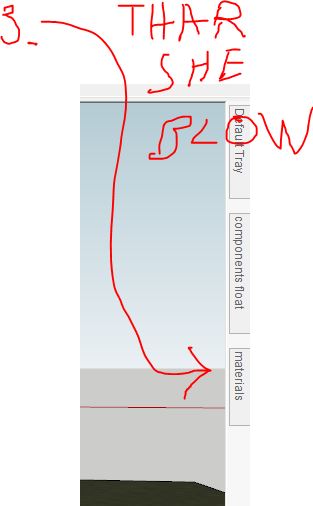
                                  create your new tray -( window-new tray ) then follow prompts.
                                  once you have your new tray floating on your screen do the following.
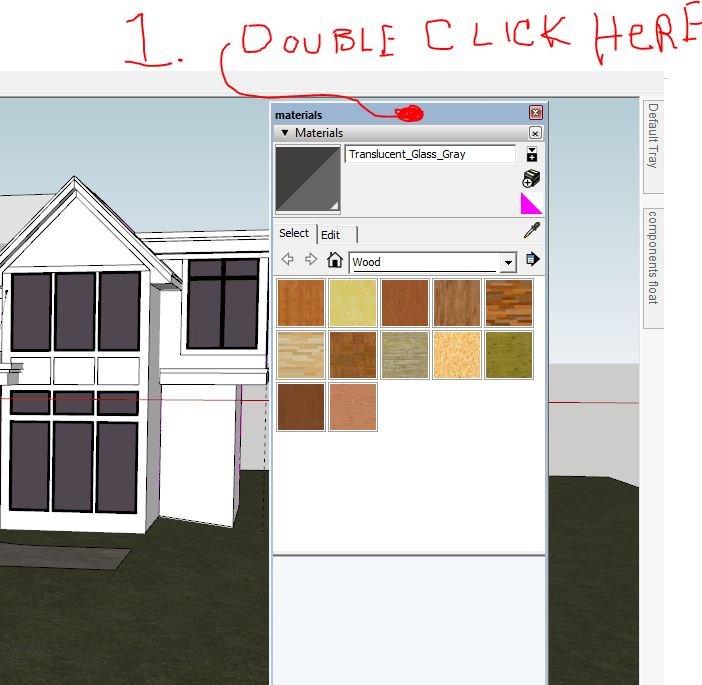
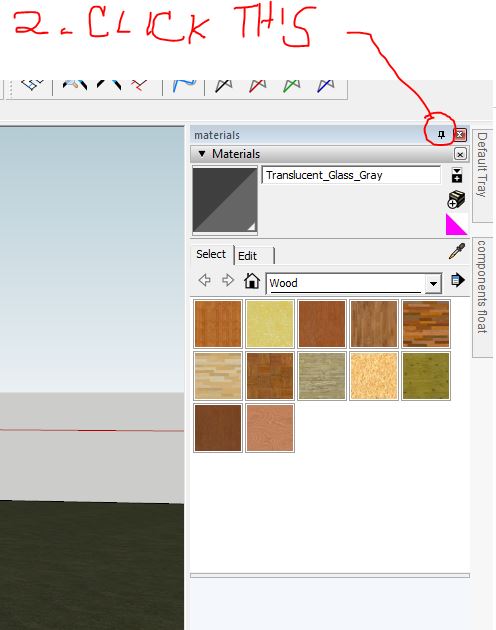
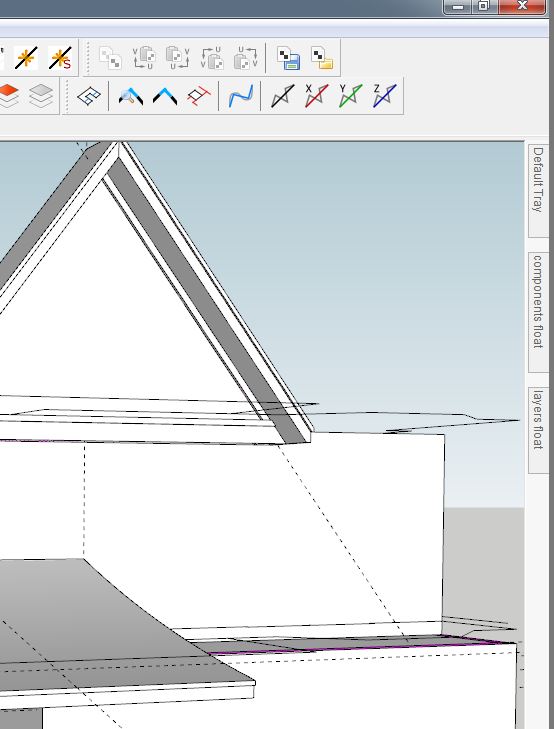
                                  step 1.JPGstep 2.JPGstep 3.JPG

                                  You can then click the little staple thing again to undock it when you want to, and just double click it and auto hide it again to put it back.

                                  1 條回覆 最後回覆 回覆 引用 0
                                  • P 離線
                                    pipingguy
                                    最後由 編輯

                                    thanks!
                                    (Isn't it fun using a mouse to write words on a clipping tool's screen cap?)

                                    One thing I noticed with the materials tray - when you strike the B key, the tray does not automatically pop open.

                                    1 條回覆 最後回覆 回覆 引用 0
                                    • K 離線
                                      kaas
                                      最後由 編輯

                                      @pipingguy said:

                                      ...One thing I noticed with the materials tray - when you strike the B key, the tray does not automatically pop open.

                                      Did you bind the B key to the tray-toggle?

                                      1 條回覆 最後回覆 回覆 引用 0
                                      • pmolsonP 離線
                                        pmolson
                                        最後由 編輯

                                        @pipingguy said:

                                        One thing I noticed with the materials tray - when you strike the B key, the tray does not automatically pop open.

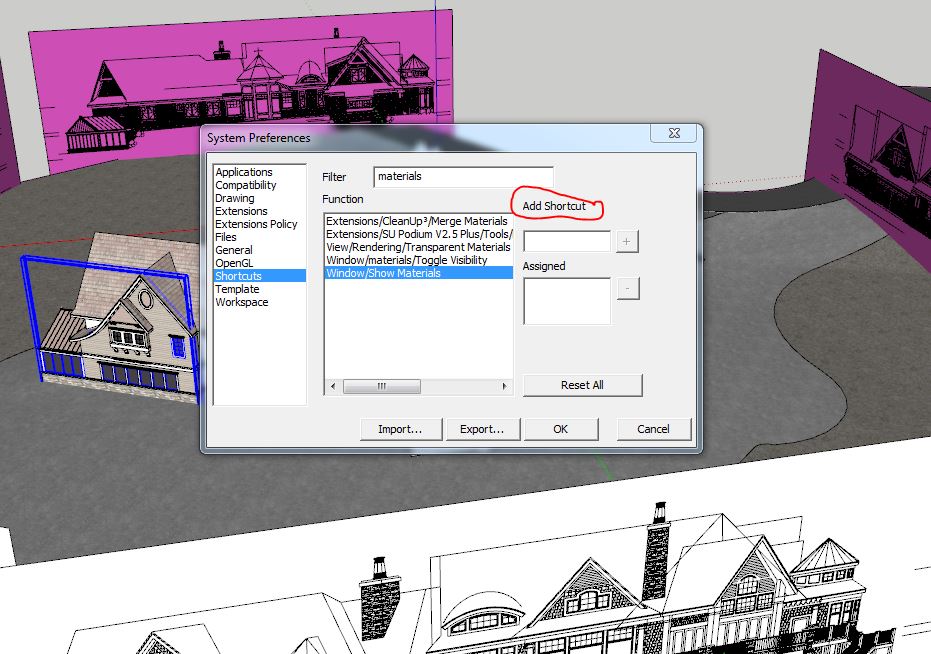
                                        Go to windows / preferences / shortcuts

                                        add the letter of your choice.

                                        I noticed many of the old default shortcuts to have gone missing in 2016
                                        b.JPG

                                        1 條回覆 最後回覆 回覆 引用 0
                                        • JQLJ 離線
                                          JQL
                                          最後由 編輯

                                          @pmolson said:

                                          I noticed many of the old default shortcuts to have gone missing in 2016
                                          [attachment=0:1ihgs1kq]<!-- ia0 -->b.JPG<!-- ia0 -->[/attachment:1ihgs1kq]

                                          If any of you hit the reset button the default buttons will be back up, even if you have none set.

                                          www.casca.pt
                                          Visit us on facebook!

                                          1 條回覆 最後回覆 回覆 引用 0
                                          • C 離線
                                            CalypsoArt
                                            最後由 編輯

                                            I have not installed 2016 yet. However, I've just read this thread and there much talk about the LO styles "Tray" in SU. This has me very apprehensive. (I do not like the tray system of LO.)

                                            I have a Dual 30" monitor set up. In the software packages I use, my Right monitor is for the actual work screen, and the Left has all my panels open. e.g components, materials, layers etc. Am I understanding correctly that the trays can only be docked to main work space (my Right monitor) and I can't move them to the second monitor? As it is, I don't expect much from Trimble. But really, for me anyway, the trays are a backward step.


                                            1 條回覆 最後回覆 回覆 引用 0
                                            • 1
                                            • 2
                                            • 5
                                            • 6
                                            • 7
                                            • 8
                                            • 9
                                            • 7 / 9
                                            • 第一個貼文
                                              最後的貼文
                                            Buy SketchPlus
                                            Buy SUbD
                                            Buy WrapR
                                            Buy eBook
                                            Buy Modelur
                                            Buy Vertex Tools
                                            Buy SketchCuisine
                                            Buy FormFonts

                                            Advertisement