SketchUp 2016 is here....
-
-
Box, strange but mine behaves different way (maybe because I'm on Win7?). Only double clicking sets it free. Thank you for reply though!
-
@philw said:
Look for shadows setting under the new (Silly) Default tray.
Who wanted that feature? The old way was muck better.
Why do they fixing whats not broken but hardly ever fix what is?Hint: BETTER MAPPING CONTROLS
I wanted that feature. It's, for me, much better now and overall has much MUCH more options and flexibility.
For instance:
- right docking trays don't come over measurements VCB;
- you can create more than one group of stacking trays;
- Autohiding trays is a really nice feature;
- Entity info is now a static box meaning it won't make trays beneath it jump up and down;
- I can't remember more, but overall I believe we're better now.
- You can still revive the old way if you make a tray per inspector and use a short cut to call it as you probably did before. You can also use that shortcut to toggle it on and off wich is great!
There are many things unpolished that are still annoying:
- If bucket tool is called and materials are in an auto hide tray the tray isn't sliding in;
- Sliding trays should be active while the command we are using is active, (bucket tool, photomatch, soften edges, shadows... etc)
- Of course some of these commands have no tool associtated so they're transparent, so at least, the trays wich have corresponding inspectors should stay active if select tool is on when using them (I'd call the select tool a neutral state in SU)
I've mine set like this:
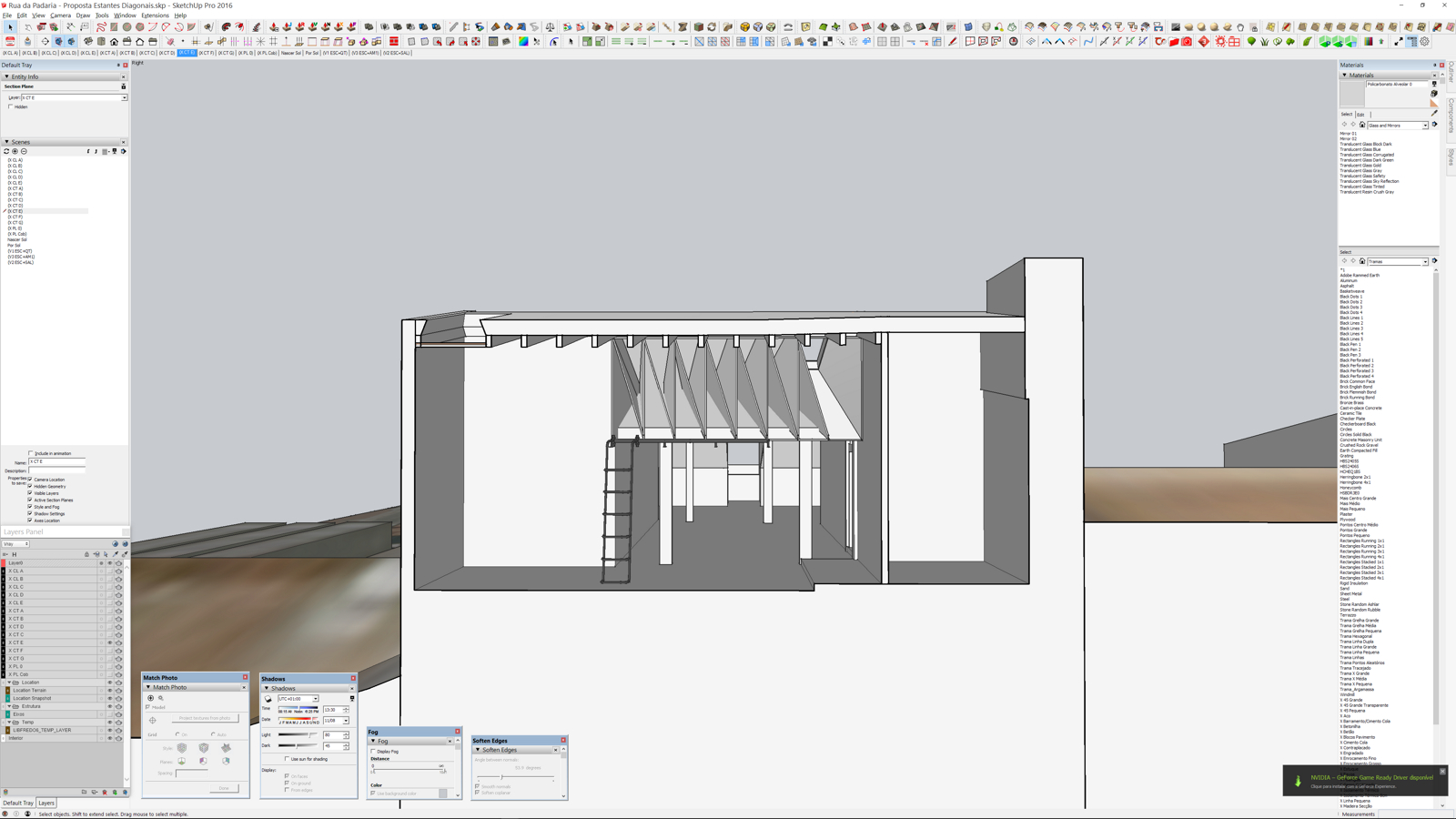
-
Mac UI is still a mess.
-
@sketchuh said:
Do you guys think is it possible any company would develop a software that is more like a hybrid of sketchup/3ds max and or modo or etc...
I really want a software that is easy to use like sketchup but has all the traditional 3d software functionality.
It's called Rhino.
-
@pbacot said:
Mac UI is still a mess.
Yes (although "mess" is subjective, it is certainly different from the Windows UI). Essentially nothing was done in this release to correct the growing divergence between the Mac and Windows GUIs. In fact, the introduction of "trays" added a new item of difference that will make it difficult to train new users.
-
@arail1 said:
It's called Rhino.
I've been curious about it for a long time now...
It has a Thea render plugin too...
Would you find transitioning from SU to Rhino painful?
-
I'm teaching myself Rhino right now.
I really like it; while it isn't quite SU for ease of modeling, it does have a very nice inference and customizable snapping interface that, once you figure out it's "flow", it is really very powerful. And the modeling tools are awesome; it pretty much even has a push/pull tool.
There are a ton of online video tutorials and training aids and their forum is very helpful as well. What has taken me the most time to come to terms with is that there seems to be 5 different ways to accomplish anything and there are 5 different ways to access each of the 5 different ways and trying to figure out what is fastest and most efficient is a trial and error process.
I am using the MAC version, which is still missing some functions, but I find it to be a very useful software to know how to use, especially if you need to produce STEP or IGES files. Another huge benefit to Rhino is that it can import and export darned near every file type out there, which makes it fantastic as a file converter.
I would never, however, use it for architectural work and blueprinting; to me, SU-LO is a better solution for that.
-
Thansk for your answer otb!
-
@sketchuh said:
...
until there is SERIOUS competition from another new and similar software, Sketchup will always bring NO real updates to people who are screaming the loudest in the wishlist topic.
Do you guys think is it possible any company would develop a software that is more like a hybrid of sketchup/3ds max and or modo or etc...
I really want a software that is easy to use like sketchup but has all the traditional 3d software functionality.
again, I don't think Sketchup has real competitions out there. 3ds vs maya? apple vs microsfot? xbox vs ps,... Sketchup vs who??? I should stop here.
Well I think Form-Z is a serious competitor for SU with the tool sets and options it offers. Now as a general 3D modeling applications I think MOI 3D and Rhino should be considered. Been playing with Form-Z myself for a while but I am so ingrained to SU I am having trouble doing things in it as easily as I do in SU. Form-Z could use a UI over haul imho still not as bad as Blender though

With the recent price increase in SU the price difference is starting to blur. I still love SU and have been using it since v2 and it's ease of use has me so spoiled. -
@otb designworks said:
I'm teaching myself Rhino right now.
I really like it; while it isn't quite SU for ease of modeling, it does have a very nice inference and customizable snapping interface that, once you figure out it's "flow", it is really very powerful. And the modeling tools are awesome; it pretty much even has a push/pull tool.
There are a ton of online video tutorials and training aids and their forum is very helpful as well. What has taken me the most time to come to terms with is that there seems to be 5 different ways to accomplish anything and there are 5 different ways to access each of the 5 different ways and trying to figure out what is fastest and most efficient is a trial and error process.
I am using the MAC version, which is still missing some functions, but I find it to be a very useful software to know how to use, especially if you need to produce STEP or IGES files. Another huge benefit to Rhino is that it can import and export darned near every file type out there, which makes it fantastic as a file converter.
I would never, however, use it for architectural work and blueprinting; to me, SU-LO is a better solution for that.
Its interesting that you say that you would never use Rhino for architectural work. Rhino with its Grashopper plugin has been extremely popular with Architects. In fact that type of visual programming interface has inspired various copy cats in the Architectural Design products such as Dynamo (Revit) and Marionette (Vectorworks).
-
@sketchuh said:
i always think the strength of sketchup is it's simplicity and the weakeness of sketchup is it's simplicity. I always hate it and love it at the same time.
until there is SERIOUS competition from another new and similar software, Sketchup will always bring NO real updates to people who are screaming the loudest in the wishlist topic.
Do you guys think is it possible any company would develop a software that is more like a hybrid of sketchup/3ds max and or modo or etc...
I really want a software that is easy to use like sketchup but has all the traditional 3d software functionality.
again, I don't think Sketchup has real competitions out there. 3ds vs maya? apple vs microsfot? xbox vs ps,... Sketchup vs who??? I should stop here.
Have you tried Renga Architecture ?
It's the latest fresh product in the Building/Architecture Design market and ramping up fast in terms of intuitive features for the AEC/BIM workflows. -
@davejay said:
Its interesting that you say that you would never use Rhino for architectural work. Rhino with its Grashopper plugin has been extremely popular with Architects. In fact that type of visual programming interface has inspired various copy cats in the Architectural Design products such as Dynamo (Revit) and Marionette (Vectorworks).
Grasshopper is not available for Mac and Layouts are not either, so there is no chance of producing effective and efficient plansets at this time.
-
@otb designworks said:
@davejay said:
Its interesting that you say that you would never use Rhino for architectural work. Rhino with its Grashopper plugin has been extremely popular with Architects. In fact that type of visual programming interface has inspired various copy cats in the Architectural Design products such as Dynamo (Revit) and Marionette (Vectorworks).
Grasshopper is not available for Mac and Layouts are not either, so there is no chance of producing effective and efficient plansets at this time.
You are right about that. For me operating system is irrelevant as far as I get the work done.
-
@solo said:
The tool bars are not bigger see image, top is new 2016 toolbars and lower are the 2014 toolbars
Hi Pete,
I see you have some interesting icons I've not seen before, are these EXTENSIONS, if so, any chance of some names & brief description. I'd hate to be missing out on any time saving ones.
Over & out,
Clayton. -
Point to the ones you have not seen in a screen grab and I'll identify for you
-
@solo said:
Point to the ones you have not seen in a screen grab and I'll identify for you
Hi Pete,
Attachment enclosed.

-
@solo said:
Point to the ones you have not seen in a screen grab and I'll identify for you
The third one will annoy some people...
-

First is Artisan.
Second Curviloft.
Third Skatter. -
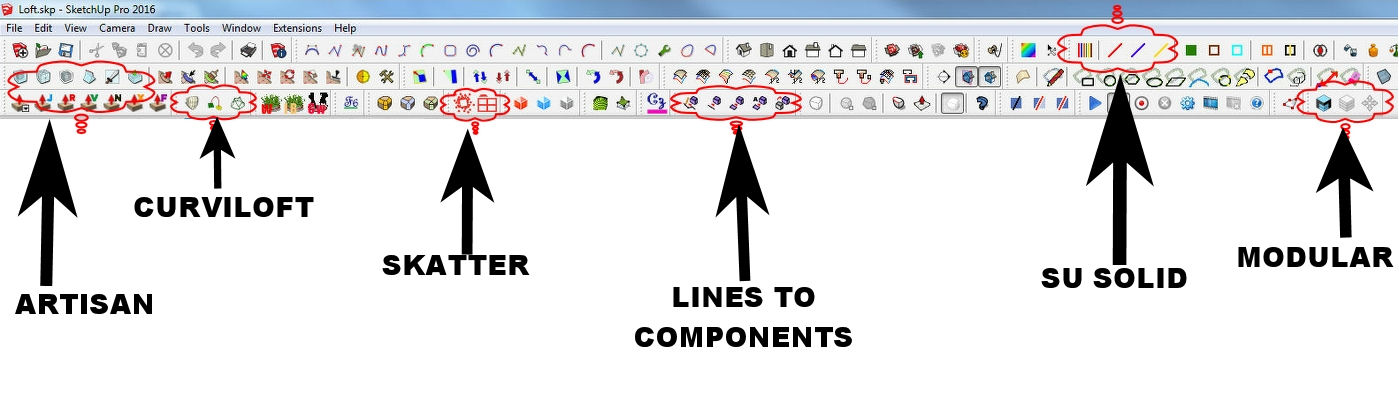
edit lines to components is actually called S4u-to components









Advertisement