sketchucation logo sketchucation
    • 登入
    Oops, your profile's looking a bit empty! To help us tailor your experience, please fill in key details like your SketchUp version, skill level, operating system, and more. Update and save your info on your profile page today!
    🔌 Smart Spline | Fluid way to handle splines for furniture design and complex structures. Download

    SketchUp 2016 is here....

    已排程 已置頂 已鎖定 已移動 SketchUp Discussions
    sketchup
    162 貼文 59 Posters 32.7k 瀏覽 59 Watching
    正在載入更多貼文
    • 從舊到新
    • 從新到舊
    • 最多點贊
    回覆
    • 在新貼文中回覆
    登入後回覆
    此主題已被刪除。只有擁有主題管理權限的使用者可以查看。
    • BoxB 離線
      Box
      最後由 編輯

      @calypsoart said:

      Am I understanding correctly that the trays can only be docked to main work space (my Right monitor) and I can't move them to the second monitor? As it is, I don't expect much from Trimble. But really, for me anyway, the trays are a backward step.

      You can have multiple trays. They can be docked left, right, top or bottom, they can float and can be moved to other monitors. They can autohide or remain static.

      1 條回覆 最後回覆 回覆 引用 0
      • Z 離線
        Zacchia
        最後由 編輯

        Hi
        I tried to use Trimble Connect, made a Login and tried to share a file. But allways when i "Trimble Connect - open or publish model just nothing happens. If i open Trimble connect there is "no Project". Did anyone tried this out?

        1 條回覆 最後回覆 回覆 引用 0
        • N 離線
          nicolasnourry
          最後由 編輯

          Obviously the people developing Sketchup doesn't use it at all, the same annoying bugs are still here, and the new features are just inexistent.
          This is so frustrating, puzzle games on iPhone have more improvements on each updates than Sketchup releases.
          SKP 2015 (14.1 really) was already poor in innovation but 2016 (14.2) just got a +1 to its current name.
          What have they been doing for 1 years, gathering crappy jpgs for the "new" textures ?
          I could post a full list of bugs and needed features, but they obviously do not care as many people already done that with no results.

          1 條回覆 最後回覆 回覆 引用 0
          • utilerU 離線
            utiler
            最後由 編輯

            @nicolasnourry said:

            Obviously the people developing Sketchup doesn't use it at all, the same annoying bugs are still here, and the new features are just inexistent.
            This is so frustrating, puzzle games on iPhone have more improvements on each updates than Sketchup releases.
            SKP 2015 (14.1 really) was already poor in innovation but 2016 (14.2) just got a +1 to its current name.
            What have they been doing for 1 years, gathering crappy jpgs for the "new" textures ?
            I could post a full list of bugs and needed features, but they obviously do not care as many people already done that with no results.

            Rather than just be frustrated Nicholas, you should post your list of bugs / features over at the 2017 wishlist.
            http://sketchucation.com/forums/viewtopic.php?f=10%26amp;t=63464

            Otherwise no one will know what your issues are. 👍

            Just Curious...

            1 條回覆 最後回覆 回覆 引用 0
            • Mike AmosM 離線
              Mike Amos
              最後由 編輯

              V 2016 is unusable for me, the inability to reliably move a group or component by locking the axis of movement means that ANY movement of components and groups is slow and tedious. I will wait until the first maintainence release and see how it goes from there. Even drawing a line by locking axis of the line fails.

              Absentia mortis praesentiam vitae probat, vita autem est argumentum constantiae.

              1 條回覆 最後回覆 回覆 引用 0
              • BoxB 離線
                Box
                最後由 編輯

                Your comments suggest to me that you aren't understanding how to move things.
                Click and release on a suitable part of your group with the move tool, this will attach it to the Cursor. You can freely move around with it or lock it to an axis with the arrow keys. Only when you click and release again will it be placed.
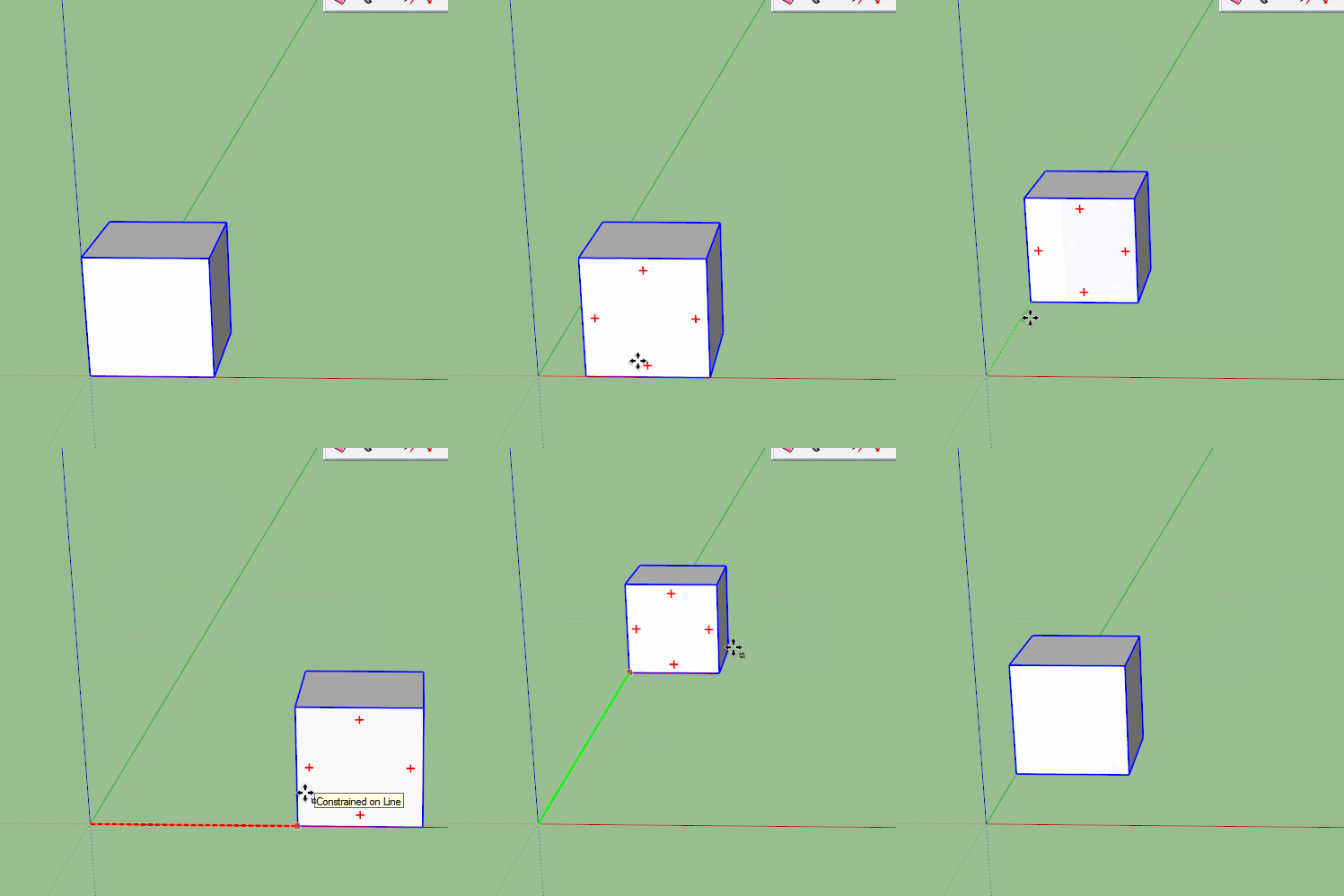


                Move.gif

                1 條回覆 最後回覆 回覆 引用 0
                • Mike AmosM 離線
                  Mike Amos
                  最後由 編輯

                  Short reply, yes mate I DO know how to do that.

                  Absentia mortis praesentiam vitae probat, vita autem est argumentum constantiae.

                  1 條回覆 最後回覆 回覆 引用 0
                  • C 離線
                    cadmunkey
                    最後由 編輯

                    @mike amos said:

                    Short reply, yes mate I DO know how to do that.

                    Mike you CAN lock the axis of movement on a group, I do it all day long.

                    Most frustrating part of 2016 for me is the increase in bugsplats with such simple operations.

                    1 條回覆 最後回覆 回覆 引用 0
                    • Mike AmosM 離線
                      Mike Amos
                      最後由 編輯

                      I used to do it all day long, the FACT that I cannot with this version is NOT a joke and it working in YOUZR experience does NOT mean it works here, just that it is not 100%.

                      I would NOT report this if it worked....... Allow for some experience and intelligence please.

                      Absentia mortis praesentiam vitae probat, vita autem est argumentum constantiae.

                      1 條回覆 最後回覆 回覆 引用 0
                      • C 離線
                        cadmunkey
                        最後由 編輯

                        Calm down Mike, I'm not saying it works for you I am saying it works for me! By stating you are waiting for a maintenance release led me to believe that you think this problem is the same for everyone. So you may be waiting a long time for a fix for a bug that doesn't effect anyone else, OK?

                        1 條回覆 最後回覆 回覆 引用 0
                        • Mike AmosM 離線
                          Mike Amos
                          最後由 編輯

                          Quite calm mate, nil desperandum. What you said was that I can and I was pointing out that I can't. There are a few issues where this program is slower than v 2015 like when copying and pasting, this leads me to conclude v 2016 is in a state of flux and needs a maintainence release. I have however, not had a single bugsplat but that will no doubt happen down the line.

                          Absentia mortis praesentiam vitae probat, vita autem est argumentum constantiae.

                          1 條回覆 最後回覆 回覆 引用 0
                          • Mike AmosM 離線
                            Mike Amos
                            最後由 編輯

                            I have now uninstalled v 2016, sick of the program not behaving properly and reducing the things I do to, no you cannot do that. Not seen the like on any other version.

                            Absentia mortis praesentiam vitae probat, vita autem est argumentum constantiae.

                            1 條回覆 最後回覆 回覆 引用 0
                            • pbacotP 離線
                              pbacot
                              最後由 編輯

                              Anyone have anything they LIKE about 2016?

                              MacOSX MojaveSketchUp Pro v19 Twilight v2 Thea v3 PowerCADD

                              1 條回覆 最後回覆 回覆 引用 0
                              • BoxB 離線
                                Box
                                最後由 編輯

                                @pbacot said:

                                Anyone have anything they LIKE about 2016?

                                Runs like a dream, like the new features, have yet to have a bug splat, much faster than 2015, better resolution on the hi def screen....................

                                1 條回覆 最後回覆 回覆 引用 0
                                • O 離線
                                  otb designworks
                                  最後由 編輯

                                  Small Dimensions and context menu layer designation in Layout get big thumbs up from me.

                                  Cheers, Chuck

                                  OTB Designworks is on Youtube

                                  6 core nMP, 32 gig RAM, (2) D700 GPU's, dual monitors

                                  1 條回覆 最後回覆 回覆 引用 0
                                  • G 離線
                                    Garry K
                                    最後由 編輯

                                    SU 2016 is the best version since Trimble took over Sketchup. I'd been working with SU8 - now Su 2016

                                    1 條回覆 最後回覆 回覆 引用 0
                                    • cottyC 離線
                                      cotty
                                      最後由 編輯

                                      @pbacot said:

                                      Anyone have anything they LIKE about 2016?

                                      The improved inference system e.g.

                                      my SketchUp gallery

                                      1 條回覆 最後回覆 回覆 引用 0
                                      • pmolsonP 離線
                                        pmolson
                                        最後由 編輯

                                        I like that within a few hours I did not even notice a difference from previous version. The improvements are seamless enough that I do not trip over them doing my day to day work.

                                        I like it!

                                        1 條回覆 最後回覆 回覆 引用 0
                                        • M 離線
                                          miggy
                                          最後由 編輯

                                          @kaas said:

                                          @miggy said:

                                          ...
                                          I have a script that manipulates very many (20-30+) Google Earth terrain groups written back in SUv8...

                                          My script copies and explodes lots of groups & components. I do see a positive difference in V16 and opening / closing the outliner doesn't make any real difference.

                                          Maybe your v8 code hasn't been optimized? You do make use of
                                          model.start_operation("name of operation",true)?
                                          the true flag here disables the UI which could make you code run faster. Just a thought.

                                          Thanks so much kaas for getting me to re-examine my scripts. 😄
                                          I have always used start_operation with disable_ui, but I have always believed that disable_ui didn't do anything useful - this because I have view.refresh in most of my loops!
                                          Because the scripts are long-running, they would seem to be dead without view.refresh, especially because, most often, I also get the Windows 'not responding' in the title bar.
                                          So, all said, a basic misunderstanding of view.refresh overriding disable_ui... 😮

                                          To clarify this for myself, I've written a test script and a mini model to test against.
                                          It has really cleared out any doubts or misunderstandings I have had.
                                          If anybody is interested I have attached both script and test model.
                                          Any further clarifications on my comments below are truly welcomed - sorry if any of them seem obvious to others, but these were grey areas for me...

                                          Also, if anybody has found a way to get Ruby/Sketchup to 'talk' to Windows and tell it that "I am busy so please don't lock out my status bar and console", I am very interested.
                                          I have tried using threads as well as Win32 calls to various PeekMessage, GetMessage, etc., but to no avail, so far, ... the only thing that works is UI.messagebox, but that is a useless solution for long running (20-40 minutes) analysis scripts...

                                          The net clarifications, for me, that came out of this script revisit and testing are:

                                          1. The Layers window is never updated whilst a script is running - regardless of start_operation or value of disable_ui.
                                          2. view.refresh overrides disable_ui.
                                          3. view.refresh is required if the model view-port needs to 'move' during processing.
                                          4. disable_ui doesdisable Outliner updates as well - good-bye attempts to automatically close it via script 😎
                                          5. status bar and console are notaffected by disable_ui
                                          6. window 'not responding' doeslock status bar & console, but does not affect view.refresh 😲

                                          test_disable_ui.rb


                                          test_disable_ui.skp

                                          1 條回覆 最後回覆 回覆 引用 0
                                          • G 離線
                                            Garry K
                                            最後由 編輯

                                            Magnus

                                            I always set disable_ui to true.
                                            Some of my longer running scripts are still usually under a minute.
                                            Regardless - inside the loop I do
                                            Sketchup::set_status_text("Cabinet: #{count}", SB_PROMPT )

                                            If you don't have a loop that provides a predetermined level of activity then you can use a timer and have that timer update the status. Say every 10 to 30 seconds. The status could show elapsed time and some form of guess to how far you are through the script.

                                            1 條回覆 最後回覆 回覆 引用 0
                                            • 1
                                            • 2
                                            • 5
                                            • 6
                                            • 7
                                            • 8
                                            • 9
                                            • 8 / 9
                                            • 第一個貼文
                                              最後的貼文
                                            Buy SketchPlus
                                            Buy SUbD
                                            Buy WrapR
                                            Buy eBook
                                            Buy Modelur
                                            Buy Vertex Tools
                                            Buy SketchCuisine
                                            Buy FormFonts

                                            Advertisement