sketchucation logo sketchucation
    • Login
    Oops, your profile's looking a bit empty! To help us tailor your experience, please fill in key details like your SketchUp version, skill level, operating system, and more. Update and save your info on your profile page today!
    ⚠️ Update | Sketchucation Tools 5.0.8 released with licensing improvements and bugfixes Download

    Copied components automatically tilted to remain flat on sur

    Scheduled Pinned Locked Moved SketchUp Discussions
    sketchup
    27 Posts 9 Posters 2.9k Views 9 Watching
    Loading More Posts
    • Oldest to Newest
    • Newest to Oldest
    • Most Votes
    Reply
    • Reply as topic
    Log in to reply
    This topic has been deleted. Only users with topic management privileges can see it.
    • hellnbakH
      hellnbak
      last edited by

      @dave r said:

      Does the component have gluing set? Is it possible the component that isn't doing it is a different one than the one you were copying before?

      I've never used gluing, and, yes, it's the very same component that I started with before.

      I've tried everything I can think of, but it just won't do it any more. I've even tried deleting all of the copies of the component, leaving just the one I started with.

      It's really driving me nuts, especially since so many of the models I've been working on contain hundreds and hundreds of rivets, the majority of which I have to adjust manually to lie flat on the surfaces after I copy and move them. Very tedious and time consuming.

      "Politicians are just like diapers -- they need to be changed often, and for the same reason"

      1 Reply Last reply
      Reply Quote 0
      • Dave RD
        Dave R
        last edited by

        I don't know why it worked and then doesn't but you really should be setting up the rivet as a gluing component. You'd save yourself a lot of work.

        Etaoin Shrdlu

        %

        (THERE'S NO PLACE LIKE)

        G28 X0.0 Y0.0 Z0.0

        M30

        %

        1 Reply Last reply
        Reply Quote 0
        • hellnbakH
          hellnbak
          last edited by

          @dave r said:

          you really should be setting up the rivet as a gluing component. You'd save yourself a lot of work.

          Well, just tried that, doesn't seem to do anything different.

          "Politicians are just like diapers -- they need to be changed often, and for the same reason"

          1 Reply Last reply
          Reply Quote 0
          • Dave RD
            Dave R
            last edited by

            Did you set it up correctly?

            Etaoin Shrdlu

            %

            (THERE'S NO PLACE LIKE)

            G28 X0.0 Y0.0 Z0.0

            M30

            %

            1 Reply Last reply
            Reply Quote 0
            • pbacotP
              pbacot
              last edited by

              Only you can have done so much with SU while utilizing so few of the features. It's incredible, just like your modelling. It MUST have to do with gluing. Hope you figure it out soon.

              MacOSX MojaveSketchUp Pro v19 Twilight v2 Thea v3 PowerCADD

              1 Reply Last reply
              Reply Quote 0
              • hellnbakH
                hellnbak
                last edited by

                Just read about gluing components here http://help.sketchup.com/en/article/114533

                Sooooo complex and confusing πŸ˜• Seems more straightforward to do it the way I have been.

                But then most things are confusing to me, that's probably just the problem.

                Thing is, it did automatically adjust the components to each new surface, just by copying and moving them. There has to be some explanation of why this happened.

                "Politicians are just like diapers -- they need to be changed often, and for the same reason"

                1 Reply Last reply
                Reply Quote 0
                • hellnbakH
                  hellnbak
                  last edited by

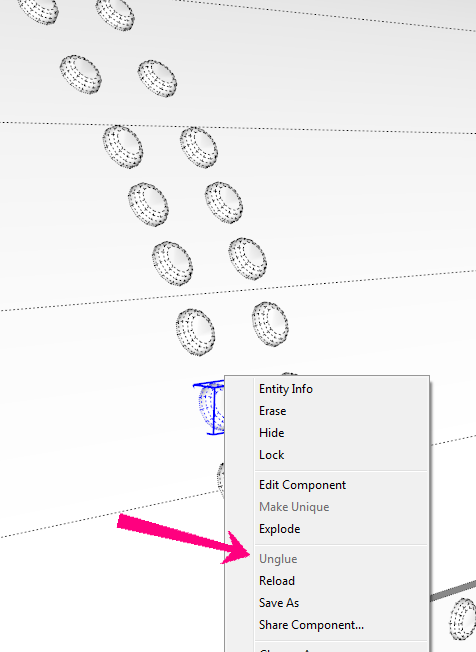
                  As I said, I have never used gluing for any component. And when I checked my model, when I click on each of the components that were involved in this, the "unglue" option is greyed out - wouldn't this indicate that they were not glued?

                  2015-08-31_195114.png

                  "Politicians are just like diapers -- they need to be changed often, and for the same reason"

                  1 Reply Last reply
                  Reply Quote 0
                  • hellnbakH
                    hellnbak
                    last edited by

                    Just watched a couple of videos on YouTube, much more helpful than that website. So I think I have it now, you can't just pick a glued component and copy it, you have to keep getting them from the component browser for this to work, right? That seems to be working.

                    "Politicians are just like diapers -- they need to be changed often, and for the same reason"

                    1 Reply Last reply
                    Reply Quote 0
                    • pbacotP
                      pbacot
                      last edited by

                      yes maybe. If you look at the component in the component browser and select "edit" it should say.

                      Oh wait. I can make a component like that. First when you create a component on a surface,SU automatically makes it a gluing component. I did this, then went in and reset the "glue to: none" in the component window. Copy and paste, it still adjusted to the new surface, but "Unglue" was gray....How you did it IDK. Hmm, but subsequent use is sketchy.

                      MacOSX MojaveSketchUp Pro v19 Twilight v2 Thea v3 PowerCADD

                      1 Reply Last reply
                      Reply Quote 0
                      • S
                        slbaumgartner
                        last edited by

                        @hellnbak said:

                        Just watched a couple of videos on YouTube, much more helpful than that website. So I think I have it now, you can't just pick a glued component and copy it, you have to keep getting them from the component browser for this to work, right? That seems to be working.

                        Yes, glueing is a "behavior" tied to the component definition. It comes into play when you fetch a new instance from the component browser. As noted earlier, under certain circumstances it gets set by default when you create a new component (sort of like the "replace selection" checkbox). You have to pay attention or you might get one glued without knowing!

                        1 Reply Last reply
                        Reply Quote 0
                        • hellnbakH
                          hellnbak
                          last edited by

                          I cannot remember the last time I used the component browser. But now that I know how to use the glue function, it will make some of my efforts much, much, much easier,

                          While at the same time making me very, very, very discouraged. All those wasted hours spent placing components by hand. Many wasted hours. I can't help but be discouraged knowing that my lack of knowledge about Sketchup has increased my difficulty level not only in this instance, but who knows how many other things have been needlessly complicated and time consuming simply because I just don't know how to do them the way they should be done.

                          "Politicians are just like diapers -- they need to be changed often, and for the same reason"

                          1 Reply Last reply
                          Reply Quote 0
                          • BoxB
                            Box
                            last edited by

                            Next time you are doing something that seems painfully tedious, post it and see how others would do it.

                            1 Reply Last reply
                            Reply Quote 0
                            • emerald15E
                              emerald15
                              last edited by

                              @hellnbak said:

                              who knows how many other things have been needlessly complicated and time consuming simply because I just don't know how to do them.

                              Well, I hadn't realised how much more helpful it would be to glue components either. I knew it was a option... just didn't take the time to explore it!

                              However, we never stop learning. If I hadn't read this thread... I wouldn't have learnt this technique. Hope that makes you feel a little better?

                              PS. perhaps we should now be call it 'rivet' not 'glue'! πŸ˜„

                              1 Reply Last reply
                              Reply Quote 0
                              • Dave RD
                                Dave R
                                last edited by

                                I'm also surprised at how much you've done with so little. It makes me a little sad, though, because it means you've been working much harder than you need to.

                                In addition to adding the gluing behavior, you should think about where to put the origin so that you can easily direct the insertion of the component. Look at this video. The first part of the video shows inserting a component that has gluing behavior set and the insertion point located so the component goes exactly where it is wanted.

                                It seems to me someone (probably TIG) wrote a plugin a long time ago that obviates the need to go back to the component browser each time. It would certainly be useful for placing your rivets.

                                Etaoin Shrdlu

                                %

                                (THERE'S NO PLACE LIKE)

                                G28 X0.0 Y0.0 Z0.0

                                M30

                                %

                                1 Reply Last reply
                                Reply Quote 0
                                • Bob JamesB
                                  Bob James
                                  last edited by

                                  @Dave R
                                  What plugin is this?
                                  What.PNG

                                  i7-4930K 3.4Ghz, 2x GTX780 6GB, 32GB DDR3-1600 ECC, OCZ Vertex 4 500GB, WD Black 3TB, 32TB NAS, 4x 27" Monitors, SpaceMouse Pro, X-keys XK-60

                                  1 Reply Last reply
                                  Reply Quote 0
                                  • Dave RD
                                    Dave R
                                    last edited by

                                    Bob, it's the Wudworx toolset. From the top, Dovetails, Mortises and Tenons, Boardmaker and Drill. I mostly use the Dovetail and Drill tools out of that set.

                                    Etaoin Shrdlu

                                    %

                                    (THERE'S NO PLACE LIKE)

                                    G28 X0.0 Y0.0 Z0.0

                                    M30

                                    %

                                    1 Reply Last reply
                                    Reply Quote 0
                                    • Bob JamesB
                                      Bob James
                                      last edited by

                                      @dave r said:

                                      Bob, it's the Wudworx toolset. From the top, Dovetails, Mortises and Tenons, Boardmaker and Drill. I mostly use the Dovetail and Drill tools out of that set.

                                      Thank you, Dave. In the video the drill seemed to be being used to "clean out" a cylindrical countersink around the component.

                                      i7-4930K 3.4Ghz, 2x GTX780 6GB, 32GB DDR3-1600 ECC, OCZ Vertex 4 500GB, WD Black 3TB, 32TB NAS, 4x 27" Monitors, SpaceMouse Pro, X-keys XK-60

                                      1 Reply Last reply
                                      Reply Quote 0
                                      • Dave RD
                                        Dave R
                                        last edited by

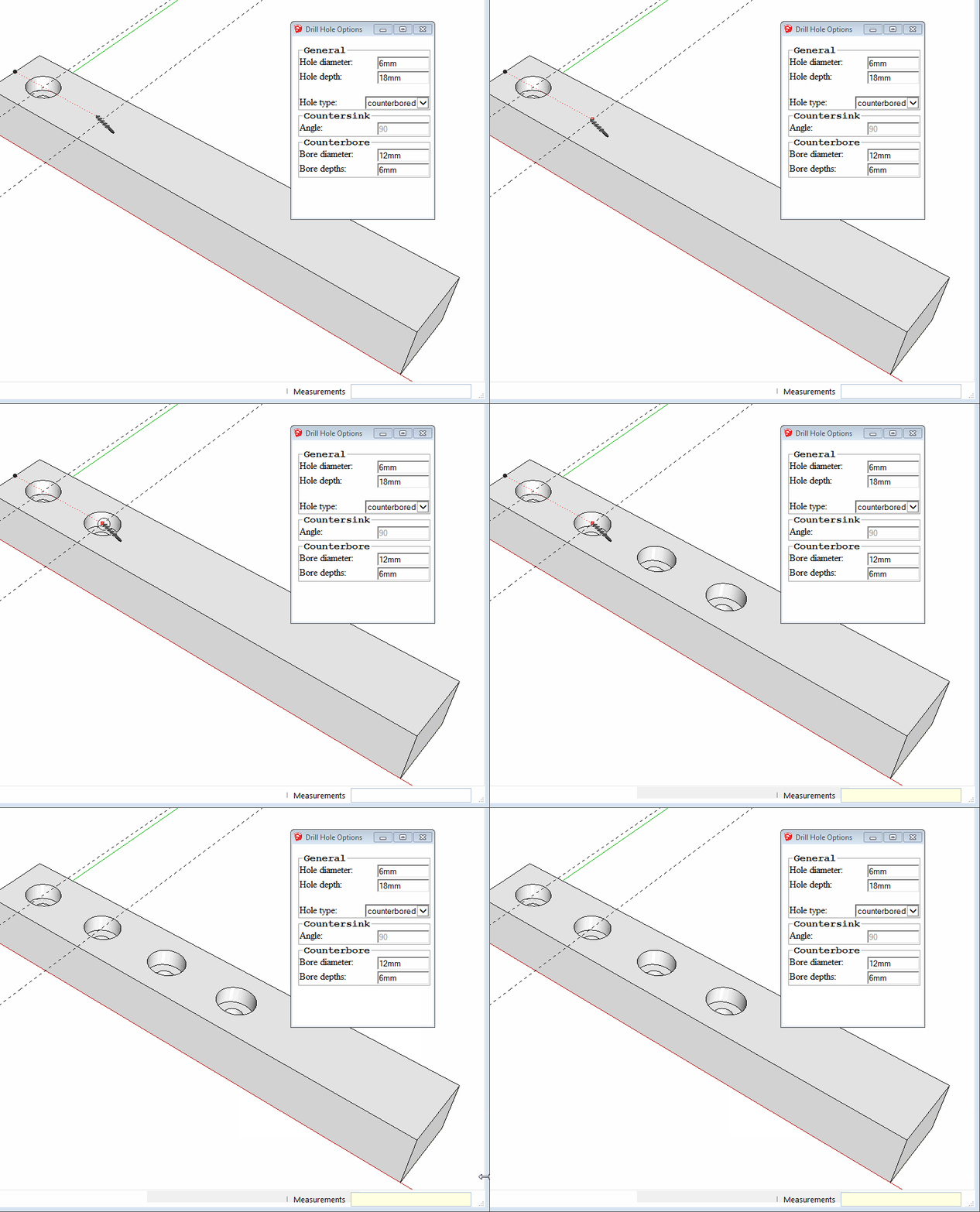
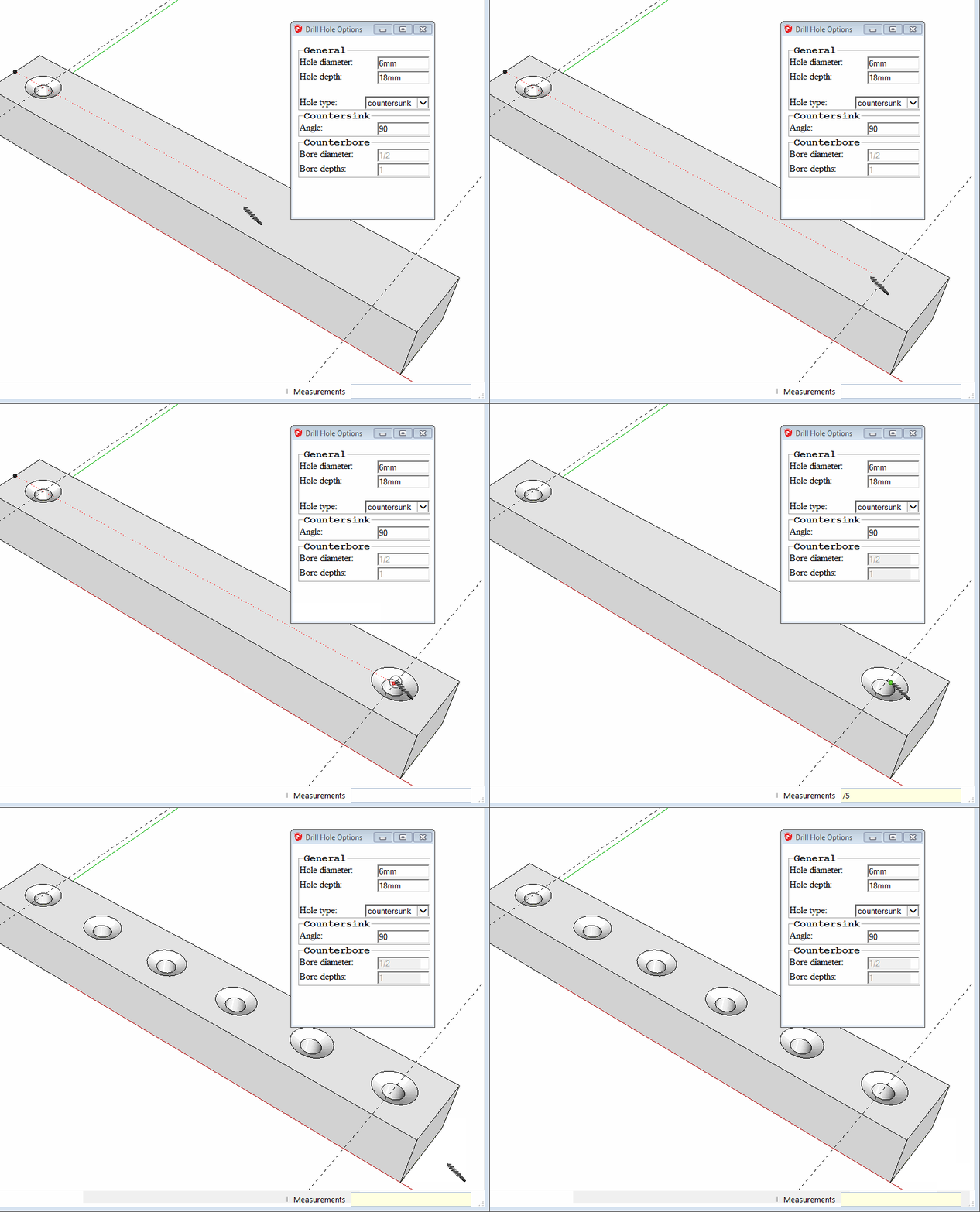
                                        Bob, the Drill tool can make straight sided holes, counterbored holes and countersunk holes and can even make arrays of holes. In the video I made the holes after placing the bolts because the gluing plane was placed at the top of the head so they would sit flush with the surface of the part. The bolts would have been difficult to put in place like I wanted them if there was no surface under the guidepoint. I already had the dimensions for the counterbored holes set for the tool so I didn't need to call up the settings window before drilling.
                                        counterbore.gif
                                        drill.gif

                                        Etaoin Shrdlu

                                        %

                                        (THERE'S NO PLACE LIKE)

                                        G28 X0.0 Y0.0 Z0.0

                                        M30

                                        %

                                        1 Reply Last reply
                                        Reply Quote 0
                                        • andybotA
                                          andybot
                                          last edited by

                                          I use gluing all the time with stuff like windows. The trick is, you can copy it from one face to another and keep the "glue" behavior, but it can be kind of hit or miss. If you are snapping to an edge, most often, it will NOT glue. If you just move "by eye" from one face to another, then it does most often glue. That's the way I usually do it, and then I go back and align by moving to relative alignment points (like I have to move a window up slightly to match the previous window heat height.) If I have time, I could do a quick video.

                                          The other thing, stuff becomes automatically a glued component if you draw it on a face then make a group out of it. No need to use component browser at all for either of my points of advice. πŸ˜„

                                          Andy

                                          http://charlottesvillearchitecturalrendering.com/

                                          1 Reply Last reply
                                          Reply Quote 0
                                          • hellnbakH
                                            hellnbak
                                            last edited by

                                            @dave r said:

                                            It seems to me someone (probably TIG) wrote a plugin a long time ago that obviates the need to go back to the component browser each time. It would certainly be useful for placing your rivets.

                                            Dave, I have tried to locate the plugin you mentioned, but no luck. I stopped visiting the plugin thread a loooonnnngggg time ago, just got too frustrating with all the plugins that sounded so fantastic but knowing that I probably wouldn't be able to use the dang things right. The thread has changed a lot since then.
                                            I did come across a few that sounded promising, I'll check them out later.
                                            Anyhow, any idea how I might find that plugin?
                                            I ask because I've not had a whole lot of luck with gluing my rivets and I'm working on several models that have approximately a bazillion of them.
                                            Thanks in advance for any help you can provide.
                                            "Politicians are just like diapers -- they need to be changed often, and for the same reason"

                                            1 Reply Last reply
                                            Reply Quote 0

                                            Hello! It looks like you're interested in this conversation, but you don't have an account yet.

                                            Getting fed up of having to scroll through the same posts each visit? When you register for an account, you'll always come back to exactly where you were before, and choose to be notified of new replies (either via email, or push notification). You'll also be able to save bookmarks and upvote posts to show your appreciation to other community members.

                                            With your input, this post could be even better πŸ’—

                                            Register Login
                                            • 1
                                            • 2
                                            • 1 / 2
                                            • First post
                                              Last post
                                            Buy SketchPlus
                                            Buy SUbD
                                            Buy WrapR
                                            Buy eBook
                                            Buy Modelur
                                            Buy Vertex Tools
                                            Buy SketchCuisine
                                            Buy FormFonts

                                            Advertisement