sketchucation logo sketchucation
    • 登入
    Oops, your profile's looking a bit empty! To help us tailor your experience, please fill in key details like your SketchUp version, skill level, operating system, and more. Update and save your info on your profile page today!
    ⚠️ Important | Libfredo 15.6b introduces important bugfixes for Fredo's Extensions Update

    Is there pluging for expanding/making face along line/edges?

    已排程 已置頂 已鎖定 已移動 Plugins
    41 貼文 12 Posters 2.5k 瀏覽 12 Watching
    正在載入更多貼文
    • 從舊到新
    • 從新到舊
    • 最多點贊
    回覆
    • 在新貼文中回覆
    登入後回覆
    此主題已被刪除。只有擁有主題管理權限的使用者可以查看。
    • N 離線
      namelessone
      最後由 編輯

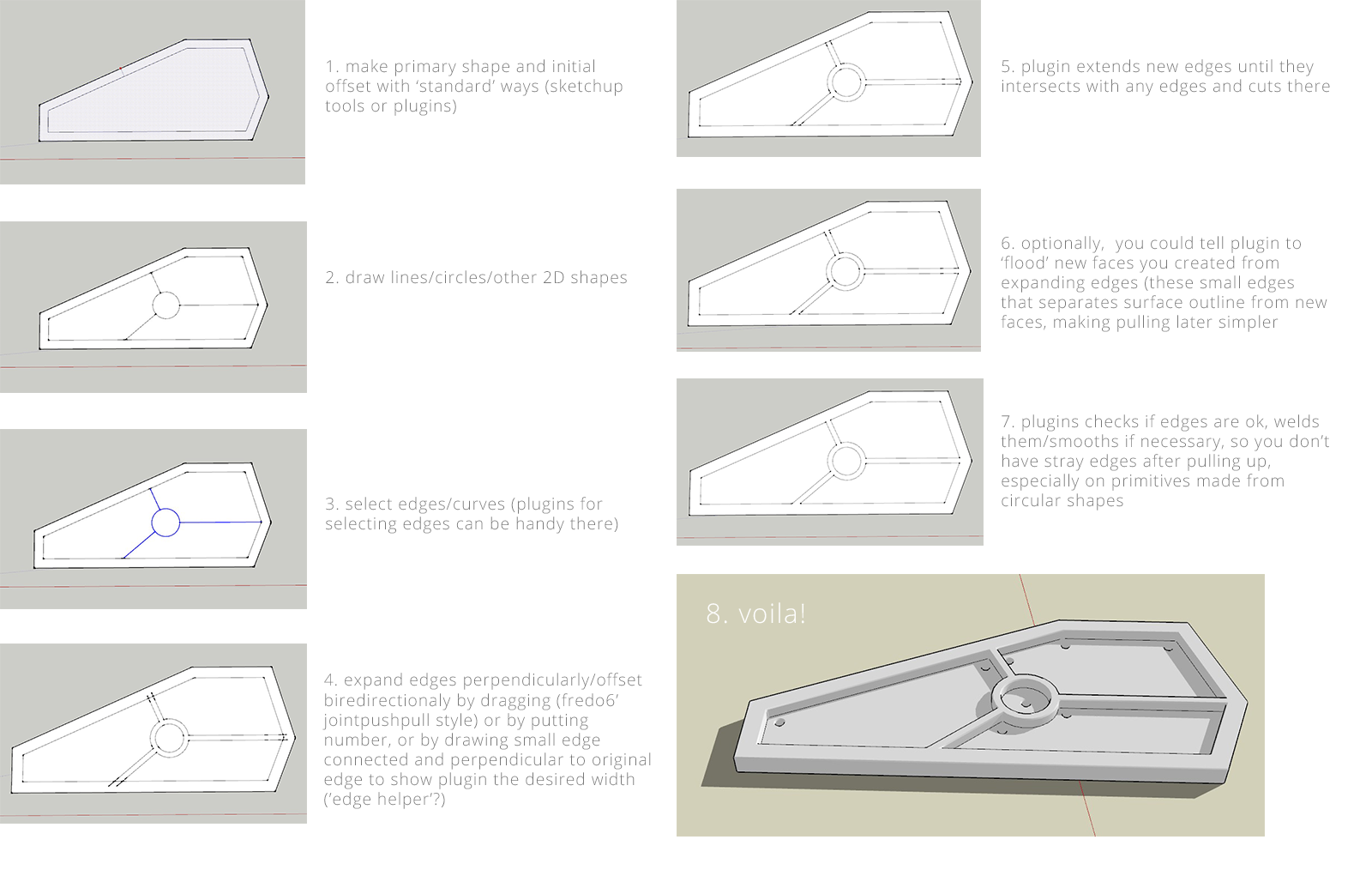
      I've made quick visual example of what I'm looking for. Doing lot of robotic elements, it's kinda slow to make additional lines manually. I'm imagining plugin could allow to select lines/edges, then drag/put width number, expand it and delete old line/edges, just like fredo6's jointpushpull plugin does, except it's 2D lines/edges.
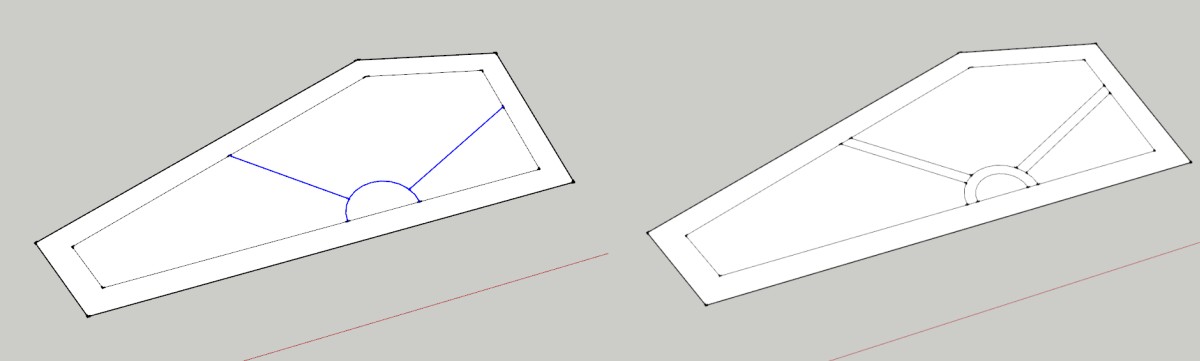

      example

      1 條回覆 最後回覆 回覆 引用 0
      • JQLJ 離線
        JQL
        最後由 編輯

        That would be useful for a lot more than robotics...

        www.casca.pt
        Visit us on facebook!

        1 條回覆 最後回覆 回覆 引用 0
        • cottyC 離線
          cotty
          最後由 編輯

          Something like "split faces" from Thomthoms edge tools but with two directions, deletion ofthe original and a multi-edge-preselection...

          my SketchUp gallery

          1 條回覆 最後回覆 回覆 引用 0
          • pbacotP 離線
            pbacot
            最後由 編輯

            This is along the lines of oft discussed methods to get grooves along edges. Meaning we draw a line that represents a break in material, but upon rendering there is nothing there--a quick method to create a 3d demarcation is desirable. This would be a nice addition-then you can proceed with quick push-pull etc.

            MacOSX MojaveSketchUp Pro v19 Twilight v2 Thea v3 PowerCADD

            1 條回覆 最後回覆 回覆 引用 0
            • N 離線
              namelessone
              最後由 編輯

              Or call it an offset tool on steroids 😉 Too bad, with such variety of plugins, I thought some of them would provide something close to feature I'm looking for. Maybe some plugin gods could listen to it? 😄

              1 條回覆 最後回覆 回覆 引用 0
              • CadFatherC 離線
                CadFather
                最後由 編輯

                TIG's extrude edges has an offset function that can take a line and widen it by a chosen amount.

                http://sketchucation.com/plugin/1103-extrudetools

                here's a few others might be worth looking at:

                %(#0000FF)[http://sketchucation.com/pluginstore?pln=multi_face_offset

                Link Preview Image
                SketchUp Plugins | PluginStore | SketchUcation

                SketchUp Plugin and Extension Store by SketchUcation provides free downloads of hundreds of SketchUp extensions and plugins

                favicon

                (sketchucation.com)

                Link Preview Image
                SketchUp Plugins | PluginStore | SketchUcation

                SketchUp Plugin and Extension Store by SketchUcation provides free downloads of hundreds of SketchUp extensions and plugins

                favicon

                (sketchucation.com)

                lattice maker
                http://sketchucation.com/pluginstore?pln=latticeMaker]

                1 條回覆 最後回覆 回覆 引用 0
                • JQLJ 離線
                  JQL
                  最後由 編輯

                  I think keeping the original edge through CTRL would also be a nice option. Regular Command would offset and erase, with CTRL it would keep. I would use it to bevel a union on two materials like polished stone slabs

                  www.casca.pt
                  Visit us on facebook!

                  1 條回覆 最後回覆 回覆 引用 0
                  • pbacotP 離線
                    pbacot
                    最後由 編輯

                    an edge is one thing. An arc is another matter. The tool would need to know what to do with it (trim and complete arc to edge of face). The various offset issues that SU faces come into play.

                    MacOSX MojaveSketchUp Pro v19 Twilight v2 Thea v3 PowerCADD

                    1 條回覆 最後回覆 回覆 引用 0
                    • sdmitchS 離線
                      sdmitch
                      最後由 編輯

                      @namelessone said:

                      I've made quick visual example of what I'm looking for. Doing lot of robotic elements, it's kinda slow to make additional lines manually. I'm imagining plugin could allow to select lines/edges, then drag/put width number, expand it and delete old line/edges, just like fredo6's jointpushpull plugin does, except it's 2D lines/edges.

                      The closest thing I have found is ThomThom's CityGen-StreetGen

                      http://forums.sketchucation.com/viewtopic.php?f=180%26amp;t=19492
                      and
                      http://forums.sketchucation.com/viewtopic.php?f=180%26amp;t=19493
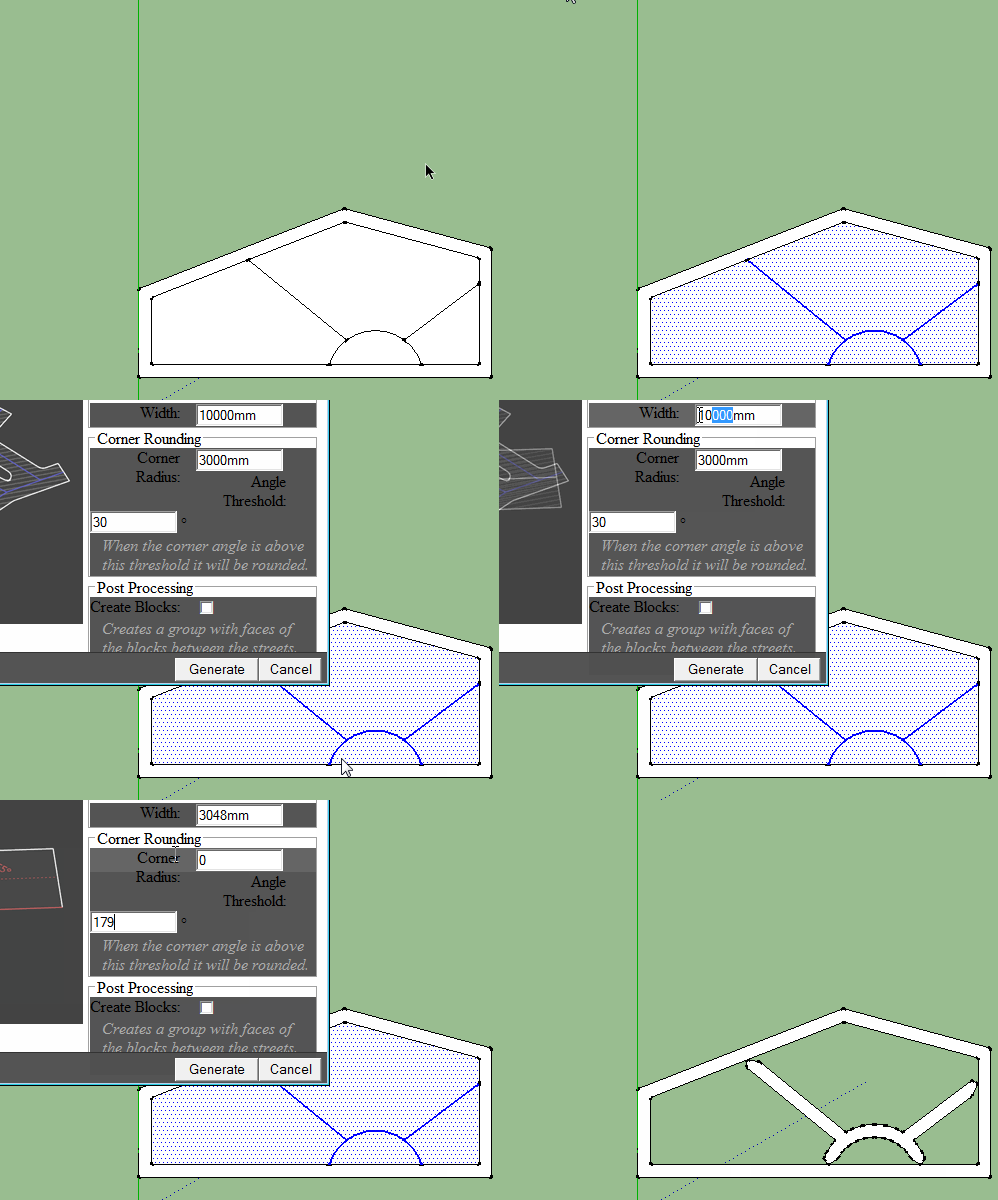

                      street gen.gif

                      Nothing is worthless, it can always be used as a bad example.

                      http://sdmitch.blogspot.com/

                      1 條回覆 最後回覆 回覆 引用 0
                      • Dave RD 離線
                        Dave R
                        最後由 編輯

                        Offset.gif

                        Why not change the setup slightly and use TIG's Smart Offset?

                        Etaoin Shrdlu

                        %

                        (THERE'S NO PLACE LIKE)

                        G28 X0.0 Y0.0 Z0.0

                        M30

                        %

                        1 條回覆 最後回覆 回覆 引用 0
                        • JQLJ 離線
                          JQL
                          最後由 編輯

                          Tig's offset its almost there Dave, but it can't work on an edge alone...

                          www.casca.pt
                          Visit us on facebook!

                          1 條回覆 最後回覆 回覆 引用 0
                          • Dave RD 離線
                            Dave R
                            最後由 編輯

                            But it can get the requested job done.

                            My apologies for suggesting it. 😒

                            Etaoin Shrdlu

                            %

                            (THERE'S NO PLACE LIKE)

                            G28 X0.0 Y0.0 Z0.0

                            M30

                            %

                            1 條回覆 最後回覆 回覆 引用 0
                            • JQLJ 離線
                              JQL
                              最後由 編輯

                              @dave r said:

                              My apologies for suggesting it. 😒

                              LOL! Shame on you!

                              www.casca.pt
                              Visit us on facebook!

                              1 條回覆 最後回覆 回覆 引用 0
                              • pilouP 離線
                                pilou
                                最後由 編輯

                                Multiple face scale Offset by by Aerilius?

                                http://www.3dsaloon.fr/phpbb3/download/file.php?id=4421&t=1

                                http://www.3dsaloon.fr/phpbb3/download/file.php?id=4417

                                http://www.3dsaloon.fr/phpbb3/download/file.php?id=4418&mode=view/rokbox.jpg

                                http://www.3dsaloon.fr/phpbb3/download/file.php?id=4419&t=1

                                Frenchy Pilou
                                Is beautiful that please without concept!
                                My Little site :)

                                1 條回覆 最後回覆 回覆 引用 0
                                • PixeroP 離線
                                  Pixero
                                  最後由 編輯

                                  Not exactly the same but Thomthoms edgetools has a tool called: "Split faces into multiple pieces".
                                  With it you can select an edge and drag to the side and it will adopt to fit the length.
                                  (Maybe a bad explanation.) You better try it.

                                  1 條回覆 最後回覆 回覆 引用 0
                                  • TIGT 離線
                                    TIG Moderator
                                    最後由 編輯

                                    @jql said:

                                    Tig's offset its almost there Dave, but it can't work on an edge alone...
                                    If you want to offset edges which have no associated faces, then how do 'we' know the plane onto which the offset new-edge is to be positioned ?
                                    I know it could be on the 'ground-plane' but that is not that useful...
                                    At least my tool offsets onto the related face.
                                    If the edges which are to be offset are coplanar why not create a face and use that for the offset edges, you can always delete the faces afterwards...
                                    😕

                                    TIG

                                    1 條回覆 最後回覆 回覆 引用 0
                                    • pbacotP 離線
                                      pbacot
                                      最後由 編輯

                                      I think the use is edges in a face. In particular, edges with two coplanar faces.

                                      MacOSX MojaveSketchUp Pro v19 Twilight v2 Thea v3 PowerCADD

                                      1 條回覆 最後回覆 回覆 引用 0
                                      • JQLJ 離線
                                        JQL
                                        最後由 編輯

                                        @tig said:

                                        @jql said:

                                        Tig's offset its almost there Dave, but it can't work on an edge alone...
                                        If you want to offset edges which have no associated faces, then how do 'we' know the plane onto which the offset new-edge is to be positioned ?
                                        I know it could be on the 'ground-plane' but that is not that useful...
                                        At least my tool offsets onto the related face.
                                        If the edges which are to be offset are coplanar why not create a face and use that for the offset edges, you can always delete the faces afterwards...
                                        😕

                                        You mean it should work on an edge alone if it is associated with a face? I should doublecheck it!

                                        I use edgetools split edges most of the time for this sort of stuff (and other) as Pixero suggested. Is your offset capable of expanding edges to the end of the associated face too?

                                        How can I've missed those features!?

                                        I should triplecheck it!

                                        www.casca.pt
                                        Visit us on facebook!

                                        1 條回覆 最後回覆 回覆 引用 0
                                        • N 離線
                                          namelessone
                                          最後由 編輯

                                          Wow, thanks for suggestions! I've tested them and unfortunately haven't found one that makes the desired result in simple, elegant manner 😄The best what I've found of all suggestions, was TIG's smart offset, but it had 2 problems. 1. Doesn't erase old edges. If you're creating a complex pattern of 'ribs', selecting edges may feel cumbersome. I guess plugins dedicated for selecting edges could help there, but it that would be a little overkill. 2. If you draw circles (for axis hinge, example), the old edge interferences with offseted circle, so you have to erase/smooth/weld to achieve correct result after pushpulling pattern 3. You have to put offset length number manually, requires experimenting/measuring to get right proportions, which sometimes isn't easy if scales of pattern isn't obvious (tldr, I'd love to see visual adjustment like in fredo6' joinpushpull plugin).

                                          Nonetheless, smart offset is super handy for robotic modelling, I've had a lot of cases where I had to offset weird shapes and I had to clean/correct the result of sketchup's default offset tool 😄 Not anymore!

                                          About how 'new' plugin could work there, I've prepared graphic how I imagine the plugin progress

                                          PS Does anyone know how this kind of structure is called? The flat metal surface strengthened by outer edges and 'ribs' inside? Check the image I've attached, you can see these structures in upper part of model
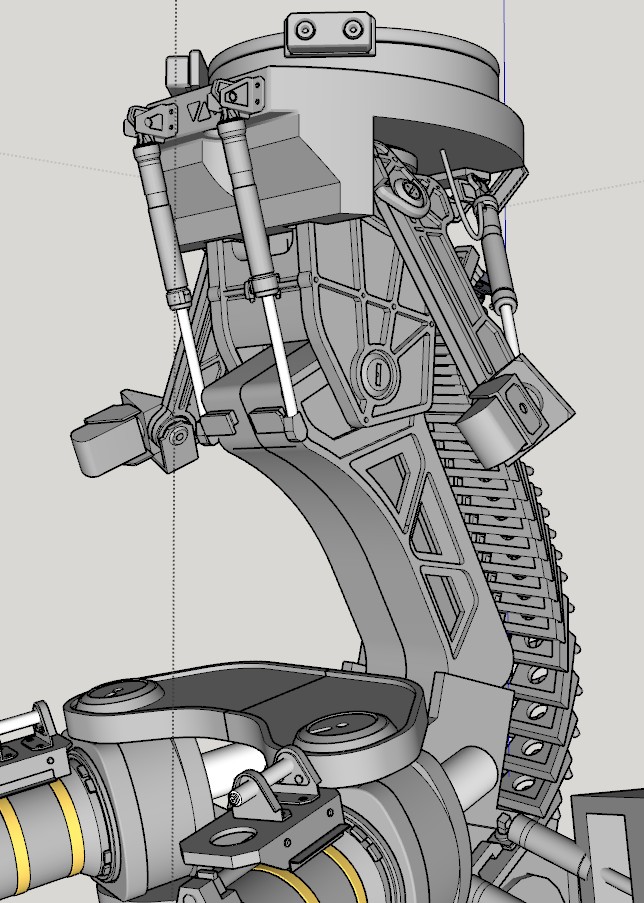
                                          mech.jpg
                                          expandedges.png

                                          1 條回覆 最後回覆 回覆 引用 0
                                          • pilouP 離線
                                            pilou
                                            最後由 編輯

                                            @unknownuser said:

                                            Is your offset capable of expanding edges to the end of the associated face too?

                                            Can you put an image of this ?

                                            Frenchy Pilou
                                            Is beautiful that please without concept!
                                            My Little site :)

                                            1 條回覆 最後回覆 回覆 引用 0
                                            • 1
                                            • 2
                                            • 3
                                            • 1 / 3
                                            • 第一個貼文
                                              最後的貼文
                                            Buy SketchPlus
                                            Buy SUbD
                                            Buy WrapR
                                            Buy eBook
                                            Buy Modelur
                                            Buy Vertex Tools
                                            Buy SketchCuisine
                                            Buy FormFonts

                                            Advertisement