sketchucation logo sketchucation
    • 登入
    Oops, your profile's looking a bit empty! To help us tailor your experience, please fill in key details like your SketchUp version, skill level, operating system, and more. Update and save your info on your profile page today!
    ⚠️ Important | Libfredo 15.6b introduces important bugfixes for Fredo's Extensions Update

    What's the best way to learn SketchUp Shortcut Keys?

    已排程 已置頂 已鎖定 已移動 SketchUp Discussions
    sketchup
    38 貼文 18 Posters 5.2k 瀏覽 18 Watching
    正在載入更多貼文
    • 從舊到新
    • 從新到舊
    • 最多點贊
    回覆
    • 在新貼文中回覆
    登入後回覆
    此主題已被刪除。只有擁有主題管理權限的使用者可以查看。
    • Rich O BrienR 離線
      Rich O Brien Moderator
      最後由 編輯

      @aureus said:

      How do you pan with your mouse?

      Middle Mouse down + left mouse down

      Download the free D'oh Book for SketchUp 📖

      1 條回覆 最後回覆 回覆 引用 0
      • AureusA 離線
        Aureus
        最後由 編輯

        @rich o brien said:

        @aureus said:

        How do you pan with your mouse?

        Middle Mouse down + left mouse down

        Thanks.
        One needs to press them one after another and not in the same time. Then you hold them both.

        This topic encouraged me to make one more shortcut.

        1 條回覆 最後回覆 回覆 引用 0
        • JQLJ 離線
          JQL
          最後由 編輯

          If you're a shortcut guy yourself, you'll probably use both hand for fast working on Sketchup.

          I know I do...

          Use shift while holding middle button and pan away. It's more stable than left click+middle button.

          www.casca.pt
          Visit us on facebook!

          1 條回覆 最後回覆 回覆 引用 0
          • AureusA 離線
            Aureus
            最後由 編輯

            @jql said:

            If you're a shortcut guy yourself, you'll probably use both hand for fast working on Sketchup.

            I know I do...

            Use shift while holding middle button and pan away. It's more stable than left click+middle button.

            You read my mind.
            I just wanted to say: "Ok, scroll wheel and left mouse in the same time does the job, but it's somehow...unstable..." 😄

            1 條回覆 最後回覆 回覆 引用 0
            • Rich O BrienR 離線
              Rich O Brien Moderator
              最後由 編輯

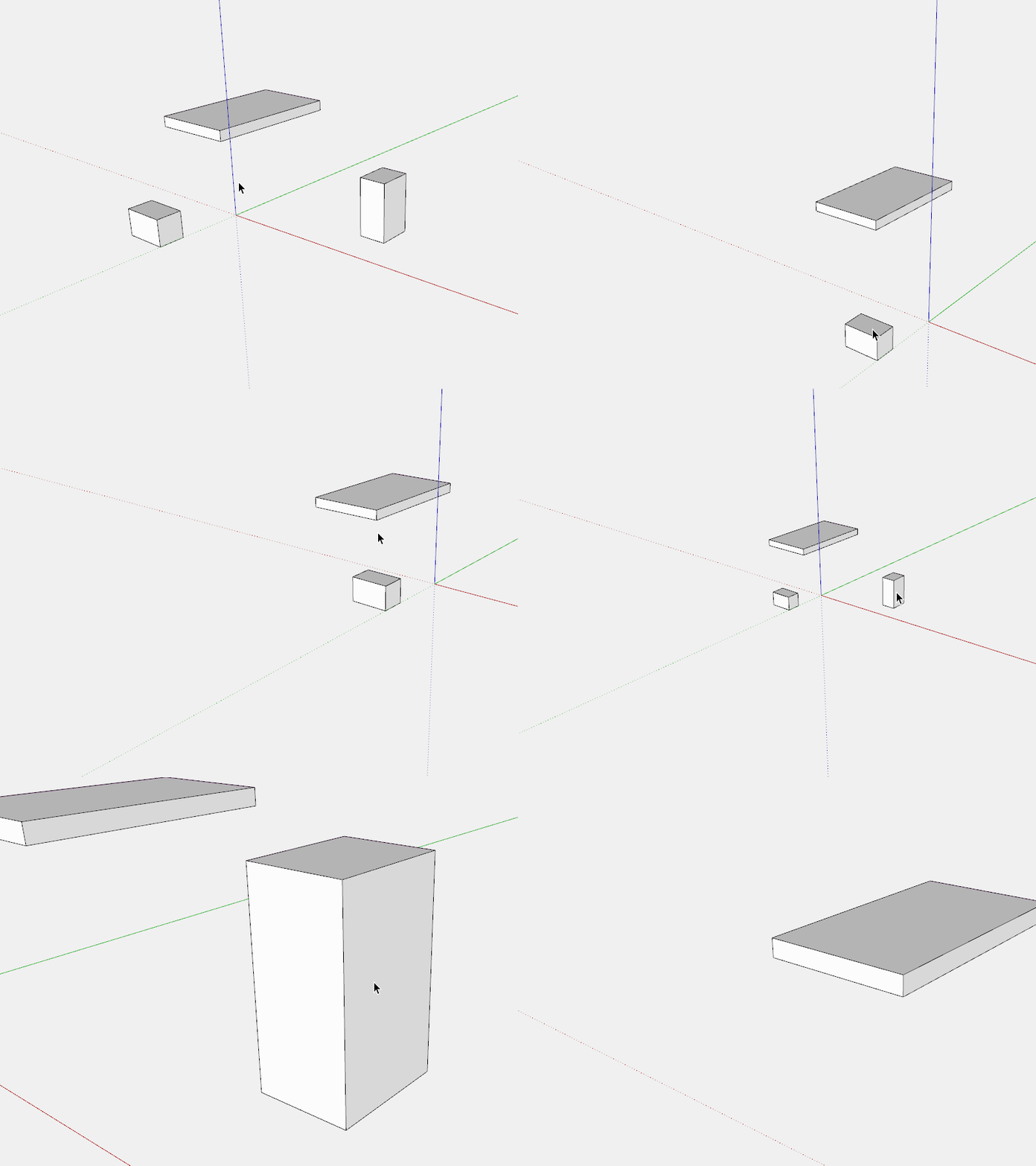
              there's also the double click middle mouse that centres to clicked area

              middle.gif

              Download the free D'oh Book for SketchUp 📖

              1 條回覆 最後回覆 回覆 引用 0
              • Mike LuceyM 離線
                Mike Lucey
                最後由 編輯

                @aureus said:

                How do you pan with your mouse?
                What kind of mouse do you use?

                I only learned recently that I can pan by pressing forward my scroll wheel on my Elecom Scope Node mouse. It was available on Amazon but any longer, here, http://www.amazon.com/Elecom-Wireless-Sensor-3-button-M-sn2dlsv2/dp/B00B08P934/ref=cm_cr_pr_pb_opt?ie=UTF8

                It might be possible to get one here, Special order anything from Japan.
                http://whiterabbitexpress.com/scope-node-mouse-elecom/

                Mike

                Support us so we can support you! Upgrade to Premium Membership!

                1 條回覆 最後回覆 回覆 引用 0
                • AureusA 離線
                  Aureus
                  最後由 編輯

                  I can't imagine work without shortcuts.

                  On the other hand, it seems there are people who are real SketchUp masters able to model excellent things in Sketchup by - clicking on tools.

                  This person needs only three and half hour to model a good looking car, yet he or she doesn't use shortcuts (at least not in this video).

                  He or she picks even the 'Select' tool from the toolbar. The 'Line' and 'Move' tool also...

                  However, this may has been done just for the sake of this video, so that people can see what's happening...

                  1 條回覆 最後回覆 回覆 引用 0
                  • AureusA 離線
                    Aureus
                    最後由 編輯

                    @mike lucey said:

                    I only learned recently that I can pan by pressing forward my scroll wheel on my Elecom Scope Node mouse.
                    It might be possible to get one here, Special order anything from Japan.
                    http://whiterabbitexpress.com/scope-node-mouse-elecom/

                    Mike

                    I've been using the same mouse for 10.5 years already.

                    Whenever I have to use someone other's mouse it feels strange...

                    This Microsoft baby is precise and reliable.

                    1 條回覆 最後回覆 回覆 引用 0
                    • cottyC 離線
                      cotty
                      最後由 編輯

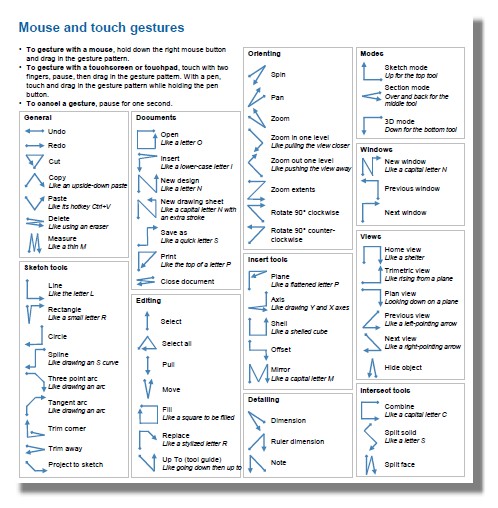
                      Print the Quick reference card and start with the most used tools ((l)ine, (r)ectangle, (c)ircle, (p)ushpull, ...).

                      my SketchUp gallery

                      1 條回覆 最後回覆 回覆 引用 0
                      • Mike LuceyM 離線
                        Mike Lucey
                        最後由 編輯

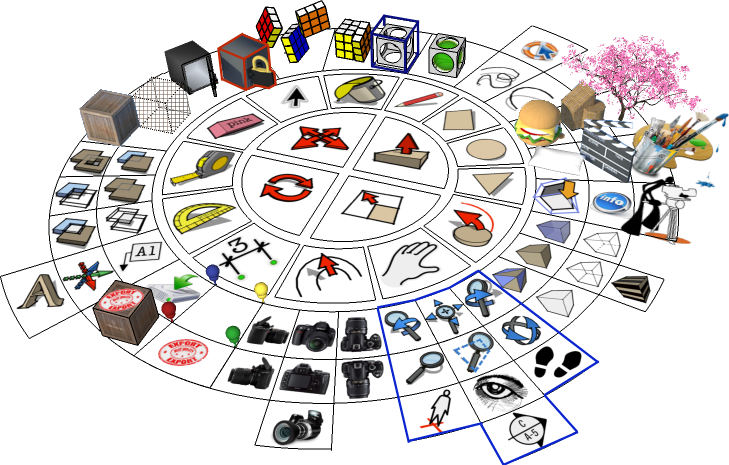
                        Does anyone remember the plugin that produced a disk shaped floating menu containing the main SU icons along with pop out sub menus. I've tried searching but have had no luck.

                        Support us so we can support you! Upgrade to Premium Membership!

                        1 條回覆 最後回覆 回覆 引用 0
                        • pilouP 離線
                          pilou
                          最後由 編輯

                          Does Sketchup has this sort of thing ?
                          (here the free DesignSpark Mechanical) A Sketchup on Steroïds 😄
                          http://moiscript.weebly.com/uploads/3/9/3/8/3938813/_7165628_orig.jpg

                          Frenchy Pilou
                          Is beautiful that please without concept!
                          My Little site :)

                          1 條回覆 最後回覆 回覆 引用 0
                          • Mike LuceyM 離線
                            Mike Lucey
                            最後由 編輯

                            DesignSpark is interesting Pilou but i imagine there would be a steepish learning curve involved.

                            The Quick Reference Card is what I steer newbies toward but its a very old fashioned way of learning.

                            The plugin I was talking about / looking for was Crysis, mentioned here, [Plugin] Crysis plugin - dynamic toolbox
                            http://sketchucation.com/forums/viewtopic.php?t=43257
                            crysisr.png

                            The Win version is still available but it looks like the developer, Fatihbarut, never got around to porting to Mac. I have emailed and asked him if he ever managed to produce a Mac version and will update on anything I hear from him.

                            I think this way of getting to functions is ideal for the Newbie as his / her eyes remain on screen rather than moving to a Quick Reference Card.

                            Support us so we can support you! Upgrade to Premium Membership!

                            1 條回覆 最後回覆 回覆 引用 0
                            • pilouP 離線
                              pilou
                              最後由 編輯

                              @unknownuser said:

                              steepish learning curve

                              steepish ? I have not this in my lexicon! 😄
                              No the learning cuve is very easy! 🤓
                              It's like Sketchup in direct modeling! 😎
                              I have put in 2 pages the difficulties! 😄
                              Sorry in French but many animations! 😄

                              Frenchy Pilou
                              Is beautiful that please without concept!
                              My Little site :)

                              1 條回覆 最後回覆 回覆 引用 0
                              • SJS66S 離線
                                SJS66
                                最後由 編輯

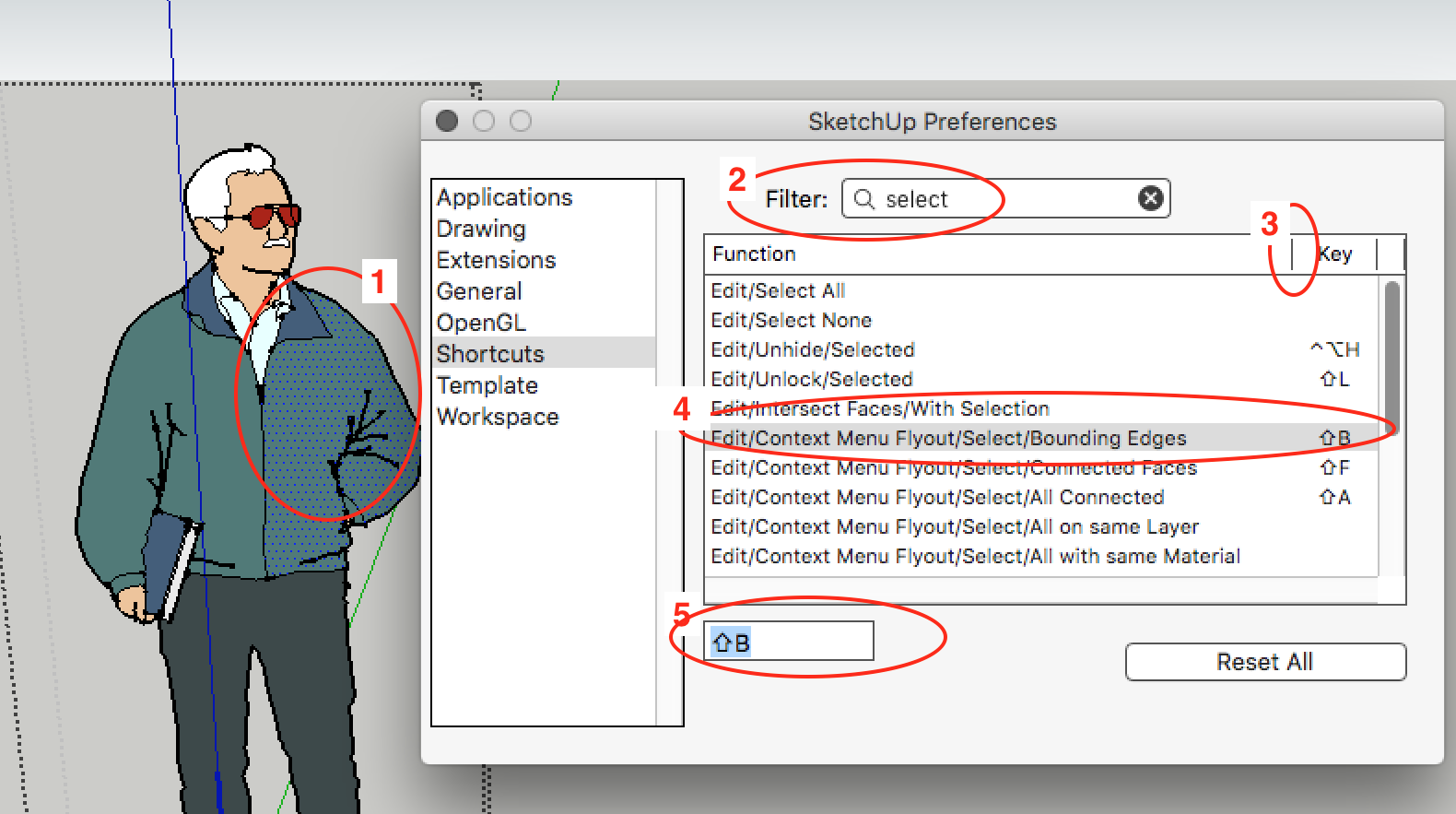
                                How would you add a shortcut for Select>Bounding Edges? I can't seem to find it in the Preferences Shortcut List. Also, while I'm at it, it's really annoying how the Preferences Window is too small to see the full title of commands etc when trying to find/select one. Anyway of making that bigger?

                                1 條回覆 最後回覆 回覆 引用 0
                                • D 離線
                                  db11
                                  最後由 編輯

                                  Like this:

                                  Context_Menu_Shortcut.png

                                  1. open the group/component and select a face only
                                  2. go to 'Preferences/Shortcuts' and filter on 'select'.
                                  3. grab this bar and drag right to view the full menu item name (you can't modify the Preferences window size itself)
                                  4. select the 'Bounding Edges' item from the list
                                  5. enter your shortcut

                                  The main thing to remember is that to add a shortcut for a context menu item, you must be in the specific context that loads it into the context menu flyout (you can check that by right clicking and seeing if your desired item shows up in the flyout: if not, you're not yet in the proper context). Otherwise it won't show up as an option in the 'Shortcuts' list.

                                  It's not obvious that it works this way, but once you understand how it works it does make sense.

                                  Hope this helps.

                                  Doug

                                  1 條回覆 最後回覆 回覆 引用 0
                                  • 1
                                  • 2
                                  • 2 / 2
                                  • 第一個貼文
                                    最後的貼文
                                  Buy SketchPlus
                                  Buy SUbD
                                  Buy WrapR
                                  Buy eBook
                                  Buy Modelur
                                  Buy Vertex Tools
                                  Buy SketchCuisine
                                  Buy FormFonts

                                  Advertisement