sketchucation logo sketchucation
    • 登入
    Oops, your profile's looking a bit empty! To help us tailor your experience, please fill in key details like your SketchUp version, skill level, operating system, and more. Update and save your info on your profile page today!
    ⚠️ Important | Libfredo 15.6b introduces important bugfixes for Fredo's Extensions Update

    SketchUcation 3D Viewer (formerly the '[ignore]' thread)

    已排程 已置頂 已鎖定 已移動 Newbie Forum
    sketchup
    276 貼文 19 Posters 13.0k 瀏覽 19 Watching
    正在載入更多貼文
    • 從舊到新
    • 從新到舊
    • 最多點贊
    回覆
    • 在新貼文中回覆
    登入後回覆
    此主題已被刪除。只有擁有主題管理權限的使用者可以查看。
    • Rich O BrienR 離線
      Rich O Brien Moderator
      最後由 編輯

      Thanks Dave.

      Currently we need to decide object scale on load. We don't factor that at the moment.

      It will be fixed

      Download the free D'oh Book for SketchUp 📖

      1 條回覆 最後回覆 回覆 引用 0
      • Rich O BrienR 離線
        Rich O Brien Moderator
        最後由 編輯

        #notwhatjiminybillybobsays

        Download the free D'oh Book for SketchUp 📖

        1 條回覆 最後回覆 回覆 引用 0
        • Rich O BrienR 離線
          Rich O Brien Moderator
          最後由 編輯

          [sw:3nww9e4f]NoVawJt1fHEVA2N[/sw:3nww9e4f]

          Download the free D'oh Book for SketchUp 📖

          1 條回覆 最後回覆 回覆 引用 0
          • pilouP 離線
            pilou
            最後由 編輯

            @unknownuser said:

            u can embed with <iframe>

            Surfer showing the viewer embeded on a site must be registered on Sketchucation ?

            Frenchy Pilou
            Is beautiful that please without concept!
            My Little site :)

            1 條回覆 最後回覆 回覆 引用 0
            • JQLJ 離線
              JQL
              最後由 編輯

              I couldn't open the nice wireframe sphere on fullscreen.

              1 - It took a lot of time to open the viewer embeded on this page;
              2 - It took what seemed to be the same amount of time for it to open the fullscreen page (I wouldn't expect I would have to reload it, only that I had to wait for my punny GPU to display it)
              3 - Reload was finished but didn't show.

              Might be related to Nvidia 425M 1025Mb

              EDIT: Also, on the full screen window there's a fullscreen icon to make it fullscreen... I guess that's for people to be sure they are in full screen or that this full screen is as full as it gets 😄

              www.casca.pt
              Visit us on facebook!

              1 條回覆 最後回覆 回覆 引用 0
              • G 離線
                Gábor
                最後由 編輯

                @pilou said:

                @unknownuser said:

                u can embed with <iframe>

                Surfer showing the viewer embeded on a site must be registered on Sketchucation ?

                To upload a model to the viewer you have to be a member. Actually now only a few testers has the ability to upload.

                If the model is set to be public it can be embedded into any HTML page and anybody can see it there. If the model is set to private, only those can see it who are allowed by the author.

                1 條回覆 最後回覆 回覆 引用 0
                • G 離線
                  Gábor
                  最後由 編輯

                  @jql said:

                  I couldn't open the nice wireframe sphere on fullscreen.

                  Did you get any error messages. If you open the javascript console do you see any error messages there?

                  @jql said:

                  1 - It took a lot of time to open the viewer embedded on this page;

                  Performance issues will be addressed later. There are several points in the script that are not performance optimized yet.

                  @jql said:

                  2 - It took what seemed to be the same amount of time for it to open the fullscreen page (I wouldn't expect I would have to reload it, only that I had to wait for my punny GPU to display it)

                  Yes, the fullscreen view at the moment reloads the model.

                  @jql said:

                  3 - Reload was finished but didn't show.
                  [/quit]
                  What was on the screen? Any error messages?

                  @jql said:

                  EDIT: Also, on the full screen window there's a fullscreen icon to make it fullscreen... I guess that's for people to be sure they are in full screen or that this full screen is as full as it gets 😄

                  Will address this as well.

                  Thank you for the testing.

                  1 條回覆 最後回覆 回覆 引用 0
                  • BoxB 線上
                    Box
                    最後由 編輯

                    Loooking good.

                    1 條回覆 最後回覆 回覆 引用 0
                    • Rich O BrienR 離線
                      Rich O Brien Moderator
                      最後由 編輯

                      [sw:9dyd83bx]9rvku6oIXacm1K8[/sw:9dyd83bx]

                      Download the free D'oh Book for SketchUp 📖

                      1 條回覆 最後回覆 回覆 引用 0
                      • ntxdaveN 離線
                        ntxdave
                        最後由 編輯

                        I had a similar experience with the wireframe model that JQL did.

                        At one point the "loading" icon stopped and there was just a black image and my computer was frozen. I kept clicking and finally the model was visible.

                        That is the only model that has acted like that. The last one that Rich posted loaded just fine.

                        BTW: When I clicked on the Full Page icon when I was already in a full page view, it just loaded a second full page window and loaded the model again in the 2nd page........I assume that is what it was supposed to do.

                        From a viewer's perspective, everything seems to be working with the exception of that one wire frame model (which BTW I liked 😄 )

                        Press F1...thank me later

                        1 條回覆 最後回覆 回覆 引用 0
                        • Rich O BrienR 離線
                          Rich O Brien Moderator
                          最後由 編輯

                          We are testing an issue with mirrored components negatively scaled.

                          Sorry for overburdening your browsers but it's a good means of flagging issues.

                          Download the free D'oh Book for SketchUp 📖

                          1 條回覆 最後回覆 回覆 引用 0
                          • JQLJ 離線
                            JQL
                            最後由 編輯

                            @gábor said:

                            @jql said:

                            JQL wrote:
                            I couldn't open the nice wireframe sphere on fullscreen.

                            Did you get any error messages. If you open the javascript console do you see any error messages there?

                            Now everything worked... no error on java console.

                            @rich o brien said:

                            We are testing an issue with mirrored components negatively scaled.

                            Sorry for overburdening your browsers but it's a good means of flagging issues.

                            Is that why some wires are black? are those reversed faces? I didn't see backfaces on the cornelbox model.

                            www.casca.pt
                            Visit us on facebook!

                            1 條回覆 最後回覆 回覆 引用 0
                            • Rich O BrienR 離線
                              Rich O Brien Moderator
                              最後由 編輯

                              There are 2 icons in the controls.

                              The first respects SU hard edges. The 2nd is the tri'd mesh.

                              I left wires on to show mesh density.

                              Download the free D'oh Book for SketchUp 📖

                              1 條回覆 最後回覆 回覆 引用 0
                              • Phillip HP 離線
                                Phillip H
                                最後由 編輯

                                First of all, wow. Your work here is very impressive, though that seems an understatement.I realize that I'm a newbie round here, but I thought to contribute a little.

                                I'm viewing these on an HP Elitebook 8440p Core i7 M620 @ 2.67GHz laptop with 4GB RAM and Intel HD graphics, Win 8.1 Pro 64 bit and Chrome Version 39.0.2171.95 m in 32 bit mode. Display of models is very fast, though there is some latency in the rotation of models. I have just read the entire thread and I have noted some characteristics of the zoom function that hadn't been mentioned. Don't know the capabilities of WebGL. But I thought I would throw this out there anyway.

                                Earlier models in the thread seemed to limit zoom when I ran into a surface. Later, once I zoom out, I could not zoom back in to the initial scale. I would have to restart the image to reset the scale. I could however alternately rotate models off center and 'walk' them past these limitations and close enough to move sideways past the outer surface and see the inner surfaces. I found this ability desirable because it more closely resembled native SU views (that's just me). Another item of note is that zoom is not relative to the cursor position within the frame but seemingly relative to the center of the frame instead. Not criticizing mind you. Just noting a few things that differ from native SU behavior.

                                Absolutely stunning work so far. I hope these observations are a help to your efforts.

                                HP EliteBook 8440p Intel® Dual Core™ i7 M620@ 2.67 4GB RAM
                                NVIDIA NVS 3100, 512 MB
                                Windows® 8.1 64 bit
                                SketchUp Pro 2015 version 15.3.331 64-bit

                                1 條回覆 最後回覆 回覆 引用 0
                                • JQLJ 離線
                                  JQL
                                  最後由 編輯

                                  Sorry but this might be my GPU or a design feature...

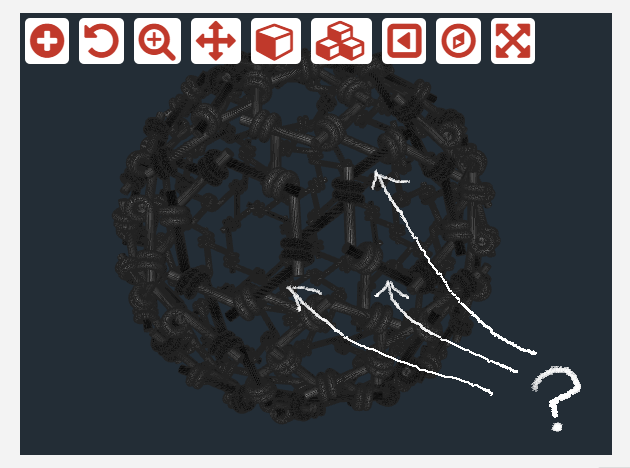
                                  I'm talking about wires but not wireframe rendering. Metal wires...

                                  There are some black metal wires there, and I was expecting them all to be steel. Take a look at image:
                                  Untitled1.png

                                  They are black painted? Reversed faces? Or rendering bugs related to my shi... hardware?

                                  www.casca.pt
                                  Visit us on facebook!

                                  1 條回覆 最後回覆 回覆 引用 0
                                  • TIGT 離線
                                    TIG Moderator
                                    最後由 編輯

                                    I assumed half the wires were 'silver' and half were 'black'.
                                    There is a consistent pattern ??
                                    The form is very complex with many many facets...

                                    TIG

                                    1 條回覆 最後回覆 回覆 引用 0
                                    • Rich O BrienR 離線
                                      Rich O Brien Moderator
                                      最後由 編輯

                                      The black is occuring when you negatively scaled a component to mirror it.

                                      it seems this causes an issue on export with textures and other things.

                                      re:orbit/zooming

                                      we know this. for now the priority is presentation. we need to nail it down.

                                      you'll see some big forward steps this month. with a full public beta to follow.

                                      Download the free D'oh Book for SketchUp 📖

                                      1 條回覆 最後回覆 回覆 引用 0
                                      • TIGT 離線
                                        TIG Moderator
                                        最後由 編輯

                                        I had a similar issue with my OBJ exporter [http://sketchucation.com/pluginstore?pln=OBJexporter now v3.0, but 'fixed' since ~v2.4 - it was initially developed for Octane-Render, where these issue first cropped up].

                                        Simplistically put... what needs to be done is when a group or component-instance is processed its transformation is checked for negative scaling [taking into account that several negative scalings/rotations cancel out!].

                                        I suggest that Gábor and co look at my OBJexporter.rb file at lines ~#337-#405 [and elsewhere, e.g. #426...] for ideas - I know it's not quite the same coding but the principals are the same...
                                        That code finds the truly 'flipped' faces and simply reverses them and swaps the remapped textured-materials from front to back etc, all before they are processed in the exporter [the operation is aborted after the export completes, so any such changes to the SKP are undone automatically] - alternatively the [re]calculated face normals etc, could simply be reversed in code alone...

                                        We can continue by PM as needed... 🤓

                                        TIG

                                        1 條回覆 最後回覆 回覆 引用 0
                                        • G 離線
                                          Gábor
                                          最後由 編輯

                                          Thank you TIG. Working on it.

                                          1 條回覆 最後回覆 回覆 引用 0
                                          • Rich O BrienR 離線
                                            Rich O Brien Moderator
                                            最後由 編輯

                                            [sw:li44u31m]HFqwrWluo8nSgB0[/sw:li44u31m]

                                            Download the free D'oh Book for SketchUp 📖

                                            1 條回覆 最後回覆 回覆 引用 0
                                            • 1
                                            • 2
                                            • 7
                                            • 8
                                            • 9
                                            • 10
                                            • 11
                                            • 12
                                            • 13
                                            • 14
                                            • 9 / 14
                                            • 第一個貼文
                                              最後的貼文
                                            Buy SketchPlus
                                            Buy SUbD
                                            Buy WrapR
                                            Buy eBook
                                            Buy Modelur
                                            Buy Vertex Tools
                                            Buy SketchCuisine
                                            Buy FormFonts

                                            Advertisement