[Plugin] MoveAlong - v1.2b - 07 Jul 14
-
MoveAlong is a standalone script which is part of FredoTools. It allows Moving and Copying entities, as well as Rotating components and groups by their center along axes.
MoveAlong is similar to the native Sketchup Move tool but provides some additional features:- Additional inferences (centers of arc, face, component / group)
- Additional auto-lock directions
- Lock of custom direction
- Remote Inferences
- Move along Direction, with possibility to pick and choose direction in the model
- Move along Plane, with possibility to pick and choose plane in the model
- Non interactive Move (easier to reach targets that would be occulted by the moving object)
- Alignment of curves and objects along priviliged directions (see video below)
MoveAlong supports the other features of the native SU Move tool: copy, multiple copies, locking on axes, rotation of group / component, etc…
MoveAlong is installed as part of FredoTools..
See the main post for this plugin for Installation of FredoTools
(see also section Quick Start and Video below)
MoveAlong - User Manual - English - v1.2.pdf
MoveAlong - Quickcard - English - v1.2.pdf- SU Versions: SU6, SU7, SU8, SU13, SU14 – works better with SU8 M1 and above
- Platforms: Windows and Mac
- Languages: English, French
- Menus: by default, MoveAlong is installed in Tools > FredoTools. It does NOT appear in the Contextual menu.
- Icon toolbar: Fredo6 Tools. There is only a single icon. By default, it is not shown. You need to go to the Default Parameters… dialog of FredoTools to enable the icon.
- The plugin is free, for private and commercial usage.

MoveAlong 1.0 - Overview
[flash=640,480:1ytnre3g]http://www.youtube.com/v/JyhYJqhycOY&hl[/flash:1ytnre3g]MoveAlong 1.1 - Remote Inferences - AutoSmooth
[flash=640,480:1ytnre3g]http://www.youtube.com/v/ETRplXHUqn4&hl[/flash:1ytnre3g]MoveAlong 1.2 - Alignment Mode
[flash=640,480:1ytnre3g]http://www.youtube.com/v/6jkwSCZs3Pw&hl[/flash:1ytnre3g]Launching MoveAlong
It can be launched on a Pre-selection. If there is no selection, then you can pick entities to move by hovering over them.
A button palette window appears. It allows controlling setting the working modes (Copy mode, Defer mode, Extended selection) as well as to lock / unlock directions on model axes.
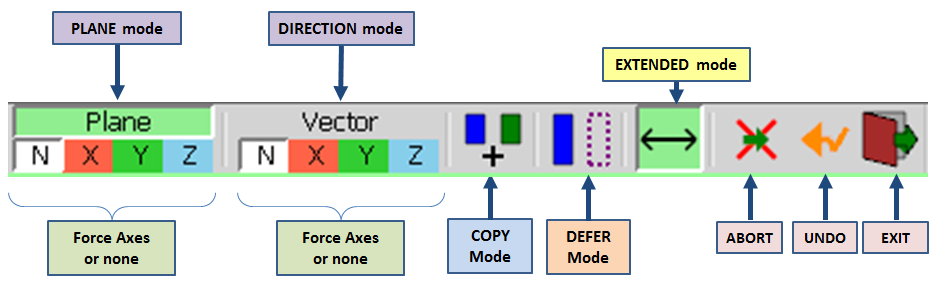
As a general statement, MoveAlong behaves very similarly to the native SU Move tool.Defer mode (non-Interactive move)
The native SU Move tool always move the entities selected interactively. The drawback is that it may occult the target you want to reach.
MoveAlong provides a non-interactive mode to avoid this inconvenience. You can enable / disable it by pressing TAB (or button in palette or contextual menu).
A wireframe is moved instead of the selected entities so that you can access any point of the model, or even select a target belonging to the selected entities (for instance move a vertex of a face to its center).- Move mode: wireframe is in dashed line
- Copy mode: wireframe is in plain, thick line
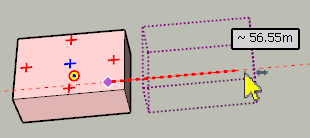
Additional Inferences
- Center of Arcs and Polygons: You hover over an arc or a polygon (as considered by Sketchup), the center of the arc or polygon is displayed (as a red cross +) and can be used as an inference for origin and target.
- Center of Faces: You hover over a face, the center of the face is displayed (as a blue cross +).
- Center and Corners of Components / Groups: when hovering over the elements of component or group, the center and edges of their bounding box is displayed. This works at any level of embedding. The center of bounding box is useful because it may be physically hidden within the component / group. With MoveAlong, you can still pick it in all cases. The center and corners of the bounding box can be used for origin and target.
- Anchor and Leader of Text Labels (if this matters!)
Locking the current Direction
When moving the mouse to reach the target, you can lock the current direction by pressing/releasing Shift.
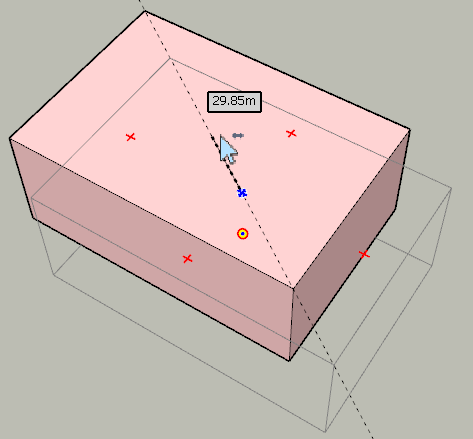
Picking Directions and Plane in the model
You can set a direction or plane by picking it from elements anywhere in the model.
This can be done by just hovering over the element and either pressing ENTER or making a Long-Click.In Vector mode
-
Picking an Edge or a midpoint --> direction of the edge
-
Picking a Face --> direction is the normal to the face
-
Picking a Guide Line --> direction is the line of the guide line
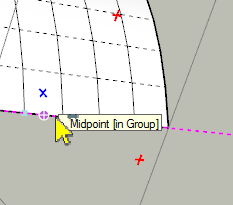
In Plane mode -
Picking an Edge or a midpoint --> plane perpendicular to the edge
-
Picking an Vertex with 2 Edges --> plane defined by the 2 edges
-
Picking an extremity (vertex with one edge) --> plane perpendicular to the edge
-
Picking a Guide Line --> plane perpendicular to the guide line
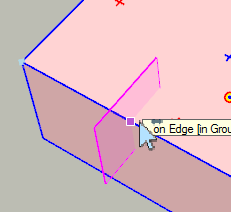
To unset the constrained direction or plane, just press Arrow Down.
VCB – Offset – Multiple copies – Rotation angle
-
Rotation angle: just type the numeric value for degrees, or a value followed by a letter for specifying unit, for instance 30d (degrees), 3.14r (radians), 100g (grades), 50% (slope)
-
Offset: just type the numeric value: without unit, i.e. current model units, ex: 33.5 or 3’4”, or with units, ex: 3.2cm. Alternatively, you can specify the direction and offset by entering the value for each axes. For instance 3 4 5 will set the move vector to 3 in X, 4 in Y and 5 in Z. You do not need to enter all values and use the semi-comma ‘;’ as separator or space when non-ambiguous: ex: ;;4 will move by 4 unit along the Z axis (0 0 4 would work as well), 50.3; will move by 50.3 units along the X axis (50.3 0 would work as well). Note that space or semi-comma ‘;’ are used as separators in the VCB, because the dot and comma are reserved as valid decimal separators for international users.
-
Multiple copies: this is similar to the SU Move tool:
- Multiple of offset: *n or nx are supported, ex: *3 or 3x
- Divide of offset: /n is supported, ex: /3
If you type a negative value (ex: -3, -3x, /-3), then multiple copies are generated on each side of the original copy. Below the result of typing '-2'
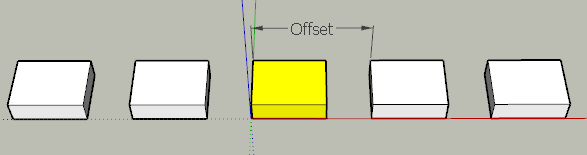
Repeating the move
Once you have moved a first object, you can move another object by the same vector and offset by double-clicking on it.
Similarly, when you have rotated a group or component, you can double click on a red cross of another group or component to perform the same rotation.MoveAlong 1.2b – 07 Jul 14: Update with fix of a bug signaled by dedmin.
MoveAlong 1.2a – 18 Jun 14: Update with fixes and additional features (Alignment Mode).
MoveAlong 1.1b – 17 May 14: Update with fixes and additional features (Remote inferences, AutoSmooth, ...). V1.1b inlcudes a fix for input of architectural units in VCB
MoveAlong 1.1a – 15 May 14: Update with fixes and additional features (Remote inferences, AutoSmooth, ...)
MoveAlong 1.0d – 20 Apr 14: Fixed a problem when selected entities are huge (signaled by rv1974)
MoveAlong 1.0c – 17 Apr 14: initial public release in FredoTools 1.8c
-
Hi, Fredo:
Thanks for posting. Your demo looks great. -
I suspect that I need longer to discover all possibilities than it has taken you to write this tool, GREAT work!
-
Joyeuses Pâques!

-
fredo excellent. thank you very much. You are always working to improve sketchup.
THANK YOU.
A query or suggestions:
You can add an option that:
1 - I move an object or geometry (eg 10cm)
2 - later, I enter in the VCB (eg - 2cm), then the geometry object or moved 8 cm. -
Redid shortcut M to MoveAlong as I did B to ThruPaint. Awesome

-
Shortcut 'M' updated!
A little observation:
The shadow is not updated until leaving the tool... (not really a problem)
[screenr:j5b9kssd]cFxN[/screenr:j5b9kssd] -
Wicked !!
One observation: when moving a group, if you move the mouse over the rotation grips of the object the cursor sticks in rotation-mode (component-like behavior?).
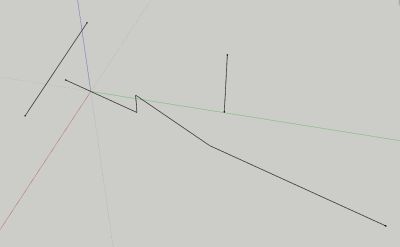
edit: another thing I noticed (trying out the techniques from your youtube movie 8m54), if the two lines to the right are grouped and I enter the group and try to move the middle line in its plane to the intersection with the left line, no intersection is indicated. When grouping the left and right line it works though.
Once again, a great addition. Having fun trying out all the options.
-
Endless possibilities...
-
Wow... Thanks Master Fredo - could do a whole basecamp based on your plugins!

-
Hello Fredo
Thank you for your plugin.
I'm your biggest fan.
For you to see a video, you might have some new ideas.
Http://video.sina.com.cn/v/b/92151582-1801050914.html -
Why? Why you are not the Project (TRMLR SU
 ) Manager?
P.S. Please check PM. In short the 'move along' won't work with relatively heavy geometry.
Could it get fixed?
Thank you. -
@rv1974 said:
In short the 'move along' won't work with relatively heavy geometry.
Could it get fixed?
Thank you.I published a provisional fix for selection with big number of entities in MoveAlong 1.0d, published as part of FredoTools 1.8e.
Fredo
-
@xianglin said:
Hello Fredo
Thank you for your plugin.
I'm your biggest fan.
For you to see a video, you might have some new ideas.
Http://video.sina.com.cn/v/b/92151582-1801050914.htmlLooks like a super-powerful road editor; very well done!
Fredo
-
@xianglin said:
Hello Fredo
Thank you for your plugin.
I'm your biggest fan.
For you to see a video, you might have some new ideas.
Http://video.sina.com.cn/v/b/92151582-1801050914.htmlWow, that's very kool... I'd love to have that in Sketchup.
-
@xianglin said:
For you to see a video, you might have some new ideas.
Http://video.sina.com.cn/v/b/92151582-1801050914.htmlThat video takes forever to load for me, although I have a very fast Internet connection...
-
Fred, It's served from China (I think) and then it has to load 14 minutes of video. I think that's why it takes so long.
-
Fredo, many thanks for 1.8e update, it's great improvement!
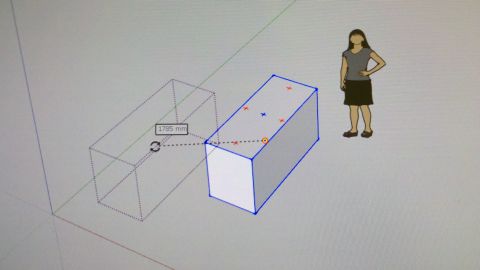
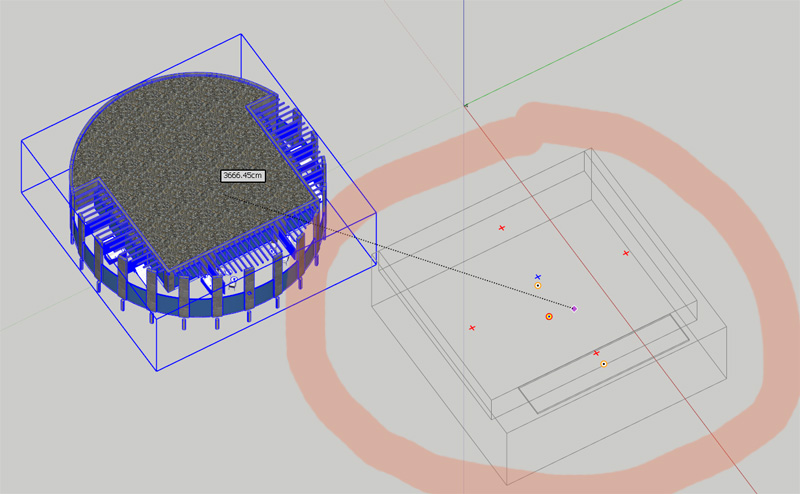
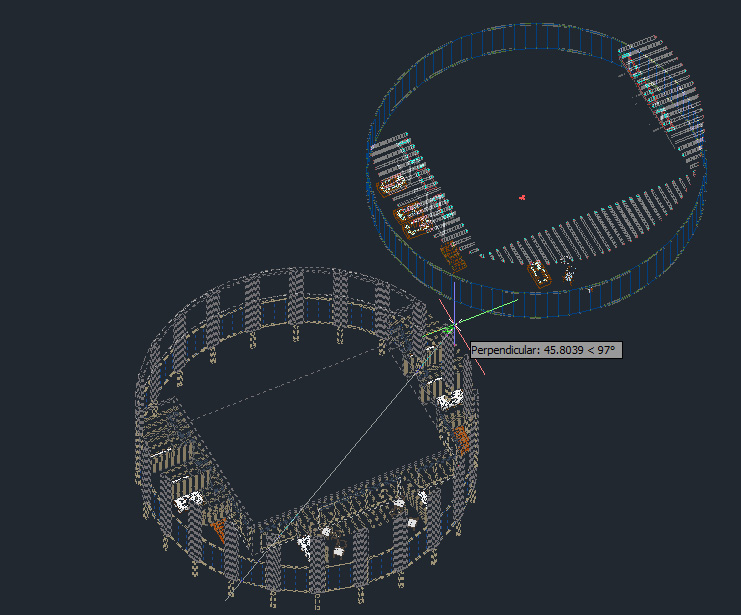
Another nuance- those Acad-like grey phantom lines of the initial position, which give posibility to snap.
I noticed that not grouped\componented geometry unfortunately doesn't give this feature;
grey phantom lines represent the object's bounding boxes (pic.1). Couldn't they represent the true
wireframe (pic.2)?
Thank you.
-
This is possible, but it would defeat performance, which I think is essential for a Move operation (remember your other request on big building!)).
What I can do is to display in wire the element picked inside the groups and components, say face, edge, ...)
Fredo
-
may be some sort of button or combo box in your ribbon toolbar that dis-\en-ables wireframe degradation?











Advertisement