sketchucation logo sketchucation
    • Login
    Oops, your profile's looking a bit empty! To help us tailor your experience, please fill in key details like your SketchUp version, skill level, operating system, and more. Update and save your info on your profile page today!
    Mac User? | Join the Rayscaper Beta for Mac Learn More

    [Plugin] Shortcutter Beta

    Scheduled Pinned Locked Moved Plugins
    98 Posts 14 Posters 52.5k Views 14 Watching
    Loading More Posts
    • Oldest to Newest
    • Newest to Oldest
    • Most Votes
    Reply
    • Reply as topic
    Log in to reply
    This topic has been deleted. Only users with topic management privileges can see it.
    • Rich O BrienR
      Rich O Brien Moderator
      last edited by

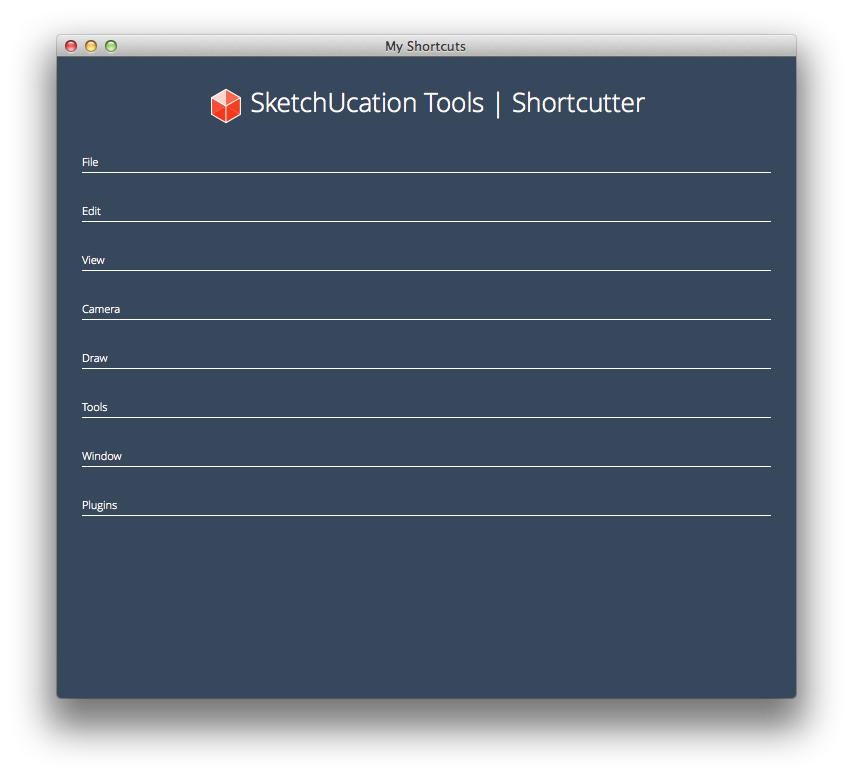
      Shortcutter for SketchUp is a simple utility that display all your assigned shortcuts in a nice web dialog.

      Modifier Keys are color coded for easy identification.

      http://i.minus.com/ibccrxOXUZcnZi.gif

      404 Not Found

      favicon

      (sketchucation.com)

      [mod=NOTE:1su51gv9]It needs SketchUcation Tools to run as its addon [restart SketchUp after you first install it], AND you will also need to be on-line to use it, because it uses files hosted on SketchUcation to display the UI.

      It is currently SU8, SU2013 and SU2014 compatible[/mod:1su51gv9]

      Download the free D'oh Book for SketchUp 📖

      1 Reply Last reply
      Reply Quote 0
      • T
        TECHDAVE02
        last edited by

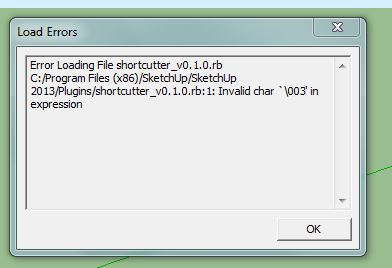
        Had an error see jpeg


        SHORTCUTTER.JPG

        1 Reply Last reply
        Reply Quote 0
        • Rich O BrienR
          Rich O Brien Moderator
          last edited by

          You need to be online to use the tool

          Download the free D'oh Book for SketchUp 📖

          1 Reply Last reply
          Reply Quote 0
          • Rich O BrienR
            Rich O Brien Moderator
            last edited by

            OK, so this tool is failing in SU2013. Sorry, we will look at a fix. In the meantime try it in SU2014 or v8

            Download the free D'oh Book for SketchUp 📖

            1 Reply Last reply
            Reply Quote 0
            • BoxB
              Box
              last edited by

              Works in 2013 and 2014 for me.

              1 Reply Last reply
              Reply Quote 0
              • cottyC
                cotty
                last edited by

                Great!
                Does the GIF shows a different version?
                I've found it here (as described in the plugin store)...
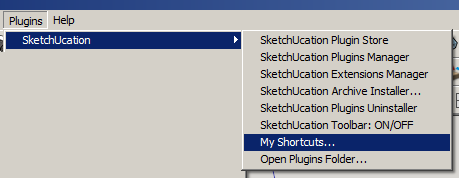
                shortcutter.png

                my SketchUp gallery

                1 Reply Last reply
                Reply Quote 0
                • Rich O BrienR
                  Rich O Brien Moderator
                  last edited by

                  It does, because the .gif was an alpha when the initial idea was the place it in the Window menu.

                  Download the free D'oh Book for SketchUp 📖

                  1 Reply Last reply
                  Reply Quote 0
                  • T
                    TECHDAVE02
                    last edited by

                    I don't get an option in the window menu
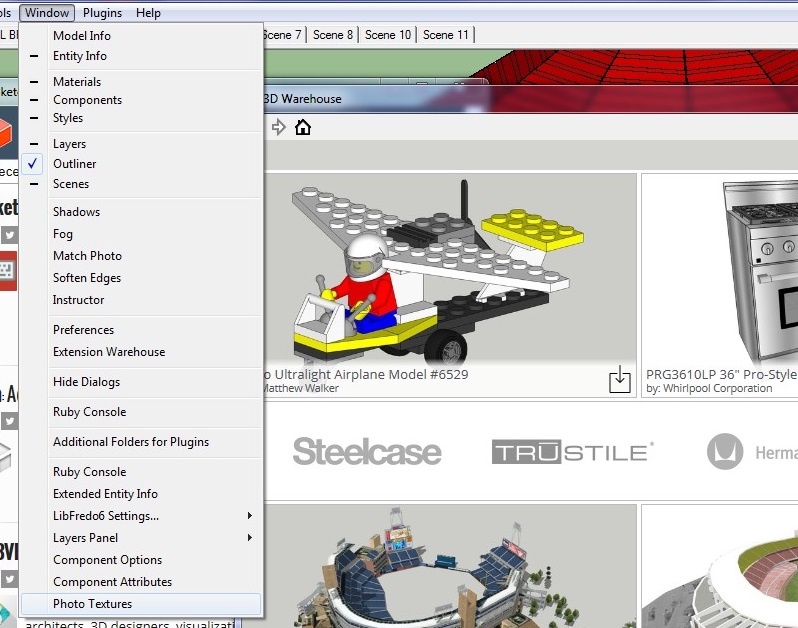

                    ScreenHunter_03 Apr. 11 11.05.jpg

                    1 Reply Last reply
                    Reply Quote 0
                    • Rich O BrienR
                      Rich O Brien Moderator
                      last edited by

                      See SketchUcation Tools menu

                      Download the free D'oh Book for SketchUp 📖

                      1 Reply Last reply
                      Reply Quote 0
                      • T
                        TECHDAVE02
                        last edited by

                        Thanks got it

                        1 Reply Last reply
                        Reply Quote 0
                        • Dave RD
                          Dave R
                          last edited by

                          Very nice. And it looks great cosmetically. Is it possible to save the page as an HTML file? I tried right clicking on it but don't get a Save or Save as... option.

                          Etaoin Shrdlu

                          %

                          (THERE'S NO PLACE LIKE)

                          G28 X0.0 Y0.0 Z0.0

                          M30

                          %

                          1 Reply Last reply
                          Reply Quote 0
                          • G
                            Gábor
                            last edited by

                            @dave r said:

                            I tried right clicking on it but don't get a Save or Save as... option.

                            No, not in the current version. For what purpose would you use that? If for printing out maybe a .pdf would be better which might be in some of the next versions if needed. (Well, Ctrl+P does the printing job until it is implemented...)

                            1 Reply Last reply
                            Reply Quote 0
                            • Rich O BrienR
                              Rich O Brien Moderator
                              last edited by

                              It prints nice too but over a couple of pages

                              Download the free D'oh Book for SketchUp 📖

                              1 Reply Last reply
                              Reply Quote 0
                              • Dave RD
                                Dave R
                                last edited by

                                @gábor said:

                                @dave r said:

                                I tried right clicking on it but don't get a Save or Save as... option.

                                No, not in the current version. For what purpose would you use that? If for printing out maybe a .pdf would be better which might be in some of the next versions if needed. (Well, Ctrl+P does the printing job until it is implemented...)

                                Not specifically for printing but possibly for including in a tutorial or other web page about using SketchUp. It's too large to get into a single screen shot so I was thinking maybe I could work from the HTML page.

                                Etaoin Shrdlu

                                %

                                (THERE'S NO PLACE LIKE)

                                G28 X0.0 Y0.0 Z0.0

                                M30

                                %

                                1 Reply Last reply
                                Reply Quote 0
                                • G
                                  Gábor
                                  last edited by

                                  @dave r said:

                                  @gábor said:

                                  @dave r said:

                                  I tried right clicking on it but don't get a Save or Save as... option.

                                  No, not in the current version. For what purpose would you use that? If for printing out maybe a .pdf would be better which might be in some of the next versions if needed. (Well, Ctrl+P does the printing job until it is implemented...)

                                  Not specifically for printing but possibly for including in a tutorial or other web page about using SketchUp. It's too large to get into a single screen shot so I was thinking maybe I could work from the HTML page.

                                  The problem with the HTML is: As this webdialog uses loads of .css stuff (created by Rich) you couldn't do anything with the .html even if you could download it without the corresponding .css files.

                                  1 Reply Last reply
                                  Reply Quote 0
                                  • Rich O BrienR
                                    Rich O Brien Moderator
                                    last edited by

                                    We'll do something bespoke for you Dave.

                                    Download the free D'oh Book for SketchUp 📖

                                    1 Reply Last reply
                                    Reply Quote 0
                                    • N
                                      numerobis
                                      last edited by

                                      Nice one! Thanks! 😄

                                      1 Reply Last reply
                                      Reply Quote 0
                                      • TIGT
                                        TIG Moderator
                                        last edited by

                                        @techdave02 said:

                                        Had an error see jpeg
                                        Your screenshot shows an error when SketchUp tries to load a file that does not [or at least should not!] exist 😲

                                        Here is my theory on what happen... 🤓

                                        You downloaded the shortcutter_v0.1.0.rbz archive for the Plugin from the PluginStore's web-page.
                                        You did NOT install it using the v2013 Preferences > Extensions > Install... button.
                                        But [for some reason which only you can explain] you renamed it as shortcutter_v0.1.0.rb and then you just put it into your v2013 Plugins folder 😒
                                        So when SketchUp.exe v2013 tried to load that file it could not because it is NOT a Ruby file - the \003 is a binary character found early in the .rbz archive [actually a .zip renamed] 😮

                                        So the first thing to do is remove that fake .rb file from the v2013 Plugins folder.
                                        Say onto your Desktop.
                                        You can rename it with its final 'z' again.
                                        Now use v2013 Preferences > Extensions > Install... button, find the correctly named .rbz and it'll get installed properly for you where it should be.
                                        You need to restart SketchUp to effect the full integration of the addon into the SketchUcation Toolset/submenu...

                                        Alternatively, since this addon only works if the SketchUcation Toolset is installed. then you could use the SketchUcation PluginStore dialog to AutoInstall the addon directly, without even worrying about the RBZ at all...
                                        Remember that you will still need to restart SketchUp to effect the full integration of the addon into the SketchUcation Toolset/submenu...

                                        TIG

                                        1 Reply Last reply
                                        Reply Quote 0
                                        • TIGT
                                          TIG Moderator
                                          last edited by

                                          Just in case some of you think that this tool doesn't work in v2013... I can assure you that it works just fine in version 8/2013/2014.
                                          I have successfully tested it in all versions. 🤓
                                          The comment added to the original post was following some spurious results - user-error rather than anything inherent in the code...

                                          TIG

                                          1 Reply Last reply
                                          Reply Quote 0
                                          • D
                                            driven
                                            last edited by

                                            @tig said:

                                            I have successfully tested it in all versions. :geek:

                                            and mac?it's nice and clean, almost minimalist...

                                            EDIT: I do have shortcuts, but maybe it's a encoding issue...
                                            Note. "§\t/Plugins/Key Scene/Key Scene 1",

                                            Sketchup.get_shortcuts.sort
                                            ["A\tselectArcTool;", "B\tselectPaintTool;", "C\tselectCircleTool;", "D\tselectDimensionTool;", "E\tselectEraseTool;", "F\tselectExtrudeTool;", "G\tmakeComponent;", "H\tviewShowHidden;", "K\t/Plugins/Keyboard Shortcuts", "L\tselectLineTool;", "M\tselectMoveTool;", "O\tselectOffsetTool;", "P\tselectPushPullTool;", "Q\tselectRotateTool;", "R\tselectRectangleTool;", "S\tselectScaleTool;", "Space\tselectSelectionTool;", "T\tselectMeasureTool;", "U\teditUnlockSelected;", "V\ttoggleHideRestOfModel;", "W\t/Plugins/Weld", "Z\tselectZoomTool;", "§\t/Plugins/Key Scene/Key Scene 1", "⇧A\t/File/Export/Animation...", "⇧E\t/File/Export/2D Graphic...", "⇧P\tviewParallelProjection;", "⇧R\t/Draw/Rotated Rectangle", "⇧S\t/File/Export/Section Slice...", "⇧T\ttogglePageTabsDsiplay;", "⇧V\tpasteInPlace;", "⇧Z\tviewZoomExtents;", "⌃S\tsaveCopy;", "⌃⌥⇧T\tviewTop;", "⌥B\torderFrontColorPanel;", "⌥M\t/Plugins/Mirror Selection", "⌥T\tdoThreeDText;"]

                                            

                                            learn from the mistakes of others, you may not live long enough to make them all yourself...

                                            1 Reply Last reply
                                            Reply Quote 0

                                            Hello! It looks like you're interested in this conversation, but you don't have an account yet.

                                            Getting fed up of having to scroll through the same posts each visit? When you register for an account, you'll always come back to exactly where you were before, and choose to be notified of new replies (either via email, or push notification). You'll also be able to save bookmarks and upvote posts to show your appreciation to other community members.

                                            With your input, this post could be even better 💗

                                            Register Login
                                            • 1
                                            • 2
                                            • 3
                                            • 4
                                            • 5
                                            • 1 / 5
                                            • First post
                                              Last post
                                            Buy SketchPlus
                                            Buy SUbD
                                            Buy WrapR
                                            Buy eBook
                                            Buy Modelur
                                            Buy Vertex Tools
                                            Buy SketchCuisine
                                            Buy FormFonts

                                            Advertisement