sketchucation logo sketchucation
    • 登入
    Oops, your profile's looking a bit empty! To help us tailor your experience, please fill in key details like your SketchUp version, skill level, operating system, and more. Update and save your info on your profile page today!
    🔌 Smart Spline | Fluid way to handle splines for furniture design and complex structures. Download

    Fishing net modeling

    已排程 已置頂 已鎖定 已移動 Plugins
    131 貼文 12 Posters 13.5k 瀏覽 12 Watching
    正在載入更多貼文
    • 從舊到新
    • 從新到舊
    • 最多點贊
    回覆
    • 在新貼文中回覆
    登入後回覆
    此主題已被刪除。只有擁有主題管理權限的使用者可以查看。
    • BoxB 離線
      Box
      最後由 編輯

      Don't know about the others but my tubes are for the look of the net, not to create the shadows.

      1 條回覆 最後回覆 回覆 引用 0
      • olisheaO 離線
        olishea
        最後由 編輯

        @pyroluna said:

        Guys if you're making those tubes merely to create accurate shadows on the ground... you know you can switch on 'from edges' in the shadow window, right?

        haha I didn't even know you could do that! 😆

        oli

        1 條回覆 最後回覆 回覆 引用 0
        • BoxB 離線
          Box
          最後由 編輯

          One thing to note on that Oli is that the shadows produced by those edges won't show in all renders.

          1 條回覆 最後回覆 回覆 引用 0
          • olisheaO 離線
            olishea
            最後由 編輯

            @box said:

            One thing to note on that Oli is that the shadows produced by those edges won't show in all renders.

            Oh I know, but sounds like the OP wants to keep things in sketchup anyway. Either way, I'd still use the tubes, they just look better.

            Some render engines can render lines where and you can change their thickness, Twilight for one can do it. But they won't look tubular, just flat lines with no texture. And it still won't render the lines' shadows.

            So yeah, model the tubes! 😆

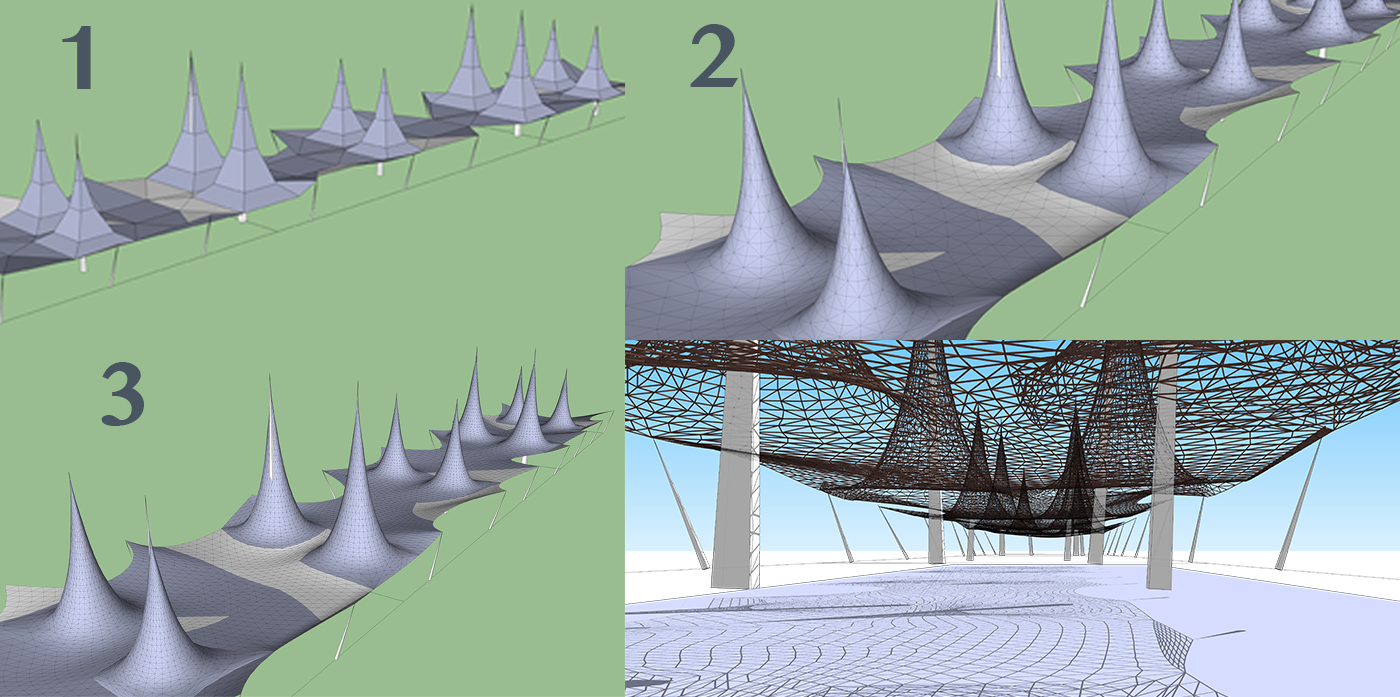
            I forgot to mention....if you delete the topmost face of the net proxies, it won't produce any triangles in the mesh. You see how my mesh has triangles towards the top of the cones? Shouldn't be like that; I just forgot to delete the top face (which is barely apparent because it's so small). Hope that makes sense, just trying to keep the mesh as tidy and as low poly as possible.

            oli

            1 條回覆 最後回覆 回覆 引用 0
            • W 離線
              willipop
              最後由 編輯

              I'm getting it ! 😄


              1.jpg

              1 條回覆 最後回覆 回覆 引用 0
              • olisheaO 離線
                olishea
                最後由 編輯

                Looking GREAT!!

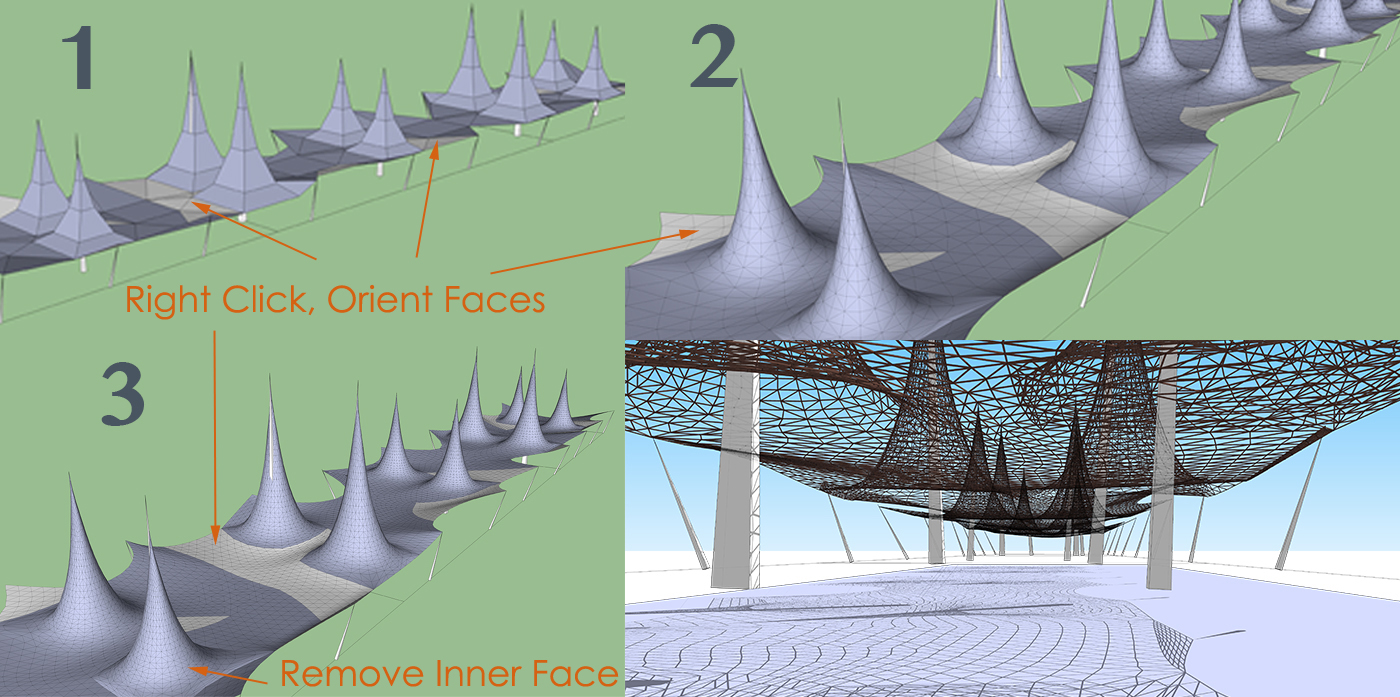
                Couple of tips....see attachment.

                I know it doesn't matter so much for this project, as you only need the lines....but you see how your mesh is mixed up with front faces and reversed faces? If you right click any front face and click Orient Faces, it will make every face the same. You can do this while it's still in the proxy stage or even after you have subdivided, but I would recommend doing it at the proxy stage for speed. It's just good practice.

                You see the cone on the bottom left of your image? How it has a strange base? This is because you have a face within the cone before you subdivided.

                Look underneath your model and delete any internal faces within the cone. Also delete the topmost face of the cone if there is a face there; your nets may converge to a point though, I can't quite tell from the image. If they converge to a point then forget what I've said regarding this. 😆

                There is also a very helpful plugin called RemoveInnerFaces.rb that I use ALL the time before a subdivision. It's always good practice to manually inspect your proxy before a subdivision though, as it's easy to miss a hidden face inside your geometry. 😉

                Great progression in your work! 👍


                1_tips.jpg

                oli

                1 條回覆 最後回覆 回覆 引用 0
                • W 離線
                  willipop
                  最後由 編輯

                  Thx you Oli ! I did realize about the reverse faces... It's my first test ! I really like artisan it's soo fun to play with it 😄🙂

                  About the innerfaces... I hide the faces and then I select the edges and run lines to tube so I can delete the faces after.. Is it what you mean ?

                  1 條回覆 最後回覆 回覆 引用 0
                  • pilouP 離線
                    pilou
                    最後由 編輯

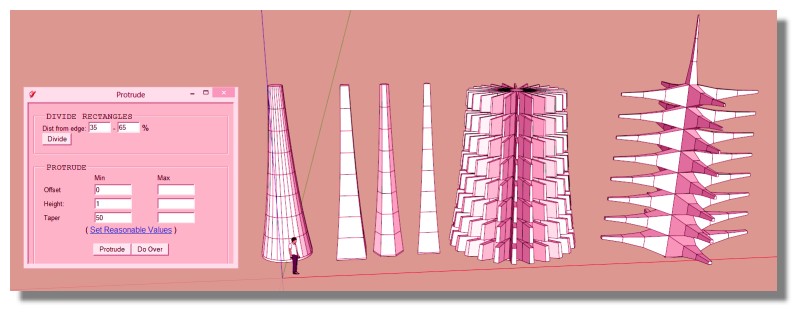
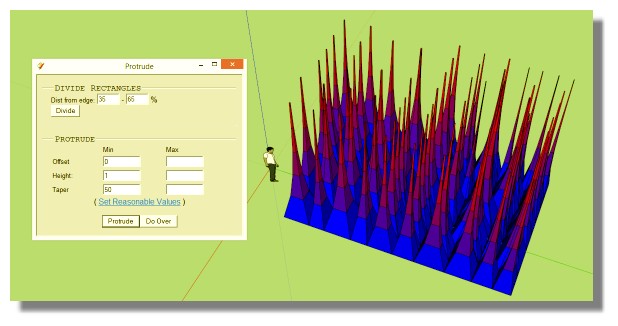
                    Seems Protrude can make easily this! 😉

                    Just draw the planar form ! 💚

                    http://sketchucation.com/forums/download/file.php?id=14939&t=1

                    Frenchy Pilou
                    Is beautiful that please without concept!
                    My Little site :)

                    1 條回覆 最後回覆 回覆 引用 0
                    • olisheaO 離線
                      olishea
                      最後由 編輯

                      @willipop said:

                      About the innerfaces... I hide the faces and then I select the edges and run lines to tube so I can delete the faces after.. Is it what you mean ?

                      No.

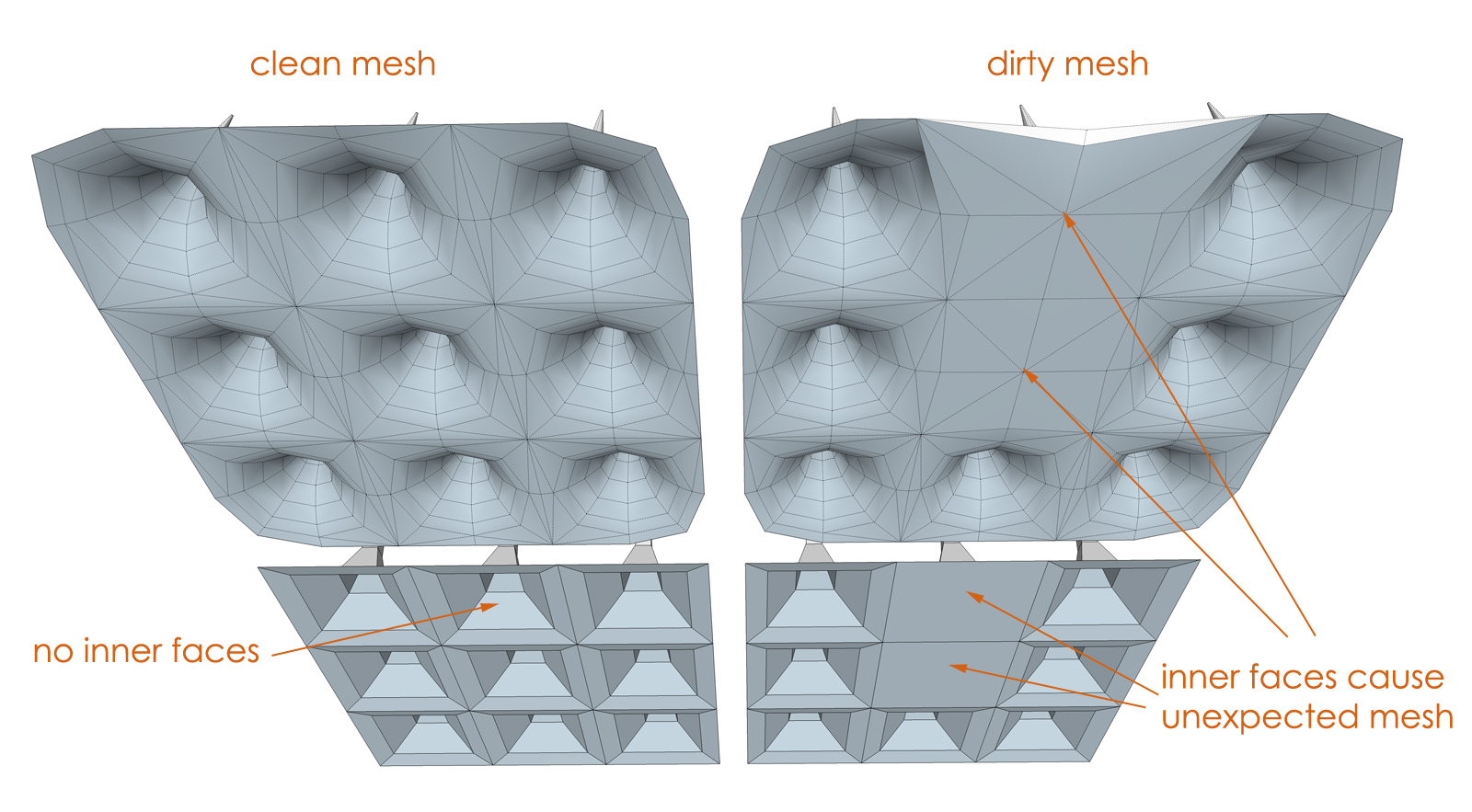
                      You see the base of the cone? How it looks distorted, unlike the other cones? It's because there is a face inside the cone. It causes the subdivided mesh to act strange.

                      See this as an example:
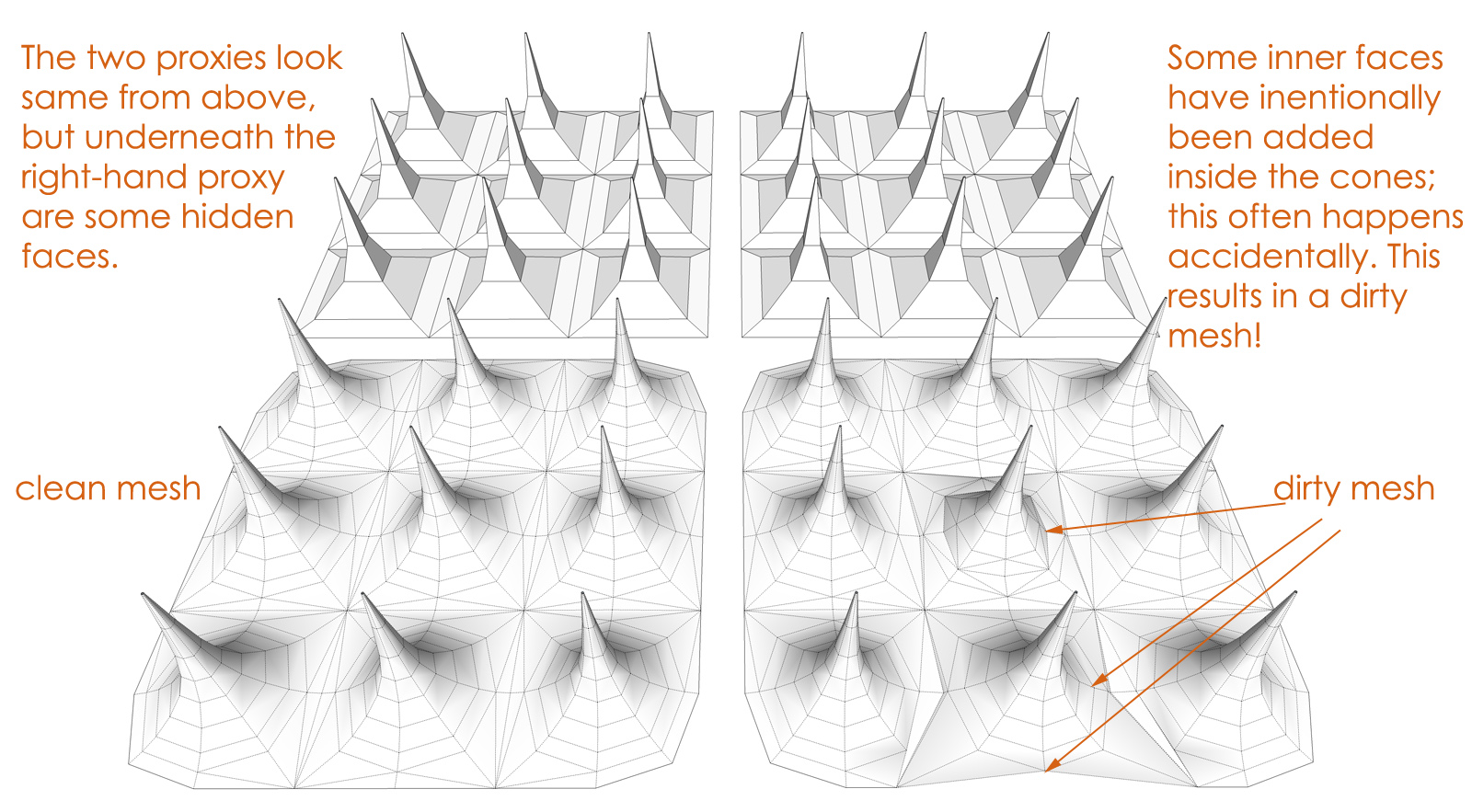

                      Above The Mesh


                      Under The Mesh

                      oli

                      1 條回覆 最後回覆 回覆 引用 0
                      • W 離線
                        willipop
                        最後由 編輯

                        Got it 😄 I actually deleted these innerfaces 😉

                        1 條回覆 最後回覆 回覆 引用 0
                        • W 離線
                          willipop
                          最後由 編輯

                          @ Pilou : What is this exactly ? 😄

                          1 條回覆 最後回覆 回覆 引用 0
                          • W 離線
                            willipop
                            最後由 編輯

                            Wow I will try it right away 😄 is it sk2014 friendly ? I like your afro btw 😉 De quelle région es-tu ? 😄

                            1 條回覆 最後回覆 回覆 引用 0
                            • pilouP 離線
                              pilou
                              最後由 編輯

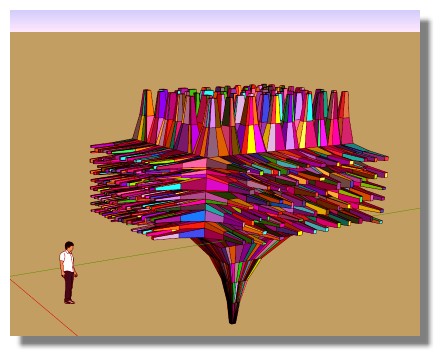
                              One of the more funny plugin! 😎
                              Select any face(s) of something and at each click you will obtain an automatic result of generations of new level of extrusions! ☀
                              A sort of "greeble"
                              A must to try! 😄

                              • Color by z and Random Painter by Chris Fullmer 💚

                              protrude.jpg
                              protrude2.jpg
                              protrude3.jpg

                              Frenchy Pilou
                              Is beautiful that please without concept!
                              My Little site :)

                              1 條回覆 最後回覆 回覆 引用 0
                              • pilouP 離線
                                pilou
                                最後由 編輯

                                For the 2014 I don't know, i use only very old versions 6,7,8 💚
                                Pour le pays tout est dans ma signature! 😄
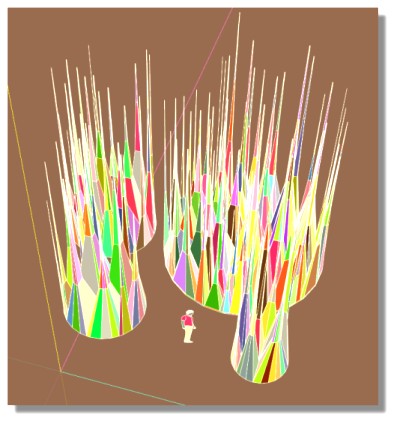
                                protrude4.jpg

                                Frenchy Pilou
                                Is beautiful that please without concept!
                                My Little site :)

                                1 條回覆 最後回覆 回覆 引用 0
                                • J 離線
                                  Jim
                                  最後由 編輯

                                  @willipop said:

                                  Wow I will try it right away 😄 is it sk2014 friendly ? I like your afro btw 😉 De quelle région es-tu ? 😄

                                  I do not think it works for 2014, but I am working on it when I can.

                                  Hi

                                  1 條回覆 最後回覆 回覆 引用 0
                                  • W 離線
                                    willipop
                                    最後由 編輯

                                    It appears but it's not working ! What version are you guys using ? any links for the download ?

                                    1 條回覆 最後回覆 回覆 引用 0
                                    • pilouP 離線
                                      pilou
                                      最後由 編輯

                                      You can find old free versions of sketchup here so you will can use the protrude plugin 😄

                                      Frenchy Pilou
                                      Is beautiful that please without concept!
                                      My Little site :)

                                      1 條回覆 最後回覆 回覆 引用 0
                                      • olisheaO 離線
                                        olishea
                                        最後由 編輯

                                        @unknownuser said:

                                        For the 2014 I don't know, i use only very old versions 6,7,8 💚

                                        That makes two of us! 😆

                                        oli

                                        1 條回覆 最後回覆 回覆 引用 0
                                        • W 離線
                                          willipop
                                          最後由 編輯

                                          Still playing with artisan and I luv it !!

                                          @ Pilou : ma copine me confirme que tu es un fan de rugby ahah 😄 ( elles vient du sud et moi de montréal 😉

                                          1 條回覆 最後回覆 回覆 引用 0
                                          • W 離線
                                            willipop
                                            最後由 編輯

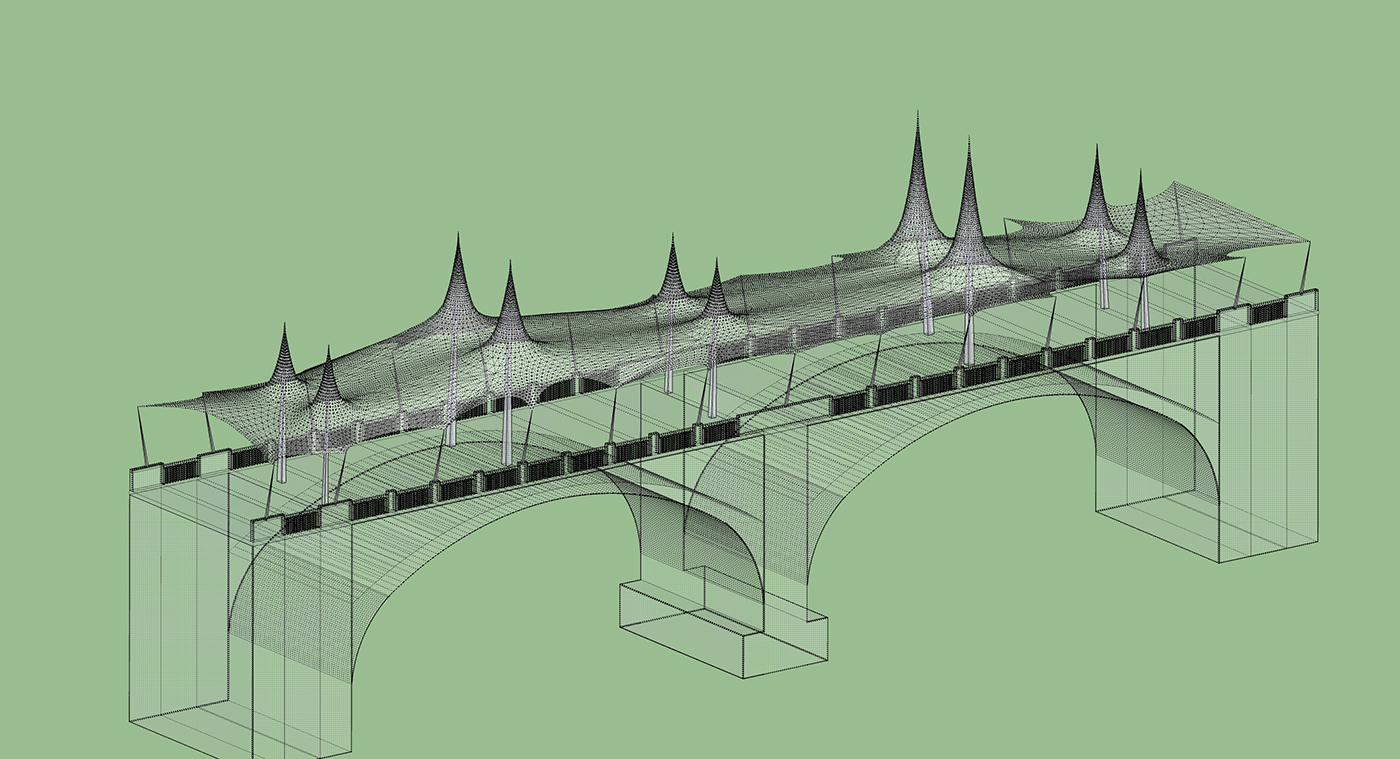
                                            Oups here's a picture 😄


                                            pont_avance4.jpg

                                            1 條回覆 最後回覆 回覆 引用 0
                                            • 1
                                            • 2
                                            • 3
                                            • 4
                                            • 5
                                            • 6
                                            • 7
                                            • 3 / 7
                                            • 第一個貼文
                                              最後的貼文
                                            Buy SketchPlus
                                            Buy SUbD
                                            Buy WrapR
                                            Buy eBook
                                            Buy Modelur
                                            Buy Vertex Tools
                                            Buy SketchCuisine
                                            Buy FormFonts

                                            Advertisement