sketchucation logo sketchucation
    • 登入
    Oops, your profile's looking a bit empty! To help us tailor your experience, please fill in key details like your SketchUp version, skill level, operating system, and more. Update and save your info on your profile page today!
    🔌 Smart Spline | Fluid way to handle splines for furniture design and complex structures. Download

    Fishing net modeling

    已排程 已置頂 已鎖定 已移動 Plugins
    131 貼文 12 Posters 15.4k 瀏覽 12 Watching
    正在載入更多貼文
    • 從舊到新
    • 從新到舊
    • 最多點贊
    回覆
    • 在新貼文中回覆
    登入後回覆
    此主題已被刪除。只有擁有主題管理權限的使用者可以查看。
    • pilouP 離線
      pilou
      最後由 編輯

      @unknownuser said:

      The problem is I can't use tig's extrusion tools

      lequel exactement ? 😄

      Le truc à savoir pour tous les outils Extrude de TIG

      Clic 1 = Profil
      Clic 2 = Rail 1
      Clic 3 = Rail 2
      Clic 4 = Profil de fin

      Quand il n'y a pas 2 rails ou 2 profils on clique quand même sur le même rail ou le même profil pour avoir les 4 clics dans l'ordre! 🤓

      http://forums.polyloop.net/picture.php?albumid=23&pictureid=586

      http://www.polyloop.net/attachment.php?attachmentid=29139&stc=1&d=1260011015

      http://forum.zbrush.fr/index.php?action=dlattach;topic=1622.0;attach=24627;image

      Avantage des Extrudes de TIG!

      http://forums.polyloop.net/picture.php?albumid=23&pictureid=633

      Frenchy Pilou
      Is beautiful that please without concept!
      My Little site :)

      1 條回覆 最後回覆 回覆 引用 0
      • BoxB 離線
        Box
        最後由 編輯

        There are quite a few ways, but do you have Bezier tools, it give you the option to right click on a line and select polyline segmentor. Here you can type in the number of segments you want.

        Selection toys is a plugin by thomthom.

        1 條回覆 最後回覆 回覆 引用 0
        • BoxB 離線
          Box
          最後由 編輯

          Short vid for net.
          [screenr:4ch62smu]4e1N[/screenr:4ch62smu]

          1 條回覆 最後回覆 回覆 引用 0
          • pilouP 離線
            pilou
            最後由 編輯

            Les courbes opposées doivent le même nombre de segments sinon c'est des calculs en plus! 🤓

            Frenchy Pilou
            Is beautiful that please without concept!
            My Little site :)

            1 條回覆 最後回覆 回覆 引用 0
            • W 離線
              willipop
              最後由 編輯

              very cool thx a lot guys !

              1 條回覆 最後回覆 回覆 引用 0
              • W 離線
                willipop
                最後由 編輯

                It crashed after 40h of working 😞😞

                1 條回覆 最後回覆 回覆 引用 0
                • W 離線
                  willipop
                  最後由 編輯

                  I kind of like the shape of it. I applied a transparent texture and cast shadows from the edges. Is it possible to this with kerkythea or artlantis for the rendering.

                  My file is about 42 megs I can share a wetransfer link if someone wants to play with it 😄
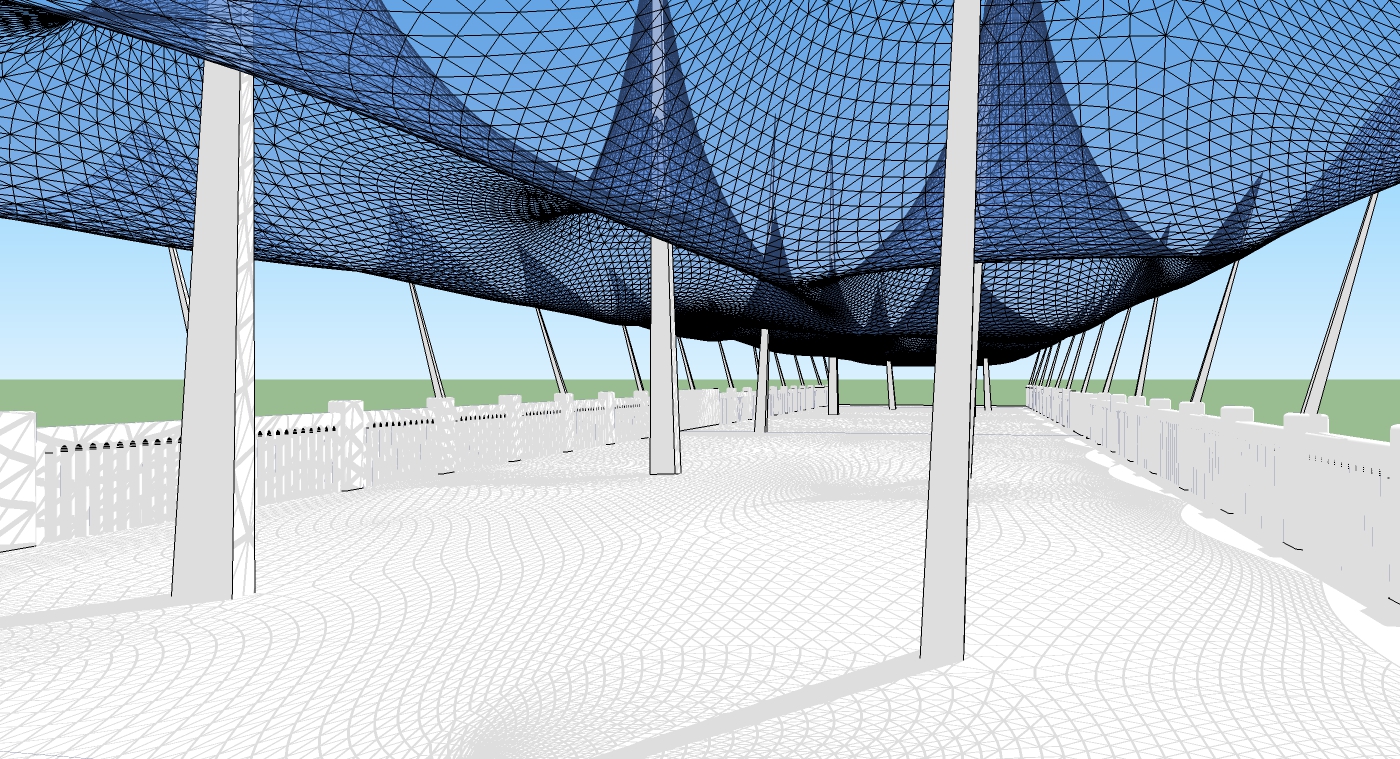

                  pont_bas1.jpg

                  1 條回覆 最後回覆 回覆 引用 0
                  • BoxB 離線
                    Box
                    最後由 編輯

                    How big is the model without the net, if it's less than 4mg you could upload it here.
                    I wouldn't mind having a look at the structure and seeing if there is a simple way to make the net.

                    1 條回覆 最後回覆 回覆 引用 0
                    • W 離線
                      willipop
                      最後由 編輯

                      It's 26meg but I guess if you delete the bridge it's less than a meg.

                      Here's the link : http://we.tl/3Zg9yeDhRw

                      If you could make a video that could be perfect 😄 I have 2 scenario to do. One with the net that is lower and one upper. If you notice, there is a line at the extreme end of the bridge, it's about 2.5meter high. The net must not drop above this line. It's why I liked playing with artisan I was able to set a limit 😄

                      1 條回覆 最後回覆 回覆 引用 0
                      • BoxB 離線
                        Box
                        最後由 編輯

                        Bit of a tip for you.
                        Purge your file and it is only 1.8mg


                        bridge1.skp

                        1 條回覆 最後回覆 回覆 引用 0
                        • W 離線
                          willipop
                          最後由 編輯

                          oh wow ! 😄 I feel ashamed ehehe 😛

                          1 條回覆 最後回覆 回覆 引用 0
                          • olisheaO 離線
                            olishea
                            最後由 編輯

                            Is the model any quicker now it's been purged?

                            If you absolutely must use the model you already have, you could always overlay the sketchup lines and shadows onto your render. The shadows can be blurred in photoshop for realism. You can do a hidden line export and then overlay these onto your render in photoshop. Change the blending mode to "multiply" and all the white disappears, leaving only the lines. This is kinda cheating though! I'd rather have a model that renders from all scenes, without having to overlay lines.

                            Here is a VERY old tutorial, from David Huang (Zem) where I learnt the overlay or "lineover" technique. You can have a line export and a shadow export in separate images giving more flexibility in photoshop when you are overlaying everything. So basically; render at the bottom, then shadows, then lines.

                            It would still be better in the long run if you find a solution that does not involve line exports etc....

                            Human Verification

                            favicon

                            (supodiumforum.websitetoolbox.com)

                            Love this thread; food for thought and some great contribution! 👍

                            oli

                            1 條回覆 最後回覆 回覆 引用 0
                            • W 離線
                              willipop
                              最後由 編輯

                              @ Oli : I'm considering this option but the shadow produced from edges by sketchup is not that precise I think... 😞 Here is a nice tutorial of one architect I like a lot that explain very well what you just bring 😄 : Alex hogrefe : http://alexhogrefe.squarespace.com/ambient-occlusion-tutorial/

                              1 條回覆 最後回覆 回覆 引用 0
                              • BoxB 離線
                                Box
                                最後由 編輯

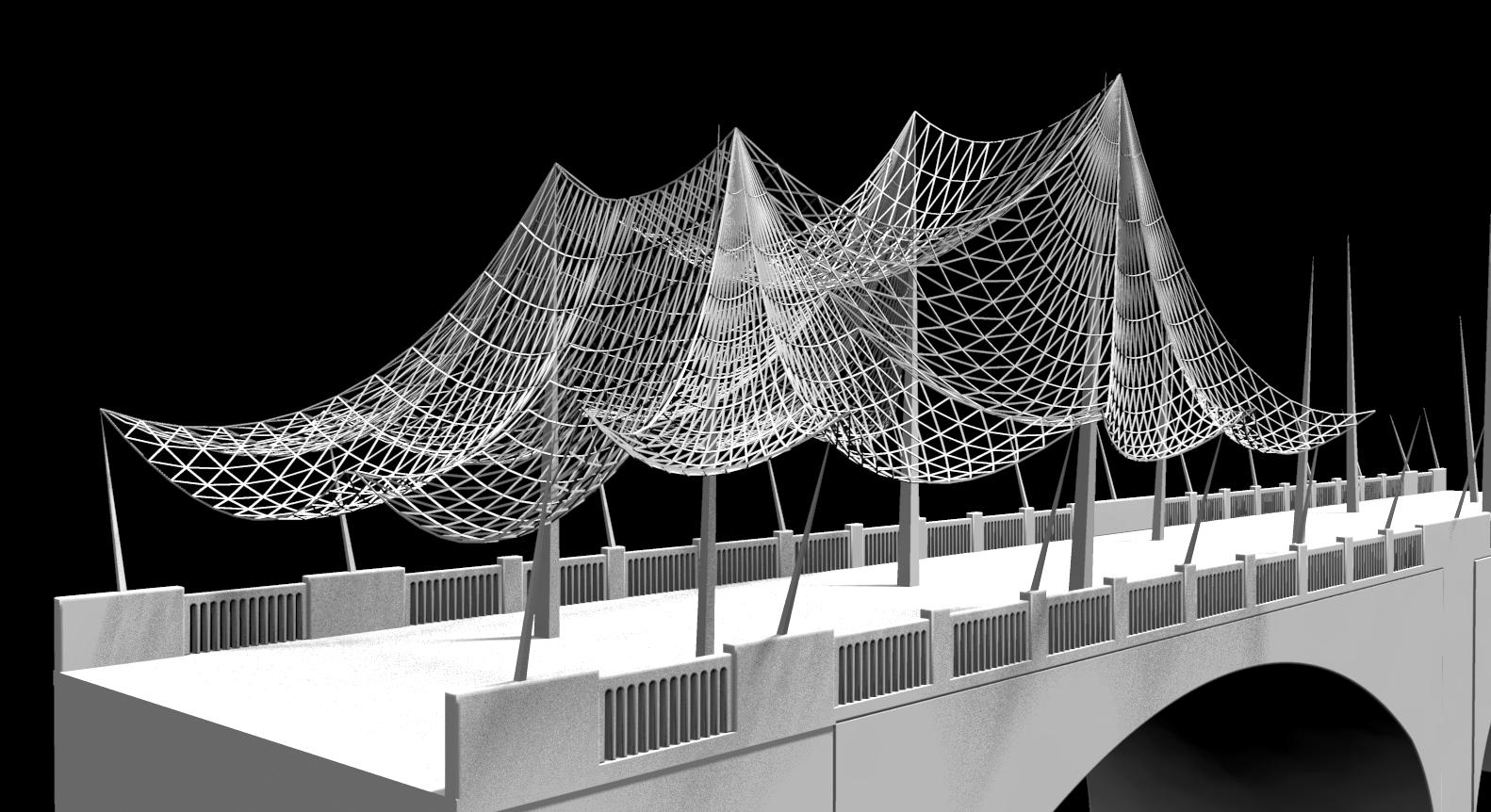
                                Is this anything like what you want?


                                Quick Bridge.jpg

                                1 條回覆 最後回覆 回覆 引用 0
                                • W 離線
                                  willipop
                                  最後由 編輯

                                  Wow it's very nice 😄 It's close to what I have in mind. I'd love the net more dense. Could you show me how you did that and I will try myself !? How did you did the rendering ? very cool !

                                  1 條回覆 最後回覆 回覆 引用 0
                                  • W 離線
                                    willipop
                                    最後由 編輯

                                    I think I will have to go with something similar you did ( I mean more space between each squares of the mesh )

                                    1 條回覆 最後回覆 回覆 引用 0
                                    • W 離線
                                      willipop
                                      最後由 編輯

                                      woaa this plugin is amazing ! you rock 😄

                                      1 條回覆 最後回覆 回覆 引用 0
                                      • BoxB 離線
                                        Box
                                        最後由 編輯

                                        You can go denser, that whole file is only 6mg and doesn't lag at all with shadows.

                                        I used another plugin called Wire tool to link the construction points with a nice droop. Then just did as I did in the video. for each section.
                                        I only used 12 segments for the curves, so that makes it quite wide, you can use more to get a finer mesh. http://sketchucation.com/pluginstore?pln=ae_WireTool
                                        You may want to use the main wires as thicker support cables, then make the mesh between.
                                        But it's up to you how you want it to look.
                                        The trick though is to make it using copies as much as possible. Make one end and flip the components to work on the other end etc

                                        The render is just a basic preset render from twilight. And as you can see in this one when I flipped it it didn't fit because you structure isn't symmetrical, hence the gap in the middle.
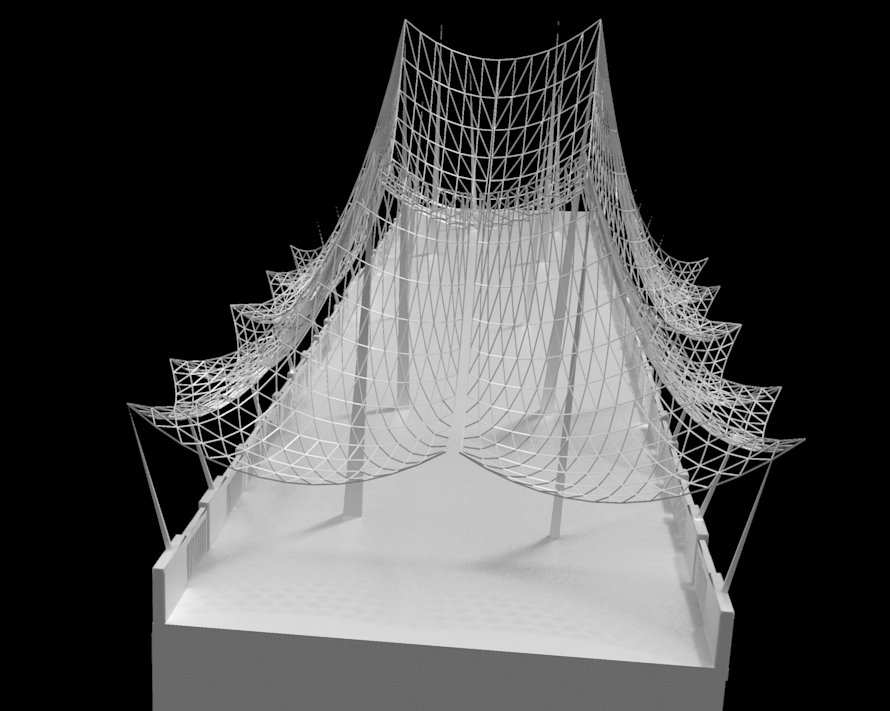
                                        Bri.jpg


                                        A finer mesh with some thick cables

                                        1 條回覆 最後回覆 回覆 引用 0
                                        • W 離線
                                          willipop
                                          最後由 編輯

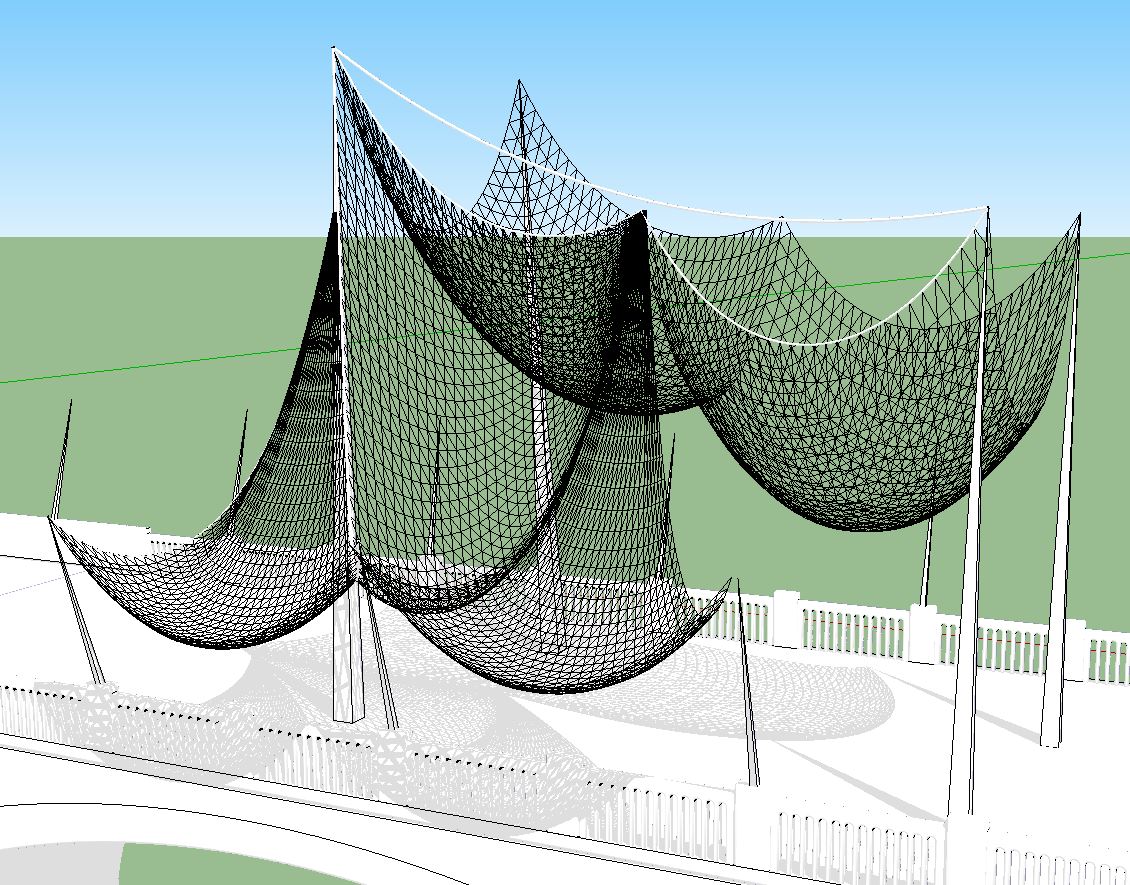
                                          This plugin makes it looks really nice !

                                          Is there another plugin that I could use to fix some summit and use some other summit that I could move.(just like artisan works with the crease tool.) vertex tool ?
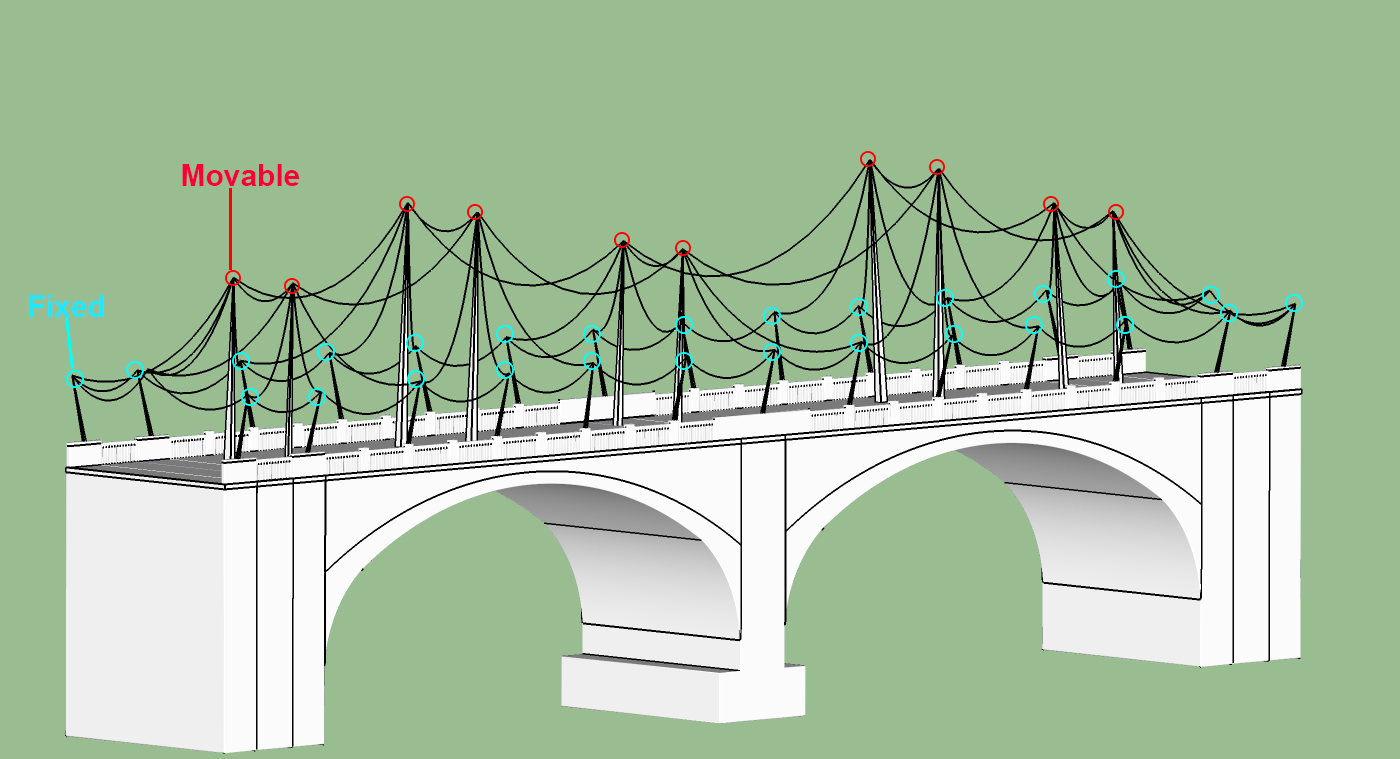

                                          bridge1_test copy.jpg

                                          1 條回覆 最後回覆 回覆 引用 0
                                          • olisheaO 離線
                                            olishea
                                            最後由 編輯

                                            gets better and better! I forgot about the wire tool, it's a classic!

                                            oli

                                            1 條回覆 最後回覆 回覆 引用 0
                                            • 1
                                            • 2
                                            • 3
                                            • 4
                                            • 5
                                            • 6
                                            • 7
                                            • 3 / 7
                                            • 第一個貼文
                                              最後的貼文
                                            Buy SketchPlus
                                            Buy SUbD
                                            Buy WrapR
                                            Buy eBook
                                            Buy Modelur
                                            Buy Vertex Tools
                                            Buy SketchCuisine
                                            Buy FormFonts

                                            Advertisement