MSPhysics 1.0.3 (16 October 2017)
-
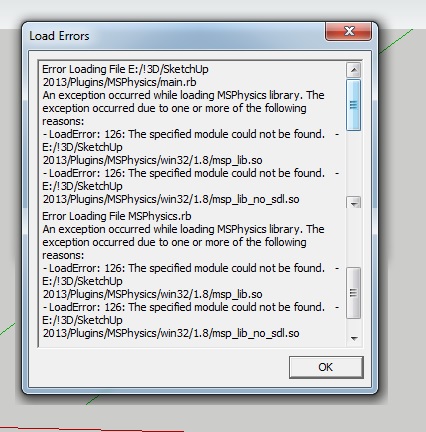
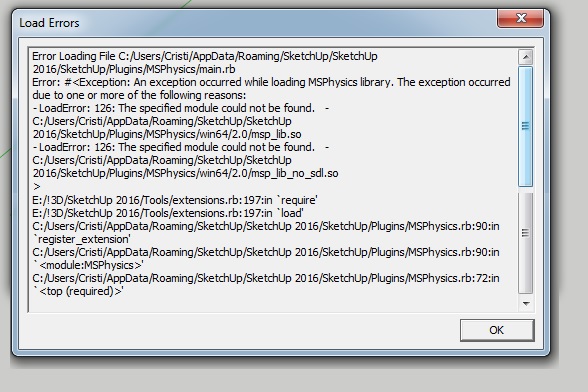
Hello to everyone out there ! and Hello Anton ! It give me an error after program is launched... 2013 and 2016... And on version ...
I manually install all the new plugins and I always delete the old ones ...
Thank you !
-
I obtain similar message:
Error al cargar archivo /Library/Application Support/SketchUp 2016/SketchUp/Plugins/MSPhysics/main.rb
Error; #<Exception; An exception occurred while loading MSPhysics library. The exception occurred due to one or more of the following reasons;
- LoadError; dlopen(/Library/Application Support/SketchUp 2016/SketchUp/Plugins/MSPhysics/osx64/2.0/msp_lib.bundle, 9); Library not loaded; @loader_path/../libSDL2-2.0.0.dylib
  Referenced from; /Library/Application Support/SketchUp 2016/SketchUp/Plugins/MSPhysics/osx64/libSDL2_mixer-2.0.0.dylib
  Reason; image not found - /Library/Application Support/SketchUp 2016/SketchUp/Plugins/MSPhysics/osx64/2.0/msp_lib.bundle
- LoadError; MSPhysics library file, "/Library/Application Support/SketchUp 2016/SketchUp/Plugins/MSPhysics/osx64/2.0/msp_lib_no_sdl.bundle", is missing!
>
/Applications/SketchUp 2016/SketchUp.app/Contents/Resources/Content/Tools/extensions.rb;197;in `require'
/Applications/SketchUp 2016/SketchUp.app/Contents/Resources/Content/Tools/extensions.rb;197;in `load'
/Library/Application Support/SketchUp 2016/SketchUp/Plugins/MSPhysics.rb;90;in `register_extension'
/Library/Application Support/SketchUp 2016/SketchUp/Plugins/MSPhysics.rb;90;in `<module;MSPhysics>'
/Library/Application Support/SketchUp 2016/SketchUp/Plugins/MSPhysics.rb;72;in `<top (required)>'
OSX 10.11.6 SU2016
-
Alright, I'll look into this.
-
The 0.9.4 still working well on OS 10.11.6 SU2016
-
Hello Anton!
I have installed this plug-in and when started a SU , came a window:Error Loading File C:/Users/Jenő/AppData/Roaming/SketchUp/SketchUp 2016/SketchUp/Plugins/MSPhysics/main.rb
Error: #<Exception: An exception occurred while loading MSPhysics library. The exception occurred due to one or more of the following reasons:- Encoding::CompatibilityError: incompatible character encodings: Windows-1250 and UTF-8
- Encoding::CompatibilityError: incompatible character encodings: Windows-1250 and UTF-8
C:/Program Files/SketchUp/SketchUp 2016/Tools/extensions.rb:197:in
require' C:/Program Files/SketchUp/SketchUp 2016/Tools/extensions.rb:197:inload'
C:/Users/Jenő/AppData/Roaming/SketchUp/SketchUp 2016/SketchUp/Plugins/MSPhysics.rb:90:inregister_extension' C:/Users/Jenő/AppData/Roaming/SketchUp/SketchUp 2016/SketchUp/Plugins/MSPhysics.rb:90:inmodule:MSPhysics'
C:/Users/Jenő/AppData/Roaming/SketchUp/SketchUp 2016/SketchUp/Plugins/MSPhysics.rb:72:in `<top (required)>'
My SU is 2016 64 bit (16.1.2104)
My wsystem WIN10 -
C:/Users/Jen**ő**/...Contains an accented character.
The extension's coding was updated to fix the user-path encoding to UTF-8, so do you have the latest version installed ?
If so then perhaps Anton needs to make his re-encoding more robust ? -
Just installed Sketchup Make 2017 and tried to install MSPhysics 0.9.6 and AMS 3.4.0 and got this error ---
Error Loading File C:/Users/anykh/AppData/Roaming/SketchUp/SketchUp 2017/SketchUp/Plugins/MSPhysics/main.rb
Error: #<Exception: An exception occurred while loading MSPhysics library. The exception occurred due to one or more of the following reasons:- LoadError: 126: The specified module could not be found. - C:/Users/anykh/AppData/Roaming/SketchUp/SketchUp 2017/SketchUp/Plugins/MSPhysics/win64/2.2/msp_lib.so
- LoadError: 126: The specified module could not be found. - C:/Users/anykh/AppData/Roaming/SketchUp/SketchUp 2017/SketchUp/Plugins/MSPhysics/win64/2.2/msp_lib_no_sdl.so
C:/Program Files/SketchUp/SketchUp 2017/Tools/extensions.rb:197:in
require' C:/Program Files/SketchUp/SketchUp 2017/Tools/extensions.rb:197:inload'
C:/Users/anykh/AppData/Roaming/SketchUp/SketchUp 2017/SketchUp/Plugins/MSPhysics.rb:90:inregister_extension' C:/Users/anykh/AppData/Roaming/SketchUp/SketchUp 2017/SketchUp/Plugins/MSPhysics.rb:90:inmodule:MSPhysics'
C:/Users/anykh/AppData/Roaming/SketchUp/SketchUp 2017/SketchUp/Plugins/MSPhysics.rb:72:in `<top (required)>' -
That's unfortunate. Looks like I will need to create another account to ensure that the encoding error is actually not fixed.
-
Hi,
I'm want to do a path following object, but I don't really know how. I found on this thread that it's done with curvy joints, but I'm lost. Please, can you explain how or do you have kind of example?
Thanks!
-
Okay, those loading and encoding issues should be fixed now. Upgrade to 0.9.7.
-
Hi M3one,
At the moment, you can refer to this tutorial on curvy joints.
https://www.youtube.com/watch?v=dU-KgxKc0dsYou can also check out this example model at 3Dwarehouse.
https://3dwarehouse.sketchup.com/model.html?id=d21984a9-477b-44d7-9eca-c191ae85afe4Anton
-
@anton_s said:
Hi M3one,
At the moment, you can refer to this tutorial on curvy joints.
https://www.youtube.com/watch?v=dU-KgxKc0dsYou can also check out this example model at 3Dwarehouse.
https://3dwarehouse.sketchup.com/model.html?id=d21984a9-477b-44d7-9eca-c191ae85afe4Anton
Thanks Anton, I'll check it later
-
@anton_s said:
Okay, those loading and encoding issues should be fixed now. Upgrade to 0.9.7.
Thanks Anton that has sorted the loading issue with Sketchup 2017.
Regards
-
Hello, I can't download MSPhysics 0.9.7 plugin from your link!
-
First of all thanks for sharing this great plugin
Please I need help. with chains. -
I installed the last version 0.9.7 and it appears this message:
Error al cargar archivo /Users/Oxer/Library/Application Support/SketchUp 2017/SketchUp/Plugins/MSPhysics/main.rb
Error; #<Exception; An exception occurred while loading MSPhysics 0.9.7! The exception occurred due to one or more of the following reasons;
- LoadError; dlopen(/Users/Oxer/Library/Application Support/SketchUp 2017/SketchUp/Plugins/MSPhysics/osx64/2.2/msp_lib.bundle, 9); Library not loaded; @loader_path/../libSDL2-2.0.0.dylib
  Referenced from; /Users/Oxer/Library/Application Support/SketchUp 2017/SketchUp/Plugins/MSPhysics/osx64/libSDL2_mixer-2.0.0.dylib
  Reason; image not found - /Users/Oxer/Library/Application Support/SketchUp 2017/SketchUp/Plugins/MSPhysics/osx64/2.2/msp_lib.bundle
- LoadError; MSPhysics library file, "/Users/Oxer/Library/Application Support/SketchUp 2017/SketchUp/Plugins/MSPhysics/osx64/2.2/msp_lib_no_sdl.bundle", is missing!
>
/Applications/SketchUp 2017/SketchUp.app/Contents/Resources/Content/Tools/extensions.rb;197;in `require'
/Applications/SketchUp 2017/SketchUp.app/Contents/Resources/Content/Tools/extensions.rb;197;in `load'
/Users/Oxer/Library/Application Support/SketchUp 2017/SketchUp/Plugins/MSPhysics.rb;90;in `register_extension'
/Users/Oxer/Library/Application Support/SketchUp 2017/SketchUp/Plugins/MSPhysics.rb;90;in `<module;MSPhysics>'
/Users/Oxer/Library/Application Support/SketchUp 2017/SketchUp/Plugins/MSPhysics.rb;72;in `<top (required)>'
SU2017 & OSX 10.11.6
-
Hello !!!
I think most stable version is MSPhysics_0.9.4 for now ... in MSPhysics_0.9.7 "Drag to orbit" does not work when the simulation is runing...
Emersonvip - you can browse through this forum about chains ( http://sketchucation.com/forums/search.php?keywords=chain%26amp;t=56852%26amp;sf=msgonly ). Here you have a file, see how it was done this chain piece by piece and you will understand how MSPhysics it works with chains.
as Anton wrote in a reply "You can adjust Update Timestep, Solver Model, and Update Rate for the desired speed, performance, and stability."
-
Hi Anton and thanks for MSPhysics your done a great job so far congratulations.
only problem for me is new MS scripts are confusing....old sketcky user
waiting on more models with script examples in them.Scaled down my j-pod/cable car model from Eneroth Railroad plugin
Curvy piston joint testing

thx again
-
The same here - Orbit doesn't work during simulation. Zooming in and out works.
-
@faust07 said:
The same here - Orbit doesn't work during simulation. Zooming in and out works.
Yes, For me also don't works the Middle click in 0.9.5+




Advertisement