SketchUp 2014
-
ok... now we know it:
jbacus via twitter
@unknownuser said:
SU isn't a quad modeler. Nor is it more likely to become one in the future than it is to become an aardvark. Why must it?
@unknownuser said:
SU isn't a sub-d modeler. Nor is it more likely to become one in the future than it is to become an aardvark. Why must it?
@unknownuser said:
SU isn't a parametric modeler, though it can behave in parametric ways. No modifier stack. Isn't 'direct' better?

@unknownuser said:
When was the last time a feature that made you catch your breath was added to Photoshop? Or Microsoft Word?

-
@tig said:
In the last day or so there have been lots of posts about v2014 - read those - for example...
http://sketchucation.com/forums/viewtopic.php?p=512951#p512951
You must NOT blindly copy plugins across from older versions.
Some will work, but some might not.Thanks, TIG.
So I uninstalled SketchUp Pro 2014 and reinstalled it without adding any plugins...and it crashed everytime I clicked on it.

I also have SketchUp Pro 2013 active. I am wondering if there is a conflict between having both on the same machine.
Does anyone experience a similar issue?
Thanks,
_KN
-
@ken28875 said:
So I uninstalled SketchUp Pro 2014 and reinstalled it without adding any plugins...and it crashed everytime I clicked on it.
SketchUp's uninstaller will only remove files it was responsible for installing in the first place. Therefore, if you copied other items into the plugins folder, then uninstalled and reinstalled SketchUp, those plugins will still be there, along with any problems related to those plugins. You'd want to uninstall 2014, then manually ensure you've removed all plugins, before reinstalling.
@ken28875 said:
I also have SketchUp Pro 2013 active. I am wondering if there is a conflict between having both on the same machine.
SketchUp 2014 was designed to install alongside 2013. It's probably the very first installation scenario we test and something nearly everyone on the SketchUp team does. I do not know of any reason why you would not be able to have both programs installed.
Andrew
-
@andrews said:
@ken28875 said:
So I uninstalled SketchUp Pro 2014 and reinstalled it without adding any plugins...and it crashed everytime I clicked on it.
SketchUp's uninstaller will only remove files it was responsible for installing in the first place. Therefore, if you copied other items into the plugins folder, then uninstalled and reinstalled SketchUp, those plugins will still be there, along with any problems related to those plugins. You'd want to uninstall 2014, then manually ensure you've removed all plugins, before reinstalling.
@ken28875 said:
I also have SketchUp Pro 2013 active. I am wondering if there is a conflict between having both on the same machine.
SketchUp 2014 was designed to install alongside 2013. It's probably the very first installation scenario we test and something nearly everyone on the SketchUp team does. I do not know of any reason why you would not be able to have both programs installed.
Andrew
Thanks for yuor reply, Andrew.
So I tried to uninstall and reinstall once more and still got the Bug Splat

even by manually deleting all plugins and folders in SketchUp 2014.
_KN
-
@tig said:
Sketchup v2014 uses a newer [better] version of Ruby.
This has meant that in anticipation of the release, over the past weeks authors have been doing a lot of reworking of Plugins, discreetly in the background.Your older Plugins will probably cause issues with v2014.
Do not copy them across.
It's highly recommended that you install fresh versions from the PluginStore etc.
Many of these are already updated to work with v2014 [as well as earlier versions].There may of course be issues with some older plugins that haven't been updated [yet]...
Please report these in each Plugin's thread, so that the author is made aware of an issue and hopefully a v2014 friendly update will be forthcoming: sometimes there is major recoding needed, but often the .rb file just needs its "encoding" changing to "UTF-8 without BOM" rather than "ANSI", which can be easily done in Notepad++...Trimble seems to think authors have nothing else to do. Was it not more important to create a 64bit version? Instead we have the entire Ruby add on Industry checking code for errant spaces, degree vs º etc.
I dumped one of my Plugin folder for SU 8 into SU2014 The list of error was 4 pages long. Most errors were from major add on makers, I wont name names, other were mine some of which were derived from copying ruby code from other code writers. If I was a Trimbler now! I would not be so proud.
I'm telling customers not to buy my scripts if they intend to use them in SU2014. I simply don't have time with an 8 hour eval copy of SU2014, to see if my Rubies are API compliant. Also I would starve if I had to survive on $5.00 scripts.
-
@unknownuser said:
So I tried to uninstall and reinstall once more and still got the Bug Splat even by manually deleting all plugins and folders in SketchUp 2014.
FYI for the thread...
We received the BugSplat and looked at it. Sure enough, the crash was due to the presence of incompatible Ruby scripts in the user's plugins folder and a failure to delete those plugins before re-launching SketchUp.
As has been indicated elsewhere, you must not copy the plugins folder. Reinstall the scripts via the extension warehouse to get the latest versions that are 2014-compatible.
Andrew
-
Su team is (i hope9 recieving a lot of feedback, ronen bekerman has a discussion on it involving bertrand also, and here Trimble have Tomot, this guys have a level of importance inside archvis but trimble dont see it that way, Sorry guys but you really need to listen to the customer, Its your software but your customers are asking for something else.
Dont guard your selves behind the well know excuses
Please rethink your plan on this and listen to the ones that pays the bills, maybe JUST maybe your vision on it its blured or what you think is not that accuarate. -
@andrews said:
@unknownuser said:
So I tried to uninstall and reinstall once more and still got the Bug Splat even by manually deleting all plugins and folders in SketchUp 2014.
FYI for the thread...
We received the BugSplat and looked at it. Sure enough, the crash was due to the presence of incompatible Ruby scripts in the user's plugins folder and a failure to delete those plugins before re-launching SketchUp.
As has been indicated elsewhere, you must not copy the plugins folder. Reinstall the scripts via the extension warehouse to get the latest versions that are 2014-compatible.
Andrew
Thanks Andrew for the help. SketchUp 2014 is working fine now.
For those of you having the same problem, you should delete the plugin folder in this directory:
C:\Users(your name)\AppData\Roaming\SketchUp\SketchUp 2014\SketchUp\Plugins.I was not aware of that folder. What I did was just deleting the one from the (C:)-> Program Files (x86), that's why I still got the Bug Splat.
Have a good day!
_KN
-
@ken28875 said:
For those of you having the same problem, you should delete the plugin folder in this directory:
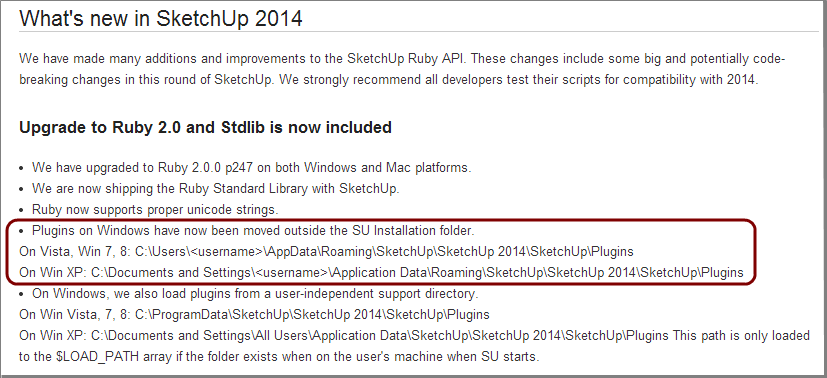
C:\Users(your name)\AppData\Roaming\SketchUp\SketchUp 2014\SketchUp\Plugins.I was not aware of that folder.
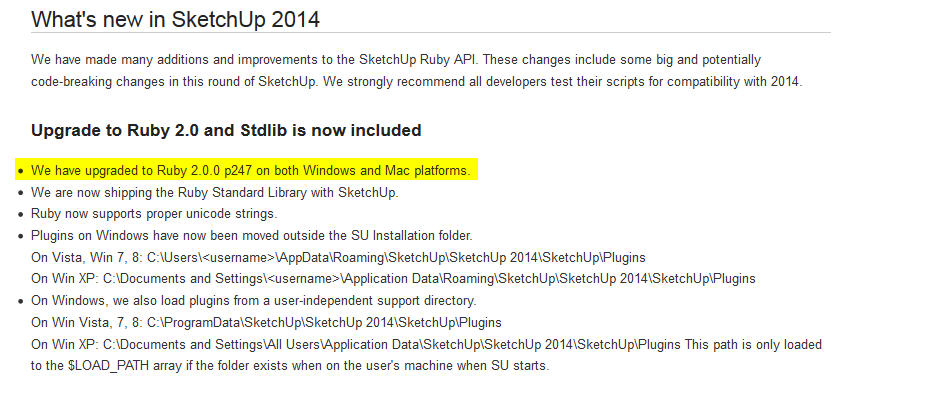
It is in the SketchUp Ruby API Release Notes !
The Trimble Team took the time (spent the money,) to author and release this information. It is the user's responsilbility to read the Release Notes for each new version.
-
I don't have a MAC. One of my Customers wants to know where the plugins directory is located on a MAC, for SU 2014 ?
-
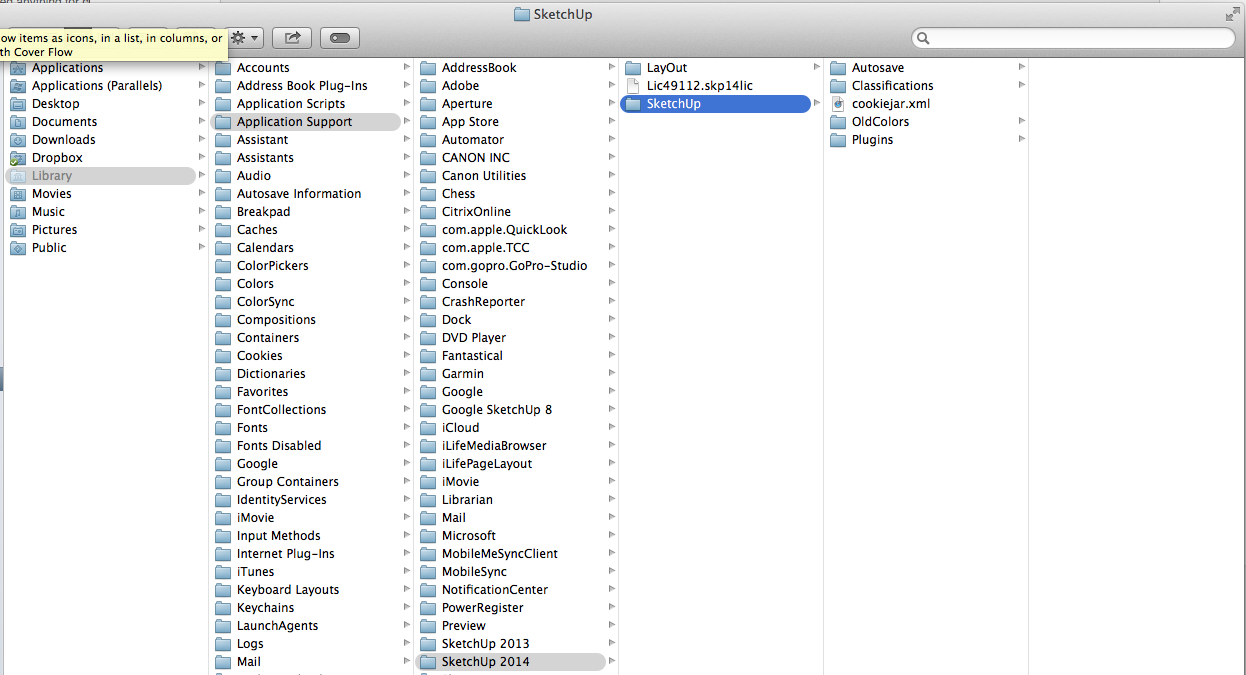
Did they move it on the Mac? Otherwise its in Application Support...
-
@bmike said:
Did they move it on the Mac? Otherwise its in Application Support...
Your intended clarification may be confusing, as there are multiple application support directories.
The location of the plugin folder for SU8 and before was buried inside the root-level app support folder:
[pre:3fpbb2ln]/Library/Application Support/Google SketchUp 8/SketchUp/plugins[/pre:3fpbb2ln]This is a system controlled (i.e. machine-wide) location that requires root privileges to modify, and is therefore a very unfriendly way of doing things.For the 2013 release, we moved the preferred plugins location inside the user's personal app support folder. It remains the same for 2014. In that sense, as of the 2014 release, Windows and Mac are now both the same in preferring to have plugins within each user's personal Plugins folder instead of in a shared location.
The full pathname for Mac plugins in 2013 and 2014 is:
[pre:3fpbb2ln]/Users/<username>/Library/Application Support/SketchUp xxxx/SketchUp/Plugins/
aka
~/Library/Application Support/SketchUp xxxx/SketchUp/Plugins/[/pre:3fpbb2ln] Where of course, "xxxx" is 2013 or 2014.I believe the code still looks for plugins in /Library as a secondary location, but as is the case with Windows, you really should use the user-specific location instead of the system-wide location unless you have a really good reason to do otherwise.
Andrew
-
@andrews said:
I believe the code still looks for plugins in /Library as a secondary location, but as is the case with Windows, you really should use the user-specific location instead of the system-wide location unless you have a really good reason to do otherwise.
And the same on Windows for the common "AllUsersProfile" / "ProgramData" plugins folder.
Usually, only IT administrtors in company or educational settings would install plugins into these paths.
But even plugins installed sytem-wide like this, still need to save settings usingSketchup::write_defaultor in files saved to the user path. So there could be a sub-folder in the user "Plugins" folder created by such a plugin, used for each specific user's settings. -
@andrews said:
@bmike said:
Did they move it on the Mac? Otherwise its in Application Support...
Your intended clarification may be confusing, as there are multiple application support directories.
The location of the plugin folder for SU8 and before was buried inside the root-level app support folder:
[pre:2w7fink1]/Library/Application Support/Google SketchUp 8/SketchUp/plugins[/pre:2w7fink1]This is a system controlled (i.e. machine-wide) location that requires root privileges to modify, and is therefore a very unfriendly way of doing things.For the 2013 release, we moved the preferred plugins location inside the user's personal app support folder. It remains the same for 2014. In that sense, as of the 2014 release, Windows and Mac are now both the same in preferring to have plugins within each user's personal Plugins folder instead of in a shared location.
The full pathname for Mac plugins in 2013 and 2014 is:
[pre:2w7fink1]/Users/<username>/Library/Application Support/SketchUp xxxx/SketchUp/Plugins/
aka
~/Library/Application Support/SketchUp xxxx/SketchUp/Plugins/[/pre:2w7fink1] Where of course, "xxxx" is 2013 or 2014.I believe the code still looks for plugins in /Library as a secondary location, but as is the case with Windows, you really should use the user-specific location instead of the system-wide location unless you have a really good reason to do otherwise.
Andrew
Andrew:
I think the common courtesy would have been to respond to my inquiry directly. Do you not think it would be appropriate to include a statement in the API that I can direct customers to where SU 2014 users, on Apple iMac's should expect to find the plugins folder?It would be really helpful to have an official reference from Trimble I can point to. I'm starting to lose credibility! Already one irate SU2014 Customer is upset by scripts are not SU 2014 compliant. Even after explaining I no prior knowledge about SU 2014. He's telling me my scripts should all be in .RBZ format and should be installable in the Extension menu.
You guys are creating a nightmare, not a solution. Solutions require critical thinking
Unfortunately you can't buy critical thinking, it only develops after one has been on the planet for a very long time. -
@tomot said:
I think the common courtesy would have been to respond to my inquiry directly.
Had there been no other responses to your inquiry, then yes, I would have responded to you directly. However, given the potential for hundreds of other users to see this thread at a later date, I chose to respond in a way I thought would benefit the greater good, by asserting my statements alongside a potentially confusing answer to your question that came from another user. No disrespect was intended.
@unknownuser said:
Do you not think it would be appropriate to include a statement in the API that I can direct customers to where SU 2014 users, on Apple iMac's should expect to find the plugins folder?
That's a fantastic idea. Luckily several other people have invested significant time and resources in such documentation. Here's just one such example from the loading instructions on our developer site.
@unknownuser said:
Customer is upset by scripts are not SU 2014 compliant.
Customer needs to be patient and understand that software development takes some time and effort, especially when it comes to adapting existing software to work with a new product. While significant effort was expended to inform the most prolific plugin developers of the impending changes and involve them in an early "alpha" test of the Ruby 2.0 interface well before we launched 2014, given the vast number of plugins that exist in the world, it was not possible for us to involve every single plugin author. Therefore, a great many people such as you are in the position of needing to update their plugins now in response to our most recent release.
The only comfort I can offer is that this action-reaction, or release-update cycle is not at all unique to SketchUp. It is a reality that exists throughout the entire software development ecosystem, for plugin developers, web designers, hardware manufacturers, etc.
I would tell your customers that if using your plugin is an absolutely essential part of their process (one which they can't work around in any other way, such as exporting the file to 2013 format and using your plugin there), then they need to carefully evaluate that as part of their migration strategy. They must then make sure they have either a replacement solution or a reasonable workaround in place before upgrading. Otherwise it's best to just hold off upgrading SketchUp until their dependencies are completely sorted.
@unknownuser said:
He's telling me my scripts should all be in .RBZ format and should be installable in the Extension menu.
There are various ways to handle making your scripts as easy as possible for your users to find and install, but I would recommend that you adapt your plugins to the standards revealed to the developer community when we launched the SketchUp Extension Warehouse almost a year ago, and do what's necessary to get them published there. It's free and pretty straightforward to do, in addition to being a great way to make your plugins easier to discover and more readily available to the SketchUp-using public. Is that the only way to do it? No, but it is the officially supported method.
@unknownuser said:
You guys are creating a nightmare, not a solution. Solutions require critical thinking
You'll forgive me if I don't share your opinion on this. From as early as 2008 (against difficult opposition by our Google overlords), I was an advocate for the creation of the extension warehouse, so I can't begin to tell you how excited I was when it became a reality last year. In fact, I think we've done a phenomenal job with the extension warehouse and its associated developer documentation.
@unknownuser said:
Unfortunately you can't buy critical thinking, it only develops after one has been on the planet for a very long time.
I fail to see how levying such character judgments is expected to motivate me or my colleagues toward further action. I'd prefer we steer clear of such unproductive endeavors.
-
The Mac example at the bottom of that loading info page has an error.
The directory variable is different in the last statement. -
So now that SketchUp 2014 is working after I deleted the Plugins folder and reinstalled the program, I encountered another issue:
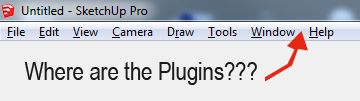
Thanks for your help in solving this mystery disappearance.
_KN
-
If no plugin initialize, the plugins menu is not created.
-
You need a Plugins folder to install the plugin.
If there is a plugin in the Plugins folder the menu is made.
Where did you install it if there was no Plugins folder
-
@dan rathbun said:
The Mac example at the bottom of that loading info page has an error.
The directory variable is different in the last statement.Thanks for pointing that out. The extensibility team is fixing it.
Andrew










Advertisement