sketchucation logo sketchucation
    • 登入
    Oops, your profile's looking a bit empty! To help us tailor your experience, please fill in key details like your SketchUp version, skill level, operating system, and more. Update and save your info on your profile page today!
    🔌 Smart Spline | Fluid way to handle splines for furniture design and complex structures. Download

    [PLUGIN]MITSUBA Render Exporter v1.5.0(20141109)

    已排程 已置頂 已鎖定 已移動 Plugins
    102 貼文 18 Posters 194.9k 瀏覽 18 Watching
    正在載入更多貼文
    • 從舊到新
    • 從新到舊
    • 最多點贊
    回覆
    • 在新貼文中回覆
    登入後回覆
    此主題已被刪除。只有擁有主題管理權限的使用者可以查看。
    • D 離線
      driven
      最後由 編輯

      that returns

      dyld; Symbol not found; __cg_jpeg_resync_to_restart
        Referenced from; /System/Library/Frameworks/ImageIO.framework/Versions/A/ImageIO
        Expected in; /usr/local/lib/libJPEG.dylib
       in /System/Library/Frameworks/ImageIO.framework/Versions/A/ImageIO
      Trace/BPT trap; 5
      

      learn from the mistakes of others, you may not live long enough to make them all yourself...

      1 條回覆 最後回覆 回覆 引用 0
      • T 離線
        tak2hata
        最後由 編輯

        @driven said:

        that returns

        dyld; Symbol not found; __cg_jpeg_resync_to_restart
        >   Referenced from; /System/Library/Frameworks/ImageIO.framework/Versions/A/ImageIO
        >   Expected in; /usr/local/lib/libJPEG.dylib
        >  in /System/Library/Frameworks/ImageIO.framework/Versions/A/ImageIO
        > Trace/BPT trap; 5
        

        Avoiding this problem,

        I will write the code for serialized mesh exporter in ruby.

        Thanks.


        by TAK2HATA

        1 條回覆 最後回覆 回覆 引用 0
        • D 離線
          driven
          最後由 編輯

          Good idea, it's probably the best long term solution...

          you can PM me if you want anything tested...

          john

          learn from the mistakes of others, you may not live long enough to make them all yourself...

          1 條回覆 最後回覆 回覆 引用 0
          • D 離線
            driven
            最後由 編輯

            I just had a thought and did some tests...

            commandline tool need to modify .bashrc to point to python...

            I don't use a .bashrc file, i use .bashprofile, so I created one under User/me/.bashrc and it's not written to...

            where is your .bashrc located, and exactly what does it contain??

            john

            learn from the mistakes of others, you may not live long enough to make them all yourself...

            1 條回覆 最後回覆 回覆 引用 0
            • T 離線
              tak2hata
              最後由 編輯

              @driven said:

              I just had a thought and did some tests...

              commandline tool need to modify .bashrc to point to python...

              I don't use a .bashrc file, i use .bashprofile, so I created one under User/me/.bashrc and it's not written to...

              where is your .bashrc located, and exactly what does it contain??

              john

              I search in my mac.
              I found "bashrc" in "/private/etc"
              it contains this.

              # System-wide .bashrc file for interactive bash(1) shells.
              if [ -z "$PS1" ]; then
                 return
              fi
              
              PS1='¥h;¥W ¥u¥$ '
              # Make bash check its window size after a process completes
              shopt -s checkwinsize
              # Tell the terminal about the working directory at each prompt.
              if [ "$TERM_PROGRAM" == "Apple_Terminal" ] && [ -z "$INSIDE_EMACS" ]; then
                  update_terminal_cwd() {
                      # Identify the directory using a "file;" scheme URL,
                      # including the host name to disambiguate local vs.
                      # remote connections. Percent-escape spaces.
              	local SEARCH=' '
              	local REPLACE='%20'
              	local PWD_URL="file;//$HOSTNAME${PWD//$SEARCH/$REPLACE}"
              	printf '¥e]7;%s¥a' "$PWD_URL"
                  }
                  PROMPT_COMMAND="update_terminal_cwd; $PROMPT_COMMAND"
              fi


              by TAK2HATA

              1 條回覆 最後回覆 回覆 引用 0
              • D 離線
                driven
                最後由 編輯

                thanks for that,
                I found a note in the 'Mitsuba' source repository that the .bashrc file was no longer written to, so their message-box needs updating.
                It does seem to be a simple path issue, that halts the process...
                I just can't find it.
                I have a separate instal of 'boost', so it may be a version/path conflict when Mitsuba calls it from shell...

                Mitsuba works with other .dae files when imported, and I have older scene files from a previous instal, that run after they are auto updated on loading...

                I'll remove my copy of boost and see if that makes a difference...

                john

                learn from the mistakes of others, you may not live long enough to make them all yourself...

                1 條回覆 最後回覆 回覆 引用 0
                • D 離線
                  driven
                  最後由 編輯

                  hi
                  got it working...
                  will need tidying...
                  line 264

                  			commandline = %Q{cd /Applications && Mitsuba.app/Contents/MacOS/mtsimport #{objfile.gsub(/\\/,'/')} #{xmlfile.gsub(/\\/,'/')}}


                  OSX 10.9.2 must be stricter about the context...

                  john

                  learn from the mistakes of others, you may not live long enough to make them all yourself...

                  1 條回覆 最後回覆 回覆 引用 0
                  • T 離線
                    tak2hata
                    最後由 編輯

                    @driven said:

                    hi
                    got it working...
                    will need tidying...
                    line 264

                    			commandline = %Q{cd /Applications && Mitsuba.app/Contents/MacOS/mtsimport #{objfile.gsub(/\\/,'/')} #{xmlfile.gsub(/\\/,'/')}}
                    > 
                    

                    OSX 10.9.2 must be stricter about the context...

                    john

                    Hi,john.
                    Thanks!!!

                    I change that line.and I update this to v1.2.1.

                    I am very Happy.

                    Thank you very much!


                    by TAK2HATA

                    1 條回覆 最後回覆 回覆 引用 0
                    • T 離線
                      tak2hata
                      最後由 編輯

                      @sadyo said:

                      Mitsuba seem work fine on my Sketchup 2014-Windowc 8.1 64bit
                      But,
                      How to implementing the clipmap/2D object in Mitsuba ❓ ❓

                      http://s1.postimg.org/jtfu9opfj/image.jpg

                      it won't appear in Renderer

                      Hi sadyo.
                      This problem is still exists.
                      if it is clip mapped material ,please use mask option in "OTHER" tab of material editor.

                      But the Image object is not material.
                      So it can not edit by material editor.
                      Please explode it to face and material.

                      The image object is no supported in this plugin ,yet
                      It will support in future version.
                      But clipping of Image object will not be supported.

                      And other notice,mitsuba render can not read TIFF and PSD.

                      Thanks!


                      by TAK2HATA

                      1 條回覆 最後回覆 回覆 引用 0
                      • D 離線
                        driven
                        最後由 編輯

                        downloaded v1.2.1 and notice you left the log code in...

                        		system(commandline, ;out => ['/tmp/log.txt', 'a'], ;err => ['/tmp/log.txt', 'a'])
                        

                        not sure if it breaks PC's
                        john

                        learn from the mistakes of others, you may not live long enough to make them all yourself...

                        1 條回覆 最後回覆 回覆 引用 0
                        • T 離線
                          tak2hata
                          最後由 編輯

                          @driven said:

                          downloaded v1.2.1 and notice you left the log code in...

                          		system(commandline, ;out => ['/tmp/log.txt', 'a'], ;err => ['/tmp/log.txt', 'a'])
                          

                          not sure if it breaks PC's
                          john

                          Sorry.

                          Now I deleted that log option.and updated.

                          Thanks john!


                          by TAK2HATA

                          1 條回覆 最後回覆 回覆 引用 0
                          • S 離線
                            sergonavt
                            最後由 編輯

                            ""sophi skin"" 😞((
                            windows-7, 64-bit, SU-7.

                            1 條回覆 最後回覆 回覆 引用 0
                            • Mike AmosM 離線
                              Mike Amos
                              最後由 編輯

                              Does anyone have any genderal advice on installing mitsuba? I am getting a report that a dll is missing and installation stops. Basically I can find no proper install documentation. Thanks.

                              Absentia mortis praesentiam vitae probat, vita autem est argumentum constantiae.

                              1 條回覆 最後回覆 回覆 引用 0
                              • D 離線
                                driven
                                最後由 編輯

                                @mike
                                did you try either/both of these window.exe downloads?http://www.mitsuba-renderer.org/download.html

                                maybe some machine specs would help us out, helping you...

                                john

                                learn from the mistakes of others, you may not live long enough to make them all yourself...

                                1 條回覆 最後回覆 回覆 引用 0
                                • Mike AmosM 離線
                                  Mike Amos
                                  最後由 編輯

                                  Thanks John, I feel like a right muppet not including specs, not as if I do not know, please put it down to a muppet day. I have tried the 64 bit program from that site/location.

                                  Specs as in the attached image.

                                  NVIDIA graphics card 1gb vram. This is updated as of about 1 week ago for drivers.
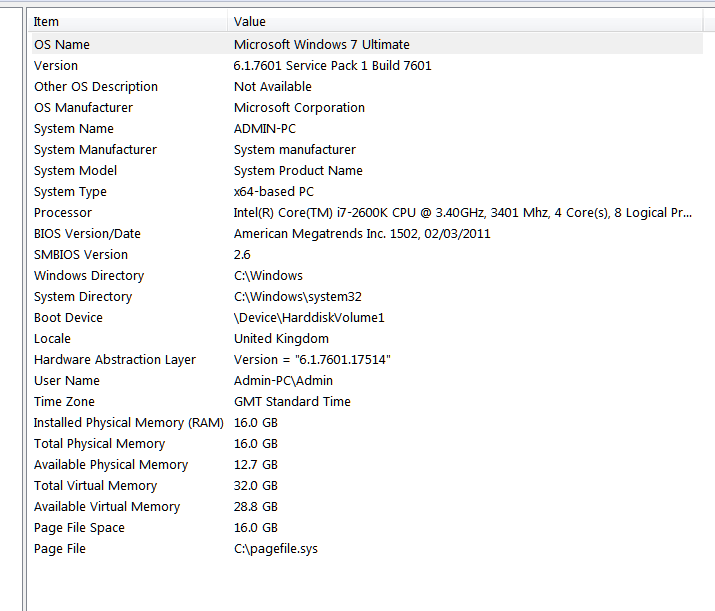

                                  System Specs

                                  Absentia mortis praesentiam vitae probat, vita autem est argumentum constantiae.

                                  1 條回覆 最後回覆 回覆 引用 0
                                  • T 離線
                                    tak2hata
                                    最後由 編輯

                                    Hi,All.
                                    I update this to v1.2.4. in 2014-03-21.
                                    I finally understood this problem of running mtsimport.
                                    I add code setting current directory in ruby.
                                    So mtsimport will make "textures" in setter directory.
                                    Thanks John.

                                    @mike amos said:

                                    Thanks John, I feel like a right muppet not including specs, not as if I do not know, please put it down to a muppet day. I have tried the 64 bit program from that site/location.

                                    Specs as in the attached image.

                                    NVIDIA graphics card 1gb vram. This is updated as of about 1 week ago for drivers.

                                    Hi,Mike.
                                    There is "vcredist_2013_x64.exe" in folder unzipped mitsuba render package.
                                    It is microsoft visual studio 2014 x64 redisributable package"
                                    Please install it.
                                    Mitsuba will work.

                                    Thanks!


                                    by TAK2HATA

                                    1 條回覆 最後回覆 回覆 引用 0
                                    • D 離線
                                      driven
                                      最後由 編輯

                                      thank you...

                                      next thought is, can we 'tag the view' before export, and if it is the 'same tag' after a materials tweak, skip the geometry re-creation? maybe an update button on the materials dialog?
                                      jonh

                                      learn from the mistakes of others, you may not live long enough to make them all yourself...

                                      1 條回覆 最後回覆 回覆 引用 0
                                      • Mike AmosM 離線
                                        Mike Amos
                                        最後由 編輯

                                        Thanks very much, its appreciated.

                                        Absentia mortis praesentiam vitae probat, vita autem est argumentum constantiae.

                                        1 條回覆 最後回覆 回覆 引用 0
                                        • D 離線
                                          driven
                                          最後由 編輯

                                          sketchup model, materials, no lights
                                          slowly getting the hang of it...

                                          learn from the mistakes of others, you may not live long enough to make them all yourself...

                                          1 條回覆 最後回覆 回覆 引用 0
                                          • D 離線
                                            driven
                                            最後由 編輯

                                            a bit to shinny, but getting there... I think
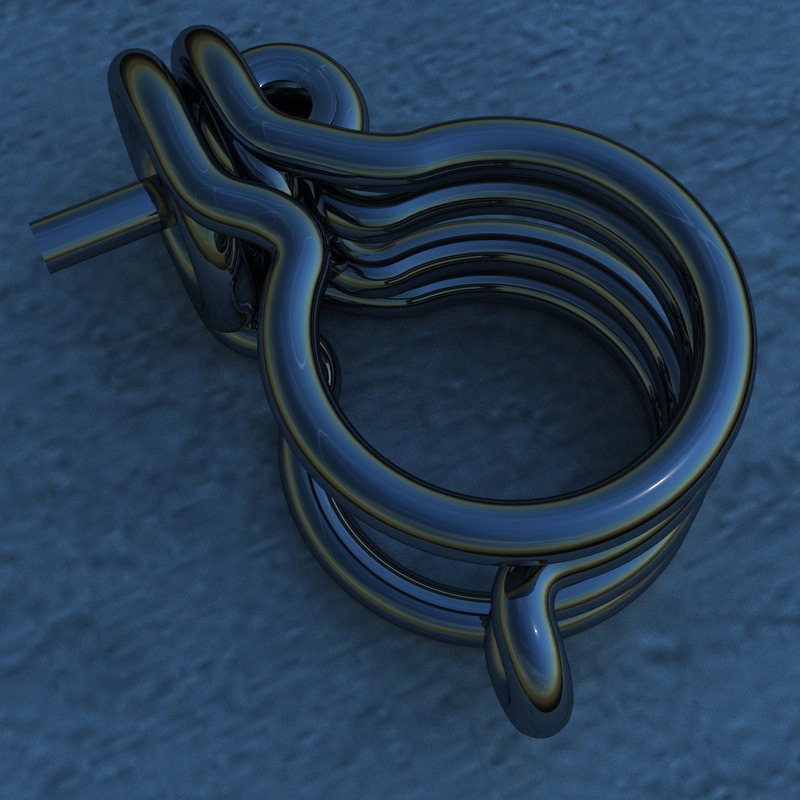
                                            learning the slow way...

                                            learn from the mistakes of others, you may not live long enough to make them all yourself...

                                            1 條回覆 最後回覆 回覆 引用 0
                                            • 1
                                            • 2
                                            • 3
                                            • 4
                                            • 5
                                            • 6
                                            • 5 / 6
                                            • 第一個貼文
                                              最後的貼文
                                            Buy SketchPlus
                                            Buy SUbD
                                            Buy WrapR
                                            Buy eBook
                                            Buy Modelur
                                            Buy Vertex Tools
                                            Buy SketchCuisine
                                            Buy FormFonts

                                            Advertisement