sketchucation logo sketchucation
    • 登入
    Oops, your profile's looking a bit empty! To help us tailor your experience, please fill in key details like your SketchUp version, skill level, operating system, and more. Update and save your info on your profile page today!
    🔌 Smart Spline | Fluid way to handle splines for furniture design and complex structures. Download

    Requesting help skewing a 3D object

    已排程 已置頂 已鎖定 已移動 Newbie Forum
    sketchup
    53 貼文 11 Posters 3.0k 瀏覽 11 Watching
    正在載入更多貼文
    • 從舊到新
    • 從新到舊
    • 最多點贊
    回覆
    • 在新貼文中回覆
    登入後回覆
    此主題已被刪除。只有擁有主題管理權限的使用者可以查看。
    • gillesG 離線
      gilles
      最後由 編輯

      Natives type rather faster than me.

      " c'est curieux chez les marins ce besoin de faire des phrases "

      1 條回覆 最後回覆 回覆 引用 0
      • gillesG 離線
        gilles
        最後由 編輯

        @unknownuser said:

        Gilles said "When you proceed to deleting unwanted geometries, make the part soft and smooth", and Box mentioned welding the segments of the curves together. It got me thinking, because the ultimate aim is to print a real clip on a 3D printer (I'm new to that, too.....).

        Smoothing allow you to to select a continuity of faces with one click (according to the smooth angle) when hidden geometry is off instead of one face.
        if you extrude a face with welded edges instead of exploded edges, smooth will be automatic.

        @unknownuser said:

        Now I know that SU draws circles as a series of straight lines, and I wanted the final 3D printed object to be circular not blocky, so I increased the segment count on the half circles to 100. Is this sensible, or just way too much? Gilles mentioned smoothing - does that just improve the visuals aspect of the image in SU, or does it have a real impact on a 3D printed object?

        Smooth just improve the visuals aspect of the image in SU if you want to have a better 3D print render increase segmentation but don't forget 3D printing tolerance, so not that much segments.

        @unknownuser said:

        And Box mentioned welding the lines/segments of the curves together (presumably because the model was exploded at some stage in its history). I googled about this, and got rather confused. I understand that welding the lines together creates a polyline (polygonal curve), but I'm not clear how that actually differs from a regular line, and whether the arc/circle tools in SU create a series of regular lines or a polyline. And in the context of 3D printing, is it better that the curves be default SU arc/circles, or polylines?

        this does not matter for 3D print, but make sure you part is a solid, must be a group or component in su to be a solid and a good orientation of the faces

        " c'est curieux chez les marins ce besoin de faire des phrases "

        1 條回覆 最後回覆 回覆 引用 0
        • ely862meE 離線
          ely862me
          最後由 編輯

          Haha, I was typing like crazy then Submit to just find out two other almost exact answers have been submitted. At least I am glad it was the right answer !

          Natives really type fast,though!!

          Edited Duh moment for me, " Paste in place " - never used it ! I was just thinking, what is Jeff doing by deleting those !!

          Elisei (sketchupper)


          Before no life was done on Earth it was THE LIFE ITSELF...GOD
          Come and See EliseiDesign

          1 條回覆 最後回覆 回覆 引用 0
          • J 離線
            jant
            最後由 編輯

            Fantastic - all my questions answered (well, until I encounter the next problem). Once again, and with feeling, thank you so much to all of you for taking a lot of time and effort to help me out (and apologies to Pilou and others for not uploading the v6 version of the model earlier).

            1 條回覆 最後回覆 回覆 引用 0
            • Dave RD 離線
              Dave R
              最後由 編輯

              @gilles said:

              Natives type rather faster than me.

              I only type with two fingers. Maybe I'll have to start typing with one eye tied behind my back. 😄

              Etaoin Shrdlu

              %

              (THERE'S NO PLACE LIKE)

              G28 X0.0 Y0.0 Z0.0

              M30

              %

              1 條回覆 最後回覆 回覆 引用 0
              • Dave RD 離線
                Dave R
                最後由 編輯

                Mostly because I was curious about the steps in the process I outlined, I made a video of it. I did it at almost the speed I'd work if I was doing it for myself and didn't need to say anything. I could have shortened it up. I think my computer was a bit overloaded when I recorded it because the first right to left selection didn't work correctly.

                Although I use Edit>Paste in place a lot--so much so I have a keyboard shortcut for it--I'd never thought to use it in a case like this. I can see some good uses for it, though.

                Etaoin Shrdlu

                %

                (THERE'S NO PLACE LIKE)

                G28 X0.0 Y0.0 Z0.0

                M30

                %

                1 條回覆 最後回覆 回覆 引用 0
                • Rich O BrienR 離線
                  Rich O Brien Moderator
                  最後由 編輯

                  Another classic

                  Download the free D'oh Book for SketchUp 📖

                  1 條回覆 最後回覆 回覆 引用 0
                  • gillesG 離線
                    gilles
                    最後由 編輯

                    @dave r said:

                    @gilles said:

                    Natives type rather faster than me.

                    I only type with two fingers. Maybe I'll have to start typing with one eye tied behind my back. 😄

                    forget typing with one eye tied behind your back, type in french how many fingers you need then google translate. 💚

                    " c'est curieux chez les marins ce besoin de faire des phrases "

                    1 條回覆 最後回覆 回覆 引用 0
                    • Dave RD 離線
                      Dave R
                      最後由 編輯

                      The only thing I know in French would be Oui, Crepe Suzette and mon dieu! 😆

                      Etaoin Shrdlu

                      %

                      (THERE'S NO PLACE LIKE)

                      G28 X0.0 Y0.0 Z0.0

                      M30

                      %

                      1 條回覆 最後回覆 回覆 引用 0
                      • pilouP 離線
                        pilou
                        最後由 編輯

                        Thx for the V6: that must be a reflex, a sort of esperento of file export between versions! 👍

                        I will exam the videos tomorrow 🤓

                        @Dave : that will be funny to know where you found only these 3 words! 😄
                        That can be a good resume of the Universe! 💚

                        Frenchy Pilou
                        Is beautiful that please without concept!
                        My Little site :)

                        1 條回覆 最後回覆 回覆 引用 0
                        • Dave RD 離線
                          Dave R
                          最後由 編輯

                          😆

                          Etaoin Shrdlu

                          %

                          (THERE'S NO PLACE LIKE)

                          G28 X0.0 Y0.0 Z0.0

                          M30

                          %

                          1 條回覆 最後回覆 回覆 引用 0
                          • jeff hammondJ 離線
                            jeff hammond
                            最後由 編輯

                            @dave r said:

                            Mostly because I was curious about the steps in the process I outlined, I made a video of it.

                            nice dave 👍
                            pretty much anything which can show someone to avoid trying to manually delete a hundred or so edges with the eraser tool is the 'right' method 😉

                            [EDIT]
                            good one pilou. i used to use that plugin (inverse selection) a lot... until v8 and the Solid Tools. (which is how i'd normally do this)

                            dotdotdot

                            1 條回覆 最後回覆 回覆 引用 0
                            • pilouP 離線
                              pilou
                              最後由 編輯

                              Ok! Very cool videos Jeff and Dave! 👍

                              But sorry for this time in this particular case...
                              I believe that I am more speedy and more simple! 💚

                              You right I use plugin but just one and indispensable in the Toolbox! 😎
                              The genious Inverse Selection by TIG! By Right Click 👍

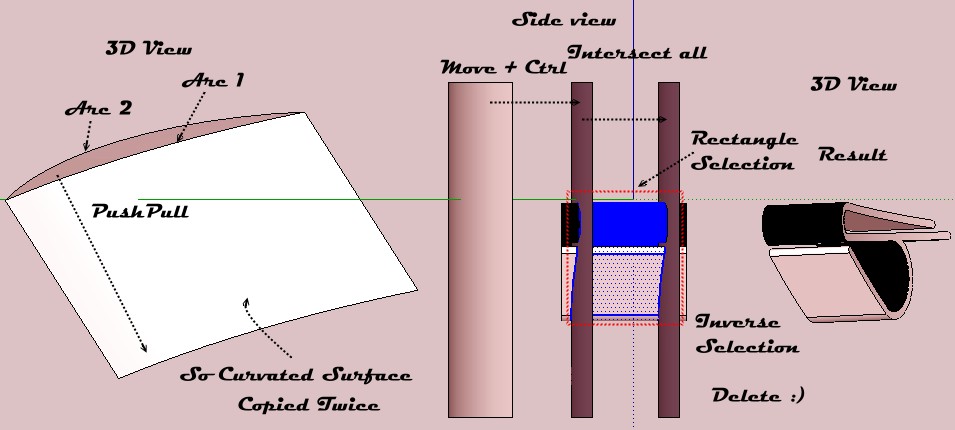
                              Only curvated face is duplicated not the volume!
                              Inverseselection.jpg

                              Edit : I verify this morning because that was just theoric this night! 😄
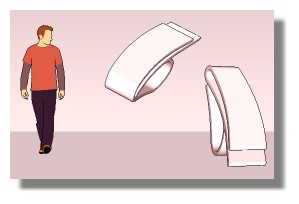
                              One of the curvated face must be "inverse white / blue" and the 2 curvated faces must be "Intersect with the model" ! And of course Rectangle Selection must be left to right! 🤓
                              aasol.jpg

                              Don't forget that in the past I have made "speedy challenge" Sketchup / Moi3D
                              "without plugin" 🤓
                              (of course I have losted at each time because Moi is unbeatable! 😒
                              It's maybe for that I use now plugins! 💚 :

                              If you are interested : Moi 22 seconds by PaQ! 😲 SU 40 seconds and playing as Horowitz! 😄

                              http://moi3d.com/forum/get_attachment.php?webtag=MOI&hash=c1961cccf715ed10247d21984cc1bc51&filename=testsk01.jpg

                              Frenchy Pilou
                              Is beautiful that please without concept!
                              My Little site :)

                              1 條回覆 最後回覆 回覆 引用 0
                              • 1
                              • 2
                              • 3
                              • 3 / 3
                              • 第一個貼文
                                最後的貼文
                              Buy SketchPlus
                              Buy SUbD
                              Buy WrapR
                              Buy eBook
                              Buy Modelur
                              Buy Vertex Tools
                              Buy SketchCuisine
                              Buy FormFonts

                              Advertisement




