sketchucation logo sketchucation
    • 登入
    Oops, your profile's looking a bit empty! To help us tailor your experience, please fill in key details like your SketchUp version, skill level, operating system, and more. Update and save your info on your profile page today!
    🔌 Smart Spline | Fluid way to handle splines for furniture design and complex structures. Download

    [Plugin][$] JointPushPull Interactive - v4.9a - 02 Apr 25


    已排程 已置頂 已鎖定 已移動 Plugins
    619 貼文 156 Posters 630.1k 瀏覽 155 Watching
    正在載入更多貼文
    • 從舊到新
    • 從新到舊
    • 最多點贊
    回覆
    • 在新貼文中回覆
    登入後回覆
    此主題已被刪除。只有擁有主題管理權限的使用者可以查看。
    • A 離線
      Ahmed0007
      最後由 編輯

      @fredo6 said:

      No need to reinstall Windows...

      Did you try with another model file?

      Also, can you confirm that

      • you get the bugsplat only when using the Random feature of JPP
      • whether this happens for both Normal and Joint tools (since both have a random option)

      Fredo

      with all JPP tools and with any model
      Video : https://streamable.com/upjw5

      1 條回覆 最後回覆 回覆 引用 0
      • Dave RD 離線
        Dave R
        最後由 編輯

        When you get the Bug Splats are you sending them in with your e-mail address attached? As a licensed SketchUp Pro user with up-to-date Maintenance and Support, you could file a ticket with their Technical Support folks and ask them to look at the Bug Splat reports and decipher what is happening to cause the splat. At this point, since you seem to be the only one having a problem and we can't reproduce the Bug Splats even with your file, more information is needed.

        Etaoin Shrdlu

        %

        (THERE'S NO PLACE LIKE)

        G28 X0.0 Y0.0 Z0.0

        M30

        %

        1 條回覆 最後回覆 回覆 引用 0
        • A 離線
          Ahmed0007
          最後由 編輯

          @ahmed0007 said:

          Getting a bugsplat when trying to change the random push pull values. in sketchup 2019 and 18
          any solution?

          problem fixed after doing following steps:

          Uninstall sketchup (2019 and 18) with revo uninstall (also delete Leftovers items and registry files)

          Reinstall only su19
          after opening first time this give me this error "mfc140u.dll" Missing

          install Visual C++ Redistributable for Visual Studio 2015
          and
          uninstall Visual C++ Redistributable for Visual Studio 2017

          Done!

          Thank you Fredo6 and Dave R for response.

          1 條回覆 最後回覆 回覆 引用 0
          • fredo6F 離線
            fredo6
            最後由 編輯

            Glad to see that it now works for you.

            Still, this is puzzling, and I don't really see why JointPushPull would specifically crash in relation to the version of C++, since it is pure Ruby.

            1 條回覆 最後回覆 回覆 引用 0
            • BoxB 離線
              Box
              最後由 編輯

              Hi Fredo,
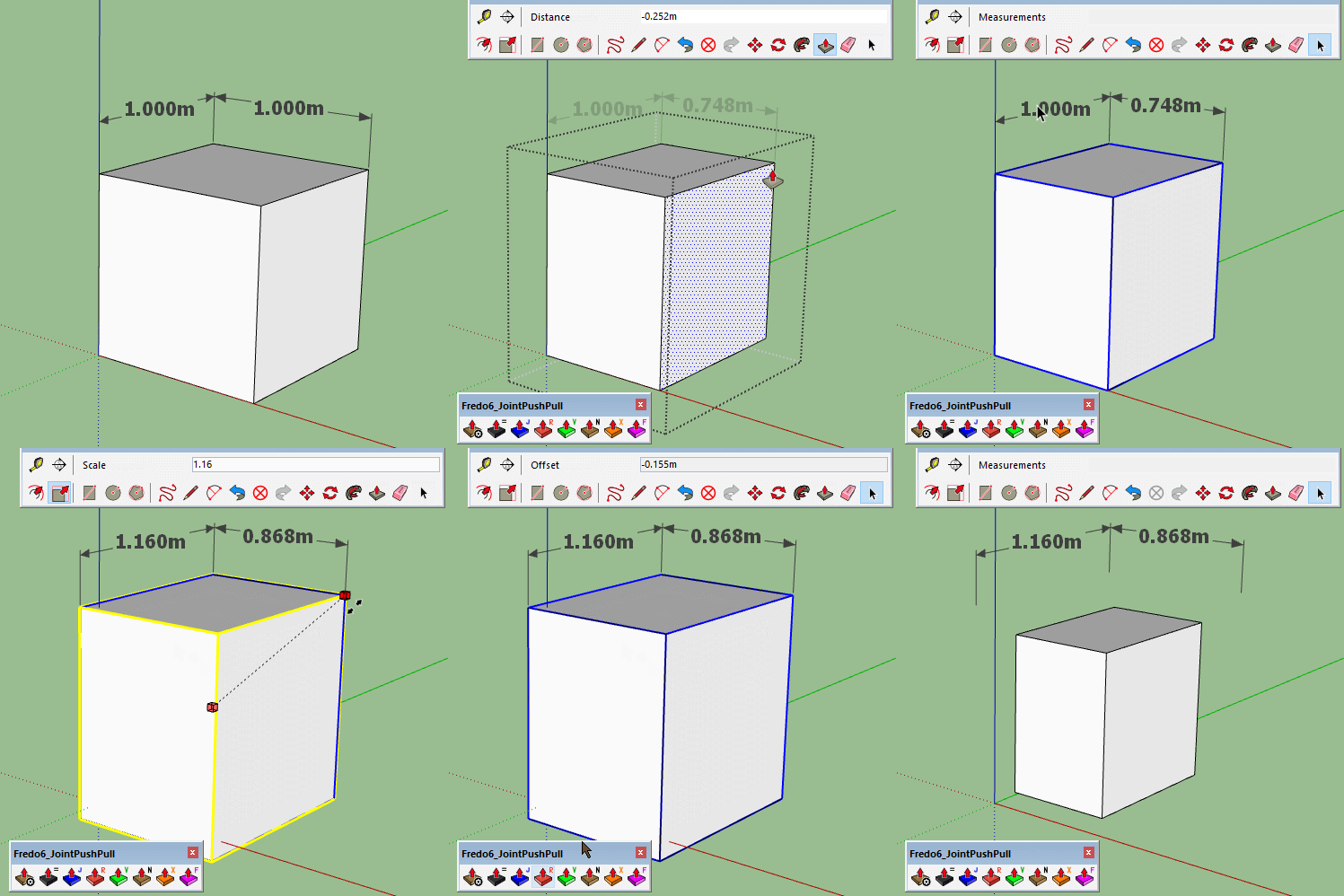
              I was just doing a gif to show something in JPP and noticed it breaks the dimension connection.
              Checked 2018,19,20.
              FredoScale for example doesn't break the connection.

              Not sure if it has always been that way and I just don't remember it being like that.

              Dims Break.gif

              1 條回覆 最後回覆 回覆 引用 0
              • pilouP 離線
                pilou
                最後由 編輯

                Breaking also in the 2017! 😉

                Frenchy Pilou
                Is beautiful that please without concept!
                My Little site :)

                1 條回覆 最後回覆 回覆 引用 0
                • fredo6F 離線
                  fredo6
                  最後由 編輯

                  JointPushPull technically creates faces (and thus new vertices), whereas FredoScale just uses a scaling transformation and therefore keeps the faces and vertices homologous.

                  JointPushPull does not use native pushpull methods, due to the fact that it is multi-face tool.

                  So it is normal that JPP loses the dimension connections.

                  Reconstructing them is maybe possible, but probably some work due to the variety of topological situations, and also the poor support of the API for dimensions. I have to check if the connections are exposed in the API and can be reconstructed.

                  EDIT: just checked that for linear dimensions, there is a possibility to manage the attachment, but as of SU2019.

                  1 條回覆 最後回覆 回覆 引用 0
                  • BoxB 離線
                    Box
                    最後由 編輯

                    Thanks for letting me know, I was just pointing it out incase it was a bug, just one of those things I hadn't noticed before.

                    1 條回覆 最後回覆 回覆 引用 0
                    • H 離線
                      hugoakio
                      最後由 編輯

                      I need a help. I'm trying to export an object and experimenting the folling error at the "erase coplanar edges":
                      An error occurred in Round Push Pull
                      Error in generation of the geometry

                      reference to deleted Entity

                      jointpushpullgeometry.rbe: 1023 -- entityID
                      jointpushpullgeometry.rbe: 1023 -- block in geometry_coplanar_edges
                      jointpushpullgeometry.rbe: 1020 -- each
                      jointpushpullgeometry.rbe: 1020 -- geometry_coplanar_edges
                      jointpushpullgeometry.rbe: 366 -- block in geometry_robot_erase_coplanar_edges
                      jointpushpullgeometry.rbe: 362 -- each
                      jointpushpullgeometry.rbe: 362 -- geometry_robot_erase_coplanar_edges
                      jointpushpullgeometry.rbe: 220 -- robot_call_action
                      jointpushpullgeometry.rbe: 183 -- geometry_robot_exec
                      jointpushpullgeometry.rbe: 166 -- geometry_robot
                      jointpushpullgeometry.rbe: 81 -- block in geometry_execute
                      lib6operation.rbe: 370 -- step_geometry
                      lib6operation.rbe: 305 -- block in yield?

                      What i'm doing wrong?

                      1 條回覆 最後回覆 回覆 引用 0
                      • fredo6F 離線
                        fredo6
                        最後由 編輯

                        @hugoakio said:

                        What i'm doing wrong?

                        Nothing a priori.

                        I have fixed the problem itself (to go in a next version of JPP), but that does not mean you will get a correct result, because you must likely be in a special situation of topology (which RoundPushPull is very sensitive to).

                        It would help if you posted the model and indicate which operation you were trying to perform.

                        Fredo

                        1 條回覆 最後回覆 回覆 引用 0
                        • D 離線
                          daniabreu1
                          最後由 編輯

                          Hi, I am having a problem with this plugin SU2020 - Trying to use the jointpushpull= and a little grade surface keep showing up and the tool doesn't work. Any solutions?

                          1 條回覆 最後回覆 回覆 引用 0
                          • Dave RD 離線
                            Dave R
                            最後由 編輯

                            You've given no useful information making it impossible to help. Share your SketchUp file and give a clear description of what you are trying to accomplish. Also show us what settings you are using with the extension.

                            Etaoin Shrdlu

                            %

                            (THERE'S NO PLACE LIKE)

                            G28 X0.0 Y0.0 Z0.0

                            M30

                            %

                            1 條回覆 最後回覆 回覆 引用 0
                            • D 離線
                              daniabreu1
                              最後由 編輯

                              Thanks Dave. Somehow I uninstall it and installed again and it works. Thank you for trying to help tho! 😄

                              1 條回覆 最後回覆 回覆 引用 0
                              • D 離線
                                daniabreu1
                                最後由 編輯

                                Good evening everybody,

                                Again I am having problem ith the thickener.

                                Date: 15-Apr-20 20:31:28
                                An error occurred in Thickener
                                Error in generation of the geometry

                                Cannot convert argument to Geom::Point3d

                                jointpushpullgeometry.rbe:: 531 -- vector_to
                                jointpushpullgeometry.rbe:: 531 -- geometry_block_reversal
                                jointpushpullgeometry.rbe:: 243 -- geometry_robot_prepare_mesh
                                jointpushpullgeometry.rbe:: 212 -- robot_call_action
                                jointpushpullgeometry.rbe:: 183 -- geometry_robot_exec
                                jointpushpullgeometry.rbe:: 166 -- geometry_robot
                                jointpushpullgeometry.rbe:: 81 -- block in geometry_execute
                                lib6operation.rbe:: 370 -- step_geometry
                                lib6operation.rbe:: 419 -- start_execution
                                jointpushpullgeometry.rbe:: 81 -- geometry_execute
                                jointpushpulltool.rbe:: 1118 -- go_preview_or_geom
                                jointpushpulltool.rbe:: 844 -- dragging_stop
                                jointpushpulltool.rbe:: 1399 -- execute_validate
                                jointpushpulltool.rbe:: 1590 -- onReturn

                                I have LibFredo6v9.5k and using SU2020. There is a post describing almost the same thing:

                                "It's a fairly complex surface - a piece of terrain that is a hill with sections cut out of it (I draped a road onto the surface so that counts as a separate surface, for example)."

                                It was solve with Libfredo 9.0 but I have 9.5 version.

                                Any idea?

                                Thank you all.

                                1 條回覆 最後回覆 回覆 引用 0
                                • fredo6F 離線
                                  fredo6
                                  最後由 編輯

                                  I fixed the error in the code, but somehow this reflects a problem or complexity in the generated geometry. It may be helpful to get the model where it happens.

                                  I am no longer able to publish updates to my plugins, pending Sketchup changes to their releasing process for developers.

                                  So the fix will go in the next version whenever I can resume publishing.

                                  Fredo

                                  1 條回覆 最後回覆 回覆 引用 0
                                  • R 離線
                                    rv1974
                                    最後由 編輯

                                    Hi Fredo,
                                    Say I have a surface cut to non-coplanar patches by visible edges.
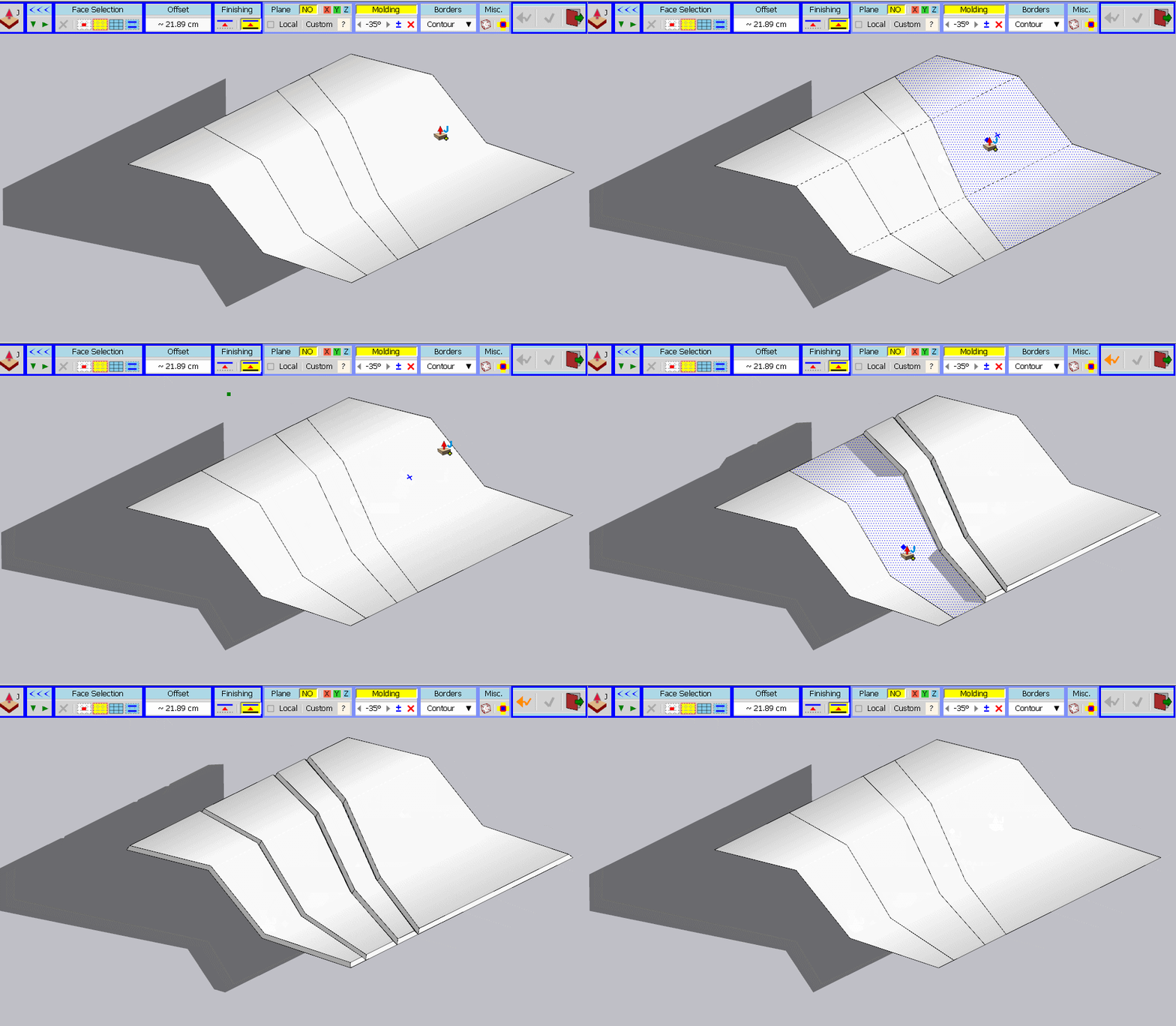
                                    I can't find a proper combination of Borders+Surface selection settings to perform a global JPP so every patch would get an independent border by contour (BTW there's some negative molding).
                                    I'm able to JJP manually patch-by-patch (demonstrated in attached gif) but there's no way to process all surface en-masse instantly.
                                    Would it be possible to implement please?

                                    GIF 5-6-2020 1-34-48 PM.gif

                                    1 條回覆 最後回覆 回覆 引用 0
                                    • fredo6F 離線
                                      fredo6
                                      最後由 編輯

                                      First, you could select the 4 surfaces at once

                                      • select the first surface
                                      • Move over the other surfaces with SHIFT pressed
                                      • Release Shift

                                      Second, if you do it surface by surface, you should toggle on the button "Neighbour influence" in the 'Misc' sub-palette.

                                      Extend Faces.png

                                      1 條回覆 最後回覆 回覆 引用 0
                                      • R 離線
                                        rv1974
                                        最後由 編輯

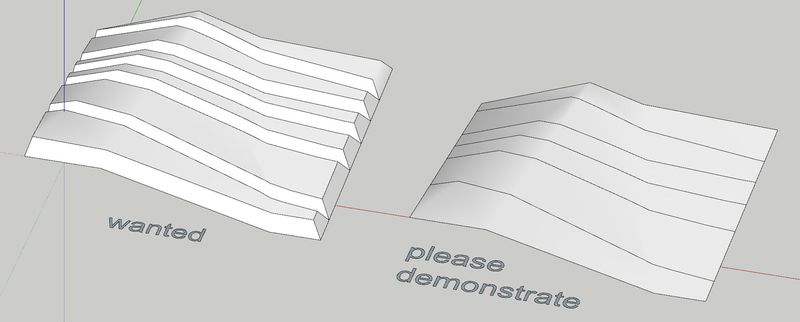
                                        Fredo, I don't understand. Could you please show 'one click' procedure (not strip by strip clicks). thank you in advance.

                                        Capture.JPG


                                        Untitled.skp

                                        1 條回覆 最後回覆 回覆 引用 0
                                        • fredo6F 離線
                                          fredo6
                                          最後由 編輯

                                          @rv1974 said:

                                          Fredo, I don't understand. Could you please show 'one click' procedure (not strip by strip clicks). thank you in advance.

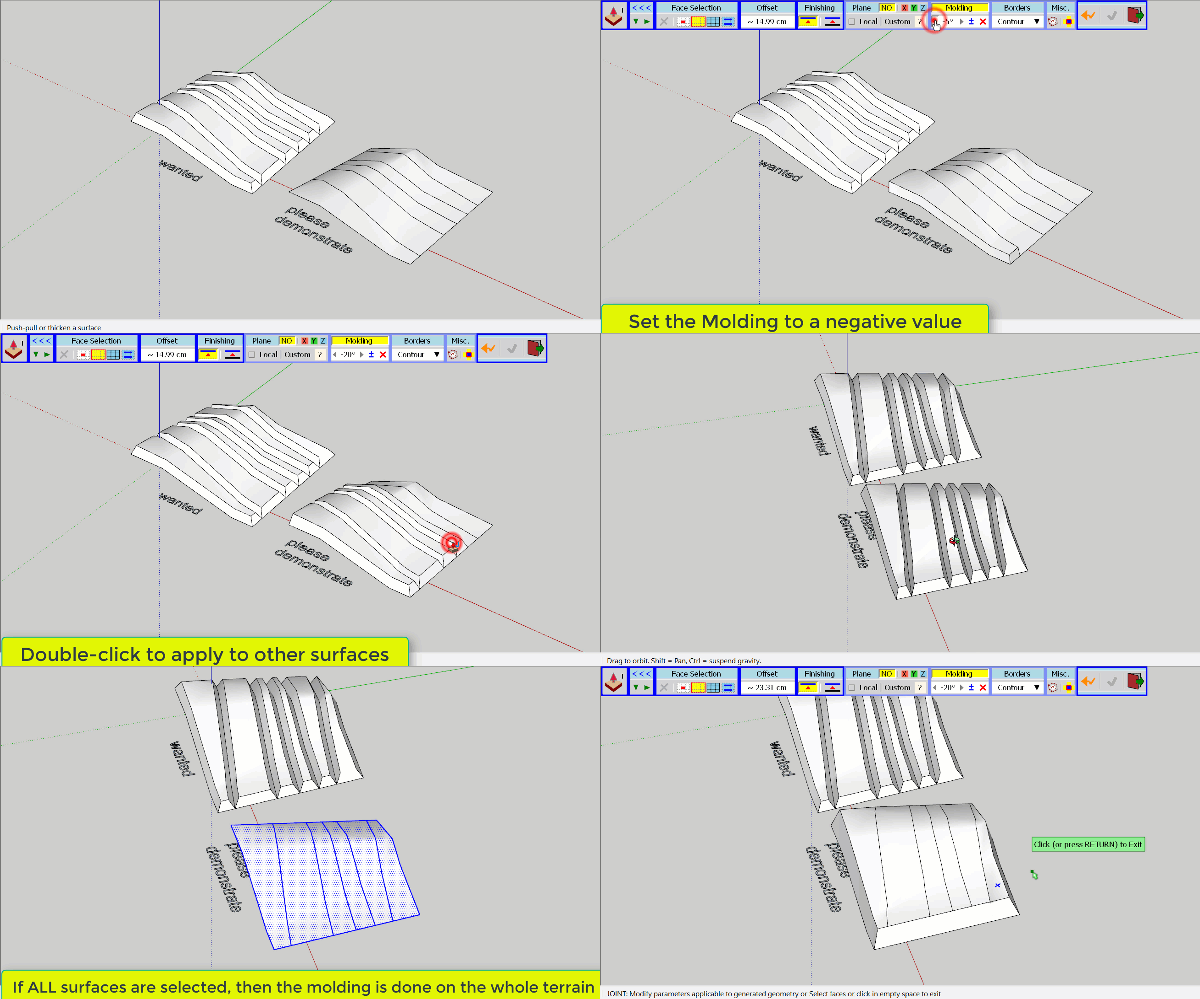
                                          I am not clear. Do you want a 'valley' between each surface or have them joined.

                                          If you wish the valleys, then you have to select the surfaces one by one. Otherwise, you would mold the whole terrain.
                                          JPP RV1974 Terrain.gif

                                          1 條回覆 最後回覆 回覆 引用 0
                                          • R 離線
                                            rv1974
                                            最後由 編輯

                                            😆 you just exactly reproduced the way I created the 'wanted' model.
                                            Originally I just wanted clarity (or request 😉) maybe there's some combination of settings that allows to achieve the 'wanted' result without tedious 'one by one' clicking


                                            1 條回覆 最後回覆 回覆 引用 0
                                            • 1
                                            • 2
                                            • 3
                                            • 4
                                            • 5
                                            • 30
                                            • 31
                                            • 3 / 31
                                            • 第一個貼文
                                              最後的貼文
                                            Buy SketchPlus
                                            Buy SUbD
                                            Buy WrapR
                                            Buy eBook
                                            Buy Modelur
                                            Buy Vertex Tools
                                            Buy SketchCuisine
                                            Buy FormFonts

                                            Advertisement