[Plugin][$] JointPushPull Interactive - v4.9a - 02 Apr 25




-
I just did some quick testing and I'm not seeing any weird behavior with the Enter key. When I type a JPP distance and hit Enter, it makes the adjustment just like the native Push/Pull tool does. Maybe there's something else causing a conflict?
FWIW, I updated LibFredo and the other extensions that got recent updates and according to the Plugin Store and LibFredo, everything is up to date.
-
I tried to reproduce it now, Couldn't. Will keep an eye on it, as it happened many times while working.
-
UNDO issue ...
sometimes when I cancel JPP it lets the geometry with missing faces. Then I undo to get it back to its previous state...the problem is that i have to hit A LOT of UNDOs.
Maybe the undo function should be reviewed and pack multiple phases in a single undo command. -
Hi, I tried to install it on my PC, and I think it doesn't work on Windows 8.1.
Are you gonna make it work on Windows 8.1 too?
Really wanna try your plugin!

-
Hail to a very reliable extension which I have used countless times so far to give thickness to my sheets! Good Job!
Today is the first time that I found an error with it.
For some reason I cannot give this form a thickness.
The ruby error I get is the following:
Date: 07-Aug-15 19:49:31
An error occurred in Joint Push Pull
Error in generation of the geometryreference to deleted Entity
JointPushPullGeometry.rb: 1027 -- entityID
JointPushPullGeometry.rb: 1027 -- block in geometry_coplanar_edges_overhang
JointPushPullGeometry.rb: 1025 -- each
JointPushPullGeometry.rb: 1025 -- geometry_coplanar_edges_overhang
JointPushPullGeometry.rb: 354 -- block in geometry_robot_erase_coplanar_edges
JointPushPullGeometry.rb: 352 -- each
JointPushPullGeometry.rb: 352 -- geometry_robot_erase_coplanar_edges
JointPushPullGeometry.rb: 214 -- robot_call_action
JointPushPullGeometry.rb: 177 -- geometry_robot_exec
JointPushPullGeometry.rb: 160 -- geometry_robot
JointPushPullGeometry.rb: 75 -- block in geometry_execute
Lib6Operation.rb: 325 -- call
Lib6Operation.rb: 325 -- step_geometry
Lib6Operation.rb: 367 -- start_execution
JointPushPullGeometry.rb: 75 -- geometry_execute
JointPushPullTool.rb: 891 -- go_preview_or_geom
JointPushPullTool.rb: 697 -- dragging_stop
JointPushPullTool.rb: 1319 -- onLButtonUpI have attached the object.
-
If you JPP OUTWARDS it works OK.
Extruding INWARDS will fail.This is because you have some tiny geometry in the surface - e.g. the segmented edges around the slotted holes semi-circular ends.
When extruding 'inwards', SketchUp's tolerance of 1/1000" can cause some tiny edges to be omitted - their start/end points are deemed coincident - then the faces relying on those also fail to be created.
But all is not lost...You can JPP INWARDS if you do the following...
Make your group into a component.
Make a copy of it and Scale that x100.
Edit that instance and Preselect its surface.
Activate JPP - making x100 allowance in the offset value.
It will now extrude successfully.
Exit the edit and delete the scaled version.
The real size version will also show the JPP changes.
Tiny geometry can exist but it cannot be created directly in SketchUp.
The "Scale up a copy of a component" trick is a well known workaround for these kinds of issues... -
Hello TIG,
Awesome!!!!
That was an excellent reply. It worked. Thanks for the heads up. I recall doing something of the sort in the very distant past but if it weren't for your reminder I would have never gotten there!
Thanks again!
Peter -
Fredo,
We are able to push pull by vector keeping original face orientation or by creating the ending faces as normal to the push pull vector. This is great!
Do you think it would be possible to pick any face in the project as the ending faces plane?
Thanks and best regards,
João
-
Joao,
This is technically feasible, but more a matter of UI, which is already complex for users, as you know.
I'll see what I can do when I refresh the plugin.
Fredo
-
@fredo6 said:
Joao,
This is technically feasible, but more a matter of UI, which is already complex for users, as you know.
I'll see what I can do when I refresh the plugin.
Fredo
I understand perfectly.
It's also something that would be good to have but that can be achieved manually. I hope you find the time to include it someday.
Thanks again,
João
-
Two changes would be great for this plugin, as it works somehow against "intuition":
-first would be Press RETURN to exit (that's the ENTER key, and usually is used to CONFIRM a action, not to cancel it) - best would be to use ESC Key
-second would be the obligation of inserting push value with (-) AFTER the push action was initialized. It is great to let the option there, in case the user really needs to revert the direction, but it would be better that once a number was introduced, to take "by default" the pushing direction already initialized by the user.
Another thing is that AFTER doing a JPP operation, I must be very careful what tool or key I press, or I risk to have my operation canceled... this is extremely frustrating, as there is no intuitive action. As I said before, I am tempted to press ENTER - but guess what? I cancel my work. If I press Space Bar (to go to select tool) it happens the same, if I click on screen I also cancel the operation... every time is "lucky guess". In my opinion should be clear: ESC= Abort, ENTER=Commit. Nothing around. To not exit from operation until ESC or ENTER was pressed. This way there is no chance of mistake.
I hope this suggestions make sense.
Thank you. -
Do you have a model where this happens? It must be related to the Preview mode, when you have a lot of faces.
-
Enter / Return is used to perform the Push Pull, so that you don't even need to drag the faces. The cursor must be still on one face, since when the cursor is in the empty space, it is used to exit the tool.
-
Escape does Abort when in interactive mode
-
Spacebar functions as in any Sketchup tool. If you did not commit beforehands, it simply exits with doing nothing.
Fredo
-
-
yes, I had many faces in the model (organic modelling)...
But why there are 2 different uses for ENTER (when cursor on face, or not on face?) Is possible that is why I miss it many times... because i move the cursor around. I am not used to pay attention to it when i don't actively use it to manipulate geometry. Do you think this behavior is actually useful?Thanks for all explanations

-
Fredo,
Would it be easy to have normal push pull Taper with an angle or a offset distance instead of exclusivelly by ratio? It would be a nice feature to have for chanfering faces outside their plane with a double click. (I love this double click through groups/components)
-
Where do i download it!!!???!!!
-
@bapito said:
Where do i download it!!!???!!!
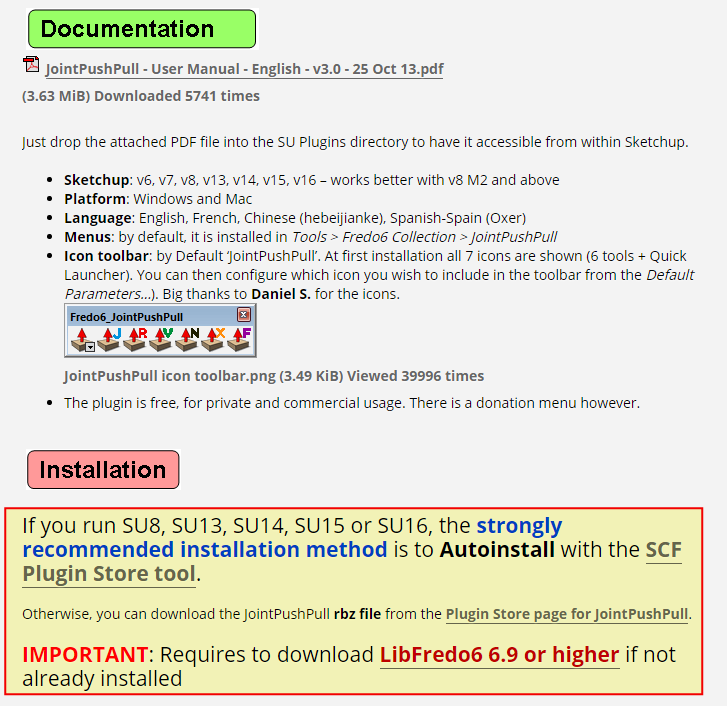
See the first post of this thread. It is clearly spelled out with bold type and links.
-
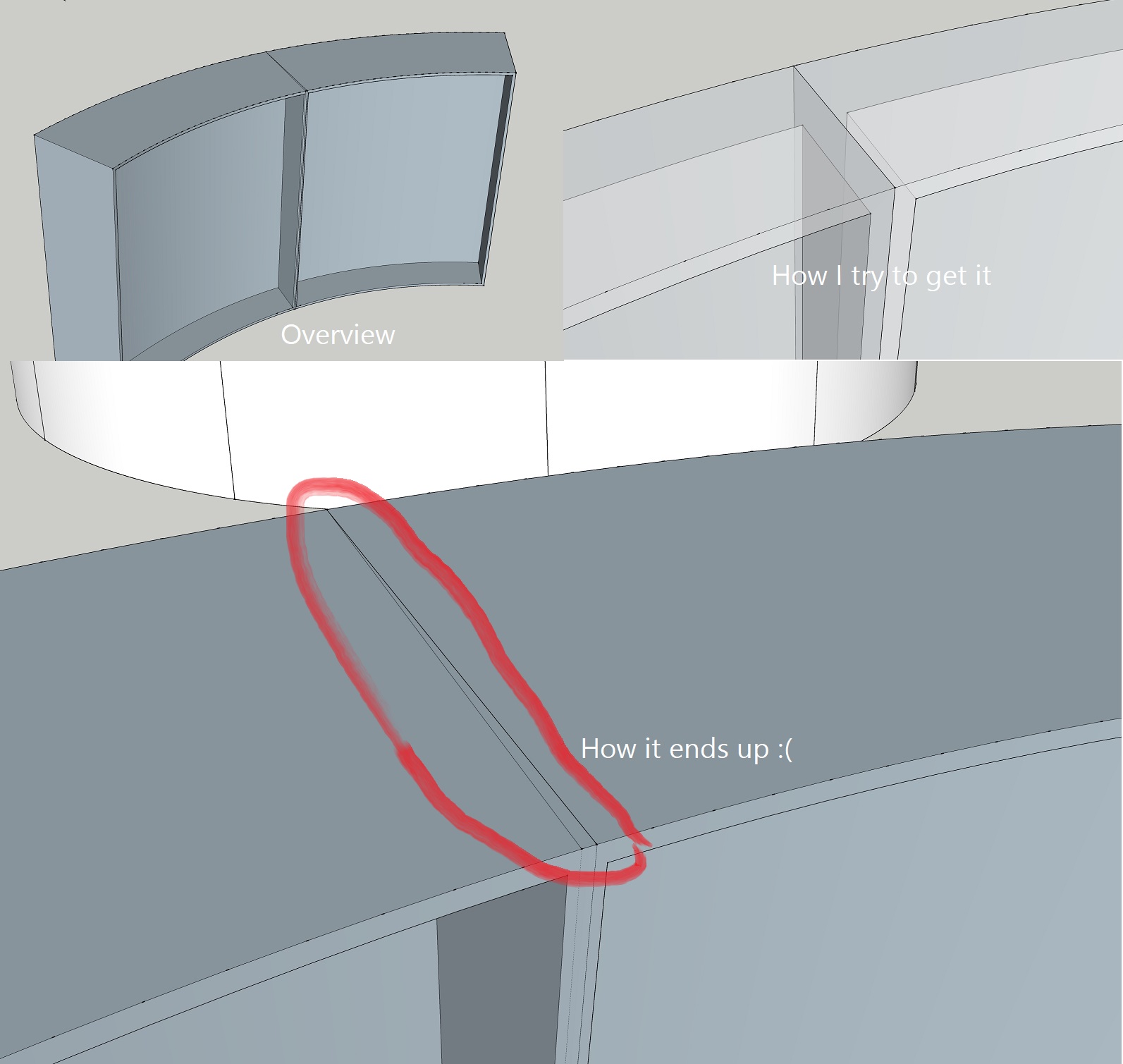
Hi I'm having a small issue that I can't for the life of me understand.
I'm extruding the wall of a truncated cone, or more like a rounded plate that along with 11 other identical plates will make up the cone. I'm trying to make flanges around the sides of one plate to then instance it, but the sides keep intersecting and I can't seem to control them!
I did manage to get it right at first, but there were some other issues with the model so I have restarted and this time around I can't get it to work.
I'm using Joint Push Pull and Round Push Pull.
-
I'm getting this error message when trying to Joint Push pull:
` [/Date: 21-Sep-16 09:11:28
An error occurred in Joint Push Pull
Error in generation of the geometryundefined method `smooth?' for nil:NilClass
JointPushPullGeometry.rb: 1107 -- block in geometry_coplanar_edges_overhang
JointPushPullGeometry.rb: 1105 -- each
JointPushPullGeometry.rb: 1105 -- each_with_index
JointPushPullGeometry.rb: 1105 -- geometry_coplanar_edges_overhang
JointPushPullGeometry.rb: 354 -- block in geometry_robot_erase_coplanar_edges
JointPushPullGeometry.rb: 352 -- each
JointPushPullGeometry.rb: 352 -- geometry_robot_erase_coplanar_edges
JointPushPullGeometry.rb: 214 -- robot_call_action
JointPushPullGeometry.rb: 177 -- geometry_robot_exec
JointPushPullGeometry.rb: 160 -- geometry_robot
JointPushPullGeometry.rb: 75 -- block in geometry_execute
Lib6Operation.rb: 332 -- call
Lib6Operation.rb: 332 -- step_geometry
Lib6Operation.rb: 374 -- start_execution
JointPushPullGeometry.rb: 75 -- geometry_execute
JointPushPullTool.rb: 892 -- go_preview_or_geom
JointPushPullTool.rb: 698 -- dragging_stop
JointPushPullTool.rb: 1320 -- onLButtonUp` -
Thanks for signaling. This seems to be an unusual case.
Anyway, I have fixed the problem and will re-release soon.Fredo
-
Hi. I'm having a problem with the plugin gui showing up really small in SU. See attached picture.
I'm on SU2016, OS X 10.9.5.
How can I make it bigger?
//Mike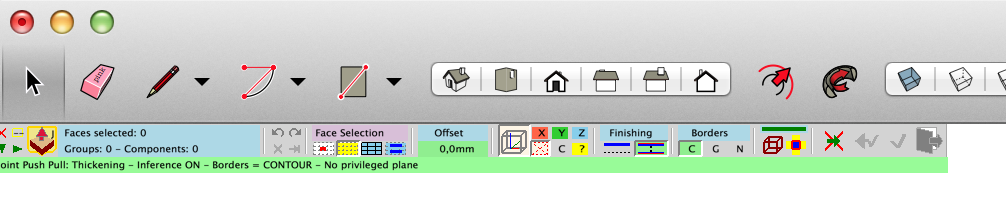








Advertisement