[Plugin][$] JointPushPull Interactive - v4.9a - 02 Apr 25




-
Hi guys.
Do you have any idea why JPP is not working ?(for a friend)
The other tools from you (Fredo) , are working but this one doesn't .
I have the latest Libfredo, I use Sketchup 2015 64 bit . I have also tested it with no other plugins in the Plugins folder. In vain.The plugin seems installed, all the incons are alright . When I select one of its tools and try to run it on a face it just highlights a polygon or a triangle and then nothing. Somehow it doesn's select the surface as it should !
The Face selection is set to Surface, but it does not select the surface, it is only highlighting a polygon that is under the surface .I ran out of ideas.
EDITED
I have read back and found out about the DC being disabled. I have checked the behavior on my own Sketchup with them turned off and this seems to be it . Lets see if it works for my friend. I am not sure if it is written in the documentation about this, but could you post it at the conflicts ? Thank you !
-
@ely862me said:
I have read back and found out about the DC being disabled. I have checked the behavior on my own Sketchup with them turned off and this seems to be it . Lets see if it works for my friend. I am not sure if it is written in the documentation about this, but could you post it at the conflicts ? Thank you !
What is "DC"? Is it Dynamic components?
I don't know why there would be a conflict.Thanks for feedback
Fredo
-
DC rubies add several additional methods into the base Sketchup and related Classes.
If you have used any of these methods in your code, then IF those DC rubies have not loaded you will get errors.These include:
` Geom::Transformation.rotx
Geom::Transformation.roty
Geom::Transformation.rotz
Geom::Transformation.xscale
Geom::Transformation.yscale
Geom::Transformation.zscaleUI::WebDialog.last_width
UI::WebDialog.last_width=
UI::WebDialog.last_height
UI::WebDialog.last_height=Sketchup::ComponentInstance.copy
Sketchup::ComponentInstance.description
Sketchup::Drawingelement.local_transformation
Sketchup::Drawingelement.scaled_size
Sketchup::Drawingelement.unscaled_size
Sketchup::Drawingelement.set_last_size
Sketchup::Drawingelement.last_scaling_factorsModel.typename
Model.entityID
Model.delete_attribute
Model.layer`There are other "
DC..." classes too, but I'd expect you won't have used those ! -
TIG,
Thanks for clarification.
I think I may use
model.entityID. Actually I thought it was a native method (which would make sense).I have to check my code to track these instances.
Fredo
-
Model.entityIDis a weird one it always returns"Model", so unsure why it's used...
You can trap it with something like:
if defined?(Sketchup.active_model.entityID)
  mid = Sketchup.active_model.entityID
else
  mid = "Model"
end
BUT then
mid = "Model"is always right - so why not use the simplest fix ! -
@Tig and Fredo
You have the notion you look like aliens with superpowers to the rest of us mortals down here...don't you?
-
@TIG:
Now I know this is not a native method, I will be careful. In fact this method is convenient because you can use entityID on a parent whether Group, ComponentInstance or active model.
Fredo
-
This tool is amazing! However, I encountered some error with the follow push/pull.
When I tried to use follow push/pull, the following error occurred:undefined method `angle_between' for nil:NilClass
Ruby File Line Method
JointPushPullAlgo.rb 1339 vertex_average_factor
JointPushPullAlgo.rb 1089 follow_compute_direction
JointPushPullAlgo.rb 1056 block in block_prepare_vertices_F
JointPushPullAlgo.rb 1056 each
JointPushPullAlgo.rb 1056 block_prepare_vertices_F
JointPushPullAlgo.rb 890 block in block_prepare_vertices_all
JointPushPullAlgo.rb 890 each
JointPushPullAlgo.rb 890 block_prepare_vertices_all
JointPushPullAlgo.rb 500 algo_prepare_calculation_exec
JointPushPullAlgo.rb 477 algo_prepare_calculation
JointPushPullTool.rb 692 dragging_start
JointPushPullTool.rb 1190 onMouseMove
22-Feb-15 14:56:56Does anyone know why?? I followed exactly what the video showed, push/pull the top of a cone shaped object.
Would love some help! Thank you!!
-
It may depend on your model.
So the best is to post it or PM it to me.
Fredo
-
-
I'm getting the same error in a specific geometry, any plans of implementing the safer generation method?
@fredo6 said:
@stamatispsarras said:
I am also getting this error in a complex model.
Any ideas what I should avoid when modeling, so it wont happen again?Unfortunately, these kind of errors may happen with complex models where the generated offset surface contains overlaps. This is due to the fast method of generation. I have the plan to have a default safe generation method to takeover when there are such errors. Should go in a next release.
Fredo
-
HI fredo
this face have problem with joint pull push plugin but easily work with puss pull tool in sketchup !
It was very surprising for me! Since this face is very Simple !I uploud this file . I thank you for the review explained above.
-
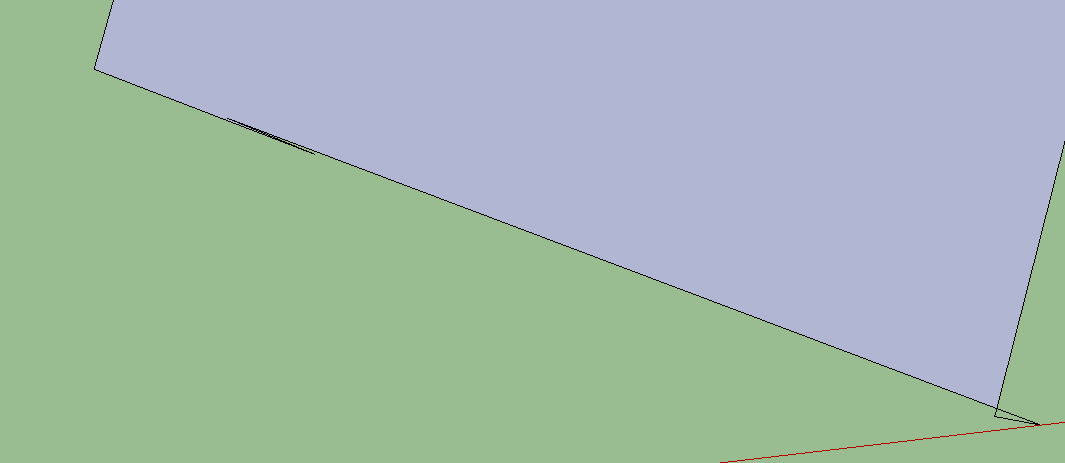
It's poorly drawn at the end near the red axis. If you did a better job of drawing it, Joint Push/Pull wouldn't fail.
-
HI Dave
I had not checked the lines For this reason,The main tool push&pull was not any problem.
I did not know that fredo plugin is more sensitive.thank you ...
-
I don't know that it's more sensitive but since you have that little triangular loop with no face in it, i'd guess that causes problems. Try this: Scale the entire geometry up by a factor of 1000. make a face on that triangle by tracing one edge of it with the Line tool. Then trying running Joint Push/Pull on the result.
-
Hy, I am a bit confused on how to PROPERLY use this plugin... Ok, I understood that I should keep the mouse button pressed while pulling the face, because click will only select/deselect (which is a bit annoying, honestly). But there is a funny behavior AFTER I do the push pull... sometimes (couldn't figure out in which conditions), when I press ENTER it actually CANCEL my pushpull.
Until now, every successful pushpull i did was out of luck... I have no idea how I confirmed the operation, because apparently I do the same thing like when it's canceled.
In my opinion it should do better use of ESC and ENTER keys (first to cancel, second to confirm). Also, selection of faces would be best to be key-assisted, as in regular SU behavior.
Is very confusing when plugins ask for different commands to do similar SU actions... is like two different programs. Select should be performed the same in native Su and under plugins (same key+mouse combinations), other operations should be similar.
Wish you best.
-
@derei said:
In my opinion it should do better use of ESC and ENTER keys (first to cancel, second to confirm). Also, selection of faces would be best to be key-assisted, as in regular SU behavior.
Is very confusing when plugins ask for different commands to do similar SU actions... is like two different programs. Select should be performed the same in native Su and under plugins (same key+mouse combinations), other operations should be similar.
I know it is a change of habit, but JPP is not designed to replace the native SU Pushpull either.
SU PushPull only acts on a single face. So when you click, the next action is PushPull.
In multiface seelction, you cannot do the same, because when you click on the first face, then this face would move / pushpull with the mouse when you will try to select a second face.
The only possibility remain is to select with NO click:
- if the mouse if over a face and you click, this face is PushPulled
- if you press CTRL why hovering over faces (.ie. no click), then these faces are added to the selection. If you then click, the Push Pull applies to all faces selected.
This method is also different from Sketchup, which does not have a multi-element selection capability in implicit selection (i.e. just hovering the mouse).
Note that I use this method in FredoScale, but I am pretty sure few users noticed or use it.
I'll have anyway another look and reflection to see if I can improve the face selection process (the best, when applicable, is to select the faces and then just type the offset, if you don't need a placement by target).
Fredo
-
I completely understand that this tool is not meant to replace a native SU tool. I was merely talking about the way of use of the similar commands (eg. selecting faces).
But this is not the biggest problem I got into. I could accommodate to it. The problem is that ENTER cancels the push-pull. I do it, i set custom value in VCB, then i press ENTER. And voila: no pushhpull. And I get confused: did I pressed ESC?
Unless there is any reason to assign a canceling to ENTER key.By the way... "before" JPP wasn't behaving like this. It's like this change was introduced recently...couldn't tell which release.
Thank you very much, Fredo
-
I will have a look.
The latest version of JPP is dated 9 Jan 15, so it's not recent, unless there is a side effect from LibFredo6.
Did the problem happens when you are extruding a few faces or a lot of faces (with many faces, you have a preview mode)?
Fredo
-
I just did some quick testing and I'm not seeing any weird behavior with the Enter key. When I type a JPP distance and hit Enter, it makes the adjustment just like the native Push/Pull tool does. Maybe there's something else causing a conflict?
FWIW, I updated LibFredo and the other extensions that got recent updates and according to the Plugin Store and LibFredo, everything is up to date.










Advertisement