sketchucation logo sketchucation
    • 登入
    Oops, your profile's looking a bit empty! To help us tailor your experience, please fill in key details like your SketchUp version, skill level, operating system, and more. Update and save your info on your profile page today!
    ⚠️ Important | Libfredo 15.6b introduces important bugfixes for Fredo's Extensions Update

    Style Stroke Width (Sketchy Edges)

    已排程 已置頂 已鎖定 已移動 SketchUp Discussions
    sketchup
    53 貼文 5 Posters 9.0k 瀏覽 5 Watching
    正在載入更多貼文
    • 從舊到新
    • 從新到舊
    • 最多點贊
    回覆
    • 在新貼文中回覆
    登入後回覆
    此主題已被刪除。只有擁有主題管理權限的使用者可以查看。
    • C 離線
      Charlie__V
      最後由 編輯

      I did not draw attention to it in my original post, but look at the editor "stroke" preview pane.
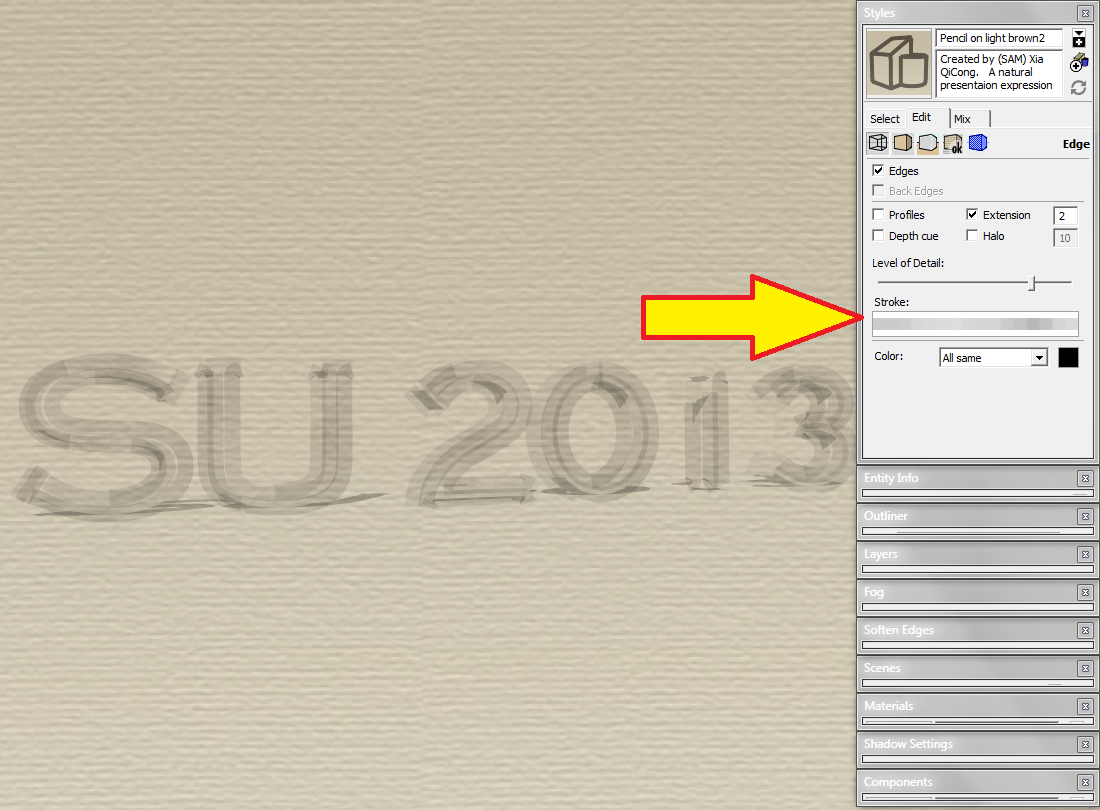

      Stroke Preview Pane

      Precision M1710/Win 7 Pro 64 bit/i-7 6920 Quad core 2.9 Ghz -3.8/16Gb ram/NVIDIA M5000M 8Gb

      1 條回覆 最後回覆 回覆 引用 0
      • BoxB 離線
        Box
        最後由 編輯

        Yep, I saw that and mine was the same.

        1 條回覆 最後回覆 回覆 引用 0
        • C 離線
          Charlie__V
          最後由 編輯

          @box said:

          Yep, I saw that and mine was the same.

          Box,
          Now that you have your settings just right.........can you turn the max tex back on and "send to layout"............on my machine it will display properly in Layout while having the thick strokes in SU.

          Edit:.....Scratch that.......I see you are on Free Make. 😳

          Best,
          Charlie

          Precision M1710/Win 7 Pro 64 bit/i-7 6920 Quad core 2.9 Ghz -3.8/16Gb ram/NVIDIA M5000M 8Gb

          1 條回覆 最後回覆 回覆 引用 0
          • BoxB 離線
            Box
            最後由 編輯

            If I turn max tex back on it goes thick in SU, I don't have layout on this machine to test, I don't use it, I have Pro for SU7 on another machine if I ever need it, but have not bothered to upgrade as I haven't found my needs stretch beyond the free version these days.

            1 條回覆 最後回覆 回覆 引用 0
            • Dave RD 離線
              Dave R
              最後由 編輯

              I noticed that, too. That seems to reflect the way the style displays but I wonder why it is like that. The line width is supposed to be 16 pixels (Well, the width of the boxes for the strokes is 16 pixels.) If you open the style in Style Builder, does it display like it should or as those wide strokes?
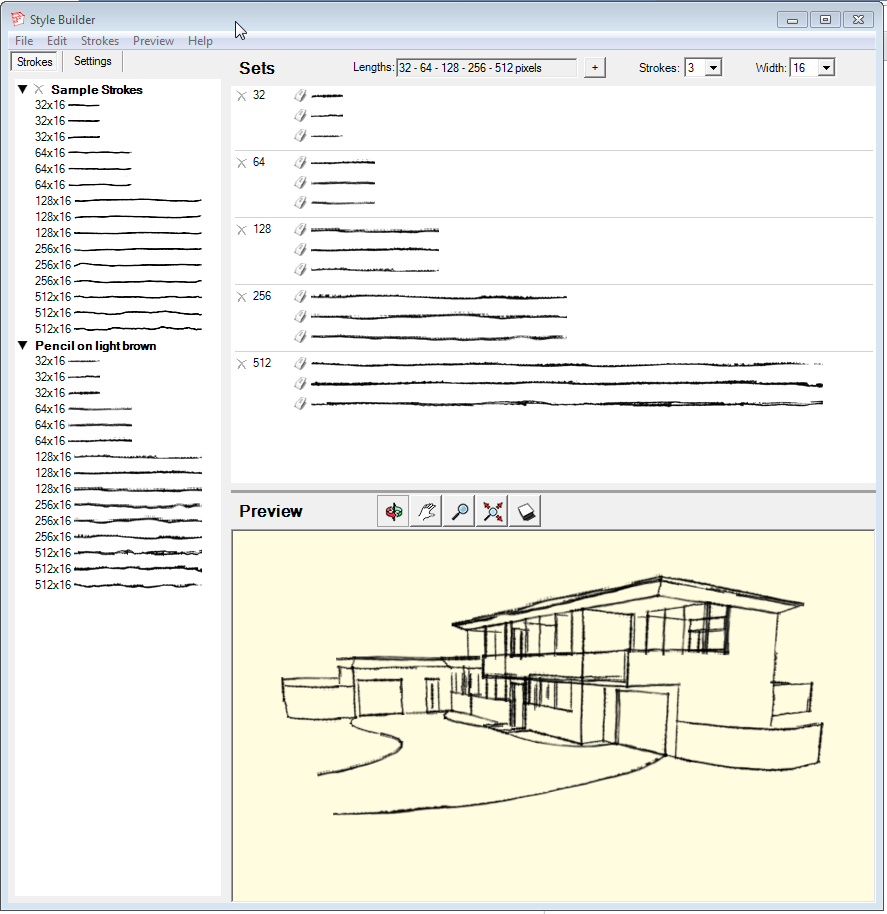

              style build.png

              Etaoin Shrdlu

              %

              (THERE'S NO PLACE LIKE)

              G28 X0.0 Y0.0 Z0.0

              M30

              %

              1 條回覆 最後回覆 回覆 引用 0
              • C 離線
                Charlie__V
                最後由 編輯

                @dave r said:

                If you open the style in Style Builder, does it display like it should or as those wide strokes?

                I checked out a few of the styles in Style Builder earlier today......and they display as they should in the preview window.

                But just now when I opened Style Builder (no Style Selected/loaded)it appears eerily like what the SU displays with Max Texture Selected.

                Hmmm....wonder if SU relys on Style Builder in the background to display the sketchy styles?
                EDIT: Or maybe selecting Max Tex somehow breaks the interpretation of the line width?
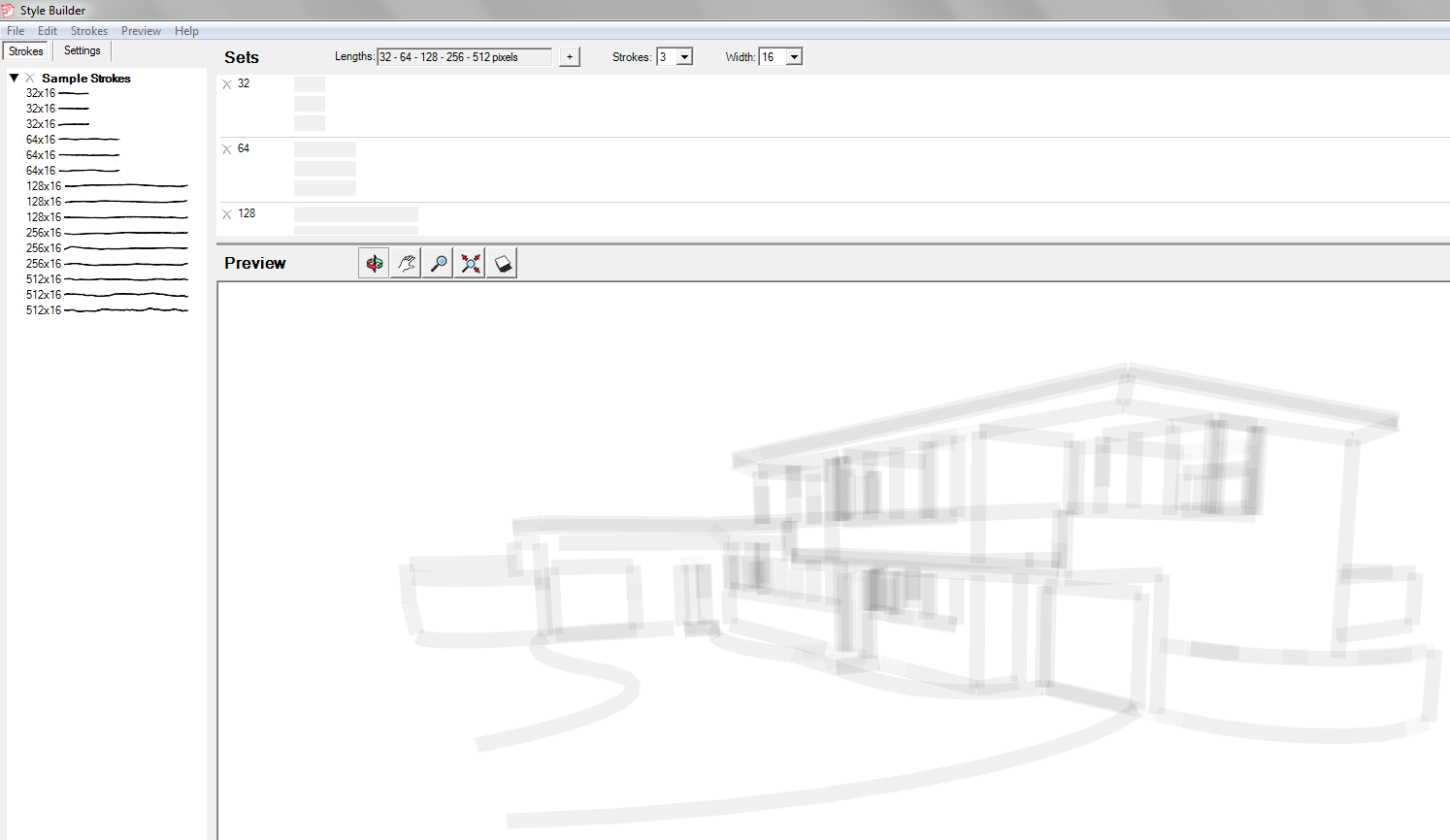

                Style Builder: No Style


                Style Builder: Brown Style


                Style Builder: Brown Style (2013 Model)

                Precision M1710/Win 7 Pro 64 bit/i-7 6920 Quad core 2.9 Ghz -3.8/16Gb ram/NVIDIA M5000M 8Gb

                1 條回覆 最後回覆 回覆 引用 0
                • Dave RD 離線
                  Dave R
                  最後由 編輯

                  @unknownuser said:

                  But just now when I opened Style Builder (no Style Selected/loaded)it appears eerily like what the SU displays with Max Texture Selected.

                  It looks like that because you have no stokes inserted in the set. In the upper right hand box you can see the empty cells where stokes need to be placed. The model displays those cells as well. You can drag the sample strokes from the left hand pane up to the cells and then you'll see the lines displayed on the model. If you open an existing style or load a style template, the strokes will be inserted into the cells automatically but the sample strokes aren't.

                  Etaoin Shrdlu

                  %

                  (THERE'S NO PLACE LIKE)

                  G28 X0.0 Y0.0 Z0.0

                  M30

                  %

                  1 條回覆 最後回覆 回覆 引用 0
                  • C 離線
                    Charlie__V
                    最後由 編輯

                    @dave r said:

                    It looks like that because you have no stokes inserted in the set. In the upper right hand box you can see the empty cells where stokes need to be placed. The model displays those cells as well. You can drag the sample strokes from the left hand pane up to the cells and then you'll see the lines displayed on the model. If you open an existing style or load a style template, the strokes will be inserted into the cells automatically but the sample strokes aren't.

                    Dave,
                    Yes...I fully understand that,what I was pointing out was Style Builder (without any strokes inserted)looks very much like what Sketchup is displaying.(or NOT displaying)

                    IOW....it's almost as if SU is not reading any of the sketchy linestyles of the particular style that is selected.
                    (while correctly displaying the selected styles colors/background/etc.)

                    Make sense?

                    Charlie

                    EDIT:
                    Wonder if making a new style without any lines inserted would replicate the condition?
                    I could test that..........but won't know if it breaks with Max Tex. on (on my machine).

                    Precision M1710/Win 7 Pro 64 bit/i-7 6920 Quad core 2.9 Ghz -3.8/16Gb ram/NVIDIA M5000M 8Gb

                    1 條回覆 最後回覆 回覆 引用 0
                    • C 離線
                      Charlie__V
                      最後由 編輯

                      Interesting.........eliminating all of the Strokes in Style Builder seems to (almost) replicate the fat lines.
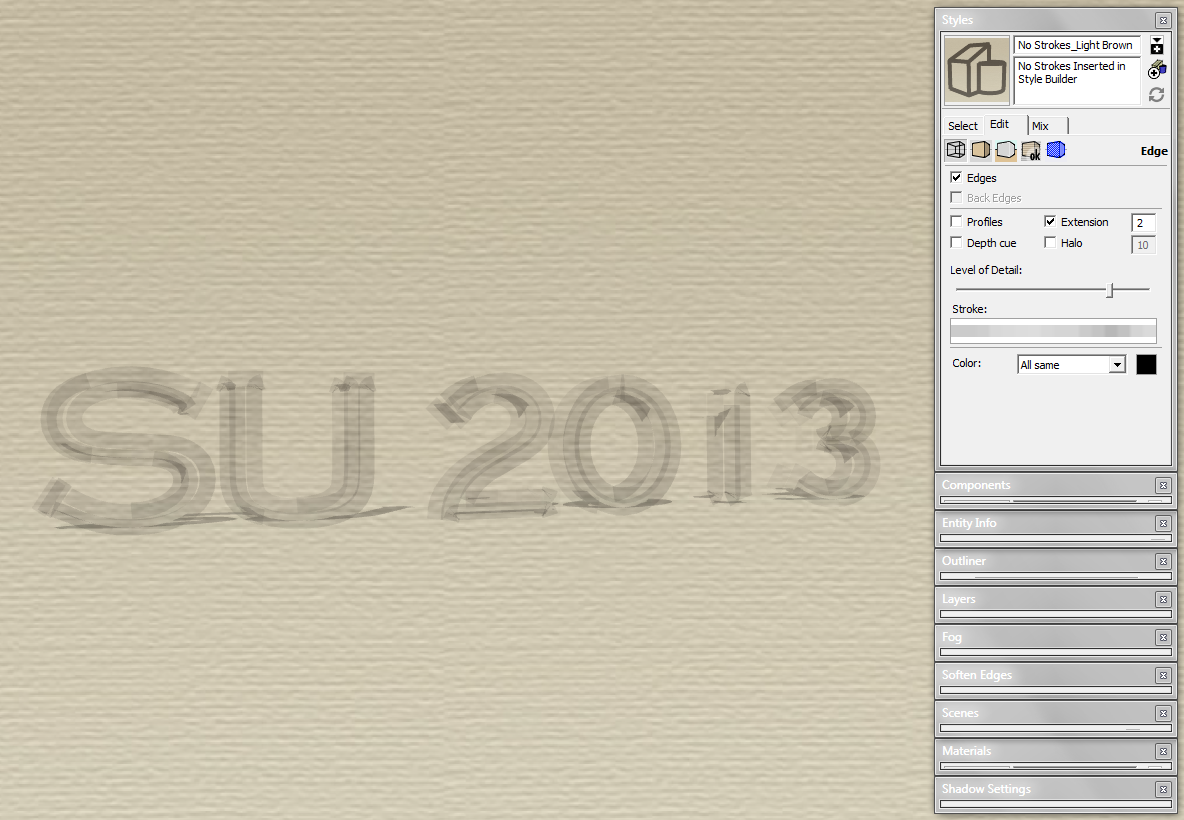

                      No Strokes (Eliminated in Style Builder)...Light Brown


                      Stroke_Width_SU2013.skp

                      Precision M1710/Win 7 Pro 64 bit/i-7 6920 Quad core 2.9 Ghz -3.8/16Gb ram/NVIDIA M5000M 8Gb

                      1 條回覆 最後回覆 回覆 引用 0
                      • Dave RD 離線
                        Dave R
                        最後由 編輯

                        Almost. I wonder if it would be useful for something.

                        Etaoin Shrdlu

                        %

                        (THERE'S NO PLACE LIKE)

                        G28 X0.0 Y0.0 Z0.0

                        M30

                        %

                        1 條回覆 最後回覆 回覆 引用 0
                        • C 離線
                          Charlie__V
                          最後由 編輯

                          @dave r said:

                          Almost. I wonder if it would be useful for something.

                          Well....perhaps not very useful for capturing Sasquatch....or say Nessie for that matter. 😉

                          But may just be a hint to where the broken link lies....and no... not the same as the missing link.

                          😐

                          Charlie

                          Precision M1710/Win 7 Pro 64 bit/i-7 6920 Quad core 2.9 Ghz -3.8/16Gb ram/NVIDIA M5000M 8Gb

                          1 條回覆 最後回覆 回覆 引用 0
                          • C 離線
                            Charlie__V
                            最後由 編輯

                            So.......almost a year later.....and having use maximum texture size ticked.......this bit me again. (how could I not immediately remember this thread) 👊

                            Anyway........I can add a little bit of info here:(perhaps useful to those having this issue)

                            It seems that if you toggle the "use maximum texture size" off..... and purge the unused styles, you can then toggle "use maximum texture size" on again and the sketchy styles will display/behave as expected.

                            I remain perplexed by this..........is it a Bug?
                            If it were a video card would it not be "consistent"...IOW...as soon as use max tex size is back on one would expect it to foul up right away...........maybe not?

                            C


                            ![intial sketchy style selection displays correctly (w/MaxTex "on")](/uploads/imported_attachments/G2q2_MaxTex_SketchyEdge1.JPG "intial sketchy style selection displays correctly (w/MaxTex "on")")


                            ![subsequent sketchy style selection(s) display incorrectly (w/MaxTex "on")](/uploads/imported_attachments/MvWy_MaxTex_SketchyEdge2.JPG "subsequent sketchy style selection(s) display incorrectly (w/MaxTex "on")")


                            ![MaxTex "off" and after style purge MaxTex "on" sketchy styles display as expected](/uploads/imported_attachments/JHg4_MaxTex_SketchyEdge3.JPG "MaxTex "off" and after style purge MaxTex "on" sketchy styles display as expected")

                            Precision M1710/Win 7 Pro 64 bit/i-7 6920 Quad core 2.9 Ghz -3.8/16Gb ram/NVIDIA M5000M 8Gb

                            1 條回覆 最後回覆 回覆 引用 0
                            • Dave RD 離線
                              Dave R
                              最後由 編輯

                              Charlie,

                              I get the results you show in your second screen shot with certain OpenGL settings. On my PC, the line styles behave themselves with Hardware Acceleration turned off.

                              Etaoin Shrdlu

                              %

                              (THERE'S NO PLACE LIKE)

                              G28 X0.0 Y0.0 Z0.0

                              M30

                              %

                              1 條回覆 最後回覆 回覆 引用 0
                              • C 離線
                                Charlie__V
                                最後由 編輯

                                @dave r said:

                                Charlie,

                                I get the results you show in your second screen shot with certain OpenGL settings. On my PC, the line styles behave themselves with Hardware Acceleration turned off.

                                Hey Dave,
                                Well.......maybe it is a graphics card issue after all?

                                Seems strange to me though that the sketchy edge styles (tied to image files) act up only when "use maximum texture size" is selected. (Hardware Acceleration off on my machine exhibits even more anomolies)

                                Would be nice to know what.......if anything......is amiss.
                                (Reminder..I think the viewports in LO ignore this anomolie...discussed earlier in this thread) 😕

                                Until then.......I will try my best to remember to disable/manipulate the "use max tex size" when this occurs.

                                Best,
                                Charlie

                                Precision M1710/Win 7 Pro 64 bit/i-7 6920 Quad core 2.9 Ghz -3.8/16Gb ram/NVIDIA M5000M 8Gb

                                1 條回覆 最後回覆 回覆 引用 0
                                • Dave RD 離線
                                  Dave R
                                  最後由 編輯

                                  I always have Max Texture selected and have never seen it influence the way the lines render but maybe it's different on different computers.

                                  Etaoin Shrdlu

                                  %

                                  (THERE'S NO PLACE LIKE)

                                  G28 X0.0 Y0.0 Z0.0

                                  M30

                                  %

                                  1 條回覆 最後回覆 回覆 引用 0
                                  • C 離線
                                    Charlie__V
                                    最後由 編輯

                                    So......I prefer to have max tex size ticked.(imported image clarity)

                                    This has been (really) bugging me........and so for anyone following this...this workaround helped me:

                                    If you (temporarily) un-tick use max tex size and create scenes with your desired sketchy style(s) you can then turn use max tex size back on..... with no ill effects to the scenes with sketchy styles.

                                    You may have to repeat the untick/re-tick if selecting a new sketchy style...but know that if it is not saved to a scene it will not (reliably) display correctly.

                                    Note:
                                    Really makes me wonder why use max tex size causes this...almost like there is a bad connection to the sketchy style (stroke) image file(s).

                                    IOW...one would not think use max tex size would cause blurred/heavy/pixelated sketchy linestyles (strokes).....I would think the opposite.....the linestyles would be more refined.........no?

                                    Heck.......the more I think about it.......the imported images (max tex) in my file react accordingly to the use max tex size......untick....and the images blur......re-tick and they clear up.
                                    Regardless of scene attributes/settings.

                                    Yet the sketchy styles "hold on" to the blurred/heavy/pixelated linestyles.....ignoring the un-ticking/re-ticking of the use max tex size.

                                    Okay.....rambling now.........thinking for sure this is a bug....not so much graphics card/other.

                                    Best.
                                    C

                                    Precision M1710/Win 7 Pro 64 bit/i-7 6920 Quad core 2.9 Ghz -3.8/16Gb ram/NVIDIA M5000M 8Gb

                                    1 條回覆 最後回覆 回覆 引用 0
                                    • Dave RD 離線
                                      Dave R
                                      最後由 編輯

                                      I don't know, Charlie. I have never seen the sketchy line styles impacted by having Max Texture Size checked on either my PC or my Mac.

                                      Etaoin Shrdlu

                                      %

                                      (THERE'S NO PLACE LIKE)

                                      G28 X0.0 Y0.0 Z0.0

                                      M30

                                      %

                                      1 條回覆 最後回覆 回覆 引用 0
                                      • C 離線
                                        Charlie__V
                                        最後由 編輯

                                        @dave r said:

                                        I don't know, Charlie. I have never seen the sketchy line styles impacted by having Max Texture Size checked on either my PC or my Mac.

                                        Dave,
                                        Yeah....thanks....It's weird...this machine was fine and all of a sudden it mis behaves like this.
                                        When I say Bug....I mean it's like something gets corruped within SU (some sort of cache?)....I see talk about some having trouble with P lists and how that can be repaired...think that's Mac though.....any way...I'm getting into the weeds.

                                        I am glad I can overcome it and use the max tex size now. (hopefully it helps others)

                                        Thanks for your help. 😉

                                        Charlie

                                        Precision M1710/Win 7 Pro 64 bit/i-7 6920 Quad core 2.9 Ghz -3.8/16Gb ram/NVIDIA M5000M 8Gb

                                        1 條回覆 最後回覆 回覆 引用 0
                                        • maxhouserocksM 離線
                                          maxhouserocks
                                          最後由 編輯

                                          i have the exact same problem in SU2014 and SU2015 on two different machines, 1 is an Origin PC with a NVIDIA TITAN BLACK, the other is an MSI laptop with an NVIDIA GeForce GTX880M . I had always kept the max texture setting check marked, now i will have to keep toggling as you suggest.

                                          So strange that these edges suddenly lose their definition and appear to be fat, wide, blurry lines...makes no sense.

                                          your work around works for me, but boy is it a pain.

                                          I had trouble even finding a reference to this issue but certainly glad i found this post.
                                          Thanks guys!
                                          Bob
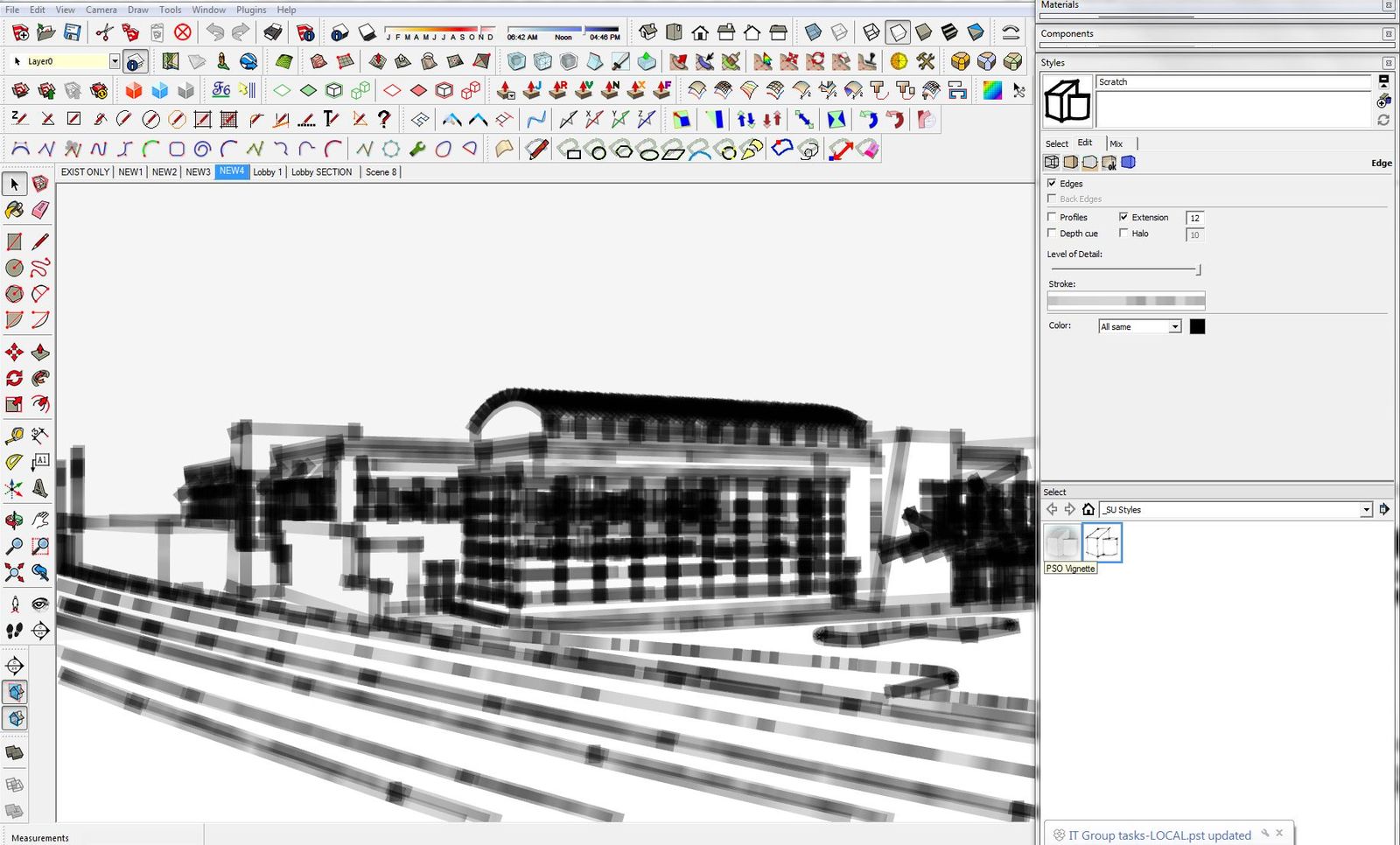

                                          Sketchup Style problem.JPG

                                          Robert A. Christman
                                          http://rachristman.blogspot.com/

                                          1 條回覆 最後回覆 回覆 引用 0
                                          • Dave RD 離線
                                            Dave R
                                            最後由 編輯

                                            Robert, was it the max Texture Size of Hardware Acceleration change that fixed it for you?

                                            I guess I haven't seen this for a long time and had kind of forgotten about it.

                                            Etaoin Shrdlu

                                            %

                                            (THERE'S NO PLACE LIKE)

                                            G28 X0.0 Y0.0 Z0.0

                                            M30

                                            %

                                            1 條回覆 最後回覆 回覆 引用 0
                                            • 1
                                            • 2
                                            • 3
                                            • 2 / 3
                                            • 第一個貼文
                                              最後的貼文
                                            Buy SketchPlus
                                            Buy SUbD
                                            Buy WrapR
                                            Buy eBook
                                            Buy Modelur
                                            Buy Vertex Tools
                                            Buy SketchCuisine
                                            Buy FormFonts

                                            Advertisement