sketchucation logo sketchucation
    • 登入
    Oops, your profile's looking a bit empty! To help us tailor your experience, please fill in key details like your SketchUp version, skill level, operating system, and more. Update and save your info on your profile page today!
    🔌 Smart Spline | Fluid way to handle splines for furniture design and complex structures. Download

    [Plugin] Layers Panel 1.2.1

    已排程 已置頂 已鎖定 已移動 Plugins
    672 貼文 109 Posters 203.5k 瀏覽 109 Watching
    正在載入更多貼文
    • 從舊到新
    • 從新到舊
    • 最多點贊
    回覆
    • 在新貼文中回覆
    登入後回覆
    此主題已被刪除。只有擁有主題管理權限的使用者可以查看。
    • BoxB 離線
      Box
      最後由 編輯

      Here you go.
      Deck builder
      http://sketchucation.com/forums/viewtopic.php?f=323%26amp;t=58084%26amp;p=533860#p533827
      Railway
      http://sketchucation.com/forums/viewtopic.php?f=323%26amp;t=57831%26amp;start=240#p533089

      1 條回覆 最後回覆 回覆 引用 0
      • jiminy-billy-bobJ 離線
        jiminy-billy-bob
        最後由 編輯

        Ok, try to redownload, I added Eneroth's fix.

        25% off Skatter for SketchUcation Premium Members

        1 條回覆 最後回覆 回覆 引用 0
        • BoxB 離線
          Box
          最後由 編輯

          Yep, that's done the trick. Thanks.

          1 條回覆 最後回覆 回覆 引用 0
          • G 離線
            glro
            最後由 編輯

            I tried

            I got an error message while i was trying to move some layers to a group

            too bad

            the appearance is well finished, and it fits a need
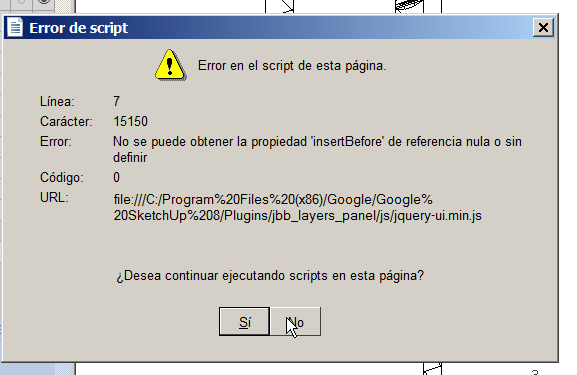

            error message

            1 條回覆 最後回覆 回覆 引用 0
            • TIGT 離線
              TIG Moderator
              最後由 編輯

              @giro

              What version of Internet Explorer do you have ?

              TIG

              1 條回覆 最後回覆 回覆 引用 0
              • G 離線
                glro
                最後由 編輯

                internet explorer 11.0.9600.17239

                @tig said:

                @giro

                What version of Internet Explorer do you have ?

                1 條回覆 最後回覆 回覆 引用 0
                • jiminy-billy-bobJ 離線
                  jiminy-billy-bob
                  最後由 編輯

                  Sorry, I was away and didn't see your post.

                  Could you translate the error message?
                  I can't reproduce it, could you explain in detail how you got the error?

                  25% off Skatter for SketchUcation Premium Members

                  1 條回覆 最後回覆 回覆 引用 0
                  • G 離線
                    glro
                    最後由 編輯

                    @jiminy-billy-bob said:

                    Sorry, I was away and didn't see your post.

                    Could you translate the error message?
                    I can't reproduce it, could you explain in detail how you got the error?

                    "not possible to get the property "inserbefore', reference null or not defined...
                    do you want to continue script of the page?"

                    more or less...

                    1 條回覆 最後回覆 回覆 引用 0
                    • jiminy-billy-bobJ 離線
                      jiminy-billy-bob
                      最後由 編輯

                      Thanks,

                      Could you explain in detail how you got the error?

                      25% off Skatter for SketchUcation Premium Members

                      1 條回覆 最後回覆 回覆 引用 0
                      • G 離線
                        glro
                        最後由 編輯

                        @jiminy-billy-bob said:

                        Thanks,

                        Could you explain in detail how you got the error?

                        i was trying to make a group of different layers
                        i selected them as shown in the video, and i couldn't drop them

                        but...

                        i tried again and this time it worked
                        false alarm, sorry

                        seems to be working on my computer too

                        1 條回覆 最後回覆 回覆 引用 0
                        • jiminy-billy-bobJ 離線
                          jiminy-billy-bob
                          最後由 編輯

                          Great, I'm glad it works.
                          Maybe you tried just after installing the plugin, before restarting SU?

                          25% off Skatter for SketchUcation Premium Members

                          1 條回覆 最後回覆 回覆 引用 0
                          • jiminy-billy-bobJ 離線
                            jiminy-billy-bob
                            最後由 編輯

                            Thanks for the donation, glro, I appreciate it! 😉

                            25% off Skatter for SketchUcation Premium Members

                            1 條回覆 最後回覆 回覆 引用 0
                            • F 離線
                              fountainhead
                              最後由 編輯

                              I've had some strange behaviour creep in with layers panel recently. At least once a day, possibly more, the layers dialogue ends up blank, with no layers showing at all. When I chose the recent history dialogue, only one of multiple layers is restored. The only solution for me is to close Sketchup, remove both the jbb_layers_panel folder, and the jbb_layers_panel.rb, then reload Sketchup, and reinstall the .rbz file. Once that is done, all of the layers show up again...until the next sudden disappearance. I need to point out that the layers don't disappear from an .skp file that is currently open, only when opening an existing .skp file initially. The behaviour also repeats itself with the same .skp file over and over. In the last 3 days, I have had to unload/reload layers panel on the same .skp file on 4 separate file opening occasions. Any ideas?

                              1 條回覆 最後回覆 回覆 引用 0
                              • F 離線
                                fountainhead
                                最後由 編輯

                                A little more information. Opened an skp file this morning, no layers. Unloaded and re-loaded layers panel, all good. Opened a second, different skp file, no layers in that one, then I decided to open the previous skp file, directly from the open skp file. Since the previous file was open on the desktop, Sketchup warned me "file is open, open read only blah blah", as soon is a picked no, to cancel the load of the previous file, boom, all of the layers in 'layers panel' loaded up in the currently open file, where they, just seconds ago, were unavailable.

                                Not sure if that helps figure out what could be going on.

                                1 條回覆 最後回覆 回覆 引用 0
                                • jiminy-billy-bobJ 離線
                                  jiminy-billy-bob
                                  最後由 編輯

                                  • Are you running on windows or MAC?

                                  • If windows, what's your Internet Explorer version?

                                  • What's your Sketchup version?

                                  • When the dialog is blank, are you able to use its buttons? For exemple, does the "Add layer" button adds a new layer in Sketchup's layers window?

                                  • Could you try with all other plugins disabled? (Rename the plugins folder to "Plugins2", and create a new "Plugins" folder with only Layers Panel files in it)

                                  (Please answer all questions, thanks)

                                  25% off Skatter for SketchUcation Premium Members

                                  1 條回覆 最後回覆 回覆 引用 0
                                  • G 離線
                                    glro
                                    最後由 編輯

                                    @fountainhead said:

                                    I've had some strange behaviour creep in with layers panel recently.

                                    i have too

                                    sketchup just freezed when i clicked on "select highlighted layer"

                                    the plugin would be very useful, but it doesn't seem stable

                                    1 條回覆 最後回覆 回覆 引用 0
                                    • jiminy-billy-bobJ 離線
                                      jiminy-billy-bob
                                      最後由 編輯

                                      @glro said:

                                      sketchup just freezed when i clicked on "select highlighted layer"

                                      Any more detail which could help me identify the issue?

                                      25% off Skatter for SketchUcation Premium Members

                                      1 條回覆 最後回覆 回覆 引用 0
                                      • G 離線
                                        glro
                                        最後由 編輯

                                        @jiminy-billy-bob said:

                                        @glro said:

                                        sketchup just freezed when i clicked on "select highlighted layer"

                                        Any more detail which could help me identify the issue?

                                        nothing much to say

                                        i had created some scenes previously, and then i launched layers panel plugin to select one layer, and it freezed the computer

                                        i shall give it another try, and try to atch better the next time i have a bug

                                        1 條回覆 最後回覆 回覆 引用 0
                                        • JQLJ 離線
                                          JQL
                                          最後由 編輯

                                          Hi Jiminy,

                                          I have another feature request for your layers panel.

                                          Delete layer's content while keeping layer.

                                          It's handy in a lot of situations, for me, for instance it's nice so I can delete the content on layers on my template file. It's also good to clean a "trash" layer I have sometimes, where I put a lot of stuff on that trash layer so I can fall back to it later on... I can imagine a lot of useful scenarios like deleting certain layers to share a file by email.

                                          I hope you'll be able to do it and thanks once again,

                                          João

                                          www.casca.pt
                                          Visit us on facebook!

                                          1 條回覆 最後回覆 回覆 引用 0
                                          • jiminy-billy-bobJ 離線
                                            jiminy-billy-bob
                                            最後由 編輯

                                            I'll add it to my todo list.

                                            25% off Skatter for SketchUcation Premium Members

                                            1 條回覆 最後回覆 回覆 引用 0
                                            • 1
                                            • 2
                                            • 24
                                            • 25
                                            • 26
                                            • 27
                                            • 28
                                            • 33
                                            • 34
                                            • 26 / 34
                                            • 第一個貼文
                                              最後的貼文
                                            Buy SketchPlus
                                            Buy SUbD
                                            Buy WrapR
                                            Buy eBook
                                            Buy Modelur
                                            Buy Vertex Tools
                                            Buy SketchCuisine
                                            Buy FormFonts

                                            Advertisement



