[Plugin] Layers Panel 1.2.1
-
Oh, I just reproduced this by accident. It seems to happen when opening an old file coming from SU2013. When saving it with SU2014 and restarting, it works fine. This is weird.
-
@jiminy-billy-bob said:
Are you using the last version of Layers Panel? Is this a fresh install?
Yes, latest version 1.0.0.
Reproduced on other PC. I removed SU2013, cleaned up folders and installed SU2014(Make) and plugin.
I get this error just opening SU.This is really weird: after saving my old 2013 file and relaunch SU - plugin is working.
Last opened file affects on plugin loading? -
Now that its at 1.0 I desided to download it and it looks great.
One wish though. Thea Render support.
Oh and is it possible to doubleclick on panel to minimize it? Mine gets stuck as minimized. -
@pixero said:
One wish though. Thea Render support.
Unfortunalty, I can't trigger Thea Render from ruby. Support for this would have to be done in Thea. Tomasz is supposed to be working on this, but it's been a while, maybe you could remind him

@pixero said:
Oh and is it possible to doubleclick on panel to minimize it? Mine gets stuck as minimized.
It seems to be broken, I'm on it.
-
Loving this update. First public use of the new Layer.color API methods!
-
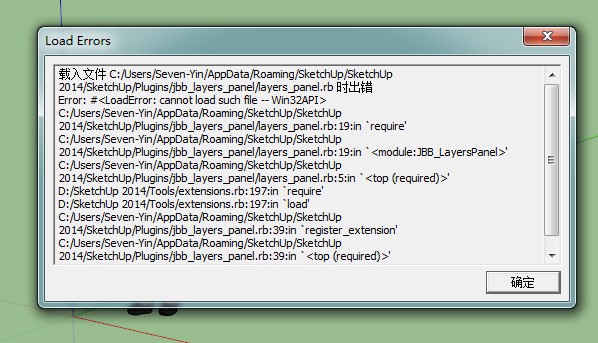
Thank you Layers Panel
Chinese version Sketchup 2014 However, to use this plug-in can not be any!!
I hope you can fix -
@yinliangxxxx said:
Thank you Layers Panel
Chinese version Sketchup 2014 However, to use this plug-in can not be any!!
I hope you can fixSee above :
@jiminy-billy-bob said:
It seems to happen when opening an old file coming from SU2013. When saving it with SU2014 and restarting, it works fine.
-
I still have same error. Opening new 2014 file...
Your advice was helpful with my PC, but on laptop it does'nt work... I will try reinstall SU. -
After reinstalling SU Make, cleaning directory in %AppData% I have same error...
-
First, thank you for the plugin !
I have the same issue as vremennyi. Sketchup 2014 pro and windows 7. The plugin works well except when I try to launch sketchup by clicking a file stored on another drive (D:) or network. Then it cannot find winAPI.so.
It could explain vremennyi problem on his laptop. -
-
I spoke to the Trimble guys, and it seems to be an issue with SU2014 itself. In some cases, ruby fails to load properly, when double-clicking on a file.
There's not much I can do... Trimble is working to fix it.
Meanwhile, try to open Sketchup, and then open your files with "Files > Open".EDIT : Oh well, I'm too slow
-
vremennyi, yinliangxxxx, babak,
Try replacing the file"Plugins/jbb_layers_panel/layers_panel.rb"by the attached one (see below), and tell me if it works.
-
%(#004080)[jiminy-billy-bob, thank you for your quick answer.
I still get the following error while launching from d:\ or network.]Erreur de chargement du fichier C:/Users/vfr/AppData/Roaming/SketchUp/SketchUp 2014/SketchUp/Plugins/jbb_layers_panel/layers_panel.rb
Error: #<LoadError: cannot load such file -- dl>
C:/Program Files (x86)/SketchUp/SketchUp 2014/Tools/RubyStdLib/Win32API.rb:5:inrequire' C:/Program Files (x86)/SketchUp/SketchUp 2014/Tools/RubyStdLib/Win32API.rb:5:in<top (required)>'
C:/Users/vfr/AppData/Roaming/SketchUp/SketchUp 2014/SketchUp/Plugins/jbb_layers_panel/layers_panel.rb:32:inrequire' C:/Users/vfr/AppData/Roaming/SketchUp/SketchUp 2014/SketchUp/Plugins/jbb_layers_panel/layers_panel.rb:32:inrescue in module:JBB_LayersPanel'
C:/Users/vfr/AppData/Roaming/SketchUp/SketchUp 2014/SketchUp/Plugins/jbb_layers_panel/layers_panel.rb:28:in<module:JBB_LayersPanel>' C:/Users/vfr/AppData/Roaming/SketchUp/SketchUp 2014/SketchUp/Plugins/jbb_layers_panel/layers_panel.rb:5:in<top (required)>'
C:/Program Files (x86)/SketchUp/SketchUp 2014/Tools/extensions.rb:197:inrequire' C:/Program Files (x86)/SketchUp/SketchUp 2014/Tools/extensions.rb:197:inload'
C:/Users/vfr/AppData/Roaming/SketchUp/SketchUp 2014/SketchUp/Plugins/jbb_layers_panel.rb:39:inregister_extension' C:/Users/vfr/AppData/Roaming/SketchUp/SketchUp 2014/SketchUp/Plugins /jbb_layers_panel.rb:39:in<top (required)>' -
Well, in that case we just need to wait for trimble to fix this.
-
Error Loading File C:/Users/Administrator/AppData/Roaming/SketchUp/SketchUp 2014/SketchUp/Plugins/jbb_layers_panel/layers_panel.rb
Error: #<LoadError: cannot load such file -- Win32API>
C:/Users/Administrator/AppData/Roaming/SketchUp/SketchUp 2014/SketchUp/Plugins/jbb_layers_panel/layers_panel.rb:19:inrequire' C:/Users/Administrator/AppData/Roaming/SketchUp/SketchUp 2014/SketchUp/Plugins/jbb_layers_panel/layers_panel.rb:19:inmodule:JBB_LayersPanel'
C:/Users/Administrator/AppData/Roaming/SketchUp/SketchUp 2014/SketchUp/Plugins/jbb_layers_panel/layers_panel.rb:5:in<top (required)>' E:/Trimble/Sketchup.14/Tools/extensions.rb:197:inrequire'
E:/Trimble/Sketchup.14/Tools/extensions.rb:197:inload' C:/Users/Administrator/AppData/Roaming/SketchUp/SketchUp 2014/SketchUp/Plugins/jbb_layers_panel.rb:39:inregister_extension'
C:/Users/Administrator/AppData/Roaming/SketchUp/SketchUp 2014/SketchUp/Plugins/jbb_layers_panel.rb:39:in `<top (required)>'it's same problem
su2014en @ win7x64chinese
so I guess, that's something about system, Trimble had better fix it -
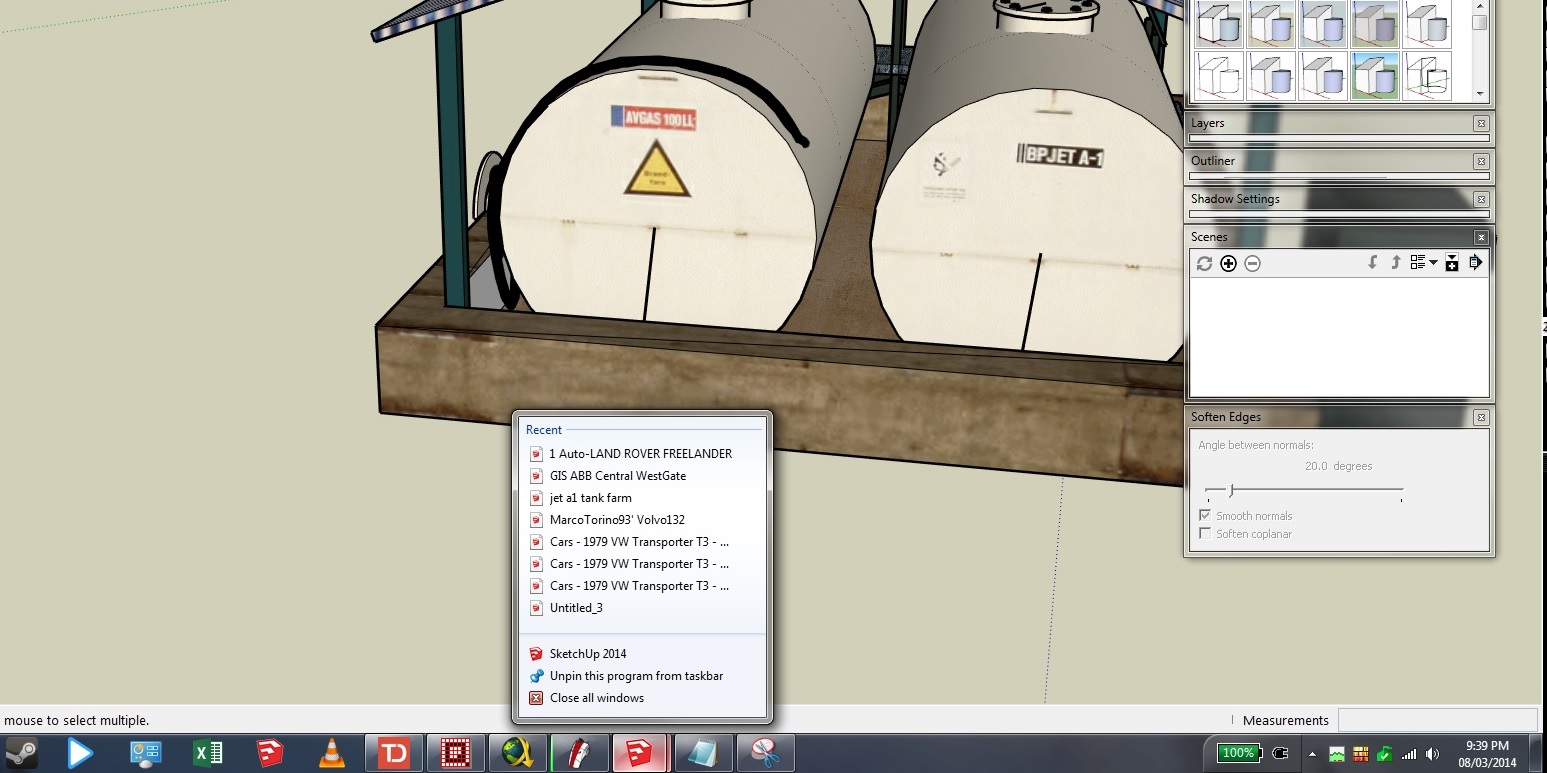
interestingly, if you pin a file to sketchup 2014, and launch from the taskbar jumplist, it will open without errors - dont know if that helps
-
Here is a short video showing how the render feature works.
-
@unclebim said:
@jiminy-billy-bob said:
@unclebim said:
@unclebim said:
- Not sure whether since ver. 0.4 or 0.5 but in both SU 8 and SU 2013 Edit->Paste and Ctrl+V do not work, Edit->Paste in place works though. Removing the plugin files from SU Plugins folder resolved the problem in both SU 8 and SU 2013. Also renaming layers in the native SU Layers window sometimes caused bugsplat with the plugin installed in SU 2013.
Weird. Does it work when Layers Panel is installed but closed ?
- Well it does happen no matter whether Layers Panel is open or closed. What happens is that you can see the pasted object shortly on the screen and then it disappears and the move tool cursor reverts back to the formally active tool. I tried this with groups and components and with ungrouped geometry. The problem occurs when the pasted object requires the creation of a new layer that does not exist in the file already. If I make a layer with the same name that the pasted object is on then it can be pasted. Although I have a problem pasting a nesting group in Layer 0 and I have no problem pasting the nested groups together (also on Layer 0). Moving the same nesting group on a newly created (after Layers Panel installation) layer does not help. Making the group a component also.
I can still report the same problem with both SU 2013 and SU 2014. Here are the respective error reports:
Error: #<TypeError: reference to deleted Entity>
C:/PROGRA~2/SketchUp/SKETCH~1/Plugins/jbb_layers_panel/rb/methods.rb:48:inget_attribute' C:/PROGRA~2/SketchUp/SKETCH~1/Plugins/jbb_layers_panel/rb/methods.rb:48:inIdLayer'
C:/PROGRA~2/SketchUp/SKETCH~1/Plugins/jbb_layers_panel/rb/observers.rb:73:inonLayerAdded' C:/PROGRA~2/SketchUp/SKETCH~1/Plugins/#WorkPlane.rb:274:incall'
C:/PROGRA~2/SketchUp/SKETCH~1/Plugins/#WorkPlane.rb:274
Error: #<TypeError: reference to deleted Entity>
C:/PROGRA~2/SketchUp/SKETCH~1/Plugins/jbb_layers_panel/rb/methods.rb:48:inget_attribute' C:/PROGRA~2/SketchUp/SKETCH~1/Plugins/jbb_layers_panel/rb/methods.rb:48:inIdLayer'
C:/PROGRA~2/SketchUp/SKETCH~1/Plugins/jbb_layers_panel/rb/observers.rb:73:inonLayerAdded' C:/PROGRA~2/SketchUp/SKETCH~1/Plugins/jbb_layers_panel/rb/methods.rb:48:incall'
C:/PROGRA~2/SketchUp/SKETCH~1/Plugins/jbb_layers_panel/rb/methods.rb:48
Error: #<TypeError: reference to deleted Entity>
C:/PROGRA~2/SketchUp/SKETCH~1/Plugins/jbb_layers_panel/rb/methods.rb:48:inget_attribute' C:/PROGRA~2/SketchUp/SKETCH~1/Plugins/jbb_layers_panel/rb/methods.rb:48:inIdLayer'
C:/PROGRA~2/SketchUp/SKETCH~1/Plugins/jbb_layers_panel/rb/observers.rb:73:inonLayerAdded' C:/PROGRA~2/SketchUp/SKETCH~1/Plugins/jbb_layers_panel/rb/methods.rb:48:incall'
C:/PROGRA~2/SketchUp/SKETCH~1/Plugins/jbb_layers_panel/rb/methods.rb:48
Error: #<TypeError: reference to deleted Entity>
C:/PROGRA~2/SketchUp/SKETCH~1/Plugins/jbb_layers_panel/rb/methods.rb:48:inget_attribute' C:/PROGRA~2/SketchUp/SKETCH~1/Plugins/jbb_layers_panel/rb/methods.rb:48:inIdLayer'
C:/PROGRA~2/SketchUp/SKETCH~1/Plugins/jbb_layers_panel/rb/observers.rb:73:inonLayerAdded' C:/PROGRA~2/SketchUp/SKETCH~1/Plugins/jbb_layers_panel/rb/methods.rb:48:incall'
C:/PROGRA~2/SketchUp/SKETCH~1/Plugins/jbb_layers_panel/rb/methods.rb:48
Error: #<TypeError: reference to deleted Entity>
C:/PROGRA~2/SketchUp/SKETCH~1/Plugins/jbb_layers_panel/rb/methods.rb:48:inget_attribute' C:/PROGRA~2/SketchUp/SKETCH~1/Plugins/jbb_layers_panel/rb/methods.rb:48:inIdLayer'
C:/PROGRA~2/SketchUp/SKETCH~1/Plugins/jbb_layers_panel/rb/observers.rb:73:inonLayerAdded' C:/PROGRA~2/SketchUp/SKETCH~1/Plugins/jbb_layers_panel/rb/methods.rb:48:incall'
C:/PROGRA~2/SketchUp/SKETCH~1/Plugins/jbb_layers_panel/rb/methods.rb:48
Error: #<TypeError: reference to deleted Entity>
C:/PROGRA~2/SketchUp/SKETCH~1/Plugins/jbb_layers_panel/rb/methods.rb:48:inget_attribute' C:/PROGRA~2/SketchUp/SKETCH~1/Plugins/jbb_layers_panel/rb/methods.rb:48:inIdLayer'
C:/PROGRA~2/SketchUp/SKETCH~1/Plugins/jbb_layers_panel/rb/observers.rb:73:inonLayerAdded' C:/PROGRA~2/SketchUp/SKETCH~1/Plugins/jbb_layers_panel/rb/methods.rb:48:incall'
C:/PROGRA~2/SketchUp/SKETCH~1/Plugins/jbb_layers_panel/rb/methods.rb:48Error: #<TypeError: reference to deleted Entity>
C:/Users/Bim/AppData/Roaming/SketchUp/SketchUp 2014/SketchUp/Plugins/jbb_layers_panel/rb/methods.rb:48:inget_attribute' C:/Users/Bim/AppData/Roaming/SketchUp/SketchUp 2014/SketchUp/Plugins/jbb_layers_panel/rb/methods.rb:48:inIdLayer'
C:/Users/Bim/AppData/Roaming/SketchUp/SketchUp 2014/SketchUp/Plugins/jbb_layers_panel/rb/observers.rb:73:inblock in onLayerAdded' -e:1:incall'
Error: #<TypeError: reference to deleted Entity>
C:/Users/Bim/AppData/Roaming/SketchUp/SketchUp 2014/SketchUp/Plugins/jbb_layers_panel/rb/methods.rb:48:inget_attribute' C:/Users/Bim/AppData/Roaming/SketchUp/SketchUp 2014/SketchUp/Plugins/jbb_layers_panel/rb/methods.rb:48:inIdLayer'
C:/Users/Bim/AppData/Roaming/SketchUp/SketchUp 2014/SketchUp/Plugins/jbb_layers_panel/rb/observers.rb:73:inblock in onLayerAdded' -e:1:incall'
Error: #<TypeError: reference to deleted Entity>
C:/Users/Bim/AppData/Roaming/SketchUp/SketchUp 2014/SketchUp/Plugins/jbb_layers_panel/rb/methods.rb:48:inget_attribute' C:/Users/Bim/AppData/Roaming/SketchUp/SketchUp 2014/SketchUp/Plugins/jbb_layers_panel/rb/methods.rb:48:inIdLayer'
C:/Users/Bim/AppData/Roaming/SketchUp/SketchUp 2014/SketchUp/Plugins/jbb_layers_panel/rb/observers.rb:73:inblock in onLayerAdded' -e:1:incall'
Error: #<TypeError: reference to deleted Entity>
C:/Users/Bim/AppData/Roaming/SketchUp/SketchUp 2014/SketchUp/Plugins/jbb_layers_panel/rb/methods.rb:48:inget_attribute' C:/Users/Bim/AppData/Roaming/SketchUp/SketchUp 2014/SketchUp/Plugins/jbb_layers_panel/rb/methods.rb:48:inIdLayer'
C:/Users/Bim/AppData/Roaming/SketchUp/SketchUp 2014/SketchUp/Plugins/jbb_layers_panel/rb/observers.rb:73:inblock in onLayerAdded' -e:1:incall'
Error: #<TypeError: reference to deleted Entity>
C:/Users/Bim/AppData/Roaming/SketchUp/SketchUp 2014/SketchUp/Plugins/jbb_layers_panel/rb/methods.rb:48:inget_attribute' C:/Users/Bim/AppData/Roaming/SketchUp/SketchUp 2014/SketchUp/Plugins/jbb_layers_panel/rb/methods.rb:48:inIdLayer'
C:/Users/Bim/AppData/Roaming/SketchUp/SketchUp 2014/SketchUp/Plugins/jbb_layers_panel/rb/observers.rb:73:inblock in onLayerAdded' -e:1:incall'
Error: #<TypeError: reference to deleted Entity>
C:/Users/Bim/AppData/Roaming/SketchUp/SketchUp 2014/SketchUp/Plugins/jbb_layers_panel/rb/methods.rb:48:inget_attribute' C:/Users/Bim/AppData/Roaming/SketchUp/SketchUp 2014/SketchUp/Plugins/jbb_layers_panel/rb/methods.rb:48:inIdLayer'
C:/Users/Bim/AppData/Roaming/SketchUp/SketchUp 2014/SketchUp/Plugins/jbb_layers_panel/rb/observers.rb:73:inblock in onLayerAdded' -e:1:incall'Thank you again for this great plugin, I would love to use it but for the reported problem.
-
Oh, I thought I had this fixed. I'll take a look at it.








Advertisement