sketchucation logo sketchucation
    • 登入
    Oops, your profile's looking a bit empty! To help us tailor your experience, please fill in key details like your SketchUp version, skill level, operating system, and more. Update and save your info on your profile page today!
    🔌 Smart Spline | Fluid way to handle splines for furniture design and complex structures. Download

    [Plugin] Layers Panel 1.2.1

    已排程 已置頂 已鎖定 已移動 Plugins
    672 貼文 109 Posters 203.4k 瀏覽 109 Watching
    正在載入更多貼文
    • 從舊到新
    • 從新到舊
    • 最多點贊
    回覆
    • 在新貼文中回覆
    登入後回覆
    此主題已被刪除。只有擁有主題管理權限的使用者可以查看。
    • Rich O BrienR 離線
      Rich O Brien Moderator
      最後由 編輯

      I never knew this tread had added a poll?

      Nice to see Thea getting some attention

      Download the free D'oh Book for SketchUp 📖

      1 條回覆 最後回覆 回覆 引用 0
      • jiminy-billy-bobJ 離線
        jiminy-billy-bob
        最後由 編輯

        Yeah it's been some time now 😄

        25% off Skatter for SketchUcation Premium Members

        1 條回覆 最後回覆 回覆 引用 0
        • jiminy-billy-bobJ 離線
          jiminy-billy-bob
          最後由 編輯

          .

          New version 0.9.1 beta !

          Changelog :

          • Fixed options dialog on OSX
          • Disabled automatic display of floating toolbar on OSX
          • Fixed "Add layer hidden on new pages"
          • Fixed clash with RichSections plugin
          • Several bug fixes

          Download in the plugin store !

          25% off Skatter for SketchUcation Premium Members

          1 條回覆 最後回覆 回覆 引用 0
          • P 離線
            paolo01
            最後由 編輯

            Just installed and the plugin is very useful, to keep layers in order. It is really excellent! Thank you!
            If I can suggest a new function, it might be useful to have the possibility to duplicate the position of a single layer in different groups. For instance, in a building with many stores, I could have the layer "external walls store2" within the group "store2", but also within the group "external walls", containing all the external walls of any store .
            I think it could be possible to reach a similar result using layers and outliner together, but using a single panel would make the function of visibility much simpler.
            Thank you again and good job!
            Paolo

            1 條回覆 最後回覆 回覆 引用 0
            • jiminy-billy-bobJ 離線
              jiminy-billy-bob
              最後由 編輯

              I think it would be rather confusing to have duplicates of the same layer. I've never seen such thing in any software, and I think there is a reason for that.
              Although, I was considering adding a function similar to layer compositions in Photoshop.

              25% off Skatter for SketchUcation Premium Members

              1 條回覆 最後回覆 回覆 引用 0
              • wind-borneW 離線
                wind-borne
                最後由 編輯

                @jiminy-billy-bob said:

                .

                New version 0.9.1 beta !

                Changelog :

                • Fixed options dialog on OSX
                • Disabled automatic display of floating toolbar on OSX

                Thanks for saving me the trouble to deal with toolbar with each update. 😄

                Options dialog still dysfunctional on my OSX,
                reverts to this setup regardless of my choices
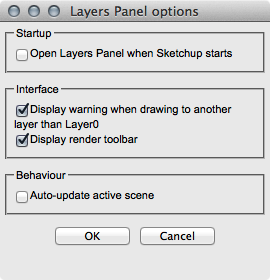

                04.png

                "To read between the lines was easier than to follow the text."OSX 10.11.6

                %(#BF80BF)[SU 8 pro

                1 條回覆 最後回覆 回覆 引用 0
                • jiminy-billy-bobJ 離線
                  jiminy-billy-bob
                  最後由 編輯

                  So you confirm you're running SU8 pro on OSX 10.9.1 ?
                  Do you see the effects of changing these options ? (Like if you uncheck "Display render toolbar")

                  25% off Skatter for SketchUcation Premium Members

                  1 條回覆 最後回覆 回覆 引用 0
                  • R 離線
                    rafaelparedes
                    最後由 編輯

                    no add a layer only visible in the current scene 😞?

                    1 條回覆 最後回覆 回覆 引用 0
                    • wind-borneW 離線
                      wind-borne
                      最後由 編輯

                      @jiminy-billy-bob said:

                      So you confirm you're running SU8 pro on OSX 10.9.1 ?
                      Do you see the effects of changing these options ? (Like if you uncheck "Display render toolbar")

                      Yes, using 10.9.1 and SU pro and tested on SU 2013, no combination of check/uncheck of boxes has any effect and reopening options displays as shown above every time.

                      Duh moment when I read warning sign when merging layers and saw I could disable elsewhere. My style of modeling doesn't bring forth that warning on its own and didn't understand why the plugin was until I watched SU's Layers window while merging layers. The warning sign was what I wanted to eliminate and now I know how.

                      "To read between the lines was easier than to follow the text."OSX 10.11.6

                      %(#BF80BF)[SU 8 pro

                      1 條回覆 最後回覆 回覆 引用 0
                      • jiminy-billy-bobJ 離線
                        jiminy-billy-bob
                        最後由 編輯

                        @wind-borne said:

                        @jiminy-billy-bob said:

                        So you confirm you're running SU8 pro on OSX 10.9.1 ?
                        Do you see the effects of changing these options ? (Like if you uncheck "Display render toolbar")

                        Yes, using 10.9.1 and SU pro and tested on SU 2013, no combination of check/uncheck of boxes has any effect and reopening options displays as shown above every time.

                        What I mean is, does it hide the render toolbar ? (In the main dialog)
                        I want to know if the changes are applied, apart from the options dialog being broken.

                        @wind-borne said:

                        Duh moment when I read warning sign when merging layers and saw I could disable elsewhere. My style of modeling doesn't bring forth that warning on its own and didn't understand why the plugin was until I watched SU's Layers window while merging layers. The warning sign was what I wanted to eliminate and now I know how.

                        Warning when merging layers ? There is none in LP. I d'ont get what you're talking about.
                        Maybe the warning when drawing geometry on another layer than layer0 ?

                        25% off Skatter for SketchUcation Premium Members

                        1 條回覆 最後回覆 回覆 引用 0
                        • wind-borneW 離線
                          wind-borne
                          最後由 編輯

                          @jiminy-billy-bob said:

                          @wind-borne said:

                          @jiminy-billy-bob said:

                          So you confirm you're running SU8 pro on OSX 10.9.1 ?
                          Do you see the effects of changing these options ? (Like if you uncheck "Display render toolbar")

                          Yes, using 10.9.1 and SU pro and tested on SU 2013, no combination of check/uncheck of boxes has any effect and reopening options displays as shown above every time.

                          What I mean is, does it hide the render toolbar ? (In the main dialog)
                          I want to know if the changes are applied, apart from the options dialog being broken.

                          @wind-borne said:

                          Duh moment when I read warning sign when merging layers and saw I could disable elsewhere. My style of modeling doesn't bring forth that warning on its own and didn't understand why the plugin was until I watched SU's Layers window while merging layers. The warning sign was what I wanted to eliminate and now I know how.

                          Warning when merging layers ? There is none in LP. I d'ont get what you're talking about.
                          Maybe the warning when drawing geometry on another layer than layer0 ?

                          Vid showing your Layers Panel rebuilding and second part shows (control-E)merge layers moving active layer(shown in SU layer window) and tripping warning sign.

                          Unticking the warning box yields same results though not shown in vid.

                          "To read between the lines was easier than to follow the text."OSX 10.11.6

                          %(#BF80BF)[SU 8 pro

                          1 條回覆 最後回覆 回覆 引用 0
                          • jiminy-billy-bobJ 離線
                            jiminy-billy-bob
                            最後由 編輯

                            Thanks for the video! very usefull 😉

                            There is clearly some issue with storing user preferences. I'll look into it.

                            As for the warning, it seems you have this plugin installed. It is the one displaying this warning.

                            25% off Skatter for SketchUcation Premium Members

                            1 條回覆 最後回覆 回覆 引用 0
                            • jiminy-billy-bobJ 離線
                              jiminy-billy-bob
                              最後由 編輯

                              When you choose another render engine in the list, does your change stay after reopening the dialog? Or does it revert back to Vray? (Which is default)

                              25% off Skatter for SketchUcation Premium Members

                              1 條回覆 最後回覆 回覆 引用 0
                              • wind-borneW 離線
                                wind-borne
                                最後由 編輯

                                @jiminy-billy-bob said:

                                When you choose another render engine in the list, does your change stay after reopening the dialog? Or does it revert back to Vray? (Which is default)

                                Those are not dependent on the OK button. They hold across sessions, in the vid you can see indigo>vray>indigo as I slowed that transition way down...

                                "To read between the lines was easier than to follow the text."OSX 10.11.6

                                %(#BF80BF)[SU 8 pro

                                1 條回覆 最後回覆 回覆 引用 0
                                • jiminy-billy-bobJ 離線
                                  jiminy-billy-bob
                                  最後由 編輯

                                  Right. So this is not related to storing user preference, the issue comes from the options dialog itself.

                                  25% off Skatter for SketchUcation Premium Members

                                  1 條回覆 最後回覆 回覆 引用 0
                                  • Bob JamesB 離線
                                    Bob James
                                    最後由 編輯

                                    Still having some problems:

                                    After working with a new model for a while I start getting this error.
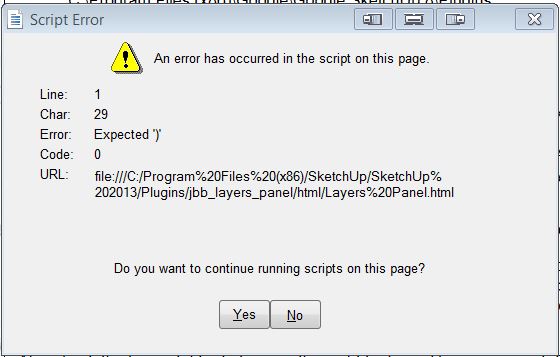

                                    LP.JPG

                                    i7-4930K 3.4Ghz, 2x GTX780 6GB, 32GB DDR3-1600 ECC, OCZ Vertex 4 500GB, WD Black 3TB, 32TB NAS, 4x 27" Monitors, SpaceMouse Pro, X-keys XK-60

                                    1 條回覆 最後回覆 回覆 引用 0
                                    • jiminy-billy-bobJ 離線
                                      jiminy-billy-bob
                                      最後由 編輯

                                      Only one file?

                                      25% off Skatter for SketchUcation Premium Members

                                      1 條回覆 最後回覆 回覆 引用 0
                                      • Bob JamesB 離線
                                        Bob James
                                        最後由 編輯

                                        @jiminy-billy-bob said:

                                        Only one file?

                                        No. Several.

                                        i7-4930K 3.4Ghz, 2x GTX780 6GB, 32GB DDR3-1600 ECC, OCZ Vertex 4 500GB, WD Black 3TB, 32TB NAS, 4x 27" Monitors, SpaceMouse Pro, X-keys XK-60

                                        1 條回覆 最後回覆 回覆 引用 0
                                        • jiminy-billy-bobJ 離線
                                          jiminy-billy-bob
                                          最後由 編輯

                                          But not all of them?
                                          Could you send me one of these files?

                                          25% off Skatter for SketchUcation Premium Members

                                          1 條回覆 最後回覆 回覆 引用 0
                                          • H 離線
                                            hesheit1028
                                            最後由 編輯

                                            Hi,

                                            OS X– Mac 10.9.1

                                            Sketch Up pro 2013 – ver. 13.0.3688

                                            I am currently having some problems with the layer panel when ever I try to switch from one sketch up project to another.

                                            All layers are gone when ever I switch from project to another and I could never get it back until I restart my Sketch Up.

                                            Please Help.

                                            Marris.

                                            1 條回覆 最後回覆 回覆 引用 0
                                            • 1
                                            • 2
                                            • 3
                                            • 4
                                            • 5
                                            • 6
                                            • 7
                                            • 8
                                            • 33
                                            • 34
                                            • 6 / 34
                                            • 第一個貼文
                                              最後的貼文
                                            Buy SketchPlus
                                            Buy SUbD
                                            Buy WrapR
                                            Buy eBook
                                            Buy Modelur
                                            Buy Vertex Tools
                                            Buy SketchCuisine
                                            Buy FormFonts

                                            Advertisement


