sketchucation logo sketchucation
    • 登入
    Oops, your profile's looking a bit empty! To help us tailor your experience, please fill in key details like your SketchUp version, skill level, operating system, and more. Update and save your info on your profile page today!
    🔌 Smart Spline | Fluid way to handle splines for furniture design and complex structures. Download

    [Plugin] Layers Panel 1.2.1

    已排程 已置頂 已鎖定 已移動 Plugins
    672 貼文 109 Posters 203.1k 瀏覽 109 Watching
    正在載入更多貼文
    • 從舊到新
    • 從新到舊
    • 最多點贊
    回覆
    • 在新貼文中回覆
    登入後回覆
    此主題已被刪除。只有擁有主題管理權限的使用者可以查看。
    • jolranJ 離線
      jolran
      最後由 編輯

      Exellent! I'll give this a go later..

      @unknownuser said:

      It would indeed be usefull. I already tried, but I use a jquery plugin for sorting/nesting, I didn't write the feature. I guess I'll have to dig into this

      I suspect you are using Jquery draggable, droppable and sortable, right?

      I'm working on similar things for my "node-editor". So far I get the impression (from all over the place) implementing "multiselect" is a bit funky. At least if you would like to do some kind of rectangle-select-multi-thingy and use thoose 3 UI features mentioned. I hope I'm wrong, cause it would be great if it could be done easily and stable.

      Anyhooo... Here's a snippet that at least let you select multiple and drag them..
      Now, sorting/dropping them is another thing..

      Multi Drag Demo - ThreeDubMedia - JSFiddle - Code Playground

      JSFiddle - Test your JavaScript, CSS, HTML or CoffeeScript online with JSFiddle.

      favicon

      (jsfiddle.net)

      (hint use ctrl to select 1 instance)

      edit: Sorry posted wrong fiddle:

      Multi Drag Demo - ThreeDubMedia - JSFiddle - Code Playground

      JSFiddle - Test your JavaScript, CSS, HTML or CoffeeScript online with JSFiddle.

      favicon

      (jsfiddle.net)

      1 條回覆 最後回覆 回覆 引用 0
      • jiminy-billy-bobJ 離線
        jiminy-billy-bob
        最後由 編輯

        @jolran said:

        I suspect you are using Jquery draggable, droppable and sortable, right?

        Nope, I'm using NestedSortable, and jQueryUI's "Selectable" feature. I'll have to combine the two.

        25% off Skatter for SketchUcation Premium Members

        1 條回覆 最後回覆 回覆 引用 0
        • jolranJ 離線
          jolran
          最後由 編輯

          Ahh, I see. That's a different matter then..

          1 條回覆 最後回覆 回覆 引用 0
          • D 離線
            db11
            最後由 編輯

            I've been waiting for this forever...

            @unknownuser said:

            It does not work on OSX !
            I tested it on windows 7 and 8, with Sketchup 8 and 2013, and Internet Explorer 10.

            Does that mean I'll just have to wait longer — i.e. it doesn't work YET on OSX, but should with additional testing / debugging — or is it that it CAN'T work on OSX?

            Really hoping that a future release will include OSX compatibility. Great work in any case!

            1 條回覆 最後回覆 回覆 引用 0
            • jiminy-billy-bobJ 離線
              jiminy-billy-bob
              最後由 編輯

              It should with some addition/modification of the code. The main problem is that I don't have a mac, so I'll need a mac user to help me testing.

              25% off Skatter for SketchUcation Premium Members

              1 條回覆 最後回覆 回覆 引用 0
              • Bob JamesB 離線
                Bob James
                最後由 編輯

                This is so incredibly useful it takes my breath away.
                There isn't a smilie that comes close to expressing how great this plugin is even in a beta state.

                i7-4930K 3.4Ghz, 2x GTX780 6GB, 32GB DDR3-1600 ECC, OCZ Vertex 4 500GB, WD Black 3TB, 32TB NAS, 4x 27" Monitors, SpaceMouse Pro, X-keys XK-60

                1 條回覆 最後回覆 回覆 引用 0
                • Rich O BrienR 離線
                  Rich O Brien Moderator
                  最後由 編輯

                  @JBB

                  I added it but for future updates you can familiarize yourself with the links below

                  favicon

                  (sketchucation.com)

                  http://sketchucation.com/forums/viewforum.php?f=382

                  http://sketchucation.com/forums/viewtopic.php?f=382&t=52516

                  Link Preview Image
                  SketchUp Plugins | PluginStore | SketchUcation

                  SketchUp Plugin and Extension Store by SketchUcation provides free downloads of hundreds of SketchUp extensions and plugins

                  favicon

                  (sketchucation.com)

                  Download the free D'oh Book for SketchUp 📖

                  1 條回覆 最後回覆 回覆 引用 0
                  • jiminy-billy-bobJ 離線
                    jiminy-billy-bob
                    最後由 編輯

                    Thanks a lot for your kind words, guys. I'm glad you like it.

                    @rich o brien said:

                    I added it but for future updates you can familiarize yourself with the links below

                    Great, thanks ! 😉

                    25% off Skatter for SketchUcation Premium Members

                    1 條回覆 最後回覆 回覆 引用 0
                    • kenK 離線
                      ken
                      最後由 編輯

                      Installed your plugin. Hope this is the type of feedback you wish to have.

                      Image 1 - Error received after trying to open layer panel menu.

                      Image 2 - Error received after trying to save the file as template.

                      Hope this helps.

                      Sketchup V13 pro

                      Window 7

                      Thanks for this plugin. Hope you get it working.

                      Ken
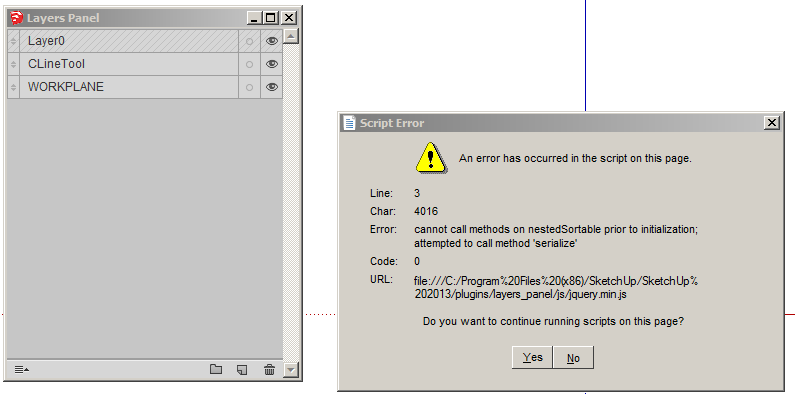

                      Image 1.png


                      Image 2.png

                      Fight like your the third monkey on Noah's Ark gangway.

                      1 條回覆 最後回覆 回覆 引用 0
                      • O 離線
                        onkravets
                        最後由 編輯

                        Very nice and useful plugin.
                        Thank you!

                        1 條回覆 最後回覆 回覆 引用 0
                        • T 離線
                          tald311
                          最後由 編輯

                          Awesome. Another very needed plugin to help sort and organize. This will get a ton of use.
                          THANK YOU
                          Daniel

                          1 條回覆 最後回覆 回覆 引用 0
                          • jiminy-billy-bobJ 離線
                            jiminy-billy-bob
                            最後由 編輯

                            Ken > Your first bug was coming from layers created before the plugin installation, this new version 0.2 should fix it : http://sketchucation.com/resources/pluginstore?pln=Layers_Panel

                            Not sure about the second... Do you have this problem with every file you're trying to save as template, even a brand new one ?

                            25% off Skatter for SketchUcation Premium Members

                            1 條回覆 最後回覆 回覆 引用 0
                            • kenK 離線
                              ken
                              最後由 編輯

                              @jiminy-billy-bob said:

                              Ken > Your first bug was coming from layers created before the plugin installation, this new version 0.2 should fix it : http://sketchucation.com/resources/pluginstore?pln=Layers_Panel

                              Not sure about the second... Do you have this problem with every file you're trying to save as template, even a brand new one ?

                              I can save a template files OK. No problems.

                              And yes the layers were created before installing your plugin. They are layers I had on my template. Will remove all my layers and try again.

                              Thanks for the quick response.

                              Ken

                              Fight like your the third monkey on Noah's Ark gangway.

                              1 條回覆 最後回覆 回覆 引用 0
                              • jiminy-billy-bobJ 離線
                                jiminy-billy-bob
                                最後由 編輯

                                The new version should work ok with old layers. No need to remove them.

                                25% off Skatter for SketchUcation Premium Members

                                1 條回覆 最後回覆 回覆 引用 0
                                • G 離線
                                  greatoe
                                  最後由 編輯

                                  @jiminy-billy-bob said:

                                  It should with some addition/modification of the code. The main problem is that I don't have a mac, so I'll need a mac user to help me testing.

                                  I am very much willing to help testing.

                                  1 條回覆 最後回覆 回覆 引用 0
                                  • jiminy-billy-bobJ 離線
                                    jiminy-billy-bob
                                    最後由 編輯

                                    That's kind of you, but do you have any knowledge in ruby/javascript development ?

                                    25% off Skatter for SketchUcation Premium Members

                                    1 條回覆 最後回覆 回覆 引用 0
                                    • bobpineoB 離線
                                      bobpineo
                                      最後由 編輯

                                      Hey this looks promising,thank you!
                                      Quick question, can I use the same layer in multiple groups I create?
                                      For Instance lets say i wanted group Called "Foundation Plan" and one of the layers in that group was called "CMU Wall"..
                                      Could I create another group called "Typical Section" that also had the same "CMU Wall" inside that new group?

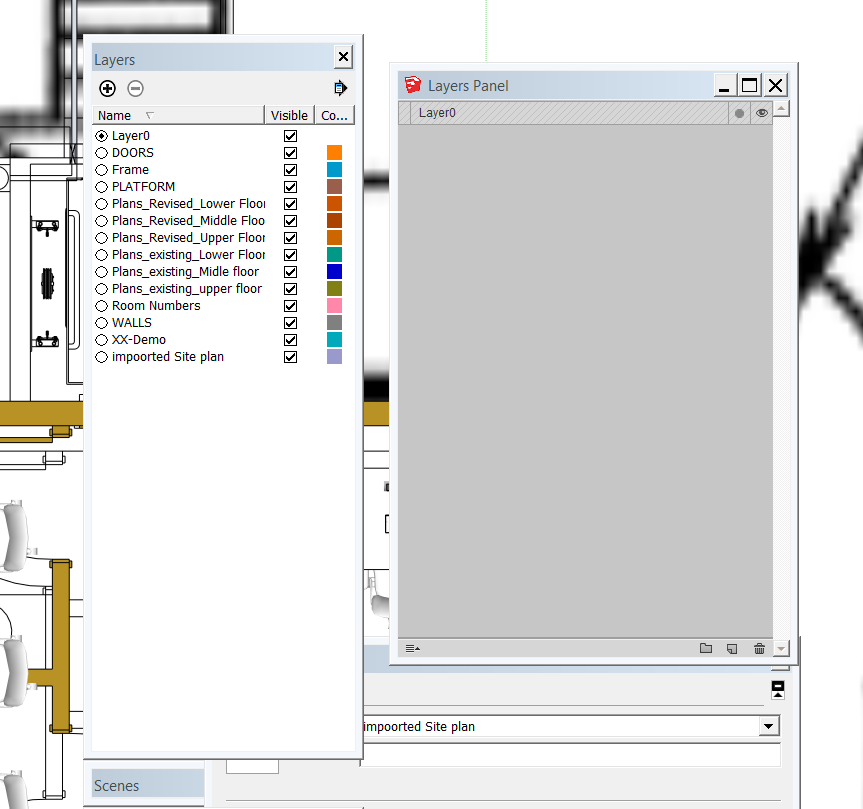
                                      Also, could this plugin be used to open an existing drawing with Layers, and the layers already created automatically show up in the dialogue box you have created?
                                      The Previously created layer names don't show up
                                      Best.
                                      BP

                                      8-27-2013 12-34-28 PM.png

                                      Bob Pineo, Design Develop LLC http://www.designdevelop.org.

                                      1 條回覆 最後回覆 回覆 引用 0
                                      • jiminy-billy-bobJ 離線
                                        jiminy-billy-bob
                                        最後由 編輯

                                        @bobpineo said:

                                        Hey this looks promising,thank you!
                                        Quick question, can I use the same layer in multiple groups I create?
                                        For Instance lets say i wanted group Called "Foundation Plan" and one of the layers in that group was called "CMU Wall"..
                                        Could I create another group called "Typical Section" that also had the same "CMU Wall" inside that new group?

                                        Nope. And even if I tried to mkde the plugin to allow that, I already see a number of problems...

                                        @bobpineo said:

                                        Also, could this plugin be used to open an existing drawing with Layers, and the layers already created automatically show up in the dialogue box you have created?
                                        The Previously created layer names don't show up
                                        Best.
                                        BP

                                        Weird, it should work. Are you using version 0.2 ? What is your windows version, and internet explorer version ? Can you send me the file ?

                                        25% off Skatter for SketchUcation Premium Members

                                        1 條回覆 最後回覆 回覆 引用 0
                                        • utilerU 離線
                                          utiler
                                          最後由 編輯

                                          Gee I hope a 'trimbler' is lurking here.... so much can be learnt from a user driven solution!!!! And soooo needed for sooo long.....!!!!!!!

                                          I've posted here previously about combining Outliner and Layer functionality and here it is!

                                          Plugin of the year for sure! Well done mate! 👍 👍 👍 👍 👍

                                          Just Curious...

                                          1 條回覆 最後回覆 回覆 引用 0
                                          • utilerU 離線
                                            utiler
                                            最後由 編輯

                                            Hey JBB, one question before I try it out: when you add a layer is that layers' visibility only visible in the current scene? If not can it be???? So tedious when adding a layer to then have to go through all other scenes to turn it off it you only want it visible in one scene.


                                            Just Curious...

                                            1 條回覆 最後回覆 回覆 引用 0
                                            • 1
                                            • 2
                                            • 28
                                            • 29
                                            • 30
                                            • 31
                                            • 32
                                            • 33
                                            • 34
                                            • 30 / 34
                                            • 第一個貼文
                                              最後的貼文
                                            Buy SketchPlus
                                            Buy SUbD
                                            Buy WrapR
                                            Buy eBook
                                            Buy Modelur
                                            Buy Vertex Tools
                                            Buy SketchCuisine
                                            Buy FormFonts

                                            Advertisement