sketchucation logo sketchucation
    • Login
    Oops, your profile's looking a bit empty! To help us tailor your experience, please fill in key details like your SketchUp version, skill level, operating system, and more. Update and save your info on your profile page today!
    โš ๏ธ Update | Sketchucation Tools 5.0.8 released with licensing improvements and bugfixes Download

    Plugin request "Section cut"

    Scheduled Pinned Locked Moved Plugins
    12 Posts 6 Posters 984 Views 6 Watching
    Loading More Posts
    • Oldest to Newest
    • Newest to Oldest
    • Most Votes
    Reply
    • Reply as topic
    Log in to reply
    This topic has been deleted. Only users with topic management privileges can see it.
    • J
      jonorman
      last edited by jonorman

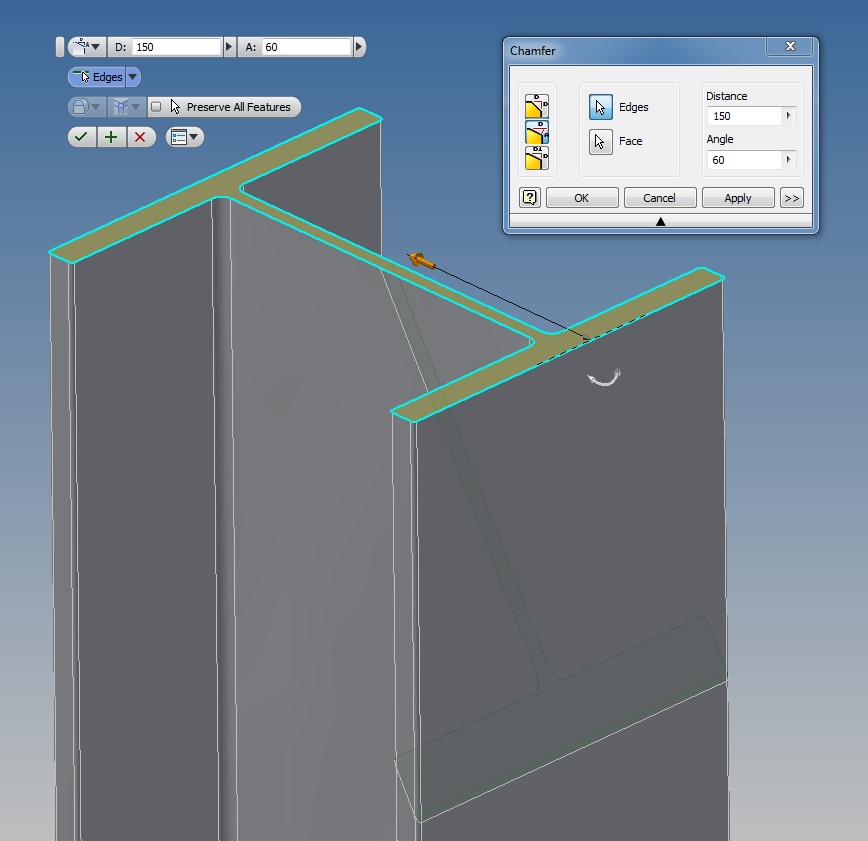
      Once again i have a wish for a new plugin, like i have in Inventor.

      Chamfer: select the surface, set distanse from edge, add angle and it trims away what you want.
      I do this manualy, but I wish i had a plugin for it.. ๐Ÿ˜„

      "crossing fingers" ๐Ÿ˜’

      Thnx


      champher test.png

      1 Reply Last reply
      Reply Quote 0
      • Dave RD
        Dave R
        last edited by

        Golly! Crossing your fingers works! The plugin you seek is now available. Actually it was available before you thought of it. ๐Ÿ˜‰ Try Round Corner by Fredo6. Read the first post and make sure you installed the LibFredo6 files as directed, too.

        Etaoin Shrdlu

        %

        (THERE'S NO PLACE LIKE)

        G28 X0.0 Y0.0 Z0.0

        M30

        %

        1 Reply Last reply
        Reply Quote 0
        • J
          jonorman
          last edited by

          LOL, have it and love it. Did not know it could do that.. Can it chamfer thru the profile like in the picture and not only the edge of the profile. If it can, then crossing fingers helped ๐Ÿ˜‰
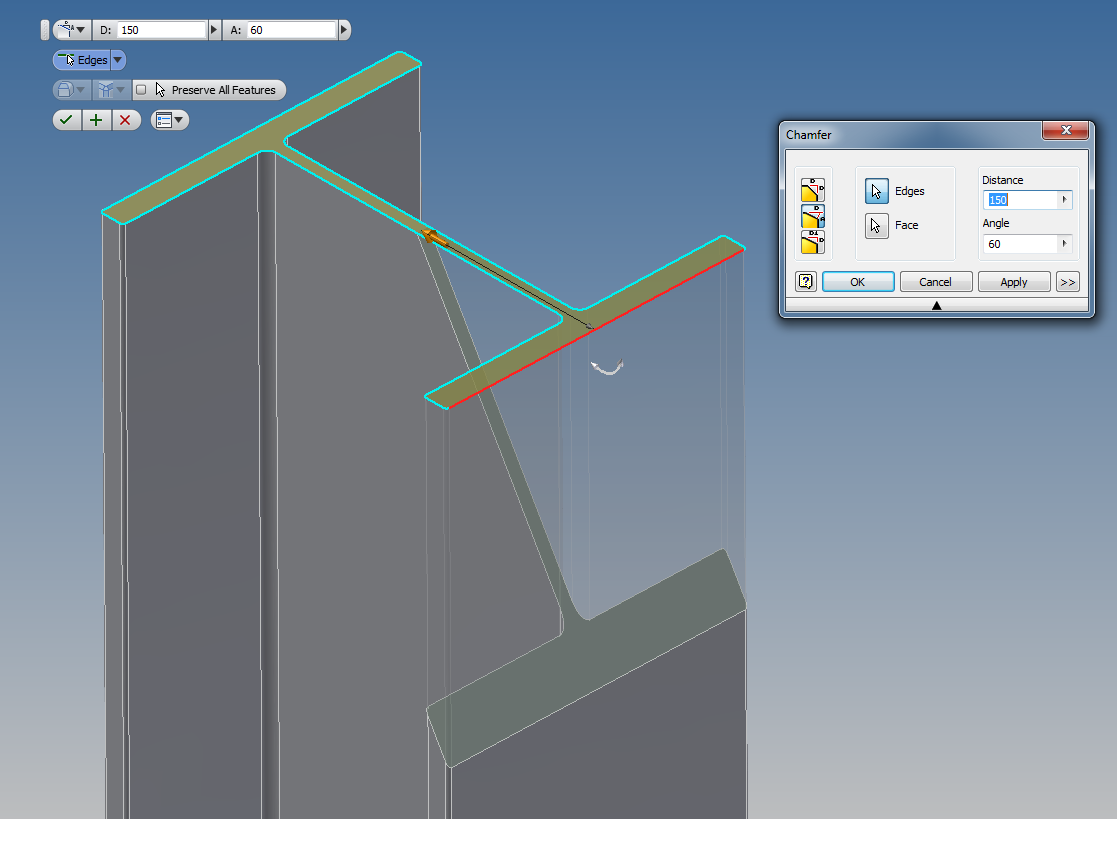

          chamfer 2.png

          1 Reply Last reply
          Reply Quote 0
          • Dave RD
            Dave R
            last edited by

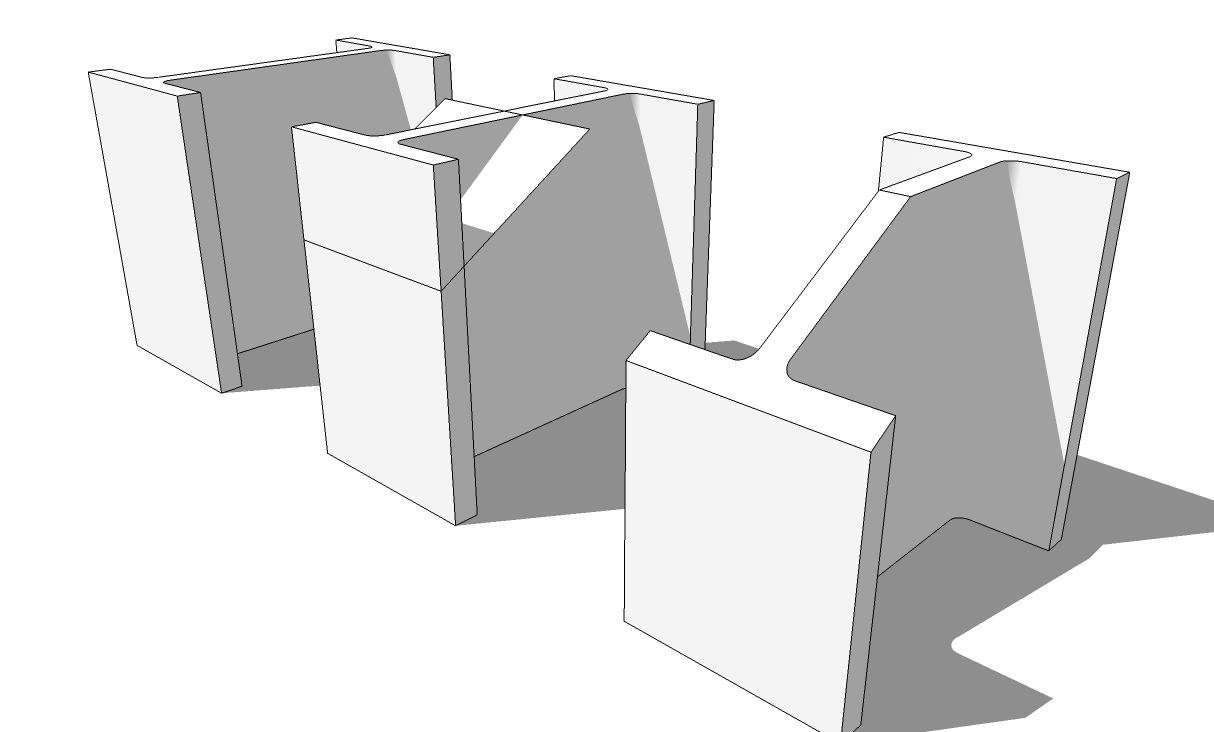
            Are you talking about the section cut in your illustration? If so, that's not a chamfer. If you want a section cut, use a cutting plane at the desired location or you can use Zorro to cut through it and then add a face.

            Etaoin Shrdlu

            %

            (THERE'S NO PLACE LIKE)

            G28 X0.0 Y0.0 Z0.0

            M30

            %

            1 Reply Last reply
            Reply Quote 0
            • soloS
              solo
              last edited by

              Create a profile, pull it, make a section plane and intersect then remove unwanted parts.

              http://www.solos-art.com

              If you see a toilet in your dreams do not use it.

              1 Reply Last reply
              Reply Quote 0
              • Dave RD
                Dave R
                last edited by

                cut.png

                No plugin needed.

                Etaoin Shrdlu

                %

                (THERE'S NO PLACE LIKE)

                G28 X0.0 Y0.0 Z0.0

                M30

                %

                1 Reply Last reply
                Reply Quote 0
                • J
                  jonorman
                  last edited by

                  That is the way i do it today yes, but as i do the "section cut" operation a lot, I was hoping for a more automated way..

                  1 Reply Last reply
                  Reply Quote 0
                  • Dave RD
                    Dave R
                    last edited by

                    So maybe you want to change the title of your thread to more accurately communicate what it is you want to do with the plugin.

                    As Pete said, you could use a section cut, and Make Group From Slice. Then explode the slice.

                    Etaoin Shrdlu

                    %

                    (THERE'S NO PLACE LIKE)

                    G28 X0.0 Y0.0 Z0.0

                    M30

                    %

                    1 Reply Last reply
                    Reply Quote 0
                    • J
                      jonorman
                      last edited by

                      Title changed. I have several ways of doing the cut, but again hoping for a faster, quicker way... Like the one i use in inventor. select surface, edge, set cut distance and angle, hit enter, "hokus pokus" and its gone.. i don't know if it is a hard script to create, but you script writers create all kinds of miracles so Im hoping for the best here.

                      1 Reply Last reply
                      Reply Quote 0
                      • yorik1984Y
                        yorik1984
                        last edited by

                        try this http://sketchucation.com/forums/viewtopic.php?p=315482#p315482

                        1 Reply Last reply
                        Reply Quote 0
                        • TIGT
                          TIG Moderator
                          last edited by

                          If you have Pro try my Cut to Plane http://sketchucation.com/resources/pluginstore?pln=TIG_Cut_to_plane

                          TIG

                          1 Reply Last reply
                          Reply Quote 0
                          • kenK
                            ken
                            last edited by

                            I am surprised no one has mentioned this plugin. I use it all the time to trim steel and piping members. Just draw a face of what you wish to trim away, make your selection and select the face and presto you have trimmed the selection.

                            I use it from drilling holes and trimming ends.

                            404 Not Found

                            favicon

                            (sketchucation.com)

                            Ken

                            Fight like your the third monkey on Noah's Ark gangway.

                            1 Reply Last reply
                            Reply Quote 0

                            Hello! It looks like you're interested in this conversation, but you don't have an account yet.

                            Getting fed up of having to scroll through the same posts each visit? When you register for an account, you'll always come back to exactly where you were before, and choose to be notified of new replies (either via email, or push notification). You'll also be able to save bookmarks and upvote posts to show your appreciation to other community members.

                            With your input, this post could be even better ๐Ÿ’—

                            Register Login
                            • 1 / 1
                            • First post
                              Last post
                            Buy SketchPlus
                            Buy SUbD
                            Buy WrapR
                            Buy eBook
                            Buy Modelur
                            Buy Vertex Tools
                            Buy SketchCuisine
                            Buy FormFonts

                            Advertisement