sketchucation logo sketchucation
    • 登入
    Oops, your profile's looking a bit empty! To help us tailor your experience, please fill in key details like your SketchUp version, skill level, operating system, and more. Update and save your info on your profile page today!
    🔌 Smart Spline | Fluid way to handle splines for furniture design and complex structures. Download

    [Plugin][$] 3D Tree Maker - New version 1.10.14

    已排程 已置頂 已鎖定 已移動 Plugins
    322 貼文 79 Posters 174.5k 瀏覽 79 Watching
    正在載入更多貼文
    • 從舊到新
    • 從新到舊
    • 最多點贊
    回覆
    • 在新貼文中回覆
    登入後回覆
    此主題已被刪除。只有擁有主題管理權限的使用者可以查看。
    • ppoublanP 離線
      ppoublan
      最後由 編輯

      @matt.gordon320 said:

      I'd love to see an eventual option for root systems, and especially on option for Aerial root systems like on the mangrove or banyan trees.

      Hi Matt,
      This is a good idea. I've seen this feature in more complex trees/plants generators.
      I will look how to develop it, but it can take me long. Will try.

      A kind of cheat/workaround to achieve this with the current version may be :

      • create your root system as a second tree
      • when happy with the result, flip it vertically, scale, and place under the first tree.

      Here is an example :
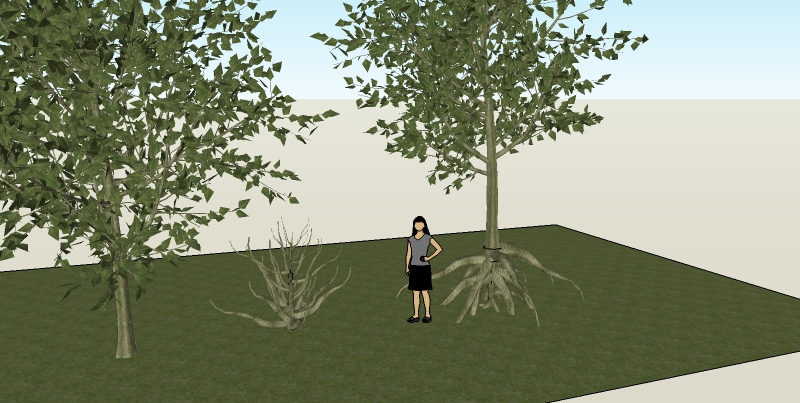
      rootsystem.jpg

      Yours
      Pascal

      1 條回覆 最後回覆 回覆 引用 0
      • pilouP 離線
        pilou
        最後由 編輯

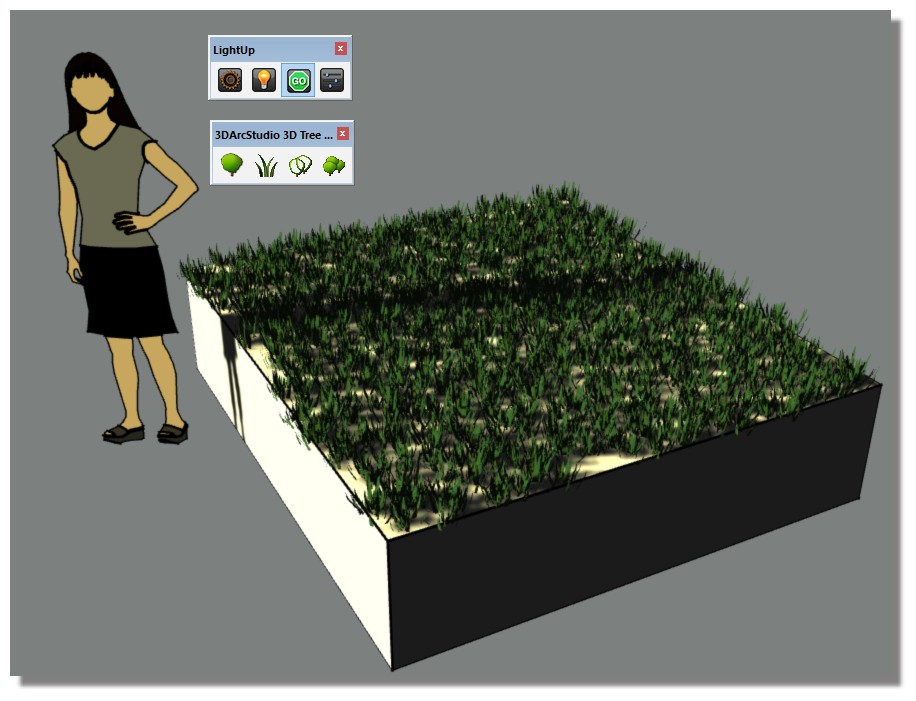
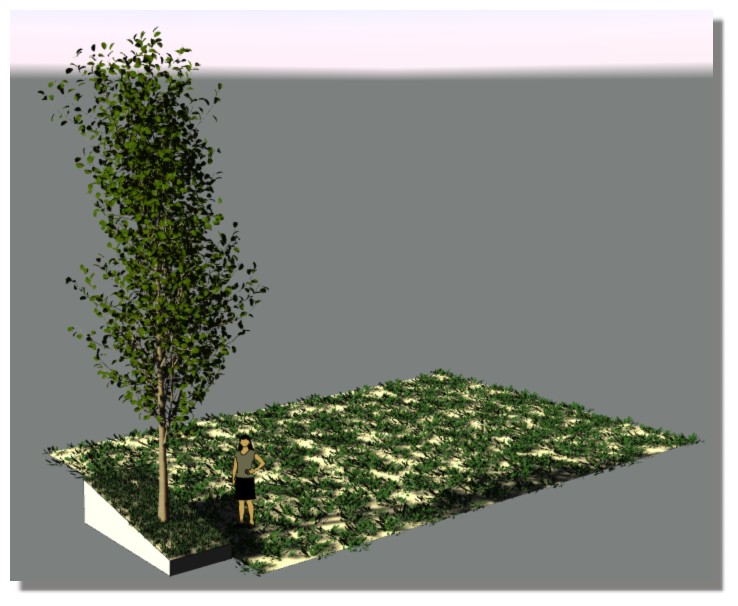
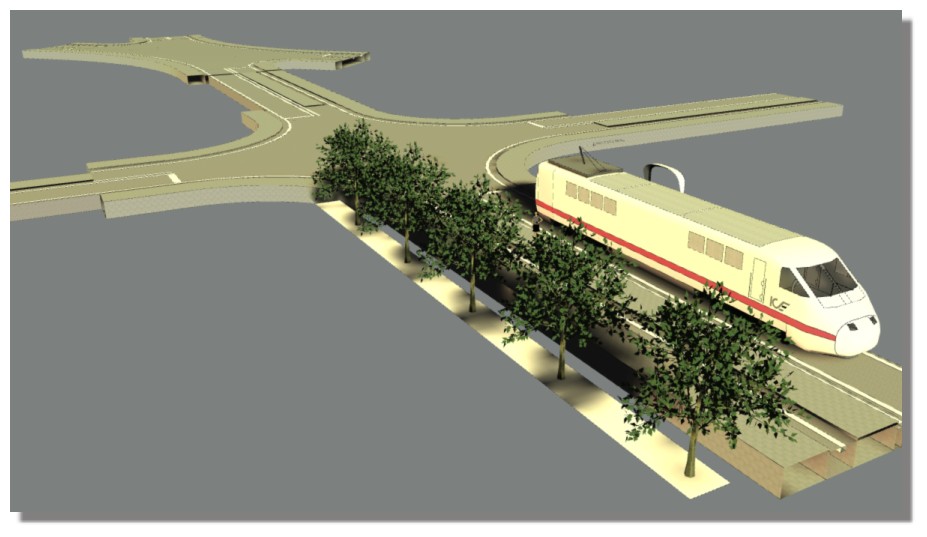
        Works fine with LightUp! ☀

        3d_tree.jpg

        3d_tree1.jpg

        And the fabulous Rail road system by Eneroth! ☀
        train2.jpg

        Frenchy Pilou
        Is beautiful that please without concept!
        My Little site :)

        1 條回覆 最後回覆 回覆 引用 0
        • L 離線
          laudhi
          最後由 編輯

          i wish there is more option for vine/ivy.it will be amazing.... 😛

          1 條回覆 最後回覆 回覆 引用 0
          • ppoublanP 離線
            ppoublan
            最後由 編輯

            @laudhi said:

            i wish there is more option for vine/ivy.it will be amazing.... 😛

            Hi Laudhi,
            Have you checked the Ivy tool from pierreden publihed in this forum ? I'm also using it and maybe it will allow you to achieve what you want.
            Regarding 3D Tree Maker, you can use existing parameters to make "ivy like" trees. Let me know if they are any others you are thinking of ?
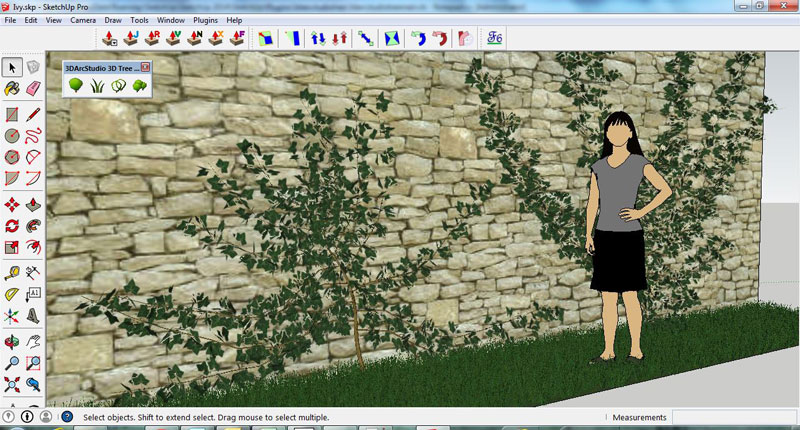
            Capture.JPG
            but it is not interactive (like Ivy) and does not take into account existing objects in the model, as 3D Tree Maker is only based on predefined parameters.
            I think that both tools are complementary.
            Yours
            Pascal

            1 條回覆 最後回覆 回覆 引用 0
            • L 離線
              laudhi
              最後由 編輯

              Let me know if they are any others you are thinking of ?
              [attachment=0:kzqk1sgm]<!-- ia0 -->Capture.JPG<!-- ia0 -->[/attachment:kzqk1sgm][/quote]

              I'm just curious if there are plans for vines, there may be an easier way to make vines on the pole ...
              Your plugin is amazing, worth to buy the pro version.... 👍

              1 條回覆 最後回覆 回覆 引用 0
              • R 離線
                rubenamaroh
                最後由 編輯

                Help!!!
                I can't run this ruby, the program display in "Plugins" folder but dont display
                right next to the arrow the window options " New" , "License" and "About", whats wrong?
                Thanks.

                1 條回覆 最後回覆 回覆 引用 0
                • TIGT 離線
                  TIG Moderator
                  最後由 編輯

                  Have you got available, and then activated its Toolbar ?
                  How did you 'install' it ?

                  TIG

                  1 條回覆 最後回覆 回覆 引用 0
                  • deaneauD 離線
                    deaneau
                    最後由 編輯

                    @tig said:

                    Have you got available, and then activated its Toolbar ?
                    How did you 'install' it ?

                    hi TIG

                    i have the same problem in 2013

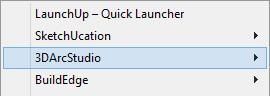
                    in the menue appear only 3d ArcStudio.

                    i have installed via sketchucation pluginstore plugin.
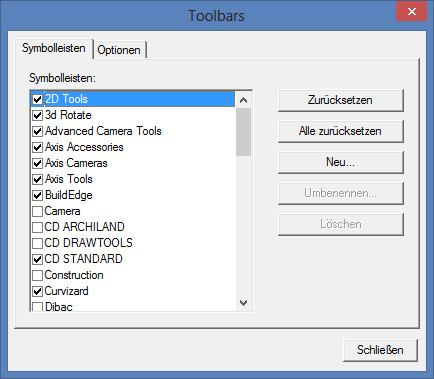
                    if i try to open the toolbar this will not show in the windows.

                    regards dean

                    _2014.06.20_10h36m16s_017_00830.jpgToolbars_2014.06.20_10h37m03s_018_00831.jpg

                    MADE, BORN AND LIVING IN BERLIN
                    Big Thank You to all Programmers
                    Some German words are so long that they have a perspective. M.Twain

                    1 條回覆 最後回覆 回覆 引用 0
                    • ppoublanP 離線
                      ppoublan
                      最後由 編輯

                      Dear all,
                      Just got an error with one of the version published, that did not work on SU8 nor SU2013.
                      Pushed the last one (1.10.11) on Sketchucation and my website.
                      Should load and setup menus now on all SU versions.
                      Let me know if you discover other errors.
                      Pascal

                      1 條回覆 最後回覆 回覆 引用 0
                      • deaneauD 離線
                        deaneau
                        最後由 編輯

                        @ppoublan said:

                        Dear all,
                        Just got an error with one of the version published, that did not work on SU8 nor SU2013.
                        Pushed the last one (1.10.11) on Sketchucation and my website.
                        Should load and setup menus now on all SU versions.
                        Let me know if you discover other errors.
                        Pascal

                        Hello Pascal,
                        this work now in 2013

                        thank you for your fast respond.

                        regards dean

                        MADE, BORN AND LIVING IN BERLIN
                        Big Thank You to all Programmers
                        Some German words are so long that they have a perspective. M.Twain

                        1 條回覆 最後回覆 回覆 引用 0
                        • J 離線
                          Jorgensen
                          最後由 編輯

                          Hi Pascal

                          I have just purchased the plugin (version 1.10.07) and installed it in SU 8 pro.

                          I get an error when I try edit a tree 😕

                          Do you know how I can avoid this?

                          Thanks

                          [EDIT]
                          It seems to work if I just press ok.

                          Is it somehow possible to speedup the redraw process - I'll have to wait several minutes before the tree is updated 😕

                          I guess it's a limitation of Sketchup, but I find the plugin hard to use then I have to wait this long every time 😕
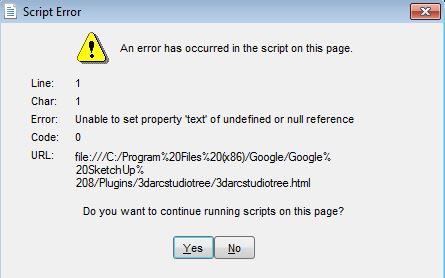

                          error.JPG

                          sketchup pro 2016 16.1.1449 64 bit | windows 10 pro | i7-3770k @3.5 GHz | 16gb ram | gtx 780 ti / gtx 980 ti | nvidia driver 368.39

                          1 條回覆 最後回覆 回覆 引用 0
                          • OxerO 離線
                            Oxer
                            最後由 編輯

                            @jorgensen said:

                            Is it somehow possible to speedup the redraw process - I'll have to wait several minutes before the tree is updated

                            I came back to the v1.06.04 because this version draws the trees in few seconds (between 3 and 8 seconds in my computer), but there is one inconvenient, you lose the feature make grass and other features related with the Materials, present in the last version.

                            "The result is the end what is important is the process" by Oxer
                            http://www.oxervision.blogspot.com/

                            1 條回覆 最後回覆 回覆 引用 0
                            • ppoublanP 離線
                              ppoublan
                              最後由 編輯

                              Hi Jorgensen,

                              @jorgensen said:

                              I get an error when I try edit a tree 😕

                              Did you try with the last version : 1.10.11 that is published in the Plugin store here or from this link :
                              http://www.3darcstudio.com/downloads/3darcstudiotree/3darcstudio_tree_v1.10.11.rbz
                              Download the file,
                              Setup using standard SU rbz extension install
                              After install, exit and restart SU
                              Did the error still occur ?
                              If yes let me know and we will try other tests. First time I see it, so I need more investigation.
                              Does anybody here also got the same error ?

                              @jorgensen said:

                              I guess it's a limitation of Sketchup, but I find the plugin hard to use then I have to wait this long every time 😕

                              Regarding speed:

                              • on 2 different PCs I'm using, drawing a tree is less than 30s for the more complex one and less than 5seconds for the standard generic tree.
                              • be sure you close the Sketchup Outliner window: this is the main cause of slowness I have seen as SU try to refresh outliner for all geometry changes within scripts
                              • ensure also that additional plugins that checks for geometry changes (like render viewport) are not running while you are drawing a tree as they will try to update
                              • the script also runs a little bit faster on SU 2014.

                              Yours
                              Pascal

                              1 條回覆 最後回覆 回覆 引用 0
                              • ppoublanP 離線
                                ppoublan
                                最後由 編輯

                                Dear all,
                                another tip to use tree maker with better performance, to place trees within large models:

                                • I build/change configuration of the tree in an new empty Sketchup model
                                • When I'm happy with the result, I convert it to proxy with the integrated tree maker proxy function
                                • Then I copy/paste this component (which is small) to the final model where I can make instances
                                • When all trees are in place and I want to render, i use "redraw all" in the final model, this can take some time if many trees, but have to do it only once before rendering
                                • I also use the proxies features of the renders when available (Thea, Octane, ...)
                                  Yours
                                  Pascal
                                1 條回覆 最後回覆 回覆 引用 0
                                • ppoublanP 離線
                                  ppoublan
                                  最後由 編輯

                                  @oxer said:

                                  I came back to the v1.06.04 because this version draws the trees in few seconds (between 3 and 8 seconds in my computer), but there is one inconvenient, you lose the feature make grass and other features related with the Materials, present in the last version.

                                  Hi Oxer,
                                  The main difference is that the old version is making SU groups, not components.
                                  Using components is really more efficient when you need to place many instances, and you got also a SU file that is lighter.
                                  So yes time to draw with the new version is a little bit more slow to draw one tree (on PC), but a lot much faster to redraw 20 or more trees as only the component is rebuild, not all instances.
                                  This was the reason I make this change to integrate features like grass.
                                  But as I really have acceptable performance on PC/2014 (few seconds to draw most of the trees), maybe i have a specific issue of speed with Mac.
                                  I will try to add few time logs to the next version so see what is slowing down the most.
                                  Yours
                                  Pascal

                                  1 條回覆 最後回覆 回覆 引用 0
                                  • OxerO 離線
                                    Oxer
                                    最後由 編輯

                                    I found a plugin that it makes slow down the drawing of trees, BGSketchup_Composants.rb, with this plugin installed the drawing of tree02:Cypress takes 47 seconds, without the plugin installed the drawing takes 12 seconds, other example, the drawing of tree00:Default Generic Tree takes 6 seconds without plugin, with the plugin installed 55 seconds.
                                    Mac OSX 10.9.4 & SU2014 with Tree Maker v1.10.11

                                    "The result is the end what is important is the process" by Oxer
                                    http://www.oxervision.blogspot.com/

                                    1 條回覆 最後回覆 回覆 引用 0
                                    • J 離線
                                      Jorgensen
                                      最後由 編輯

                                      I tried to removed all plugins, and the script seems to run ok - but I still get the error.

                                      If I install octane render, the problem happens again (things take very long time), even with the Octane Viewport closed.

                                      So it seems that octane render somehow sesses things up in my Sketchup.

                                      sketchup pro 2016 16.1.1449 64 bit | windows 10 pro | i7-3770k @3.5 GHz | 16gb ram | gtx 780 ti / gtx 980 ti | nvidia driver 368.39

                                      1 條回覆 最後回覆 回覆 引用 0
                                      • ppoublanP 離線
                                        ppoublan
                                        最後由 編輯

                                        Dear all,
                                        Just fixed the issue with script error when loading configuration webdialog.
                                        New file published in PluginStore and on my website.
                                        Version is 3darcstudio_tree_v1.10.11a.rbz
                                        Yours
                                        Pascal

                                        PS : do not understand why javascript is executed differently when called from SU8 and from SU2014, but...

                                        1 條回覆 最後回覆 回覆 引用 0
                                        • ppoublanP 離線
                                          ppoublan
                                          最後由 編輯

                                          @oxer said:

                                          I found a plugin that it makes slow down the drawing of trees, BGSketchup_Composants.rb, with this plugin installed the drawing of tree02:Cypress takes 47 seconds, without the plugin installed the drawing takes 12 seconds, other example, the drawing of tree00:Default Generic Tree takes 6 seconds without plugin, with the plugin installed 55 seconds.
                                          Mac OSX 10.9.4 & SU2014 with Tree Maker v1.10.11

                                          Hi Oxer,
                                          Great to know. Thanks for tests you made.
                                          My understanding is that other plugins may add entities observers to Sketchup to be informed of any entity change. I'm not sure if this is the case for those you mentioned but I will have a look. When this is the case, each time a change is made to an entity, the third plugin is called. As drawing a tree make lots of change to entities within tree component, it add time due to all these calls.
                                          Yours

                                          1 條回覆 最後回覆 回覆 引用 0
                                          • ppoublanP 離線
                                            ppoublan
                                            最後由 編輯

                                            @jorgensen said:

                                            I tried to removed all plugins, and the script seems to run ok - but I still get the error.

                                            Fixed (SU8).

                                            @jorgensen said:

                                            If I install octane render, the problem happens again (things take very long time), even with the Octane Viewport closed.

                                            I'm also using Octane and cant see important additional delay to draw tree when viewport closed, Could you make a test with SU2014 as Octane Plugin is different for SU2014 ?

                                            Yours
                                            Pascal
                                            1 條回覆 最後回覆 回覆 引用 0
                                            • 1
                                            • 2
                                            • 10
                                            • 11
                                            • 12
                                            • 13
                                            • 14
                                            • 15
                                            • 16
                                            • 17
                                            • 12 / 17
                                            • 第一個貼文
                                              最後的貼文
                                            Buy SketchPlus
                                            Buy SUbD
                                            Buy WrapR
                                            Buy eBook
                                            Buy Modelur
                                            Buy Vertex Tools
                                            Buy SketchCuisine
                                            Buy FormFonts

                                            Advertisement