SketchUp 2014 Wishlist
-
Physics, physics, physics.
Doesn't have to be fancy. The previous Sketchy Physics plug-in was quite nice.
-
@dod3r said:
more than one active section plane
It's not a straightforward function of SU, but you can make several cuts simultaneously active.
The first section plane is inside of a group, and then the second is outside of it.
Well, it's a "workaround", I know...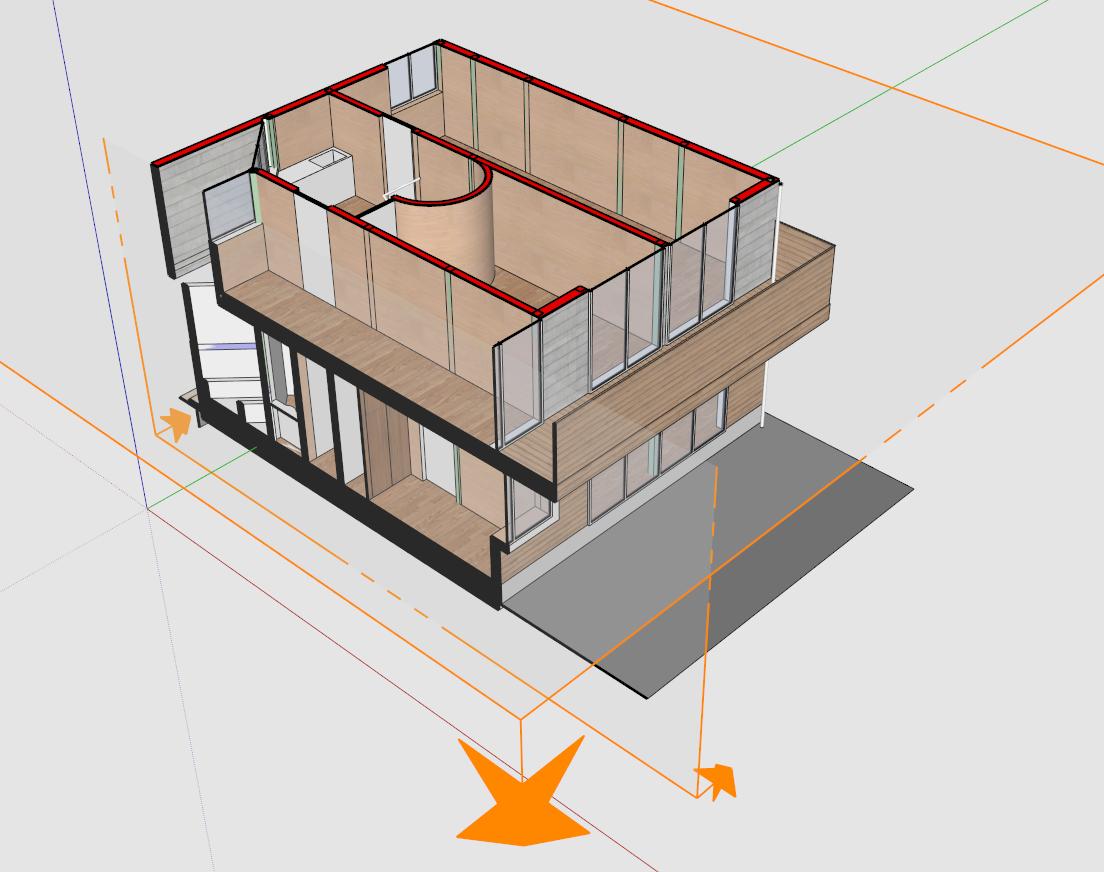
-
thanks takesh h,
I know about this possibility, but as you sad it is workaround.
Multi section planes active would be pretty useful for creating scene for layout, where i need to generate vector drawing. And having 4 layers of group or component just for section cuts is pure pain.
Basic philosophy is: I have big model, from with i need to generate some drawing through layout and in order to this process being fast i need to make the su model smaller and just show just the geometry from with the drawing should be generated.
I hope this is better explanation of what i needD.
-
It would be nice to have entity.path function that will return an array of parent entities.
Ex:<span class="syntaxdefault">model </span><span class="syntaxkeyword">=</span><span class="syntaxdefault"> Sketchup</span><span class="syntaxkeyword">.</span><span class="syntaxdefault">active_model<br />ents </span><span class="syntaxkeyword">=</span><span class="syntaxdefault"> model</span><span class="syntaxkeyword">.</span><span class="syntaxdefault">entities<br />ents</span><span class="syntaxkeyword">[</span><span class="syntaxdefault">0</span><span class="syntaxkeyword">][</span><span class="syntaxdefault">2</span><span class="syntaxkeyword">].</span><span class="syntaxdefault">path<br /></span><span class="syntaxcomment"># -> [#<Sketchup;;Group;0xc69a4f4>] # returns path containing parent groups/components<br /></span><span class="syntaxdefault">ents</span><span class="syntaxkeyword">[</span><span class="syntaxdefault">0</span><span class="syntaxkeyword">].</span><span class="syntaxdefault">path<br /></span><span class="syntaxcomment"># -> [] # return empty array, since ents[0] is top entity<br /></span><span class="syntaxdefault">ents</span><span class="syntaxkeyword">[</span><span class="syntaxdefault">0</span><span class="syntaxkeyword">][</span><span class="syntaxdefault">2</span><span class="syntaxkeyword">][</span><span class="syntaxdefault">0</span><span class="syntaxkeyword">].</span><span class="syntaxdefault">path<br /></span><span class="syntaxcomment"># -> [#<Sketchup;;Group;0xc69a4f4>, #<Sketchup;;Group;0xc6428a8>] # returns path containing parent groups/components </span><span class="syntaxdefault"></span>This follows from this topic: Finding deepest entity in pick path
-
@anton_s said:
It would be nice to have entity.path function that will return an array of parent entities.
This isn't doable because an entity, say a face, might appear multiple times in a model due to components. When you have a reference to an entity you must keep track of the path from where you picked it yourself.
There is model.active_path that will give you the path of the active context if you obtained the reference for the entity there. And the PickHelper will also return a path for each possible pick solutions.
-
Ok then, what about that?
- Add view.active_entities - that will return a list of entities visible in the view
- Add a clear button to the standard ruby console. I don't like how developers console and ruby console+ adds extra spaces, or removes the "\n" from text, which ruins the reports.
-
i would like to control the visibility of layers of sketch-up model in layout
-
shift key, when used with something like the move or line tool, can lock to any vector as opposed to x,y,z only
-
why not replace photo match by video match !!
Ex:
http://www.youtube.com/watch?v=vda2RAEuW_g -
Wow, nice!
-
I little improvement to the UI::Toolbar would be great:
<span class="syntaxdefault">unless file_loaded</span><span class="syntaxkeyword">?(</span><span class="syntaxdefault">__FILE__</span><span class="syntaxkeyword">)<br /></span><span class="syntaxdefault"> toolbar </span><span class="syntaxkeyword">=</span><span class="syntaxdefault"> UI</span><span class="syntaxkeyword">;;</span><span class="syntaxdefault">Toolbar</span><span class="syntaxkeyword">.</span><span class="syntaxdefault">new </span><span class="syntaxstring">"Test"<br /></span><span class="syntaxdefault"> cmd </span><span class="syntaxkeyword">=</span><span class="syntaxdefault"> UI</span><span class="syntaxkeyword">;;</span><span class="syntaxdefault">Command</span><span class="syntaxkeyword">.new(</span><span class="syntaxstring">"Test"</span><span class="syntaxkeyword">)</span><span class="syntaxdefault"> </span><span class="syntaxkeyword">{</span><span class="syntaxdefault"> UI</span><span class="syntaxkeyword">.</span><span class="syntaxdefault">messagebox</span><span class="syntaxkeyword">(</span><span class="syntaxstring">"Hello World"</span><span class="syntaxkeyword">)</span><span class="syntaxdefault"> </span><span class="syntaxkeyword">}<br /></span><span class="syntaxdefault"> cmd</span><span class="syntaxkeyword">.</span><span class="syntaxdefault">menu_text </span><span class="syntaxkeyword">=</span><span class="syntaxdefault"> </span><span class="syntaxstring">"My Command"<br /></span><span class="syntaxdefault"> cmd</span><span class="syntaxkeyword">.</span><span class="syntaxdefault">small_icon </span><span class="syntaxkeyword">=</span><span class="syntaxdefault"> </span><span class="syntaxstring">"pause small.png"<br /></span><span class="syntaxdefault"> cmd</span><span class="syntaxkeyword">.</span><span class="syntaxdefault">large_icon </span><span class="syntaxkeyword">=</span><span class="syntaxdefault"> </span><span class="syntaxstring">"pause large.png"<br /></span><span class="syntaxdefault"> </span><span class="syntaxcomment"># Changing icons after calling add_item will not work<br /></span><span class="syntaxdefault"> toolbar </span><span class="syntaxkeyword">=</span><span class="syntaxdefault"> toolbar</span><span class="syntaxkeyword">.</span><span class="syntaxdefault">add_item cmd<br /> toolbar</span><span class="syntaxkeyword">.</span><span class="syntaxdefault">show<br /> </span><span class="syntaxcomment"># So this won't modify the icon<br /></span><span class="syntaxdefault"> cmd</span><span class="syntaxkeyword">.</span><span class="syntaxdefault">small_icon </span><span class="syntaxkeyword">=</span><span class="syntaxdefault"> </span><span class="syntaxstring">"play small.png"<br /></span><span class="syntaxdefault"> cmd</span><span class="syntaxkeyword">.</span><span class="syntaxdefault">large_icon </span><span class="syntaxkeyword">=</span><span class="syntaxdefault"> </span><span class="syntaxstring">"play large.png"<br /><br /></span><span class="syntaxdefault"> file_loaded</span><span class="syntaxkeyword">(</span><span class="syntaxdefault">__FILE__</span><span class="syntaxkeyword">)<br /></span><span class="syntaxdefault">end</span>This follows a very old post: Changing Command Icons of the Toolbar
-
Yesrterday, I actually went to see my temp folder and found there is a lot of "SketchUpUndo..." files. Would it be nice if they be automatically deleted?

Or will it be even better if the user was able to undo operations that were done in the previous saves
Example:- User draws a rectangle, and then push-pulls the face.
- Saves the model
- Closes SU
- Launches the model once again
- Presses Ctrl-Z and undoes the pushpull operation
Let the user undo operations even after restarting SU...
Just an idea
-
what's really needed:
- line-styles, line-colors and line-weights
- workplanes for dimensioning (now it's somewhere in space speaking about dimensioning a layout/plans/sections) and annotations (text without leader in certain workplane)
- hatches of cutted components coresponding material types
- improved relation with LO: now to print SU model in LO make no sence - terible quality, or vector rendering option shall be reconsidered (probably this is an improvement for LO)
-
Solid sections when cutting solid elements!!!! (with an option to assign a material to the cut face
In layout, components, and better dwg export (with sketchup layers)
-
1) Real 64 bit support
2) A native search-box(searches all plugins, and options). Basically launchup but located permantly in the same bar as plugin,help etc, as to not obstruct the work-space3) Surprise me with something really new
-
Thankyou Trimbale for fixing the construction lines colour problem when axes were switched on and off and thankyou for the engine changes I assume you've made.
Here's my list
- Return the two column option for the large toolset - it fits on laptops left column. Not everyone is using large screens.
- Get rid of scrolling on Layer select drop down.
- Return all dropdowns (Scenes, Layers etc) to original size so they tuck up to top of screen - why someone would want to make them bigger has me baffled.
- Windows version to have ability to have multiple projects open at once as the Mac version does.
- cancelled.
- Somewhere down the line Google screwed the zoom in. Now construction lines also disappear if you zoom in too far. This never happened in earlier versions.
- Someone at Google changed it so you had to click a surface to push/pull it! it's stupid, worked perfectly well before where you just moused over the surface you wanted and it highlighted.
- Similarly they changed the ability to mouse over surfaces behind other surfaces and the mouse changed to pushpull tool when you were over the active surface behind another surface that you can't see.
- Have a box to check if you want the rotate factor when using the move option. If you want to move it, then move it - if you want to rotate it then rotate it. The rotate option switching on when you are trying to move something is annoying.
-
@john sayers said:
- Somewhere down the line Google screwed the zoom in. Now construction lines also disappear if you zoom in too far. This never happened in earlier versions.
Under Preferences there is a checkbox labelled "Disable pre-pick on Push/Pull Tool" which will return the behaviour to the old style.
Alternatively, hit Ctrl+T to quickly deselect and you can use hover over a face to push pull it. -
Wow - thanks Thomas - I've never noticed that before

-
SAVING LARGE FILES IS SO SLOW!!!

I have a 150MB file (about 25m edges). When I hit ctrl+s it takes about 1 minute to save to file. I created a ram disk so speed up the saving process. The time was reduced to 25 seconds. But still IMO this is irritating. 25 seconds? I converted the model to 3ds max format and checked how fast it is saved under 3ds max. Ctrl+S and ... it's done. Not even a second.
SU TEAM please do something with speeding up the saving process.
-
I'm sure I'll have to edit this as I think of more "wishes", but here's one:
A more accessible way to work with large (100+) numbers of scenes. I frequently have to create views for lets say 10 different homes with a view from 4 different rooms. I typically export linework, shadows, textures, false Z-Buffer, and other maps separately so I can comp them in photoshop. Obviously, this leads to a LOT of scenes. Scrolling through the scene manager or the scene bar gets a little tedious.







Advertisement