sketchucation logo sketchucation
    • Login
    Oops, your profile's looking a bit empty! To help us tailor your experience, please fill in key details like your SketchUp version, skill level, operating system, and more. Update and save your info on your profile page today!
    ⚠️ Update | Sketchucation Tools 5.0.8 released with licensing improvements and bugfixes Download

    Sketchup 2013 issues

    Scheduled Pinned Locked Moved SketchUp Discussions
    sketchup
    208 Posts 53 Posters 54.8k Views 53 Watching
    Loading More Posts
    • Oldest to Newest
    • Newest to Oldest
    • Most Votes
    Reply
    • Reply as topic
    Log in to reply
    This topic has been deleted. Only users with topic management privileges can see it.
    • GaieusG
      Gaieus
      last edited by

      @chrisik said:

      Drag and Drop of a picture or a sketchup file from the windows explorer to SU2013 doesn't work any more. With Sketchup 8 it works fine. Did i miss something?

      I've set SU to "always run as admin" but still does not work for me. Win 8 and SU 2013 (Pro).

      I guess I need to play around more...

      Gai...

      1 Reply Last reply
      Reply Quote 0
      • TIGT
        TIG Moderator
        last edited by

        Running it 'as admin' will help with some issues...
        BUT remember that being an admin on PC does not guarantee you 'full access' to folders like Plugins, UNLESS you have also expressly changed the folder's default properties>security to be FULL...

        TIG

        1 Reply Last reply
        Reply Quote 0
        • thomthomT
          thomthom
          last edited by

          @frederik said:

          @krisidious said:

          Preferences... OpenGL

          Cheers, Kris...
          However, I'm still puzzled...
          Where do I apply the new settings...
          This is what it looks like on my laptop...

          There doesn't appear to be any more options available for your graphic card. Laptop graphic cards tend to be more limited. What card do you have? And have you updated its drivers?

          Thomas Thomassen β€” SketchUp Monkey & Coding addict
          List of my plugins and link to the CookieWare fund

          1 Reply Last reply
          Reply Quote 0
          • FrederikF
            Frederik
            last edited by

            @thomthom said:

            There doesn't appear to be any more options available for your graphic card. Laptop graphic cards tend to be more limited. What card do you have? And have you updated its drivers?

            It's an old laptop with a ATI Mobility Radeon HD 3650 card...
            And yes - I have the latest drivers installed...

            Similar to the original question, I also seem to have a better antialising when using SU 8 Pro... 😐

            Cheers
            Kim Frederik

            1 Reply Last reply
            Reply Quote 0
            • thomthomT
              thomthom
              last edited by

              Do you have more OpenGL options in SketchUp 8?

              Thomas Thomassen β€” SketchUp Monkey & Coding addict
              List of my plugins and link to the CookieWare fund

              1 Reply Last reply
              Reply Quote 0
              • KrisidiousK
                Krisidious
                last edited by

                Here's my Options Fredrick...

                CaptureSUantialias.JPG

                By: Kristoff Rand
                Home DesignerUnique House Plans

                1 Reply Last reply
                Reply Quote 0
                • jeff hammondJ
                  jeff hammond
                  last edited by

                  @frederik said:

                  @thomthom said:

                  There doesn't appear to be any more options available for your graphic card. Laptop graphic cards tend to be more limited. What card do you have? And have you updated its drivers?

                  It's an old laptop with a ATI Mobility Radeon HD 3650 card...
                  And yes - I have the latest drivers installed...

                  Similar to the original question, I also seem to have a better antialising when using SU 8 Pro... 😐

                  hey Frederik

                  you can try setting your AA via the ruby console.. enter this:

                  Test.set_AA_method(4)

                  it will probably echo back 0 meaning your AA was previously set to 0.. relaunch sketchup and it will be set to 4x (or whatever # you choose to enter in the console.)

                  dotdotdot

                  1 Reply Last reply
                  Reply Quote 0
                  • thomthomT
                    thomthom
                    last edited by

                    @unknownuser said:

                    Test.set_AA_method(4)

                    Where did you find this?? 😲

                    Thomas Thomassen β€” SketchUp Monkey & Coding addict
                    List of my plugins and link to the CookieWare fund

                    1 Reply Last reply
                    Reply Quote 0
                    • Rich O BrienR
                      Rich O Brien Moderator
                      last edited by

                      @thomthom said:

                      @unknownuser said:

                      Test.set_AA_method(4)

                      Where did you find this?? 😲

                      that's an old hack. i think it is on the su forums.

                      Download the free D'oh Book for SketchUp πŸ“–

                      1 Reply Last reply
                      Reply Quote 0
                      • jeff hammondJ
                        jeff hammond
                        last edited by

                        @thomthom said:

                        @unknownuser said:

                        Test.set_AA_method(4)

                        Where did you find this?? 😲

                        well, when your openGL prefs look like this:
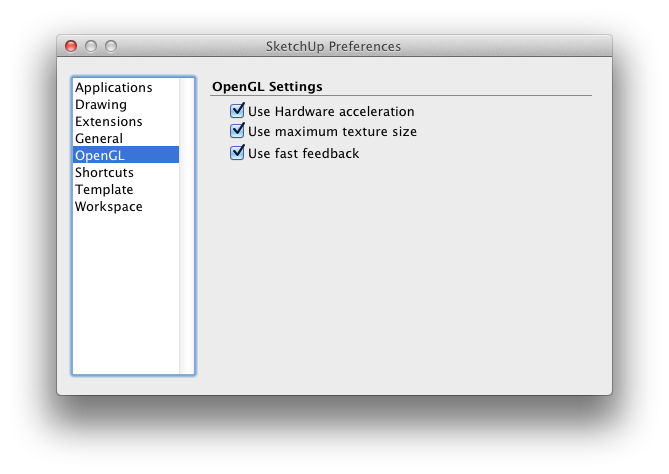
                        Screen Shot 2013-05-26 at 7.09.12 PM.png

                        you're more inclined to seek out a workaround πŸ˜‰..

                        [j.bacus gave the ruby method a long time ago for us lowly mac users]

                        dotdotdot

                        1 Reply Last reply
                        Reply Quote 0
                        • GarethG
                          Gareth
                          last edited by

                          Jeff, that's the minimalistic look...!

                          1 Reply Last reply
                          Reply Quote 0
                          • FrederikF
                            Frederik
                            last edited by

                            @thomthom said:

                            Do you have more OpenGL options in SketchUp 8?

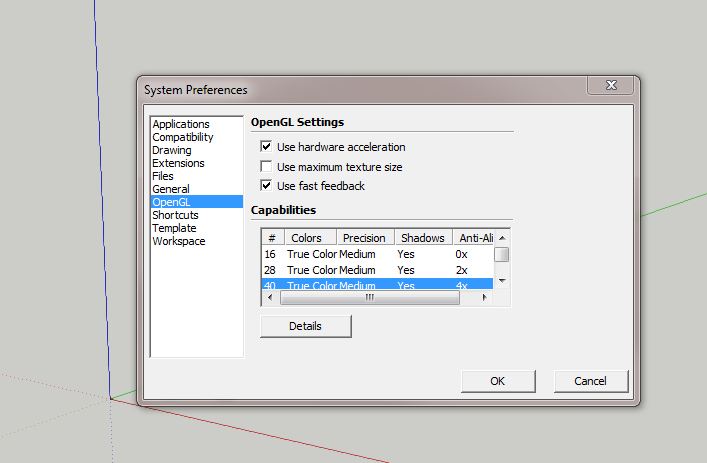
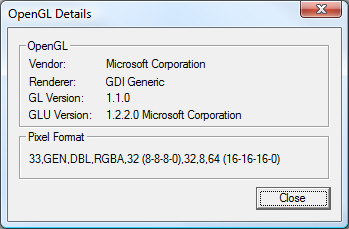
                            These are my settings in SU 8...
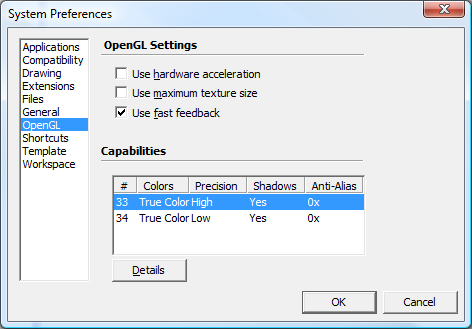
                            SU8-Sys-pref-OpenGL.jpg
                            SU8-Sys-pref-OpenGL-details.jpg
                            The "Use hardware acceleration" is by default ticked in SU2013, while it's not ticked in SU8...
                            Furthermore there's a difference in the detail window... 😐

                            Thanks to everyone... I will give the hack a try... πŸ˜„

                            In a few weeks I'll get a new computer, so I guess I will just leave it here...

                            Cheers
                            Kim Frederik

                            1 Reply Last reply
                            Reply Quote 0
                            • thomthomT
                              thomthom
                              last edited by

                              @unknownuser said:

                              well, when your openGL prefs look like this:

                              Yea, I noticed this on my OSX as well. Think I asked once about this and got only shrugs.

                              Thomas Thomassen β€” SketchUp Monkey & Coding addict
                              List of my plugins and link to the CookieWare fund

                              1 Reply Last reply
                              Reply Quote 0
                              • jiminy-billy-bobJ
                                jiminy-billy-bob
                                last edited by

                                @gareth said:

                                Jeff, that's the minimalistic look...!

                                Haha ! I laughed hard πŸ˜„

                                25% off Skatter for SketchUcation Premium Members

                                1 Reply Last reply
                                Reply Quote 0
                                • KrisidiousK
                                  Krisidious
                                  last edited by

                                  What happened to the WalkThrough Toolbar? Walk, Look Around and Position Camera. The commands are still there in the drop down, but the toolbar is gone? I liked that toolbar damnit!

                                  By: Kristoff Rand
                                  Home DesignerUnique House Plans

                                  1 Reply Last reply
                                  Reply Quote 0
                                  • BoxB
                                    Box
                                    last edited by

                                    Do you mean the one called Camera? Ah I see now, they have combined walkthrough with other tools.
                                    Edit, so you can make your own now if you just want the small walkthrough tools.

                                    1 Reply Last reply
                                    Reply Quote 0
                                    • KrisidiousK
                                      Krisidious
                                      last edited by

                                      Oh... So I need to move them from the large tool set where ever I want. Ok. I can do that.

                                      I see what you meant. They added it to the camera toolbar.

                                      So my Wallet is not gone... 🀣

                                      By: Kristoff Rand
                                      Home DesignerUnique House Plans

                                      1 Reply Last reply
                                      Reply Quote 0
                                      • GarethG
                                        Gareth
                                        last edited by

                                        @jiminy-billy-bob said:

                                        @gareth said:

                                        Jeff, that's the minimalistic look...!

                                        Haha ! I laughed hard πŸ˜„

                                        πŸ˜„ i chuckled too.....but I always laugh at my own jokes...!!

                                        1 Reply Last reply
                                        Reply Quote 0
                                        • A
                                          archheni
                                          last edited by

                                          @unknownuser said:

                                          hey Frederik

                                          you can try setting your AA via the ruby console.. enter this:

                                          Test.set_AA_method(4)

                                          it will probably echo back 0 meaning your AA was previously set to 0.. relaunch sketchup and it will be set to 4x (or whatever # you choose to enter in the console.)

                                          Wow, that's interesting. Should've known some years ago..πŸ˜’ However on Retina displays Anti Aliasing has become irrelevant (in both CAD and Games applications). In fact it looks better now with the setting "0"..

                                          1 Reply Last reply
                                          Reply Quote 0
                                          • S
                                            sepo
                                            last edited by

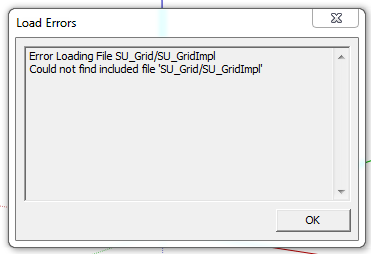
                                            Capture.PNG

                                            I am having this error....any idea where it is coming from?

                                            1 Reply Last reply
                                            Reply Quote 0

                                            Hello! It looks like you're interested in this conversation, but you don't have an account yet.

                                            Getting fed up of having to scroll through the same posts each visit? When you register for an account, you'll always come back to exactly where you were before, and choose to be notified of new replies (either via email, or push notification). You'll also be able to save bookmarks and upvote posts to show your appreciation to other community members.

                                            With your input, this post could be even better πŸ’—

                                            Register Login
                                            • 1
                                            • 2
                                            • 3
                                            • 4
                                            • 5
                                            • 10
                                            • 11
                                            • 3 / 11
                                            • First post
                                              Last post
                                            Buy SketchPlus
                                            Buy SUbD
                                            Buy WrapR
                                            Buy eBook
                                            Buy Modelur
                                            Buy Vertex Tools
                                            Buy SketchCuisine
                                            Buy FormFonts

                                            Advertisement