sketchucation logo sketchucation
    • 登入
    Oops, your profile's looking a bit empty! To help us tailor your experience, please fill in key details like your SketchUp version, skill level, operating system, and more. Update and save your info on your profile page today!
    🔌 Smart Spline | Fluid way to handle splines for furniture design and complex structures. Download

    How could i get realistic grass? Any suggestions?

    已排程 已置頂 已鎖定 已移動 V-Ray
    renderpluginsextensions
    34 貼文 9 Posters 3.7k 瀏覽 9 Watching
    正在載入更多貼文
    • 從舊到新
    • 從新到舊
    • 最多點贊
    回覆
    • 在新貼文中回覆
    登入後回覆
    此主題已被刪除。只有擁有主題管理權限的使用者可以查看。
    • Z 離線
      Zylescozar19
      最後由 編輯

      Could anyone help me out how can i achieve realistic grass? (Not displacement)
      Here is the image that I've rendered using SU8 Pro.
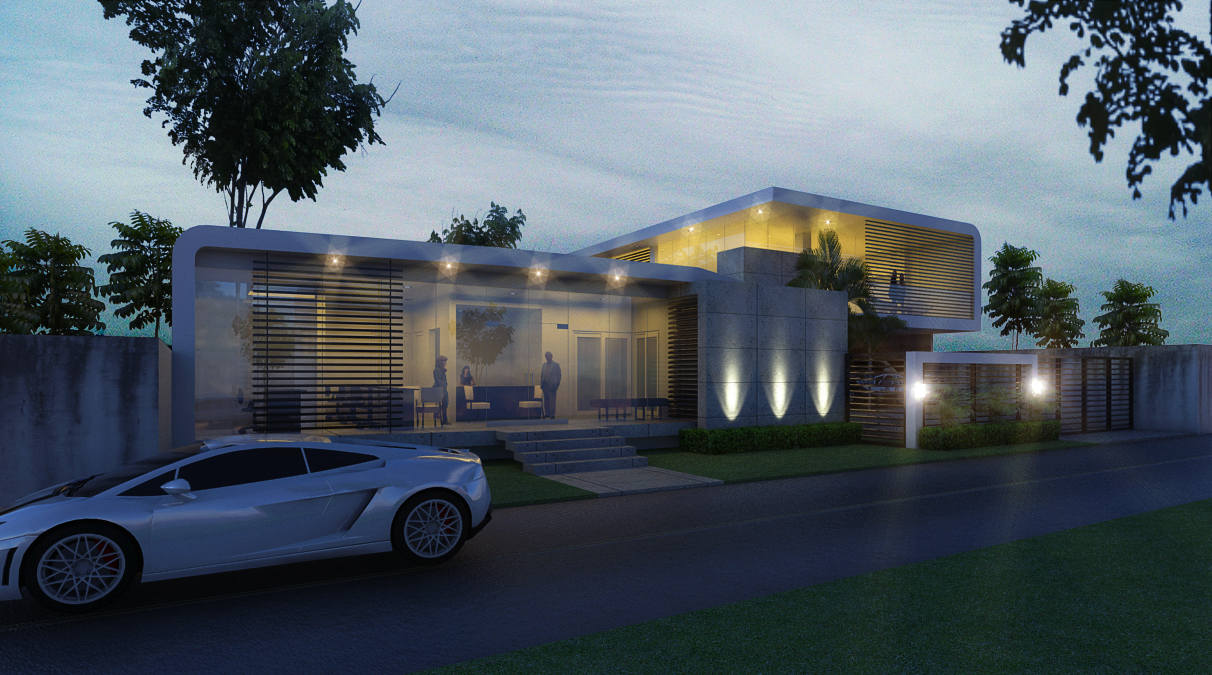

      Rendered image.

      1 條回覆 最後回覆 回覆 引用 0
      • R 離線
        rspierenburg
        最後由 編輯

        To be honest I think that looks better than most non-post grass. There is a tutorial floating around these forums (check tutorial section) on how to place grass using photoshop as I think that would be your best bet for realism.

        1 條回覆 最後回覆 回覆 引用 0
        • V 離線
          valerostudio
          最後由 編輯

          Fur plugin, but I would only use it in the foreground as good density grass will be very plo heavy.

          1 條回覆 最後回覆 回覆 引用 0
          • Z 離線
            Zylescozar19
            最後由 編輯

            @rspierenburg said:

            To be honest I think that looks better than most non-post grass. There is a tutorial floating around these forums (check tutorial section) on how to place grass using photoshop as I think that would be your best bet for realism.

            Im not good with photoshop but if theres a tutorial step by step. I can do so. 😄
            Ok ill check it out. BTW Thanks.

            1 條回覆 最後回覆 回覆 引用 0
            • Z 離線
              Zylescozar19
              最後由 編輯

              @valerostudio said:

              Fur plugin, but I would only use it in the foreground as good density grass will be very plo heavy.

              I did try Fur plugin - But still im not satisfy with the result. 😞
              Here's the result with fur plug-in (see attached)
              Using fur plug-in the file becomes heavy and it takes more rendering time.
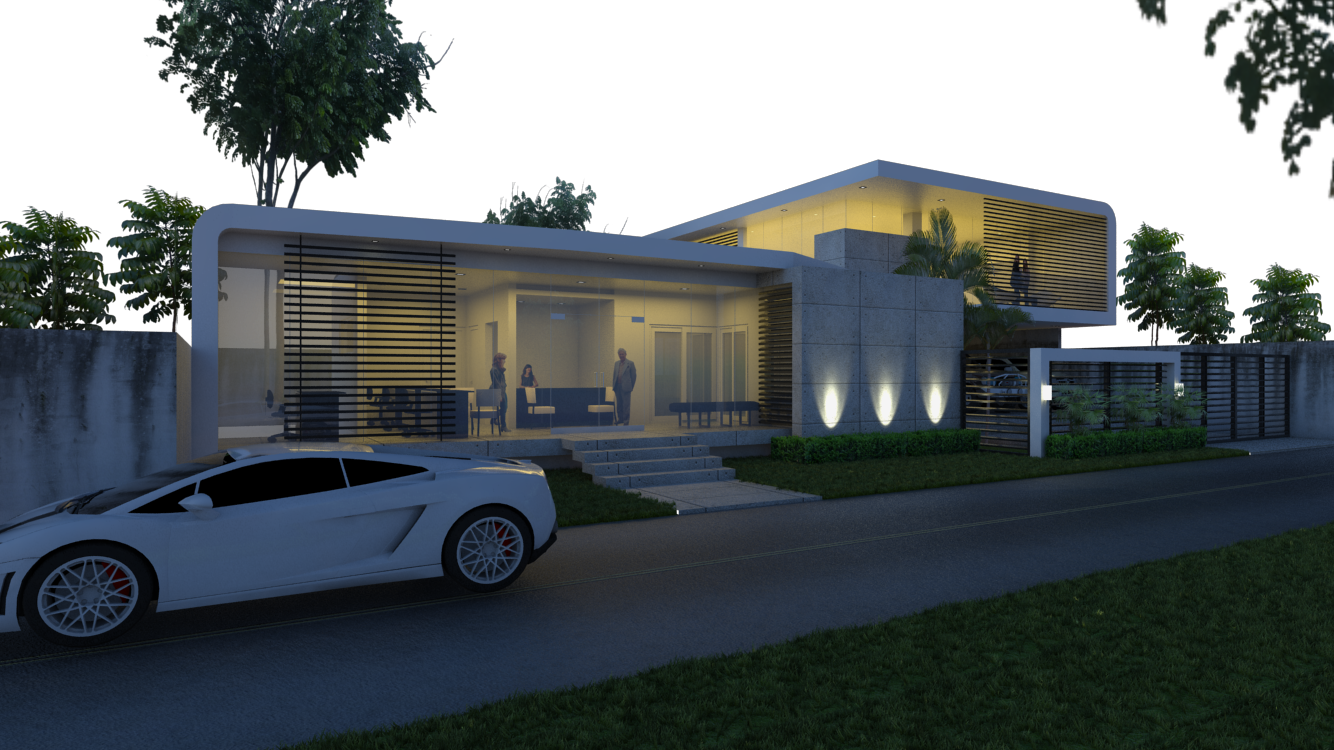

              Raw Render

              1 條回覆 最後回覆 回覆 引用 0
              • V 離線
                valerostudio
                最後由 編輯

                Yeah, fur will dramatically make your file slower. Honestly, the floating car bothers me more than your grass. The best method for grass where you don't use fur or displacement is Photoshop as suggested.

                What component did you use for the grass in Fur? Use the crown feature paired with something like this http://sketchup.google.com/3dwarehouse/details?mid=dcd8fba2ac24d3b5bbb8a2bd32325576&prevstart=0

                or this one

                Error 404 (Not Found)!!1

                favicon

                (sketchup.google.com)

                1 條回覆 最後回覆 回覆 引用 0
                • HieruH 離線
                  Hieru
                  最後由 編輯

                  @zylescozar19 said:

                  Im not good with photoshop but if theres a tutorial step by step. I can do so. 😄

                  davidh did a good mini-tutorial on this:

                  viewtopic.php?f=351&t=42259&p=374885&hilit=+grass#p374885

                  www.davidhier.co.uk

                  1 條回覆 最後回覆 回覆 引用 0
                  • thomthomT 離線
                    thomthom
                    最後由 編輯

                    Best and fastest is to make a mask out of the areas where the grass should be and just add it in post. Displacement won't look good - it just looks like spikes and eats lots of render time and memory. Fur isn't supported in VfS and it'd still be faster and better to do in post when you're not doing an animation.

                    Thomas Thomassen — SketchUp Monkey & Coding addict
                    List of my plugins and link to the CookieWare fund

                    1 條回覆 最後回覆 回覆 引用 0
                    • andybotA 離線
                      andybot
                      最後由 編輯

                      you can set up a material ID mask. Here is my tutorial for doing post-process grass in vray. Good luck.

                      http://charlottesvillearchitecturalrendering.com/?p=127

                      http://charlottesvillearchitecturalrendering.com/

                      1 條回覆 最後回覆 回覆 引用 0
                      • Z 離線
                        Zylescozar19
                        最後由 編輯

                        @valerostudio said:

                        Yeah, fur will dramatically make your file slower. Honestly, the floating car bothers me more than your grass. The best method for grass where you don't use fur or displacement is Photoshop as suggested.

                        What component did you use for the grass in Fur? Use the crown feature paired with something like this http://sketchup.google.com/3dwarehouse/details?mid=dcd8fba2ac24d3b5bbb8a2bd32325576&prevstart=0

                        or this one

                        Error 404 (Not Found)!!1

                        favicon

                        (sketchup.google.com)

                        😮 Hahaha! I didnt notice that the car was floating.
                        Uhh..I use this grass (edited)


                        grass patern.skp

                        1 條回覆 最後回覆 回覆 引用 0
                        • Z 離線
                          Zylescozar19
                          最後由 編輯

                          @thomthom said:

                          Best and fastest is to make a mask out of the areas where the grass should be and just add it in post. Displacement won't look good - it just looks like spikes and eats lots of render time and memory. Fur isn't supported in VfS and it'd still be faster and better to do in post when you're not doing an animation.

                          Yeah! Your right Master Thomthom.
                          I'm having hard time with Photoshops as of now Fur will be the best option for me. 💚
                          Thanks.

                          1 條回覆 最後回覆 回覆 引用 0
                          • Z 離線
                            Zylescozar19
                            最後由 編輯

                            @hieru said:

                            @zylescozar19 said:

                            Im not good with photoshop but if theres a tutorial step by step. I can do so. 😄

                            davidh did a good mini-tutorial on this:

                            viewtopic.php?f=351&t=42259&p=374885&hilit=+grass#p374885

                            Hieru, Already see this tutorial but still i cant understand how to mask 😳
                            I guess really need to study this.

                            Anyways Thanks.

                            1 條回覆 最後回覆 回覆 引用 0
                            • Z 離線
                              Zylescozar19
                              最後由 編輯

                              @hieru said:

                              @zylescozar19 said:

                              Im not good with photoshop but if theres a tutorial step by step. I can do so. 😄

                              davidh did a good mini-tutorial on this:

                              viewtopic.php?f=351&t=42259&p=374885&hilit=+grass#p374885

                              I guess a Video tutorial will do that would be the easiest way 🤣

                              1 條回覆 最後回覆 回覆 引用 0
                              • Z 離線
                                Zylescozar19
                                最後由 編輯

                                @andybot said:

                                you can set up a material ID mask. Here is my tutorial for doing post-process grass in vray. Good luck.

                                http://charlottesvillearchitecturalrendering.com/?p=127

                                Andy, This will be great.
                                I'll try to study this method.
                                Thanks a lot.

                                1 條回覆 最後回覆 回覆 引用 0
                                • Z 離線
                                  Zylescozar19
                                  最後由 編輯

                                  @andybot said:

                                  you can set up a material ID mask. Here is my tutorial for doing post-process grass in vray. Good luck.

                                  http://charlottesvillearchitecturalrendering.com/?p=127

                                  Sir andy. I saw this grass of yours. Can i ask where did u get this? i mean is this a SU model? can i download it?
                                  Thanks
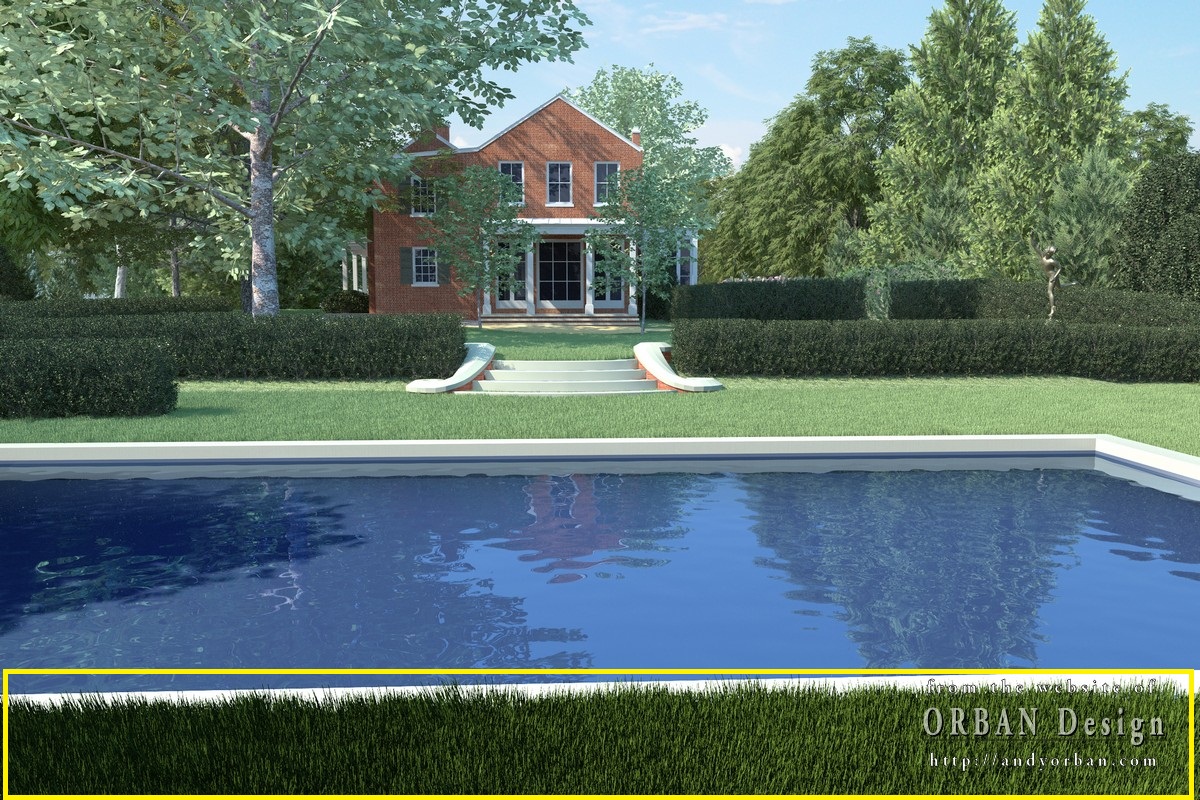

                                  addison_01.jpg

                                  1 條回覆 最後回覆 回覆 引用 0
                                  • V 離線
                                    valerostudio
                                    最後由 編輯

                                    If you're not using MatID channels and Photoshop then you are not taking advantage of the most powerful tool in a render artists kit. Learn as soon as you can!

                                    1 條回覆 最後回覆 回覆 引用 0
                                    • andybotA 離線
                                      andybot
                                      最後由 編輯

                                      @zylescozar19 said:

                                      @andybot said:

                                      you can set up a material ID mask. Here is my tutorial for doing post-process grass in vray. Good luck.

                                      http://charlottesvillearchitecturalrendering.com/?p=127

                                      Sir andy. I saw this grass of yours. Can i ask where did u get this? i mean is this a SU model? can i download it?
                                      Thanks

                                      Sorry - that's done in vray for blender ☀

                                      http://charlottesvillearchitecturalrendering.com/

                                      1 條回覆 最後回覆 回覆 引用 0
                                      • broomstickB 離線
                                        broomstick
                                        最後由 編輯

                                        @andybot said:

                                        @zylescozar19 said:

                                        @andybot said:

                                        you can set up a material ID mask. Here is my tutorial for doing post-process grass in vray. Good luck.

                                        http://charlottesvillearchitecturalrendering.com/?p=127

                                        Sir andy. I saw this grass of yours. Can i ask where did u get this? i mean is this a SU model? can i download it?
                                        Thanks

                                        Sorry - that's done in vray for blender ☀

                                        That's funny: an unofficial version of vray works better than the official version for Sketchup. Chaosgroup needs to address these problems..

                                        1 條回覆 最後回覆 回覆 引用 0
                                        • andybotA 離線
                                          andybot
                                          最後由 編輯

                                          @broomstick said:

                                          That's funny: an unofficial version of vray works better than the official version for Sketchup. Chaosgroup needs to address these problems..

                                          Well, when sketchup gets particle systems, modifiers, etc., maybe it'll get to the level of Blender... 🤣

                                          oh yeah, and when SU goes to 64bit 💚

                                          http://charlottesvillearchitecturalrendering.com/

                                          1 條回覆 最後回覆 回覆 引用 0
                                          • HieruH 離線
                                            Hieru
                                            最後由 編輯

                                            @zylescozar19 said:

                                            I guess a Video tutorial will do that would be the easiest way 🤣

                                            In which case Pixel Flakes have a good one that includes the project files (so you can work along):

                                            www.pixelflakes.com/tutorial/5-concrete-cliff/

                                            For those of us who already know our way around PS, masks and material ID, this time lapse video is superb:


                                            www.pixelflakes.com/tutorial/8-1-hour-challenge/

                                            www.davidhier.co.uk

                                            1 條回覆 最後回覆 回覆 引用 0
                                            • 1
                                            • 2
                                            • 1 / 2
                                            • 第一個貼文
                                              最後的貼文
                                            Buy SketchPlus
                                            Buy SUbD
                                            Buy WrapR
                                            Buy eBook
                                            Buy Modelur
                                            Buy Vertex Tools
                                            Buy SketchCuisine
                                            Buy FormFonts

                                            Advertisement

