[Plugin] ToolbarEditor (1.1.2) – updated 08.06.2014
-
The toolbars are stored in the registry
HKEY_CURRENT_USER\Software\SketchUp\SketchUp 2014\Plugins_ae\ToolbarEditor.
You can copy and paste it in the same key on another SketchUp installation or version. You can also use the File → Export functionality of the registry. I'm not sure whether I should add an export button to each of my plugins, I hope SketchUp will provide an efficient and central place to migrate settings.From a developer side, I want to emphasis again that most of us want plugin settings to be namespaced and bundled in one sub-key, and not mixed within SketchUp's internal keys.
-
@aerilius said:
The toolbars are stored in the registry
HKEY_CURRENT_USER\Software\SketchUp\SketchUp 2014\Plugins_ae\ToolbarEditor.
You can copy and paste it in the same key on another SketchUp installation or version. You can also use the File → Export functionality of the registry. I'm not sure whether I should add an export button to each of my plugins, I hope SketchUp will provide an efficient and central place to migrate settings.Thank you for your response! Greetings!

-
i would love this tool could create groups of nested buttons, like those in the bar "getting started"

-
I would love this too!
But they are neither user-editable nor available for plugins. -
@lewisee said:
I can't enter code for custom (new) buttons using SketchUp Make 2014. Other wise this is a great extension. Thanks
i can't enter snippets either
su8, win7
-
What happens when you can't enter snippets? What do you do and what does not happen?
-
@aerilius said:
What happens when you can't enter snippets? What do you do and what does not happen?
nothing happens...
after i fill in the form (name, category, ...), and i choose a file for the icon, it is then impossible for me to type anything in the area below the icon file address
-
I cannot reproduce this. For me the webdialog accepts input in all input fields in SU 2014, SU 2013, SU8, WinXP, Win7.
• What version of Internet Explorer do you have installed?
• Does the text area for Ruby code never accept input or only after you selected an icon?
• Can you see that it is a text area (or is it possible that it just has a zero size)? -
@aerilius said:
I cannot reproduce this. For me the webdialog accepts input in all input fields in SU 2014, SU 2013, SU8, WinXP, Win7.
• What version of Internet Explorer do you have installed?
• Does the text area for Ruby code never accept input or only after you selected an icon?
• Can you see that it is a text area (or is it possible that it just has a zero size)?internet explorer 11
never accepts input
cannot see that it is a text area (screen copy added)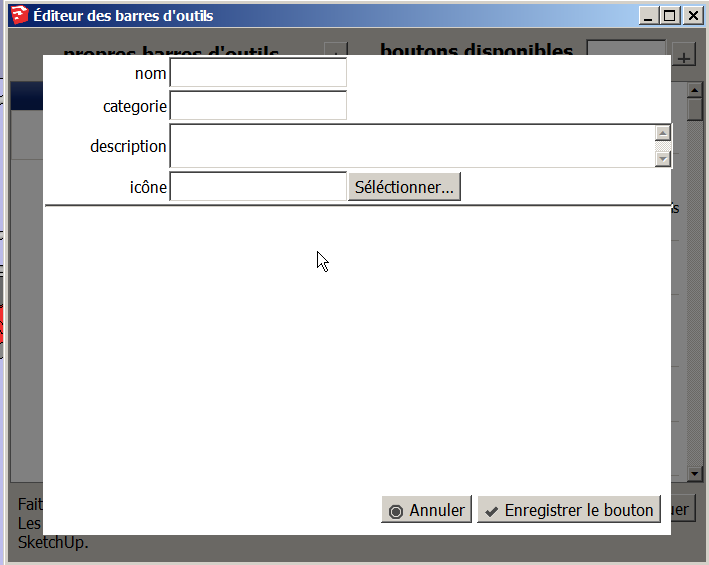
hope it helps
-
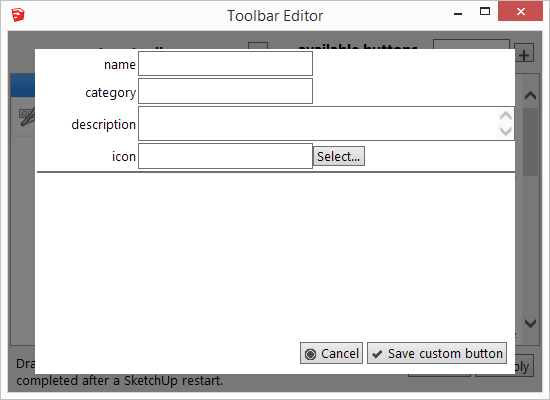
Same here - no input area for code.
Win 8.1, SU-2014 Pro, IE 11 (never used outside of SketchUp.)
-
me too, same problem, cannot whrite anything in the text zone
-
I know it has probably already been thought about, but it would be incredible to have a command repository where we can browse, install, and share commands...
Maybe a dvcs repo (github) could be used as the repo. What format would be good for command files - json or yaml maybe?
-
I uploaded a workaround for IE 11's bug (ToolbarEditor 1.1.2).
Currently the plugin writes each snippet to a ruby file (in %APPDATA%) and stores the metadata with the plugin's preferences in the registry.
A json or yaml format would also not be a bad idea. I chose rb because it contains runnable code and I don't need to extract the code from a part of the file (or deal with escaping etc.). The metadata is also written in the comment of the ruby file, but I haven't decided yet to parse it out of the comment again, because there would be many sources of error (or the comment would have to strictly follow a specific syntax. -
Currently the plugin writes each snippet to a ruby file (in %APPDATA%) and stores the metadata with the plugin's preferences in the registry.
Is the numeric part of the filename unique for each user? If so, that makes it difficult to have a way to share commands.
-
another detail: the toolbar position is not stored when you close sketchup
so you have to move it everytime you open
not really important, but would it be possible to dck the created toolbars as the other native toolbars?
-
Plugins can not influence the position of the toolbar (they can only tell SketchUp to show/hide a toolbar, and Sketchup remembers the position). Since these toolbars are created with a timeout (after all other plugins have been loaded), there was initially a problem wher the toolbar didn't remember its position. After report it was improved in SU2013 so that SketchUp should remember the position even after timeout. In which SketchUp version does it happen to you?
I have reduced the timeout, maybe that caused the problem? -
@aerilius said:
Plugins can not influence the position of the toolbar (they can only tell SketchUp to show/hide a toolbar, and Sketchup remembers the position). Since these toolbars are created with a timeout (after all other plugins have been loaded), there was initially a problem wher the toolbar didn't remember its position. After report it was improved in SU2013 so that SketchUp should remember the position even after timeout. In which SketchUp version does it happen to you?
I have reduced the timeout, maybe that caused the problem?i use sketchup 8
i shall try version 13 or 14, to check
thank you
-
This would be just what I'm looking for... if I could get it working.
When I open it up (v. 1.1.2 on SU 2014 on Win7), the list of available commands is very limited.
The vast majority of them is from the 1001bits extension I've got installed. Then there are perhaps 20 more. No View menu commands, for example, which is what I wanted.
Speaking for myself and as a relative noob, I think I'd prefer the commands listed in menu order: i.e. Tools/Sandbox/Smoove, but I perhaps I'm putting too much stock in the menus, with which I'm faintly familiar. I'd also love an option to list in different formats, i.e. a nice tight text list that would show about twice as much per page.
This looks awesome, and I can see it's working for other people. I've tried shutting down & restarting SU. I also just uninstalled and reinstalled TE, and an interesting thing happened: it still had about as many non-1001bits commands, but not the same ones! I only know this b/c I saw smoove on there before, and it's not there now. I tried disabling 1001bits, and interestingly enough there aren't any more non-1001bits tools there than before. 25 to be precise. Then I uninstalled TE, reinstalled, and same thing.
-
SketchUp does not make its menus readable, they can not be accessed or included in custom plugin toolbars. This plugin can only make toolbars for plugin commands (sorry, it got missing from the description in the SCF plugins store, it's still mentioned in the SU extension warehouse).
SketchUp's native commands need to be replicated one by one. You can install LaunchUp, which comes with a lot of copies of SketchUp's native commands.
-
Thanks Aurelius, I don't think I understand, but now I understand that I don't understand. I haven't really looked at creating commands, my level of sophistication extended only to picking something off a list




Advertisement