sketchucation logo sketchucation
    • 登入
    Oops, your profile's looking a bit empty! To help us tailor your experience, please fill in key details like your SketchUp version, skill level, operating system, and more. Update and save your info on your profile page today!
    🔌 Smart Spline | Fluid way to handle splines for furniture design and complex structures. Download

    [Plugin][$] TopoShaper - v2.7b - 30 Jan 26


    已排程 已置頂 已鎖定 已移動 Plugins
    456 貼文 144 Posters 715.4k 瀏覽 143 Watching
    正在載入更多貼文
    • 從舊到新
    • 從新到舊
    • 最多點贊
    回覆
    • 在新貼文中回覆
    登入後回覆
    此主題已被刪除。只有擁有主題管理權限的使用者可以查看。
    • pilouP 離線
      pilou
      最後由 編輯

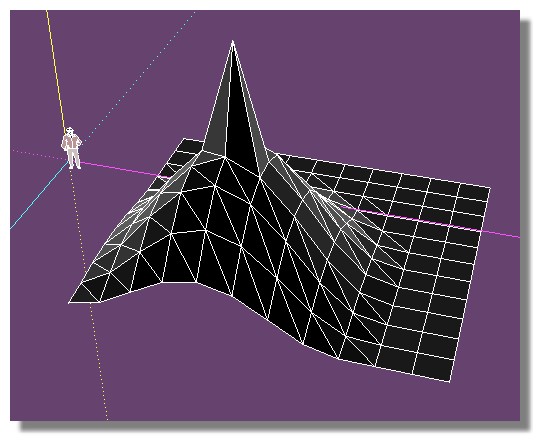
      does toposhaper can use this sort of file ?
      Because it generates bugs! 😮
      (I have last version Prog / Lib )

      tset_topo.jpg


      test_topo.skp

      Frenchy Pilou
      Is beautiful that please without concept!
      My Little site :)

      1 條回覆 最後回覆 回覆 引用 0
      • fredo6F 離線
        fredo6
        最後由 編輯

        Pilou,

        What do you mean by 'use'.

        Did you generate the terrain via Toposhaper QaudMesh instead?

        Fredo

        1 條回覆 最後回覆 回覆 引用 0
        • pilouP 離線
          pilou
          最後由 編輯

          @unknownuser said:

          What do you mean by 'use'.

          Start from this file

          @unknownuser said:

          Did you generate the terrain via Toposhaper QaudMesh instead?

          No just speedy by hand for the grid (a copy/Move square) + SandBox for deformation

          Frenchy Pilou
          Is beautiful that please without concept!
          My Little site :)

          1 條回覆 最後回覆 回覆 引用 0
          • pbacotP 離線
            pbacot
            最後由 編輯

            The plugin requires Point cloud or isocontours.

            MacOSX MojaveSketchUp Pro v19 Twilight v2 Thea v3 PowerCADD

            1 條回覆 最後回覆 回覆 引用 0
            • pilouP 離線
              pilou
              最後由 編輯

              @unknownuser said:

              requires Point cloud

              Seems that is the key ! 😄
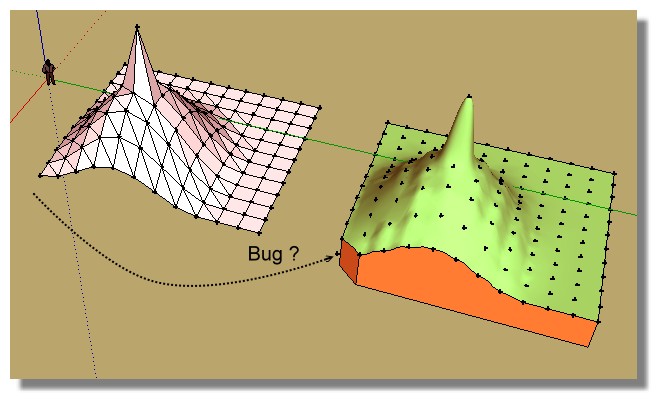
              When I create points from the file then use TopoShaper that works!
              (except for the little triangle bottom left corner? )

              PS The alert message when you select points who are not a group/ component is empty!
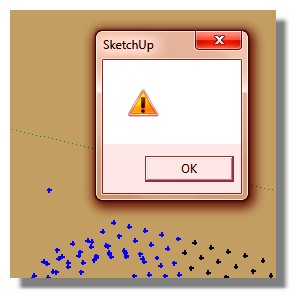
              alert.jpg
              Topoz1.jpg

              Frenchy Pilou
              Is beautiful that please without concept!
              My Little site :)

              1 條回覆 最後回覆 回覆 引用 0
              • fredo6F 離線
                fredo6
                最後由 編輯

                Pilou,

                Could you post the file with the point cloud. I'll check for the missing triangle and the missing message.

                Which Sketchup version do you use by the way?

                Fredo

                1 條回覆 最後回覆 回覆 引用 0
                • pilouP 離線
                  pilou
                  最後由 編輯

                  It was from the file previous linked! 😄
                  But here with the points! 😉
                  I have the 2015 and all at the last versions (plug and Lib) !
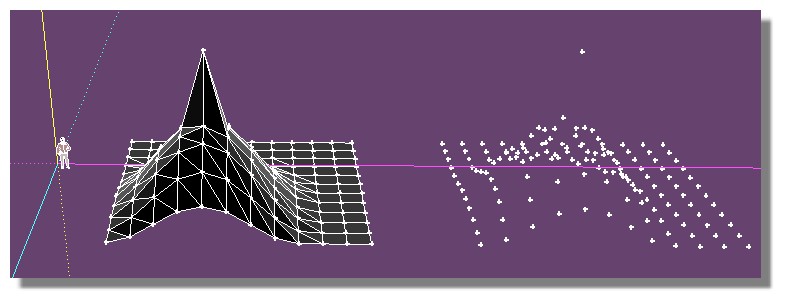
                  points_cloud.jpg


                  test_topo_points.skp

                  Frenchy Pilou
                  Is beautiful that please without concept!
                  My Little site :)

                  1 條回覆 最後回覆 回覆 引用 0
                  • pilouP 離線
                    pilou
                    最後由 編輯

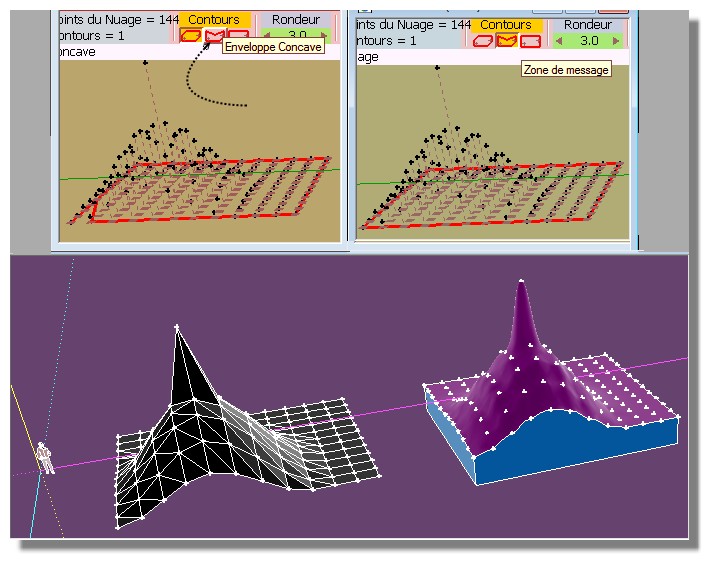
                    Resolved! 😄
                    We must press Concave contour first! 😳

                    resolu.jpg

                    Frenchy Pilou
                    Is beautiful that please without concept!
                    My Little site :)

                    1 條回覆 最後回覆 回覆 引用 0
                    • B 離線
                      Ben Ritter
                      最後由 編輯

                      When I run the toposhaper using terrain generator, although the contour lines setting is set to 1.0' increments, the first contour line above O.O' becomes 0.783' instead of 1.0'. After that, the contour line intervals are all 1.0' apart.

                      What could be the cause of this? How can I fix this?

                      Thanks. Ben

                      1 條回覆 最後回覆 回覆 引用 0
                      • B 離線
                        Ben Ritter
                        最後由 編輯

                        topo.skpHere is the file of cloud points

                        1 條回覆 最後回覆 回覆 引用 0
                        • O 離線
                          orei
                          最後由 編輯

                          Hi my friends,

                          i have a little problem.. i tried to model a cloud point to get a soil.. everything ok, except some peek and deep that the plugin generate, and i don't know to get rid.

                          You see in the attached screen, and in the skp file with point.

                          Hope in your help! Thanks man!!


                          PE_9064 - MODELLAZIONE TERRENO_light.skp
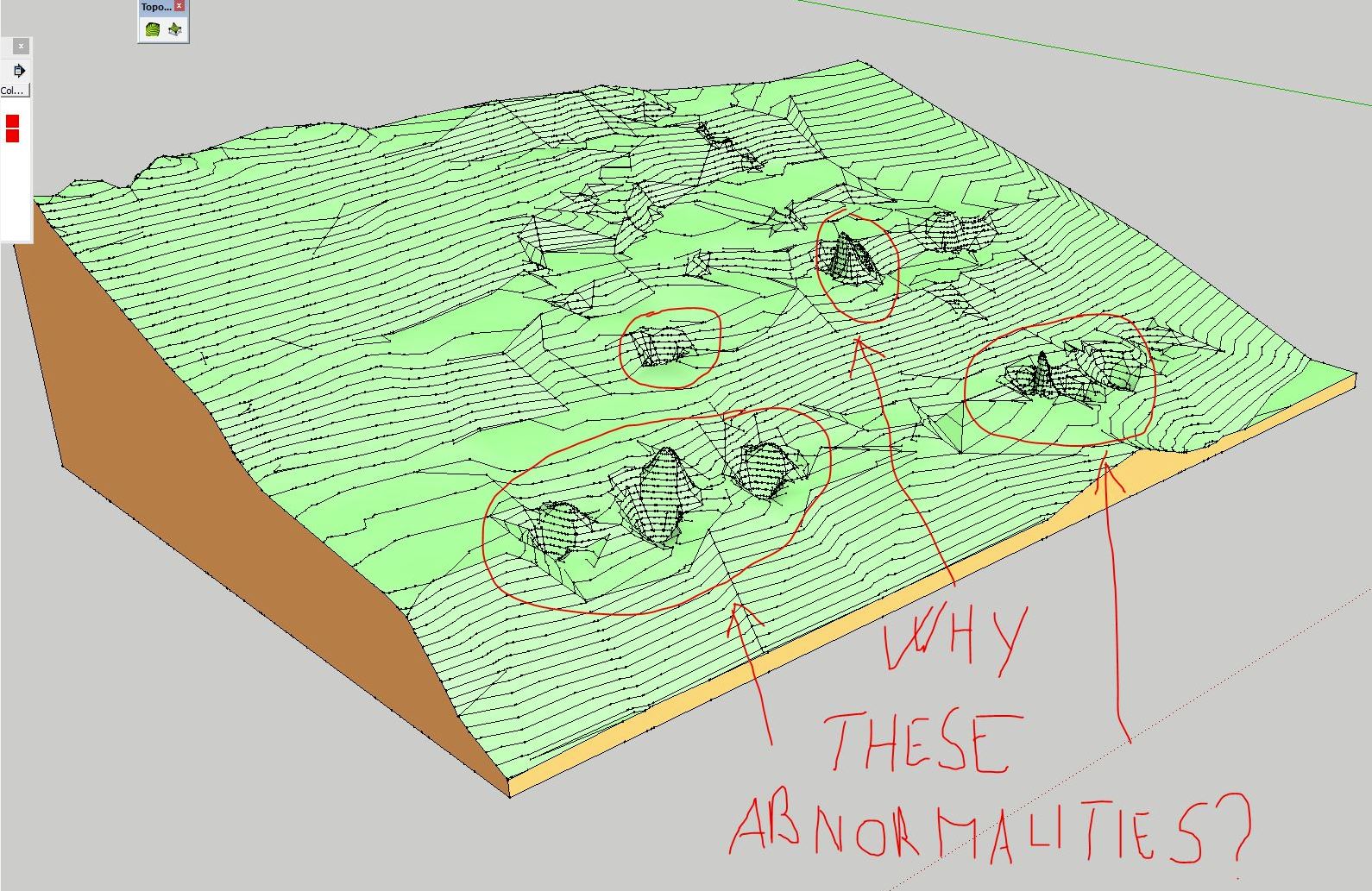

                          anomalie.JPG

                          1 條回覆 最後回覆 回覆 引用 0
                          • O 離線
                            orei
                            最後由 編輯

                            no one could help me?

                            1 條回覆 最後回覆 回覆 引用 0
                            • cottyC 離線
                              cotty
                              最後由 編輯

                              What would you expect from such a point?
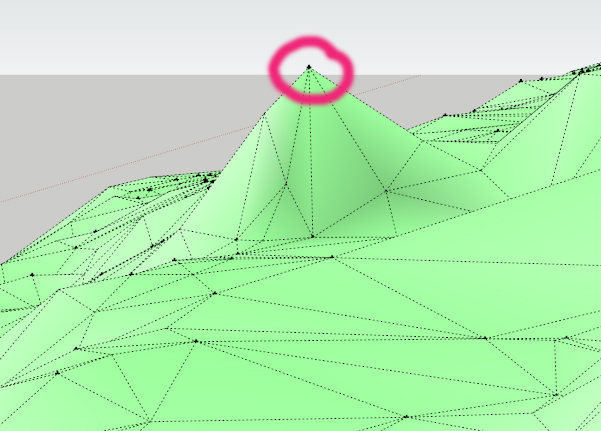
                              spike.jpg

                              If you only have some of these, you can move the vertices afterwards manually.

                              Or you can use a plugin to smooth the surface after the creation.

                              my SketchUp gallery

                              1 條回覆 最後回覆 回覆 引用 0
                              • K 離線
                                Kenny
                                最後由 編輯

                                If you only have a limited number of these points above the terrain causing the spikes then delete these points before running Toposhaper.

                                http://www.townscapesolutions.co.uk/

                                1 條回覆 最後回覆 回覆 引用 0
                                • pilouP 離線
                                  pilou
                                  最後由 編輯

                                  Why not use Triangulate Points first by TIG ?
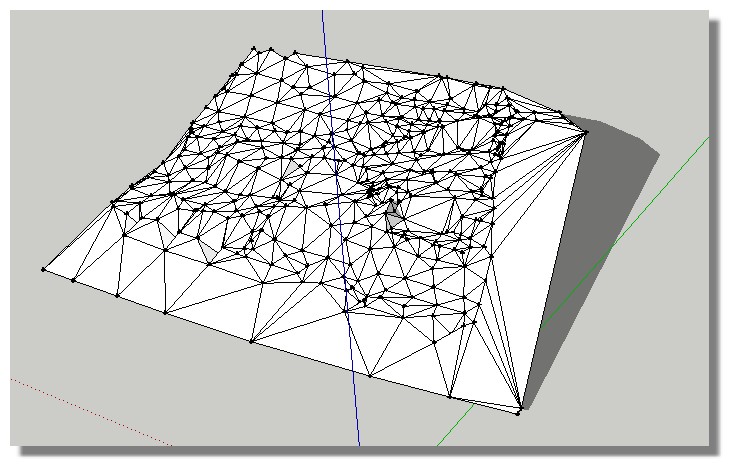
                                  triangle_tig.jpg

                                  Frenchy Pilou
                                  Is beautiful that please without concept!
                                  My Little site :)

                                  1 條回覆 最後回覆 回覆 引用 0
                                  • dereiD 離線
                                    derei
                                    最後由 編輯

                                    After playing with TopoShaper I ended up with several (three) terrains overlapped. Why this happened? It seems I am missing something in functionality of this plugin, so instead of refining the just created terrain, I end up with new modified copies of the terrain.

                                    DESIGNER AND ARTIST DEREI.UK

                                    1 條回覆 最後回覆 回覆 引用 0
                                    • O 離線
                                      orei
                                      最後由 編輯

                                      @kenny said:

                                      If you only have a limited number of these points above the terrain causing the spikes then delete these points before running Toposhaper.

                                      I have some deeps and some peeks. I don't know why this happened.
                                      I know that i can move up and down these points to get a level.. but i would like to understand how to evitate those problem.

                                      Why suggest to use triangulate point instead of toposhaper? toposhaper is much better than triangulate point for this, or not?

                                      Thanks mate!

                                      1 條回覆 最後回覆 回覆 引用 0
                                      • pilouP 離線
                                        pilou
                                        最後由 編輯

                                        It was just a suggestion for have a preview of the terrain and maybe see if there are not aeras where some confusion between near vertices are possible! 😉
                                        And give to Toposhaper faces and not only vertices! 🤓

                                        Frenchy Pilou
                                        Is beautiful that please without concept!
                                        My Little site :)

                                        1 條回覆 最後回覆 回覆 引用 0
                                        • fredo6F 離線
                                          fredo6
                                          最後由 編輯

                                          @pilou said:

                                          Why not use Triangulate Points first by TIG ?

                                          Pilou,

                                          The first iteration of TopoShaper is precisely the Delaunay Triangulation (same results normally as with the Falé /TIG plugin).

                                          @orei: the spikes are due to singular points with very different altitudes compared with immediate neighbours. TopoShaper CloudPoints generates a surface passing through the points.

                                          My suggestion would be that:

                                          • you generate the group of isocontours from the triangular mesh (an option in TopoShaper Cloud)
                                          • then from the isocontours group, you generate a quad mesh terrain, using the other tool of TopoShaper.

                                          This will smooth the spikes

                                          Fredo

                                          1 條回覆 最後回覆 回覆 引用 0
                                          • pilouP 離線
                                            pilou
                                            最後由 編輯

                                            😄

                                            Frenchy Pilou
                                            Is beautiful that please without concept!
                                            My Little site :)

                                            1 條回覆 最後回覆 回覆 引用 0
                                            • 1
                                            • 2
                                            • 3
                                            • 4
                                            • 5
                                            • 22
                                            • 23
                                            • 2 / 23
                                            • 第一個貼文
                                              最後的貼文
                                            Buy SketchPlus
                                            Buy SUbD
                                            Buy WrapR
                                            Buy eBook
                                            Buy Modelur
                                            Buy Vertex Tools
                                            Buy SketchCuisine
                                            Buy FormFonts

                                            Advertisement