sketchucation logo sketchucation
    • Login
    Oops, your profile's looking a bit empty! To help us tailor your experience, please fill in key details like your SketchUp version, skill level, operating system, and more. Update and save your info on your profile page today!
    Mac User? | Join the Rayscaper Beta for Mac Learn More

    [Plugin] GOSU v1.1.1

    Scheduled Pinned Locked Moved Plugins
    69 Posts 16 Posters 74.5k Views 16 Watching
    Loading More Posts
    • Oldest to Newest
    • Newest to Oldest
    • Most Votes
    Reply
    • Reply as topic
    Log in to reply
    This topic has been deleted. Only users with topic management privileges can see it.
    • S
      smicha
      last edited by

      It's almost it. But selecting one component and running the plugin should also change all other components without a need of selecting them. And an option to have one selected component visible and rest in a form of frames would be so useful.

      Perfect solution (for me) would look like this: select a component, apply the plugin - frames on all components, apply it again - frames on all but selected, apply again - go back to an original view. And a dream πŸ˜„ is to assign one shortcut, eg. 'F6'.

      What do you think Rafael?

      1 Reply Last reply
      Reply Quote 0
      • renderizaR
        renderiza
        last edited by

        @smicha said:

        It's almost it. But selecting one component and running the plugin should also change all other components without a need of selecting them. And an option to have one selected component visible and rest in a form of frames would be so useful.

        Perfect solution (for me) would look like this: select a component, apply the plugin - frames on all components, apply it again - frames on all but selected, apply again - go back to an original view. And a dream πŸ˜„ is to assign one shortcut, eg. 'F6'.

        What do you think Rafael?

        Sounds like a plan! I will put this things on my to do list and hopefully make it happen in a reasonable amount of time. I like to realease simple scripts that solve just a few of your suggestions and then refine it by updates.

        No promises since I have extra work but I think is a good idea so I will try.

        @techdave02 said:

        If so what about a right click sub menu to choose function???

        This is done already just need to check few thing so I can release it.

        Cheers

        [url=https://www.sketchupcode.com/:z3kqsidd]My Extensions ...[/url:z3kqsidd]

        1 Reply Last reply
        Reply Quote 0
        • renderizaR
          renderiza
          last edited by

          GOSU v1.0.5 Released!

          [highlight=#bfff00:hy2ldg96]1.0.5:: 4/26/2013[/highlight:hy2ldg96]

          • Right click sub menu to choose functions.

          Cheers!

          [url=https://www.sketchupcode.com/:z3kqsidd]My Extensions ...[/url:z3kqsidd]

          1 Reply Last reply
          Reply Quote 0
          • renderizaR
            renderiza
            last edited by

            @smicha said:

            It's almost it. But selecting one component and running the plugin should also change all other components without a need of selecting them. And an option to have one selected component visible and rest in a form of frames would be so useful.

            Perfect solution (for me) would look like this: select a component, apply the plugin - frames on all components, apply it again - frames on all but selected, apply again - go back to an original view. And a dream πŸ˜„ is to assign one shortcut, eg. 'F6'.

            What do you think Rafael?

            Hey I stumbled upon this ... http://sketchucation.com/forums/viewtopic.php?f=180&t=21334

            Please tell me what you think...cheers!

            [url=https://www.sketchupcode.com/:z3kqsidd]My Extensions ...[/url:z3kqsidd]

            1 Reply Last reply
            Reply Quote 0
            • S
              smicha
              last edited by

              I saw ghostcomp yesterday - great plugin but its use is not as fast as I wanted. It introduces extra layer, wireframe is only for original component (box is with sides). Anyway ghostcomp is a great plugin.

              1 Reply Last reply
              Reply Quote 0
              • renderizaR
                renderiza
                last edited by

                @smicha said:

                I saw ghostcomp yesterday - great plugin but its use is not as fast as I wanted. It introduces extra layer, wireframe is only for original component (box is with sides), it doesn't convert all same components unless I select them,... I think proxy component works better for me. Anyway ghostcomp is a great plugin.

                I have started to add the 'Set:: Proxy' to Gosu.

                @smicha said:

                BTW. Do you know any plugin that selects same components? This function is available in a component manager, right click on a component that is on a list, and choose 'select instances' but I cannot assign shortcut key for it.

                Here is the one I found by Confitex Architure;

                [Plugin] Select component instances on right click - http://sketchucation.com/forums/viewtopic.php?t=9810

                Note: You can add a shortcut key to that plugin under 'Edit/Item/DC Instances/Select Active

                [url=https://www.sketchupcode.com/:z3kqsidd]My Extensions ...[/url:z3kqsidd]

                1 Reply Last reply
                Reply Quote 0
                • S
                  smicha
                  last edited by

                  5 minutes ago I found the same plugin πŸ˜„

                  1 Reply Last reply
                  Reply Quote 0
                  • S
                    smicha
                    last edited by

                    @unknownuser said:

                    Note: You can add a shortcut key to that plugin under 'Edit/Item/DC Instances/Select Active

                    I am confused - I cannot find it.

                    1 Reply Last reply
                    Reply Quote 0
                    • S
                      smicha
                      last edited by

                      I found it. Thanks.

                      1 Reply Last reply
                      Reply Quote 0
                      • renderizaR
                        renderiza
                        last edited by

                        GOSU v1.0.6 Released!

                        [highlight=#bfff00:3lqn88ji]1.0.6:: 4/26/2013[/highlight:3lqn88ji]

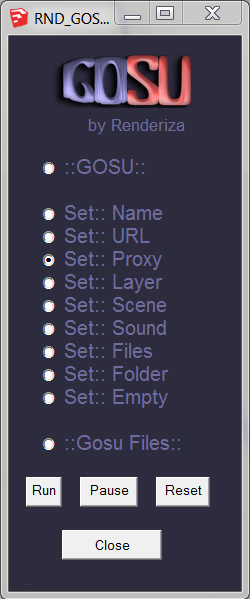
                        • Set:: Proxy - Replaces complex component with simple one temporarily.

                        Set:: Proxy

                        Note: The Set:: Proxy feature in Gosu is a modification of a plugin called 'Bounding Box View by AdamB' and even though is written little different at its base is the same thing with couple functions added. So most of the credits should go to him...again thanks and if there is any issue please let me know.

                        ::GOSU dlg::
                        dlg-1.jpg

                        [url=https://www.sketchupcode.com/:z3kqsidd]My Extensions ...[/url:z3kqsidd]

                        1 Reply Last reply
                        Reply Quote 0
                        • S
                          smicha
                          last edited by

                          You are my hero πŸ˜„ Great job Rafael!

                          Can you add an option to get frames only (boxes with edges only, no sides)?

                          1 Reply Last reply
                          Reply Quote 0
                          • renderizaR
                            renderiza
                            last edited by

                            @smicha said:

                            Can you add an option to get frames only (boxes with edges only, no sides)?

                            Download the plugin again because I added some code that will allow you to add cline lines with no faces to proxy if you hold 'ctrl' key while clicking component.

                            Note: In the video I said 'cline line' and the correct name for it is 'construction line'. Also sometime if the web dlg is focused and you hold ctrl and click component it will not work, so before doing this move camera to refresh view-port so the plugin recognize a key being press.

                            [url=https://www.sketchupcode.com/:z3kqsidd]My Extensions ...[/url:z3kqsidd]

                            1 Reply Last reply
                            Reply Quote 0
                            • S
                              smicha
                              last edited by

                              Ctrl function is not working - I installed it twice.

                              1 Reply Last reply
                              Reply Quote 0
                              • S
                                smicha
                                last edited by

                                Another improvement would be proxy on a single group, not a component.

                                1 Reply Last reply
                                Reply Quote 0
                                • renderizaR
                                  renderiza
                                  last edited by

                                  @smicha said:

                                  Ctrl function is not working - I installed it twice.

                                  At the moment it seem that when the GOSU web dialog window is focused it doesn't recognize the keyboard so to fix it follow this steps until I can solve it on code...

                                  1. click Set::Proxy on dlg window

                                  2. Use middle button to orbit around so the dlg window is not focused anymore

                                  3. Hold Ctrl and click component

                                  4. Let me know if it worked because if not then the problem is not what I have in mind. Also just in case delete web cookies and download again because since I used same name as the one I had uploaded before it might had something to do with that (not sure).

                                  @smicha said:

                                  Another improvement would be proxy on a single group, not a component.

                                  At the moment the Definition Name is being used to set proxy and only components can have them. Not saying it cannot be done with groups but it will take more time to make it work.

                                  [url=https://www.sketchupcode.com/:z3kqsidd]My Extensions ...[/url:z3kqsidd]

                                  1 Reply Last reply
                                  Reply Quote 0
                                  • S
                                    smicha
                                    last edited by

                                    Refael,

                                    Isn't it better to do two separate functions - proxy with boxes and proxy with clines? That could let a user assign different shortcuts to such functions.

                                    I'll test your plugin tomorrow morning.

                                    1 Reply Last reply
                                    Reply Quote 0
                                    • renderizaR
                                      renderiza
                                      last edited by

                                      GOSU v1.0.7 Released!

                                      [highlight=#bfff00:2t64rsa8]1.0.7:: 4/29/2013[/highlight:2t64rsa8]

                                      • Set:: Proxy(box) - Added this to web dlg
                                      • Set:: Proxy(cline) - Added this to web dlg
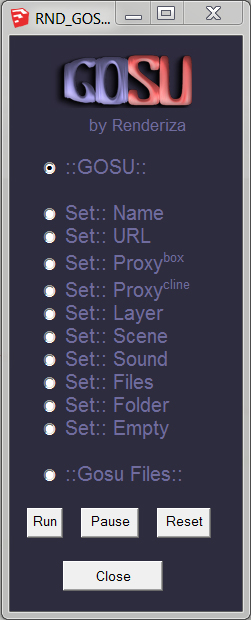
                                      new-dlg.jpg

                                      You can set a keyboard to Set::Proxy(box or cline) and No::Proxy(box or cline)like this

                                      To set key shortcut to Set::Proxy(box or cline);

                                      1. Select component
                                      2. Got to Window menu
                                      3. Then Preference
                                        4 On the left side click 'Shortcuts'
                                      4. On Filter type cline
                                      5. This should appear...Edit/Item/GOSU/Set::Proxy(Cline)
                                      6. Add Shorcut

                                      To set key shortcut to No::Proxy(box or cline);

                                      1. Select component that is already with Proxy(Cline) Aplied or it will not work
                                      2. Got to Window menu
                                      3. Then Preference
                                        4 On the left side click 'Shortcuts'
                                      4. On Filter type cline
                                      5. This should appear...Edit/Item/GOSU/No::Proxy(Cline)
                                      6. Add Shorcut

                                      By the way ::smicha:: thanks for making suggestions! This will make GOSU better. πŸ‘

                                      Cheers!

                                      [url=https://www.sketchupcode.com/:z3kqsidd]My Extensions ...[/url:z3kqsidd]

                                      1 Reply Last reply
                                      Reply Quote 0
                                      • Rich O BrienR
                                        Rich O Brien Moderator
                                        last edited by

                                        Added to store

                                        Download the free D'oh Book for SketchUp πŸ“–

                                        1 Reply Last reply
                                        Reply Quote 0
                                        • renderizaR
                                          renderiza
                                          last edited by

                                          @rich o brien said:

                                          Added to store

                                          Thank you very much!

                                          [url=https://www.sketchupcode.com/:z3kqsidd]My Extensions ...[/url:z3kqsidd]

                                          1 Reply Last reply
                                          Reply Quote 0
                                          • CadFatherC
                                            CadFather
                                            last edited by

                                            Thanks Rafael, it's a fun plugin!

                                            would be great if it went stealth - fantastic for jokes - imagine your boss clicks an object during a presentation and the appropriate sound goes off! πŸ˜†

                                            1 Reply Last reply
                                            Reply Quote 0

                                            Hello! It looks like you're interested in this conversation, but you don't have an account yet.

                                            Getting fed up of having to scroll through the same posts each visit? When you register for an account, you'll always come back to exactly where you were before, and choose to be notified of new replies (either via email, or push notification). You'll also be able to save bookmarks and upvote posts to show your appreciation to other community members.

                                            With your input, this post could be even better πŸ’—

                                            Register Login
                                            • 1
                                            • 2
                                            • 3
                                            • 4
                                            • 3 / 4
                                            • First post
                                              Last post
                                            Buy SketchPlus
                                            Buy SUbD
                                            Buy WrapR
                                            Buy eBook
                                            Buy Modelur
                                            Buy Vertex Tools
                                            Buy SketchCuisine
                                            Buy FormFonts

                                            Advertisement

