sketchucation logo sketchucation
    • 登入
    Oops, your profile's looking a bit empty! To help us tailor your experience, please fill in key details like your SketchUp version, skill level, operating system, and more. Update and save your info on your profile page today!
    🔌 Smart Spline | Fluid way to handle splines for furniture design and complex structures. Download

    [Plugin] Canvas v1.1.3

    已排程 已置頂 已鎖定 已移動 Plugins
    98 貼文 31 Posters 73.8k 瀏覽 31 Watching
    正在載入更多貼文
    • 從舊到新
    • 從新到舊
    • 最多點贊
    回覆
    • 在新貼文中回覆
    登入後回覆
    此主題已被刪除。只有擁有主題管理權限的使用者可以查看。
    • renderizaR 離線
      renderiza
      最後由 編輯

      srx::

      Thank you

      cuttingedge::

      There is no parameter controls at the moment but its on my to do list.

      3dsmax9::

      Added RND_0_Menu.rb to Rar File...Thank you for pointing it out. 👍

      Thanks for your suggestion I will look into it but in the mean time please check 'Repeat Copy' by Chris Fullmer here... http://sketchucation.com/forums/viewtopic.php?t=26117

      Krisidious::

      What makes Canvas unique is the constant copies you get without having to do multiple clicks.

      guanjin::

      I am glad you were able to resolve the issue. 👍

      [url=https://www.sketchupcode.com/:z3kqsidd]My Extensions ...[/url:z3kqsidd]

      1 條回覆 最後回覆 回覆 引用 0
      • guanjinG 離線
        guanjin
        最後由 編輯

        guanjin::

        I am glad you were able to resolve the issue. 👍[/quote]

        😍

        geshishua.gif

        Increase the size of the adjustment distance the better, some randomness, overlapping other components, will produce along the Z axis superimposed.

        I come from China, is to learn

        1 條回覆 最後回覆 回覆 引用 0
        • sicksickisckS 離線
          sicksickisck
          最後由 編輯

          hah nice tool! and work very fine for me :]

          1 條回覆 最後回覆 回覆 引用 0
          • renderizaR 離線
            renderiza
            最後由 編輯

            Update RND_Canvas v1.0.2 Beta

            New::
            1.0.2 Beta:: 4/8/2013

            • Add:: Multiple -- Adds Multiple Groups or Components while holding left mouse button
            • Add:: Single -- Adds Single Groups or Components while holding left mouse button
            • Don't Add:: If pointer on top of face
            • Select:: Normal or Random Input Position

            http://sketchucation.com/forums/download/file.php?id=104057

            "Add:: On Edge" will be available on v1.0.3

            Note:

            Added new features that some of you were suggesting and if you have any more suggestions let me know.

            Now you can choose to add only one group or component per click use "Add:: Single".

            Also for people that want to avoid having groups or components overlaps use the "Don't Add:: If pointer on top of face".

            ::A tip:: When using "Don't Add:: If pointer on top of face" I suggest having the Group or Component Axis on center

            For adding some randomness while adding groups or components click :Select:: Random Input Position"

            That is it I hope you like the new features for "Canvas"! 👍

            [url=https://www.sketchupcode.com/:z3kqsidd]My Extensions ...[/url:z3kqsidd]

            1 條回覆 最後回覆 回覆 引用 0
            • guanjinG 離線
              guanjin
              最後由 編輯

              @unknownuser said:

              Update RND_Canvas v1.0.2 Beta

              New::
              1.0.2 Beta:: 4/8/2013

              • Add:: Multiple -- Adds Multiple Groups or Components while holding left mouse button
              • Add:: Single -- Adds Single Groups or Components while holding left mouse button
              • Don't Add:: If pointer on top of face
              • Select:: Normal or Random Input Position

              http://sketchucation.com/forums/download/file.php?id=104057

              "Add:: On Edge" will be available on v1.0.3

              Note:

              Added new features that some of you were suggesting and if you have any more suggestions let me know.

              Now you can choose to add only one group or component per click use "Add:: Single".

              Also for people that want to avoid having groups or components overlaps use the "Don't Add:: If pointer on top of face".

              ::A tip:: When using "Don't Add:: If pointer on top of face" I suggest having the Group or Component Axis on center

              For adding some randomness while adding groups or components click :Select:: Random Input Position"

              That is it I hope you like the new features for "Canvas"! 👍

              The so quickly update the functionality I want,Renderiza: Great, you're God.

              👍 😍

              I come from China, is to learn

              1 條回覆 最後回覆 回覆 引用 0
              • renderizaR 離線
                renderiza
                最後由 編輯

                guanjin ::

                Thanks for your positive comment!

                Here is a Sneak Peak on next Canvas version 1.0.3 Beta!

                http://sketchucation.com/forums/download/file.php?id=104104&mode=view/rokbox.jpg

                Hope to release it soon and maybe add more features...again thanks!

                [url=https://www.sketchupcode.com/:z3kqsidd]My Extensions ...[/url:z3kqsidd]

                1 條回覆 最後回覆 回覆 引用 0
                • guanjinG 離線
                  guanjin
                  最後由 編輯

                  @unknownuser said:

                  guanjin ::

                  Thanks for your positive comment!

                  Here is a Sneak Peak on next Canvas version 1.0.3 Beta!

                  http://sketchucation.com/forums/download/file.php?id=104104&mode=view/rokbox.jpg

                  Hope to release it soon and maybe add more features...again thanks!

                  If you modify the options selective disappearance,and then activate the tool view window space-saving, thank you.

                  Thanks again!

                  I hope the first to try new brushes!

                  😍 😍

                  I come from China, is to learn

                  1 條回覆 最後回覆 回覆 引用 0
                  • 3 離線
                    3dsmax9
                    最後由 編輯

                    the update ils so cool thank you, the next update look great it will help me a lote thank you so much for this Renderiza.

                    1 條回覆 最後回覆 回覆 引用 0
                    • renderizaR 離線
                      renderiza
                      最後由 編輯

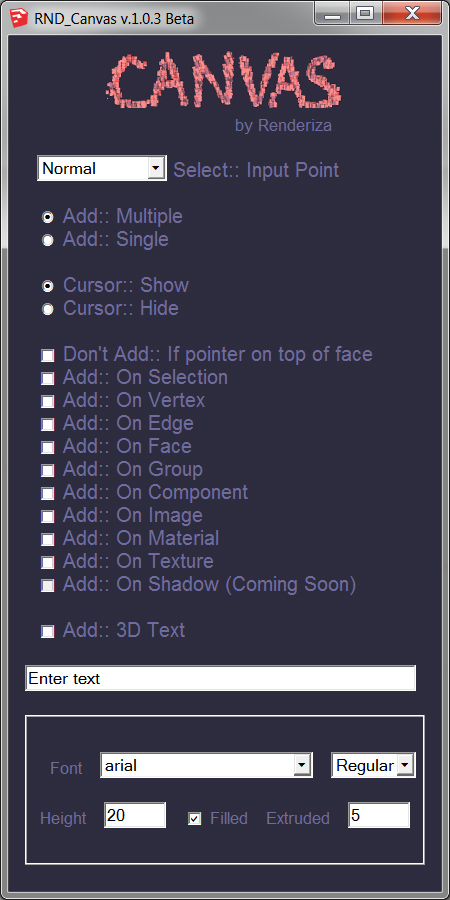
                      Canvas version 1.0.3 Beta - Released today!!!

                      Hi, hope this new version is well accepted and sorry the Add:: On Shadow is not available in this version but hopefully the next one.
                      canvas-dlg.jpg

                      Again any feedback & advise is more than welcome. 👍

                      3dsmax9::
                      Thanks for the feedback I really appreciate it!

                      guanjin::
                      I modified the code so that if you don't have component or group selected the window dlg will still be there after warning message. Thanks!

                      [url=https://www.sketchupcode.com/:z3kqsidd]My Extensions ...[/url:z3kqsidd]

                      1 條回覆 最後回覆 回覆 引用 0
                      • PixeroP 離線
                        Pixero
                        最後由 編輯

                        Thanks, I would like to see both fixed and randomized scale and rotation withing bounds.
                        Also to be able to select where it should be scaled and rotated from. Component axis isnt Always where it ought to be. See Chris Fullmer's Rotate and scale multiple for a good example.

                        1 條回覆 最後回覆 回覆 引用 0
                        • 3 離線
                          3dsmax9
                          最後由 編輯

                          thank you very much for this update these stuff is cool, here's some proposition for this great script:

                          . it will be great if the dialog box remeber the last position and setting that we give to it so that wen we reopen it it stais in that possition with the same setting that we used last (I am sorry for my bad english).

                          . wen we use the add on vertex it will be cool if we can see the vertex that we will be inserte the groupe or comp like wen we use the move/copy tool.

                          . a description video will be very helpfull.

                          AND THANK YOU VERY MUCH I THINK THAT THIS TOOLS WILL BE ONE OF THE MUST USED IN SKETCHUP FORoM NOW ON i now i will be using it a lot THANK'S again.

                          1 條回覆 最後回覆 回覆 引用 0
                          • renderizaR 離線
                            renderiza
                            最後由 編輯

                            Bug Fixed in Canvas

                            I was receiving a Warning Prompt to select a Group or Component even if Group was selected so I fixed that in v1.0.4.

                            @pixero said:

                            Thanks, I would like to see both fixed and randomized scale and rotation withing bounds.
                            Also to be able to select where it should be scaled and rotated from. Component axis isnt Always where it ought to be. See Chris Fullmer's Rotate and scale multiple for a good example.

                            This suggested feature sounds really useful and will try my best to make it happen even though I am little busy with work.

                            @3dsmax9 said:

                            . it will be great if the dialog box remeber the last position and setting that we give to it so that wen we reopen it it stais in that possition with the same setting that we used last (I am sorry for my bad english).

                            I found a tutorial on how to do this with cookies so hope to make it happen soon

                            @3dsmax9 said:

                            . wen we use the add on vertex it will be cool if we can see the vertex that we will be inserte the groupe or comp like wen we use the move/copy tool.

                            I will look into how to do this...thanks for the idea.

                            @3dsmax9 said:

                            . a description video will be very helpfull.

                            Reason why I have yet to make a video is that plugin is changing in fast paste so I am afraid to spend time make video when plugin will be different soon but soon I will find time to do one.

                            Again Thanks!

                            [url=https://www.sketchupcode.com/:z3kqsidd]My Extensions ...[/url:z3kqsidd]

                            1 條回覆 最後回覆 回覆 引用 0
                            • guanjinG 離線
                              guanjin
                              最後由 編輯

                              (1) whether selecting the components out of the Options dialog box, select the function dialog box will disappear automatically affect the visibility of the window.
                              (2)Select the function to maintain the next default.
                              (3)Can achieve a variety of different components replication, scaling.

                              Thank you!Do not mind if I just fantasy! 👍 👍 👍[/quote]

                              I come from China, is to learn

                              1 條回覆 最後回覆 回覆 引用 0
                              • guanjinG 離線
                                guanjin
                                最後由 編輯

                                (1) whether selecting the components out of the Options dialog box, select the function dialog box will disappear automatically affect the visibility of the window.
                                (2)Select the function to maintain the next default.
                                (3)Can achieve a variety of different components replication, scaling.

                                Thank you!Do not mind if I just fantasy! 👍

                                I come from China, is to learn

                                1 條回覆 最後回覆 回覆 引用 0
                                • guanjinG 離線
                                  guanjin
                                  最後由 編輯

                                  (1) whether selecting the components out of the Options dialog box, select the function dialog box will disappear automatically affect the visibility of the window.
                                  (2)Select the function to maintain the next default.
                                  (3)Can achieve a variety of different components replication, scaling.

                                  Thank you!Do not mind if I just fantasy! 👍 👍 👍

                                  I come from China, is to learn

                                  1 條回覆 最後回覆 回覆 引用 0
                                  • olisheaO 離線
                                    olishea
                                    最後由 編輯

                                    Well done Rafael, looking forward to the plugin's progression.

                                    Thank you very much.

                                    oli

                                    1 條回覆 最後回覆 回覆 引用 0
                                    • A 離線
                                      Anton_S
                                      最後由 編輯

                                      Nice plugin!! 👍

                                      A suggestion:

                                      Add start and commit operation for each click, so that I woudn't have to press ctrl-z for each added entity. 😒

                                      1 條回覆 最後回覆 回覆 引用 0
                                      • D 離線
                                        driven
                                        最後由 編輯

                                        @unknownuser said:

                                        Bug Fixed in Canvas
                                        I found a tutorial on how to do this with cookies so hope to make it happen soon

                                        this does it...
                                        ## @@canvas_dlg.set_position (70,95) ;
                                        john

                                        learn from the mistakes of others, you may not live long enough to make them all yourself...

                                        1 條回覆 最後回覆 回覆 引用 0
                                        • renderizaR 離線
                                          renderiza
                                          最後由 編輯

                                          **@guanjin said:

                                          (1) whether selecting the components out of the Options dialog box, select the function dialog box will disappear automatically affect the visibility of the window.
                                          (2)Select the function to maintain the next default.
                                          (3)Can achieve a variety of different components replication, scaling.

                                          Thank you!Do not mind if I just fantasy! 👍**
                                          Thanks for the suggestions they really help. 👍

                                          **@olishea said:

                                          Well done Rafael, looking forward to the plugin's progression.

                                          Thank you very much.**
                                          Thanks!

                                          **@anton_s said:

                                          Nice plugin!! 👍
                                          A suggestion:

                                          Add start and commit operation for each click, so that I woudn't have to press ctrl-z for each added entity. 😒**
                                          I have tried to enclose some code with start and commit operations but even though its assigned name appears as a undo option it only does it one step at a time. 😞

                                          **@driven said:

                                          @unknownuser said:

                                          Bug Fixed in Canvas
                                          I found a tutorial on how to do this with cookies so hope to make it happen soon

                                          this does it...
                                          ## @@canvas_dlg.set_position (70,95) ;
                                          john**

                                          What I meant was for plugin to remember form values like check boxes for example

                                          [url=https://www.sketchupcode.com/:z3kqsidd]My Extensions ...[/url:z3kqsidd]

                                          1 條回覆 最後回覆 回覆 引用 0
                                          • A 離線
                                            Anton_S
                                            最後由 編輯

                                            @unknownuser said:

                                            I have tried to enclose some code with start and commit operations but even though its assigned name appears as a undo option it only does it one step at a time. 😞

                                            Oh, just add model.start_operation(...) at the beginning of onLButtonDown method, and add model.commit_operation in the onLButtonUp method. After that, it must work 😄

                                            Btw, open Ruby Console and test your plugin; it has a bunch of tiny bugs 💚

                                            1 條回覆 最後回覆 回覆 引用 0
                                            • 1
                                            • 2
                                            • 3
                                            • 4
                                            • 5
                                            • 2 / 5
                                            • 第一個貼文
                                              最後的貼文
                                            Buy SketchPlus
                                            Buy SUbD
                                            Buy WrapR
                                            Buy eBook
                                            Buy Modelur
                                            Buy Vertex Tools
                                            Buy SketchCuisine
                                            Buy FormFonts

                                            Advertisement