sketchucation logo sketchucation
    • 登入
    Oops, your profile's looking a bit empty! To help us tailor your experience, please fill in key details like your SketchUp version, skill level, operating system, and more. Update and save your info on your profile page today!
    🔌 Smart Spline | Fluid way to handle splines for furniture design and complex structures. Download

    [Plugin] Canvas v1.1.3

    已排程 已置頂 已鎖定 已移動 Plugins
    98 貼文 31 Posters 75.1k 瀏覽 31 Watching
    正在載入更多貼文
    • 從舊到新
    • 從新到舊
    • 最多點贊
    回覆
    • 在新貼文中回覆
    登入後回覆
    此主題已被刪除。只有擁有主題管理權限的使用者可以查看。
    • renderizaR 離線
      renderiza
      最後由 編輯

      [pre:101ascxl]Authors:: Renderiza
      Plugin Name:: Canvas
      Version:: 1.1.3
      Date:: 10/12/2013
      Cost:: Free[/pre:101ascxl]
      Canvas v1.1.3 is now available for download.

      [url=https://www.sketchupcode.com/:z3kqsidd]My Extensions ...[/url:z3kqsidd]

      1 條回覆 最後回覆 回覆 引用 0
      • J 離線
        jpalm32
        最後由 編輯

        Really clean polished work. Well done.

        1 條回覆 最後回覆 回覆 引用 0
        • halroachH 離線
          halroach
          最後由 編輯

          Very nice Renderiza!

          1. It would be great to have the ability to choose a bunch/list of components to paint, that alternate randomly or in a cycle - kinda like with the "component spray" plugin.

          2. An idea to think about... Having the ability to set a point in space that all blue axis of newly inserted components will align to. Like a magnet point.

          3. The ability to rotate objects randomly in all axis. Not only in the XY. Not sure what it would be good for... but it could be nice.

          FlexTools - Super Quick Windows, Doors, Slats...

          1 條回覆 最後回覆 回覆 引用 0
          • guanjinG 離線
            guanjin
            最後由 編輯

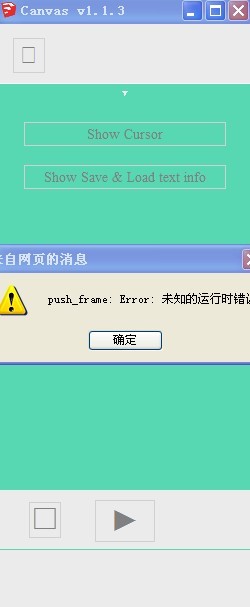
            Can not be opened, an error 😒

            QQ图片20131013004608.jpg

            I come from China, is to learn

            1 條回覆 最後回覆 回覆 引用 0
            • renderizaR 離線
              renderiza
              最後由 編輯

              @guanjin said:

              Can not be opened, an error 😒

              Can you close SketchUp and try running the plugin again a second time?
              If I am not mistaken that error should go away...Please let me know.

              That error has to do with trying to load the previous data stored but since your loading the plugin for the very fist time there is no data to load. 😕

              I thought I solved this by adding a condition to skip that line of code if there was no data but it seems the problem persists.

              I will be very grateful if another person confirm this issue and if it went away the second time trying to load the plugin.

              Thanks!

              @halroach said:

              Very nice Renderiza!

              1. It would be great to have the ability to choose a bunch/list of components to paint, that alternate randomly or in a cycle - kinda like with the "component spray" plugin.

              2. An idea to think about... Having the ability to set a point in space that all blue axis of newly inserted components will align to. Like a magnet point.

              3. The ability to rotate objects randomly in all axis. Not only in the XY. Not sure what it would be good for... but it could be nice.

              Very good suggestions!
              Will try to integrate them for future updates. 👍

              @jpalm32 said:

              Really clean polished work. Well done.

              I appreciate your comment thank you! 😄

              [url=https://www.sketchupcode.com/:z3kqsidd]My Extensions ...[/url:z3kqsidd]

              1 條回覆 最後回覆 回覆 引用 0
              • renderizaR 離線
                renderiza
                最後由 編輯

                @guanjin said:

                Can not be opened, an error 😒

                One more thing...

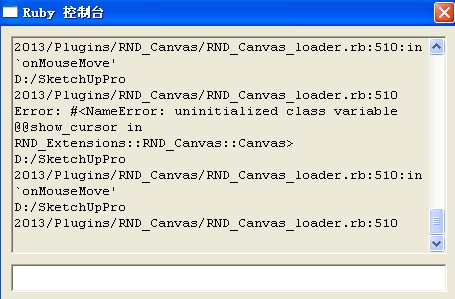
                Can you verify that your plugins folder permission are set to full?

                Thanks!

                [url=https://www.sketchupcode.com/:z3kqsidd]My Extensions ...[/url:z3kqsidd]

                1 條回覆 最後回覆 回覆 引用 0
                • guanjinG 離線
                  guanjin
                  最後由 編輯

                  QQ截图20131013021525.jpg

                  I come from China, is to learn

                  1 條回覆 最後回覆 回覆 引用 0
                  • renderizaR 離線
                    renderiza
                    最後由 編輯

                    Don't see that error on my Ruby Console but I uploaded another file to Plugin Store to solve it so please install that to see if the error goes away.

                    Thanks and sorry for inconvenience.

                    NOTE: IMPORTANT! You need to install the latest Internet Explorer version. This plugin uses HTML5 & jQuery and if your browser doesn't support that it can cause problems.

                    [url=https://www.sketchupcode.com/:z3kqsidd]My Extensions ...[/url:z3kqsidd]

                    1 條回覆 最後回覆 回覆 引用 0
                    • guanjinG 離線
                      guanjin
                      最後由 編輯

                      @renderiza said:

                      Don't see that error on my Ruby Console but I uploaded another file to Plugin Store to solve it so please install that to see if the error goes away.

                      Thanks and sorry for inconvenience.

                      NOTE: IMPORTANT! You need to install the latest Internet Explorer version. This plugin uses HTML5 & jQuery and if your browser doesn't support that it can cause problems.

                      Thank you,

                      QQ图片20131013133846.jpg

                      I come from China, is to learn

                      1 條回覆 最後回覆 回覆 引用 0
                      • Z 離線
                        Zacchia
                        最後由 編輯

                        Thank you for it!

                        1 條回覆 最後回覆 回覆 引用 0
                        • JQLJ 離線
                          JQL
                          最後由 編輯

                          Hi Renderiza,

                          Excellent Plugin, beautifully excecuted, with a great visual appearence and a perfect video tutorial!

                          What more could one wish for?

                          Congratulations and thanks!

                          JQL

                          www.casca.pt
                          Visit us on facebook!

                          1 條回覆 最後回覆 回覆 引用 0
                          • renderizaR 離線
                            renderiza
                            最後由 編輯

                            Very happy to see everyone is comments thank you! 💚

                            [url=https://www.sketchupcode.com/:z3kqsidd]My Extensions ...[/url:z3kqsidd]

                            1 條回覆 最後回覆 回覆 引用 0
                            • guanjinG 離線
                              guanjin
                              最後由 編輯

                              @renderiza said:

                              Very happy to see everyone is comments thank you! 💚

                              Thank you for your hard work 😍

                              I come from China, is to learn

                              1 條回覆 最後回覆 回覆 引用 0
                              • halroachH 離線
                                halroach
                                最後由 編輯

                                Another suggestion. a toggle to be able to orient the component to the surface it is being dropped on, Or the ability to maintain it's "glueing" properties that were set upon the component's creation.

                                FlexTools - Super Quick Windows, Doors, Slats...

                                1 條回覆 最後回覆 回覆 引用 0
                                • O 離線
                                  orchard collie
                                  最後由 編輯

                                  Hi Renderiza
                                  Have just installed Canvas 1.1.3 on MacBOok Pro and can't seem to make it work. It loads the Dialog Box but there are no parameters or any of the other features you talked about in your video. Am I doing something wrong, or is Canvas only for Windows. If so - Please make a Mac version it looks such a fantastic plugin.
                                  Tried Component Spray and couldn't make it work either
                                  Any ideas?
                                  I would love to get it up and running as I have a tree covered island to vegetate with 1000 trees or more!
                                  Cheers
                                  Orchard from Darwin

                                  1 條回覆 最後回覆 回覆 引用 0
                                  • renderizaR 離線
                                    renderiza
                                    最後由 編輯

                                    @halroach said:

                                    Another suggestion. a toggle to be able to orient the component to the surface it is being dropped on, Or the ability to maintain it's "glueing" properties that were set upon the component's creation.

                                    That would be very good addition to the plugin indeed, it will eventually be on my to do list. 👍

                                    @orchard collie said:

                                    Any ideas?

                                    Do you have internet explorer 9 or higher installed?

                                    [url=https://www.sketchupcode.com/:z3kqsidd]My Extensions ...[/url:z3kqsidd]

                                    1 條回覆 最後回覆 回覆 引用 0
                                    • O 離線
                                      orchard collie
                                      最後由 編輯

                                      HI Renderiza
                                      There is no IE for Mac. Best I could do was change agent in Safari to IE9. downloaded plugin again - can get at all the settings, but it just doesn't copy anything. Selected object is a Component by the way.
                                      Cursor changes to a small hollow red square but nothing happens on mouse click
                                      Any more ideas?
                                      Orchard

                                      1 條回覆 最後回覆 回覆 引用 0
                                      • renderizaR 離線
                                        renderiza
                                        最後由 編輯

                                        @orchard collie said:

                                        Any more ideas?

                                        Hi,

                                        Verify every option under 'Only Add On' menu is unchecked and see if it works.

                                        If not please open 'window>Ruby Console' and then try to run the plugin to check if any errors show up in Ruby Console. If you see something please let me know what it says.

                                        Thanks

                                        ...

                                        @orchard collie said:

                                        Best I could do was change agent in Safari to IE9.

                                        Can you put it to IE 10 instead?

                                        [url=https://www.sketchupcode.com/:z3kqsidd]My Extensions ...[/url:z3kqsidd]

                                        1 條回覆 最後回覆 回覆 引用 0
                                        • O 離線
                                          orchard collie
                                          最後由 編輯

                                          Hi Renderiza
                                          Tried 'nothing selected' in Only Add On Menu - no difference still little red square
                                          Ran Ruby Console by typing "load 'plugins/RND_Canvas.rb'"
                                          Hit Return key and it wrote
                                          load 'plugins/RND_Canvas.rb" underneath on line 2
                                          Nothing else happened.
                                          PS never opened Ruby Console before so am a total newbie
                                          Regards
                                          Orchard

                                          1 條回覆 最後回覆 回覆 引用 0
                                          • O 離線
                                            orchard collie
                                            最後由 編輯

                                            Hi Renderiza
                                            Me again
                                            Just noticed your comment on switching to IE 10
                                            The latest version of Safari doesn't go higher than IE9 I'm afraid
                                            Orchard

                                            1 條回覆 最後回覆 回覆 引用 0
                                            • 1
                                            • 2
                                            • 3
                                            • 4
                                            • 5
                                            • 4 / 5
                                            • 第一個貼文
                                              最後的貼文
                                            Buy SketchPlus
                                            Buy SUbD
                                            Buy WrapR
                                            Buy eBook
                                            Buy Modelur
                                            Buy Vertex Tools
                                            Buy SketchCuisine
                                            Buy FormFonts

                                            Advertisement