sketchucation logo sketchucation
    • Login
    Oops, your profile's looking a bit empty! To help us tailor your experience, please fill in key details like your SketchUp version, skill level, operating system, and more. Update and save your info on your profile page today!
    Mac User? | Join the Rayscaper Beta for Mac Learn More

    [Plugin]Extend Trim Faces.rb(Mar27,2013.)

    Scheduled Pinned Locked Moved Plugins
    28 Posts 19 Posters 54.2k Views 19 Watching
    Loading More Posts
    • Oldest to Newest
    • Newest to Oldest
    • Most Votes
    Reply
    • Reply as topic
    Log in to reply
    This topic has been deleted. Only users with topic management privileges can see it.
    • pilouP
      pilou
      last edited by

      Seems a cool one! ☀

      Frenchy Pilou
      Is beautiful that please without concept!
      My Little site :)

      1 Reply Last reply
      Reply Quote 0
      • pilouP
        pilou
        last edited by

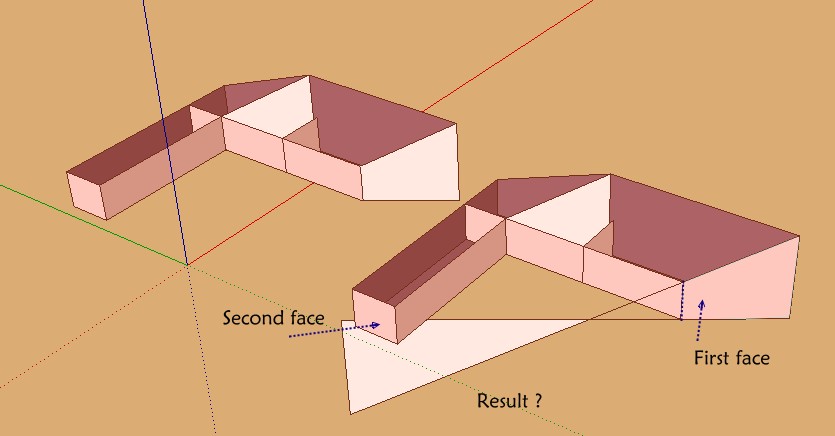
        First bug? 😉
        Seems there is more and not the good trimed face 😉

        taka.jpg


        testtak.skp

        Frenchy Pilou
        Is beautiful that please without concept!
        My Little site :)

        1 Reply Last reply
        Reply Quote 0
        • srxS
          srx
          last edited by

          👍 This is very useful. Deserves shortcut! I'd like to assign the same shortcut to this function and to 2d adjust (from 2d tools) which is doing the same for lines. So, by selecting lines it is adjusting lines, by selecting edges and faces it is adjusting faces...Please!

          www.saurus.rs

          1 Reply Last reply
          Reply Quote 0
          • PixeroP
            Pixero
            last edited by

            Thanks! 👍

            1 Reply Last reply
            Reply Quote 0
            • srxS
              srx
              last edited by

              Working great! Very SU-like concept. Thank you very much!

              www.saurus.rs

              1 Reply Last reply
              Reply Quote 0
              • TIGT
                TIG Moderator
                last edited by

                @srx said:

                :thumb: This is very useful. Deserves shortcut! I'd like to assign the same shortcut to this function and to 2d adjust (from 2d tools) which is doing the same for lines. So, by selecting lines it is adjusting lines, by selecting edges and faces it is adjusting faces...Please!
                You can set your own shortcuts to any native OR loaded tool. Open Preferences > Shortcuts and filter the list to help you find the entry. Select it and set a key-combo... Provided that a tool has a menu entry it is shortcut-able...
                Some tools only appear in the list if a 'context' is met.
                So for example, if you want to shortcut the 'Reverse' tool that flips a face over [available in the context-menu if you have selected at least one face] you must have a face selected when you open Preferences > Shortcuts... then 'Reverse' is on the list... This is a very useful shortcut, as is 'Orient'...

                TIG

                1 Reply Last reply
                Reply Quote 0
                • R
                  rv1974
                  last edited by

                  great tool, tak2hata! It deserves shortcut 👍
                  Thank you.
                  P.S. Humble request: 'extend to the edge' feature

                  1 Reply Last reply
                  Reply Quote 0
                  • srxS
                    srx
                    last edited by

                    @tig said:

                    @srx said:

                    :thumb: This is very useful. Deserves shortcut! I'd like to assign the same shortcut to this function and to 2d adjust (from 2d tools) which is doing the same for lines. So, by selecting lines it is adjusting lines, by selecting edges and faces it is adjusting faces...Please!
                    You can set your own shortcuts to any native OR loaded tool. Open Preferences > Shortcuts and filter the list to help you find the entry. Select it and set a key-combo... Provided that a tool has a menu entry it is shortcut-able...
                    Some tools only appear in the list if a 'context' is met.
                    So for example, if you want to shortcut the 'Reverse' tool that flips a face over [available in the context-menu if you have selected at least one face] you must have a face selected when you open Preferences > Shortcuts... then 'Reverse' is on the list... This is a very useful shortcut, as is 'Orient'...

                    TIG, thank you for this. I guess I was misunderstood because of my not so good English. I know how to set shortcut, already done it...but what I'd had in mind was to make 2dadjust from your 2dtools 😄 integrated with this 3d adjustment as one plugin. For now I have ALT+X for 2Dadjust, and SHIFT+X for this, say "3Dadjust". But it would be more effective to have it under one shortcut, and the action would smartly depend on what is selected - 2D adjust for selected 2D elements (lines), 3D adjust for selected 3D elements (faces). Now when I think they are 1D and 2D elements, what we are missing is 3D adjust (maybe from Didiers Projections plugin) for adjusting solids. 😄

                    www.saurus.rs

                    1 Reply Last reply
                    Reply Quote 0
                    • sumasterS
                      sumaster
                      last edited by

                      HI tak2hata sir,

                      again great tool you build NICE work . . . .

                      THANK YOU,

                      Thank you,
                      SUmaster

                      1 Reply Last reply
                      Reply Quote 0
                      • ElibjrE
                        Elibjr
                        last edited by

                        Wow Thanks! it's like doing 2D CAD in 3d. This should be in the base commands! Extremely useful!

                        1 Reply Last reply
                        Reply Quote 0
                        • simon le bonS
                          simon le bon
                          last edited by

                          Simple and useful.
                          "Very SU-like concept" -> +1
                          another nice one.
                          downloaded.
                          thank you a lot Tak2Hata

                          ++simon

                          1 Reply Last reply
                          Reply Quote 0
                          • J
                            jpalm32
                            last edited by

                            Nice. This should help will fix my screw ups.

                            1 Reply Last reply
                            Reply Quote 0
                            • K
                              Kiey
                              last edited by

                              Great tool, it's useful.

                              1 Reply Last reply
                              Reply Quote 0
                              • T
                                Trogluddite
                                last edited by

                                Very nice plugin 😄
                                I think, this will save me much time messing around with construction lines and the protactor tools.

                                Many Thanks.

                                1 Reply Last reply
                                Reply Quote 0
                                • D
                                  designforgood
                                  last edited by

                                  This looks to be a very helpful plugin. Thank you tak2hata!

                                  1 Reply Last reply
                                  Reply Quote 0
                                  • demD
                                    dem
                                    last edited by

                                    Thanks! Great plugin! But one nuance. Does not always get on the right plane when I click near the edge. Is it difficult to make the backlight of planes when cursor is on the small distance near the edge?)

                                    1 Reply Last reply
                                    Reply Quote 0
                                    • T
                                      tak2hata
                                      last edited by

                                      @dem said:

                                      Thanks! Great plugin! But one nuance. Does not always get on the right plane when I click near the edge. Is it difficult to make the backlight of planes when cursor is on the small distance near the edge?)

                                      Hi,dem.
                                      I think it difficult.
                                      But I want it, too.

                                      I will consider it well.

                                      Thanks All!


                                      by TAK2HATA

                                      1 Reply Last reply
                                      Reply Quote 0
                                      • I
                                        ishining
                                        last edited by

                                        very easy to use, thks

                                        1 Reply Last reply
                                        Reply Quote 0
                                        • R
                                          rv1974
                                          last edited by

                                          tak2hata, is it possible to add those standard SU\Acad selection options:
                                          with Shift- select additional areas to be stretched
                                          with Alt- DEselect affected areas
                                          with Cnrl- precisely select or deselect (Cnrl+Alt) separate points.
                                          ?
                                          Thanks.

                                          1 Reply Last reply
                                          Reply Quote 0
                                          • B
                                            Ben Ritter
                                            last edited by

                                            Awesome. Thank you again for sharing the fruits of your talent.

                                            1 Reply Last reply
                                            Reply Quote 0

                                            Hello! It looks like you're interested in this conversation, but you don't have an account yet.

                                            Getting fed up of having to scroll through the same posts each visit? When you register for an account, you'll always come back to exactly where you were before, and choose to be notified of new replies (either via email, or push notification). You'll also be able to save bookmarks and upvote posts to show your appreciation to other community members.

                                            With your input, this post could be even better 💗

                                            Register Login
                                            • 1
                                            • 2
                                            • 2 / 2
                                            • First post
                                              Last post
                                            Buy SketchPlus
                                            Buy SUbD
                                            Buy WrapR
                                            Buy eBook
                                            Buy Modelur
                                            Buy Vertex Tools
                                            Buy SketchCuisine
                                            Buy FormFonts

                                            Advertisement