sketchucation logo sketchucation
    • Login
    Oops, your profile's looking a bit empty! To help us tailor your experience, please fill in key details like your SketchUp version, skill level, operating system, and more. Update and save your info on your profile page today!
    โš ๏ธ Update | Sketchucation Tools 5.0.8 released with licensing improvements and bugfixes Download

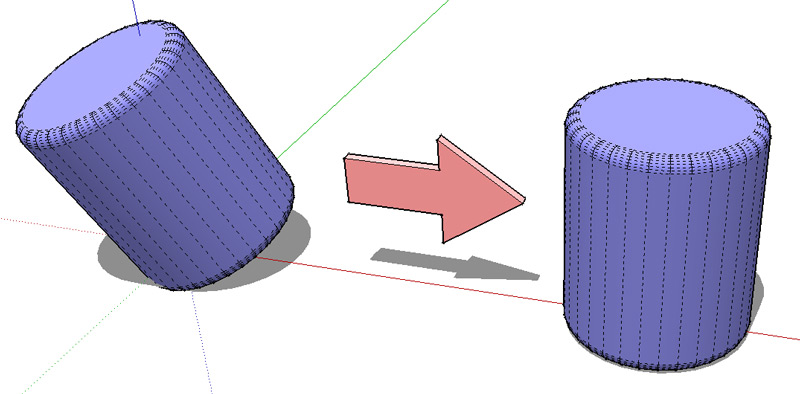
    Fastest rotation?

    Scheduled Pinned Locked Moved SketchUp Discussions
    sketchup
    26 Posts 13 Posters 2.0k Views 13 Watching
    Loading More Posts
    • Oldest to Newest
    • Newest to Oldest
    • Most Votes
    Reply
    • Reply as topic
    Log in to reply
    This topic has been deleted. Only users with topic management privileges can see it.
    • Wo3DanW
      Wo3Dan
      last edited by

      @unknownuser said:

      use the move tool (at least in this particular instance)

      Clever underestimated solution!
      The tool lets you align to any current drawing axes with input 0, 90 etc. (degrees)

      1 Reply Last reply
      Reply Quote 0
      • cottyC
        cotty
        last edited by

        @unknownuser said:

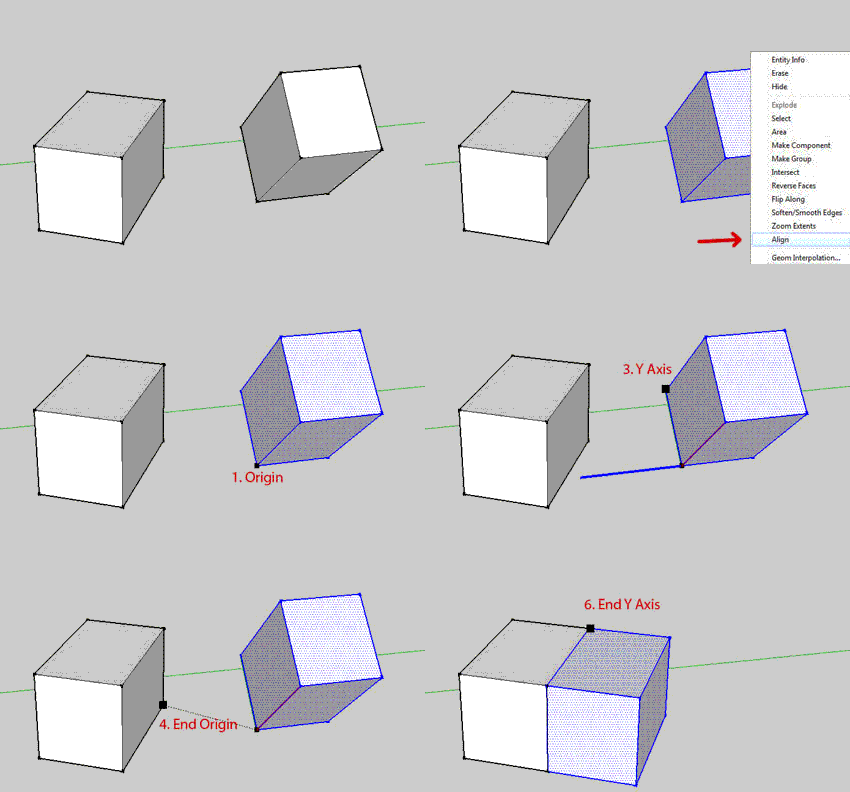
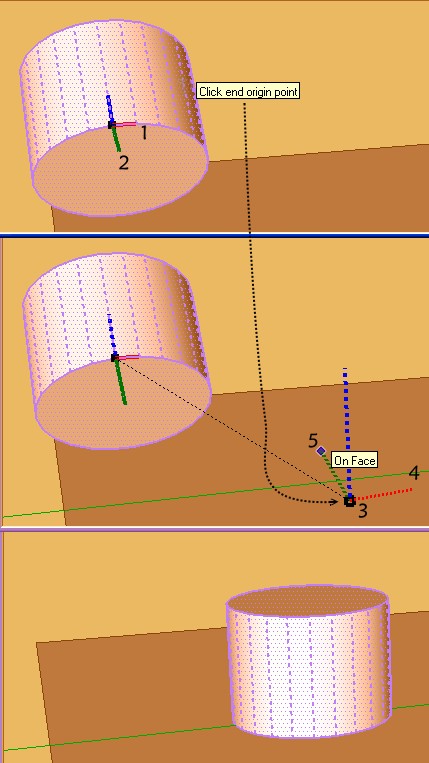
        Align Tool 3D By Didier Bur ?
        Draw a Plane wished as second end Object
        and now just 5 clicks ๐Ÿ˜„

        ๐Ÿ‘ Didn't try this one but have to...

        @unknownuser said:

        use the move tool (at least in this particular instance)

        This will only work if the group was created before the rotations but if this is the case, it is very fast too.

        @solo said:

        In theory one should be able to use 'smartdrop'

        Didn't work for me in this case.

        my SketchUp gallery

        1 Reply Last reply
        Reply Quote 0
        • mitcorbM
          mitcorb
          last edited by

          In case you folks didn't notice, Pilou has updated his post with a demo sequence.

          I take the slow, deliberate approach in my aimless wandering.

          1 Reply Last reply
          Reply Quote 0
          • sdmitchS
            sdmitch
            last edited by

            Using the Ruby Console

            Sketchup.active_model.selection.first.transformation=Geom;;Transformation.new


            Nothing is worthless, it can always be used as a bad example.

            http://sdmitch.blogspot.com/

            1 Reply Last reply
            Reply Quote 0
            • pilouP
              pilou
              last edited by

              About the 3D Align tool by DIdier Bur above. ๐Ÿค“

              And works also even the object is not a group or a component!
              So just a selection of something is sufficient! ๐Ÿ˜‰

              Frenchy Pilou
              Is beautiful that please without concept!
              My Little site :)

              1 Reply Last reply
              Reply Quote 0
              • cottyC
                cotty
                last edited by

                @sdmitch said:

                Using the Ruby Console

                Sketchup.active_model.selection.first.transformation=Geom;;Transformation.new
                > 
                

                I will call it an expert solution ๐Ÿ‘

                Did I say that I love this forum? โ˜€

                my SketchUp gallery

                1 Reply Last reply
                Reply Quote 0
                • Dave RD
                  Dave R
                  last edited by

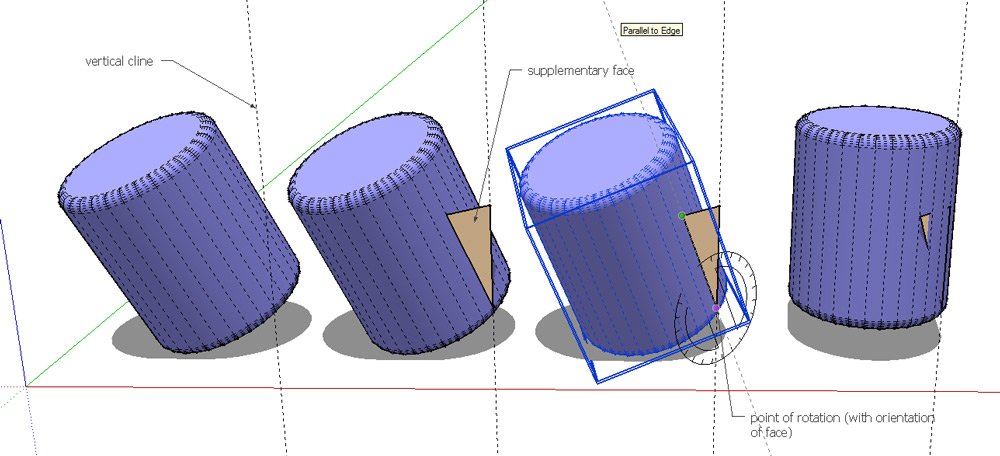
                  As always, there's more than one way to do this. Some great options offered. Here's another one just for the heck of it.
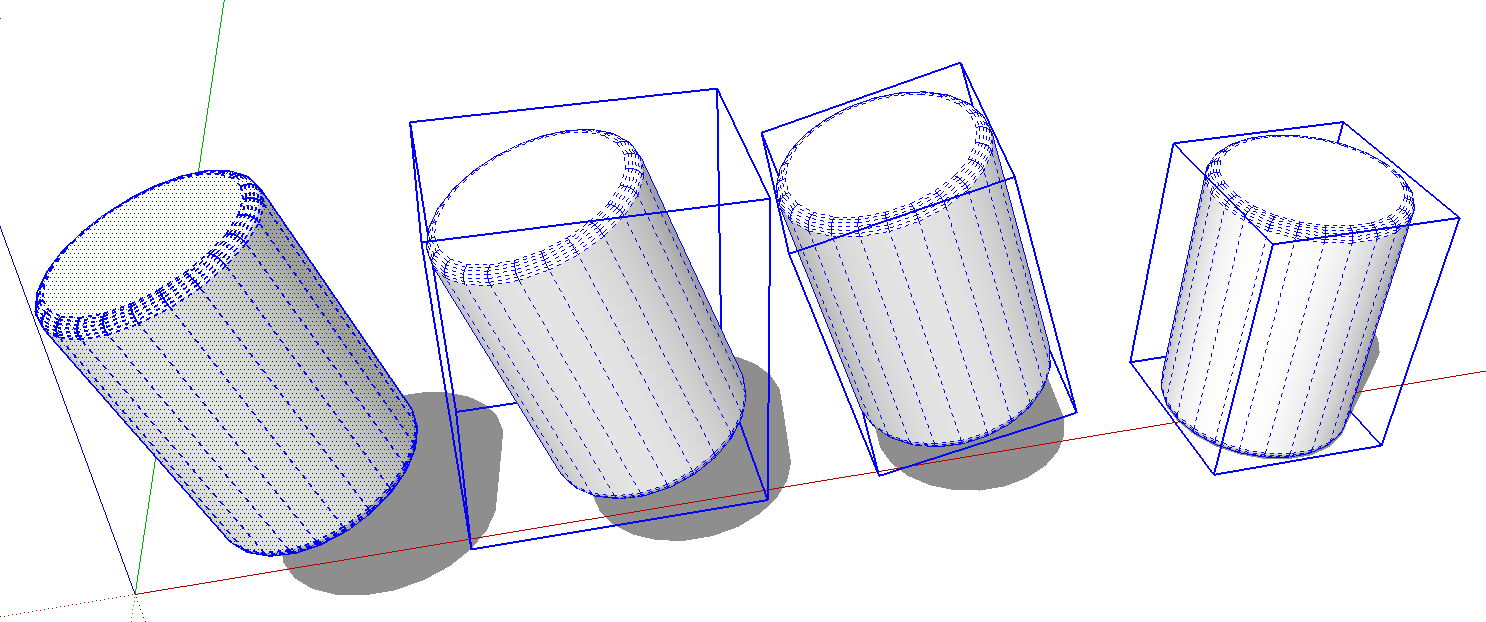
                  Rotate.png

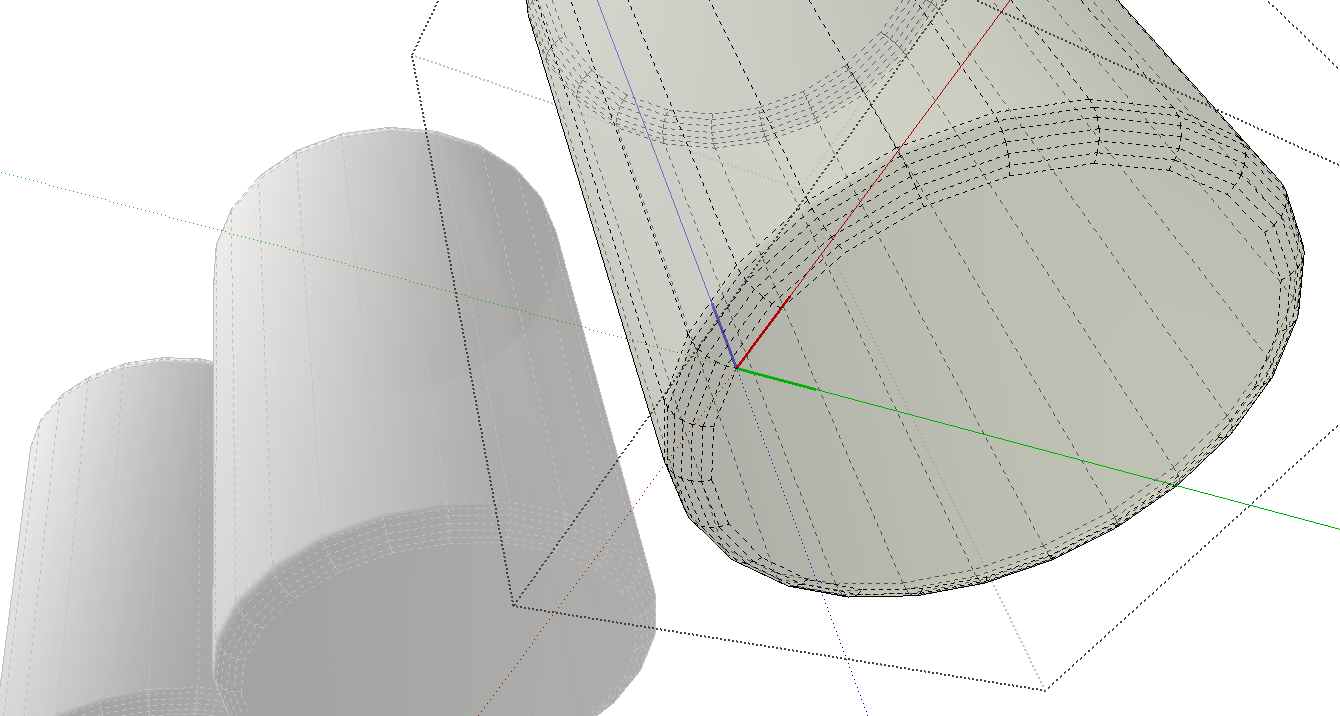
                  Assuming the cylinder is just loose geometry to start, make it a component, change it's axes so the bounding box is aligned to the geometry with the blue axis in the desired up direction. Bring in a copy of the component from the In Model Component library.
                  rotate2.png

                  Etaoin Shrdlu

                  %

                  (THERE'S NO PLACE LIKE)

                  G28 X0.0 Y0.0 Z0.0

                  M30

                  %

                  1 Reply Last reply
                  Reply Quote 0
                  • T
                    Trogluddite
                    last edited by

                    Easy - just open the previous version of your project that you saved before going nuts making the geometry all wonky! ๐Ÿ˜†

                    1 Reply Last reply
                    Reply Quote 0
                    • pilouP
                      pilou
                      last edited by

                      In this particular start position Sketchyphics can also works! ๐Ÿ’š

                      Frenchy Pilou
                      Is beautiful that please without concept!
                      My Little site :)

                      1 Reply Last reply
                      Reply Quote 0
                      • Jean LemireJ
                        Jean Lemire
                        last edited by

                        Hi folks.

                        If you want to practice with native tools, it takes only two quickly done rotations.

                        Don't forget this trick from the help:

                        Error 404 (Not Found)!!1

                        favicon

                        (support.google.com)

                        See this SU file for ideas:


                        fastest_rotation - V6 - JL.skp

                        Jean (Johnny) Lemire from Repentigny, Quebec, Canada.

                        1 Reply Last reply
                        Reply Quote 0
                        • cottyC
                          cotty
                          last edited by

                          @jean lemire said:

                          If you want to practice with native tools, it takes only two quickly done rotations.
                          ๐Ÿ‘

                          my SketchUp gallery

                          1 Reply Last reply
                          Reply Quote 0
                          • pilouP
                            pilou
                            last edited by

                            Or 3 rotations if the volume was more bad oriented! ๐Ÿ˜„

                            Frenchy Pilou
                            Is beautiful that please without concept!
                            My Little site :)

                            1 Reply Last reply
                            Reply Quote 0
                            • utilerU
                              utiler
                              last edited by

                              @jean lemire said:

                              Hi folks.

                              If you want to practice with native tools, it takes only two quickly done rotations.

                              Don't forget this trick from the help:

                              Error 404 (Not Found)!!1

                              favicon

                              (support.google.com)

                              See this SU file for ideas:

                              What Jean said. Best tool! ๐Ÿ‘

                              Just Curious...

                              1 Reply Last reply
                              Reply Quote 0
                              • Jean LemireJ
                                Jean Lemire
                                last edited by

                                Hi folks.

                                Another quick method based on Gerrit's (Wo3Dan's idea).

                                Two variants shown in the 2 scenes of this SU file:

                                fastest_rotation-2 - V6 - JL.skp
                                Just ideas.

                                Jean (Johnny) Lemire from Repentigny, Quebec, Canada.

                                1 Reply Last reply
                                Reply Quote 0
                                • 3
                                  3eighty
                                  last edited by

                                  Use the rotate function in the Mover2 Plugin..

                                  1 Reply Last reply
                                  Reply Quote 0
                                  • dukejazzD
                                    dukejazz
                                    last edited by

                                    Hey
                                    One component already on the orgin plane this make it easy to do,
                                    if you have scaleGroupFloat_dj.rb loaded.

                                    target save and move meathod:

                                    step 1: Make one component unique. (right click to context list)

                                    step 2: 1-time left click of the component you want to change. Save target, via scaleGroupFloat_dj (press ok).

                                    step 3: 2-times left click set axes to component and 3-times more edit select the object of the component . Using the Move to target, via scaleGroupFloat_dj.(press ok), will auto aline component to orgin plain. Now select ouside of component now your done.

                                    All above steps is shown here

                                    Movie_0007.gif
                                    If both were non aline to orgin plain then do other with step two and three too.

                                    Advance woking of this; just add the axes tool into the mix. then turning object is just a breeze, for those tools that needs to be aline to x-y plain for z axis drops .

                                    examples usesages to
                                    [Plugin] Color by Z
                                    drop
                                    sandbox.rb
                                    smartdrop.rb
                                    TIG-drapematerials.rb
                                    TIG-Drop Material onto Instances
                                    tt_component_dropper

                                    1 Reply Last reply
                                    Reply Quote 0

                                    Hello! It looks like you're interested in this conversation, but you don't have an account yet.

                                    Getting fed up of having to scroll through the same posts each visit? When you register for an account, you'll always come back to exactly where you were before, and choose to be notified of new replies (either via email, or push notification). You'll also be able to save bookmarks and upvote posts to show your appreciation to other community members.

                                    With your input, this post could be even better ๐Ÿ’—

                                    Register Login
                                    • 1
                                    • 2
                                    • 1 / 2
                                    • First post
                                      Last post
                                    Buy SketchPlus
                                    Buy SUbD
                                    Buy WrapR
                                    Buy eBook
                                    Buy Modelur
                                    Buy Vertex Tools
                                    Buy SketchCuisine
                                    Buy FormFonts

                                    Advertisement