sketchucation logo sketchucation
    • 登入
    Oops, your profile's looking a bit empty! To help us tailor your experience, please fill in key details like your SketchUp version, skill level, operating system, and more. Update and save your info on your profile page today!
    🔌 Smart Spline | Fluid way to handle splines for furniture design and complex structures. Download

    Creating ribs...?

    已排程 已置頂 已鎖定 已移動 Newbie Forum
    sketchup
    34 貼文 10 Posters 1.2k 瀏覽 10 Watching
    正在載入更多貼文
    • 從舊到新
    • 從新到舊
    • 最多點贊
    回覆
    • 在新貼文中回覆
    登入後回覆
    此主題已被刪除。只有擁有主題管理權限的使用者可以查看。
    • bunnyackB 離線
      bunnyack
      最後由 編輯

      Hey forum,

      I have a question for those of you, who have experience with the kind of techniques used in this tutorial. Rounding off the ribs correctly in order to archieve flawless results is killing me. I am currently working on my second project using this technique (after giving up on the first one) and I am not getting anywhere. I try to round the ribs by using the standard curve tool and then simplyfying the contours with Curvizard. But I find it almost impossible to get the shape and number of edges on every rib right... there allways is a difference in edge count between two ribs, and the shapes themselves are also hard to get right. This later irritates Curviloft during lofting and causes it to produce faulty results, such as bumpy surfaces, holes in the model and lines going all over the place.
      I have searched the internet for infos and tutorials on this technique, but it seems Jaques Cleghorn is the only one who has a semi-tutorial out there, which isn't detailled enough to help me.

      Am I missing something, is there an easier way, some kind of trick? I have spent weeks trying to figure out how people like Jaques Cleghorn peroduce such clean results with this type of modeling, mine look more like a play-doh model made by a 3-year old.

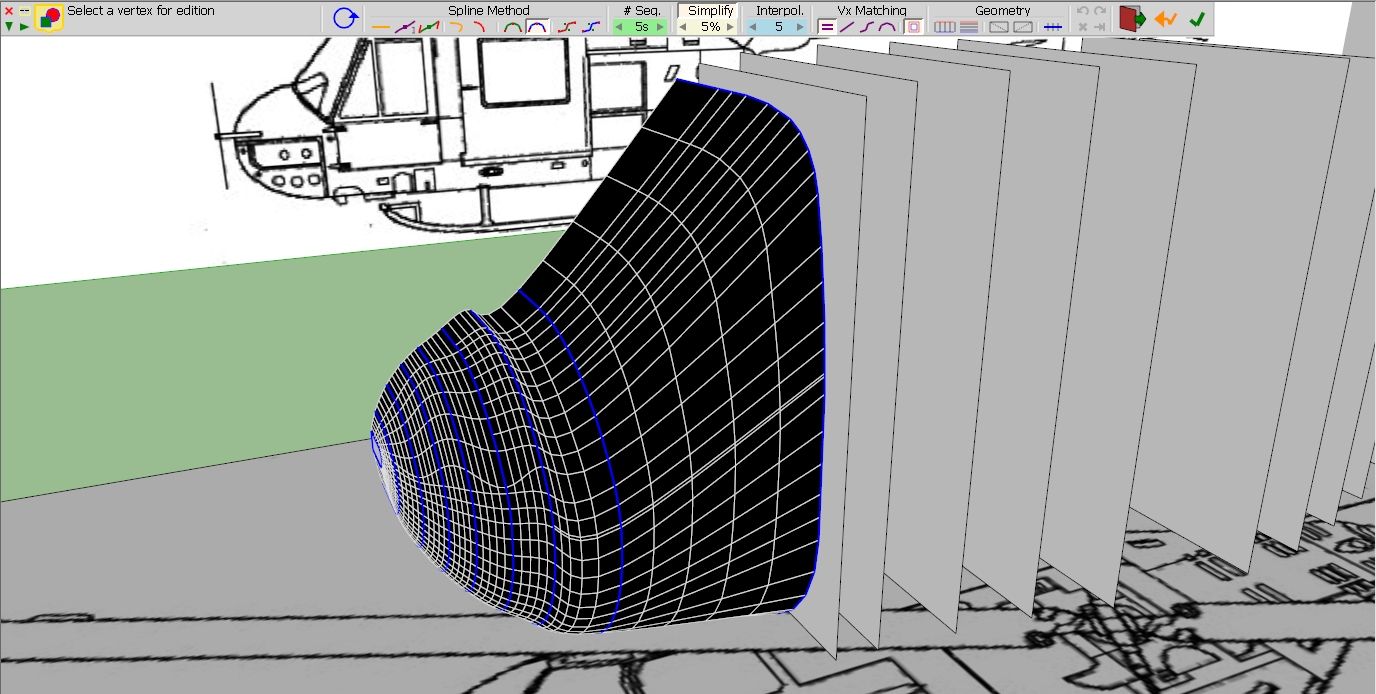
      Here are some screenshots of my current model, in case they help explain.

      This is what my model looks like so far.
      Ribs1.PNG

      And this is what I get from Curviloft
      ribs2.PNG

      Does anybody have any experience with this technique and is there anything (besides practicing) I can do to finally get this helicopter body to look right?
      You cannot imagine how grateful I would be for just the smallest useful advice 😛

      Kevin

      Bell UH-1 Huey.skp

      1 條回覆 最後回覆 回覆 引用 0
      • pilouP 離線
        pilou
        最後由 編輯

        Normally curviloft must gives you the good result! 😲

        Post your file save as V6 for a more large audiance! 😉

        Frenchy Pilou
        Is beautiful that please without concept!
        My Little site :)

        1 條回覆 最後回覆 回覆 引用 0
        • bunnyackB 離線
          bunnyack
          最後由 編輯

          @unknownuser said:

          Normally curviloft must gives you the good result! 😲

          Post your file save as V6 for a more large audiance! 😉

          I'm not blaming curviloft, I suspect its me doing something wrong while creating the ribs 😉

          Heres the V6:

          Bell UH-1B Huey.skp

          1 條回覆 最後回覆 回覆 引用 0
          • jeff hammondJ 離線
            jeff hammond
            最後由 編輯

            @bunnyack said:

            I'm not blaming curviloft, I suspect its me doing something wrong while creating the ribs 😉

            how & with what tools are you using to create the profiles?

            .

            dotdotdot

            1 條回覆 最後回覆 回覆 引用 0
            • soloS 離線
              solo
              最後由 編輯

              @unknownuser said:

              Post your file save as V6 for a more large audiance!

              Hmm, I believe you are the last one. 😄

              http://www.solos-art.com

              If you see a toilet in your dreams do not use it.

              1 條回覆 最後回覆 回覆 引用 0
              • M 離線
                mac1
                最後由 編輯

                I looks like you have a transition from the nose cone to the body not accounted for. Try and add some more info in that area. I did just a slanted line and the bump is no more ❓
                BTW you can take the section after the nose cone, copy it forward and use the scale tool to match the profile of the wind shield and maybe get much better results.
                I maybe misreading the drawing but it looks like the section elevations are not symmetrical with center line. Check that you may need to include the total cross section vs 1/2 you are now ❓

                1 條回覆 最後回覆 回覆 引用 0
                • cottyC 離線
                  cotty
                  最後由 編輯

                  @solo said:

                  @unknownuser said:

                  Post your file save as V6 for a more large audiance!

                  Hmm, I believe you are the last one. 😄

                  "More large" is true nevertheless 😉

                  my SketchUp gallery

                  1 條回覆 最後回覆 回覆 引用 0
                  • bunnyackB 離線
                    bunnyack
                    最後由 編輯

                    @unknownuser said:

                    @bunnyack said:

                    I'm not blaming curviloft, I suspect its me doing something wrong while creating the ribs 😉

                    how & with what tools are you using to create the profiles?

                    .

                    I simply create square planes in the right dimensions (just like done in the tutorial I linked above) and then use the arc tool to round them off on the corners.

                    1 條回覆 最後回覆 回覆 引用 0
                    • gillesG 離線
                      gilles
                      最後由 編輯

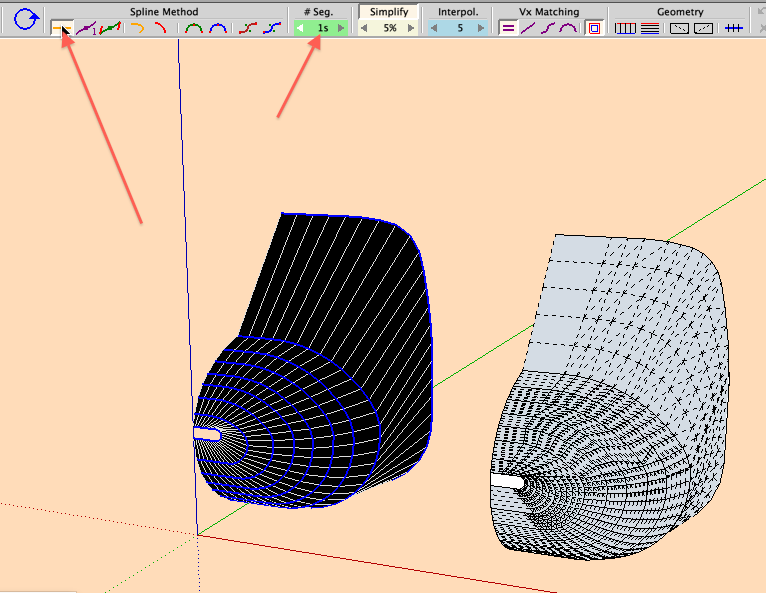
                      Play with parameters you see on the picture, READ the documentation.

                      Also for better results make al curves the same account of segments, use BZ tools, right click on a selected curve then choose convert to/ segmentor.

                      curviloft.png

                      " c'est curieux chez les marins ce besoin de faire des phrases "

                      1 條回覆 最後回覆 回覆 引用 0
                      • bunnyackB 離線
                        bunnyack
                        最後由 編輯

                        @gilles said:

                        Play with parameters you see on the picture, READ the documentation.

                        Also for better results make al curves the same account of segments, use BZ tools, right click on a selected curve then choose convert to/ segmentor.

                        Thanks, I had never tried playing with the parameters, that does help a lot. You mentioned BZ tools, what are they and if thats a plugin, where can I get it?

                        1 條回覆 最後回覆 回覆 引用 0
                        • Rich O BrienR 離線
                          Rich O Brien Moderator
                          最後由 編輯

                          Fredo's Bezier Spline Tools

                          Download the free D'oh Book for SketchUp 📖

                          1 條回覆 最後回覆 回覆 引用 0
                          • gillesG 離線
                            gilles
                            最後由 編輯

                            http://sketchucation.com/forums/viewtopic.php?t=13563#p100509

                            Read the doc! 😉

                            " c'est curieux chez les marins ce besoin de faire des phrases "

                            1 條回覆 最後回覆 回覆 引用 0
                            • bunnyackB 離線
                              bunnyack
                              最後由 編輯

                              @gilles said:

                              http://sketchucation.com/forums/viewtopic.php?t=13563#p100509

                              Read the doc! 😉

                              Sorry 😳 will read. And thank you!

                              1 條回覆 最後回覆 回覆 引用 0
                              • pilouP 離線
                                pilou
                                最後由 編輯

                                @unknownuser said:

                                I had never tried playing with the parameters

                                All the power of Curviloft is inside changing parameters!
                                It's like a stand alone program inside SU ! ☀

                                PS

                                @unknownuser said:

                                Post your file save as V6 for a more large audiance!
                                Hmm, I believe you are the last one.

                                No,no, I know even some people who has stay in the V5 Pro without Update ! 😉

                                Frenchy Pilou
                                Is beautiful that please without concept!
                                My Little site :)

                                1 條回覆 最後回覆 回覆 引用 0
                                • gillesG 離線
                                  gilles
                                  最後由 編輯

                                  @unknownuser said:

                                  No,no, I know even some people who has stay in the V5 Pro without Update ! 😉

                                  Your old brother? 💚

                                  " c'est curieux chez les marins ce besoin de faire des phrases "

                                  1 條回覆 最後回覆 回覆 引用 0
                                  • bunnyackB 離線
                                    bunnyack
                                    最後由 編輯

                                    @gilles said:

                                    Play with parameters you see on the picture, READ the documentation.

                                    Also for better results make al curves the same account of segments, use BZ tools, right click on a selected curve then choose convert to/ segmentor.

                                    Again, thank you so much! ☀

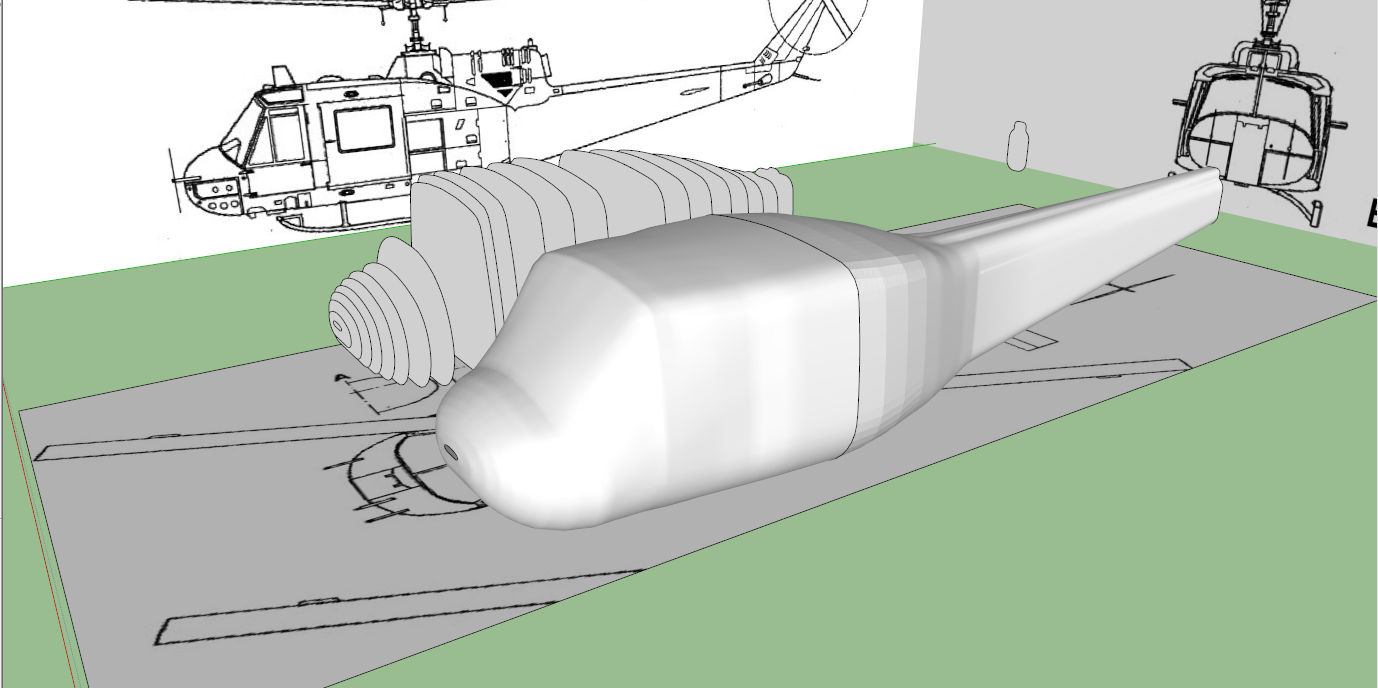
                                    for the first time, I'm actually happy with the results I get, and its thanks to Fredo's BZ tools you mentioned. This finally solves a huge problem, which had been holding me up for the past weeks. The body still needs some minor tweaks, but it is finally free of holes and bumps all over it:
                                    Unbenannt.PNG

                                    You sir, saved my day.

                                    1 條回覆 最後回覆 回覆 引用 0
                                    • M 離線
                                      mac1
                                      最後由 編輯

                                      @bunnyack said:

                                      @unknownuser said:

                                      @bunnyack said:

                                      I'm not blaming curviloft, I suspect its me doing something wrong while creating the ribs 😉

                                      how & with what tools are you using to create the profiles?

                                      .

                                      I simply create square planes in the right dimensions (just like done in the tutorial I linked above) and then use the arc tool to round them off on the corners.

                                      You should not be doing that. The drawing gives you section planes a,b,c,d,e etc for the the profiles of the fuselage.They are not symmetrical with is cenetr line and what I was trying to tell you above.

                                      1 條回覆 最後回覆 回覆 引用 0
                                      • jeff hammondJ 離線
                                        jeff hammond
                                        最後由 編輯

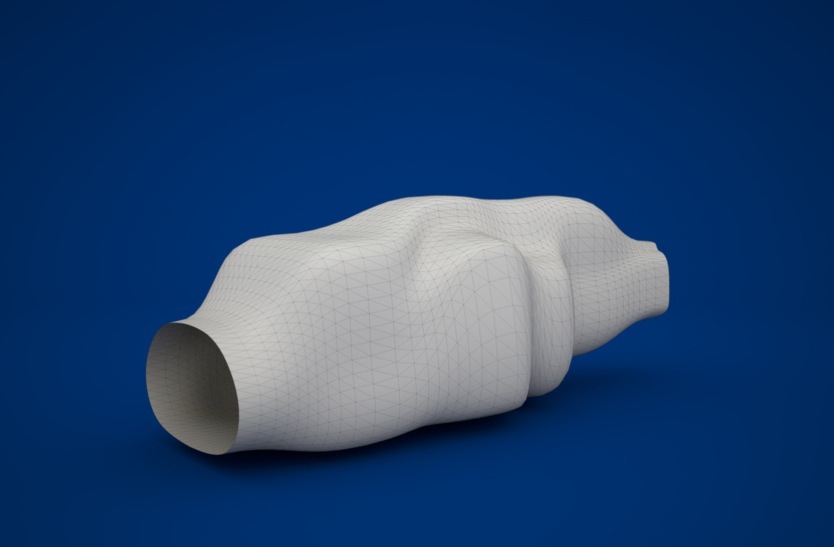
                                        if you just loft the profiles provided on the top view without paying attention to creasing when appropriate.. it gives you somewhat of a more conceptual or futuristic looking shape that you might be able to use as a launching point if you ever get into a more loose interpretation mode..
                                        huey2.skp

                                        whoey.jpg

                                        [edit]..to tie in more appropriately to the thread-- i guess i should add that even though this isn't what you're after, it's an example of using fredo's BezierSpline tools to draw your profiles (uniform B-splines.. order 4.. 30 segments each)..
                                        i could probably edit them in certain areas to get a better mesh with CurviLoft but i don't really see a problem with just lofting what BZspline gives..

                                        dotdotdot

                                        1 條回覆 最後回覆 回覆 引用 0
                                        • gillesG 離線
                                          gilles
                                          最後由 編輯

                                          Looks like a gold fish Jeff, do you 💚 think this could fly?

                                          " c'est curieux chez les marins ce besoin de faire des phrases "

                                          1 條回覆 最後回覆 回覆 引用 0
                                          • jeff hammondJ 離線
                                            jeff hammond
                                            最後由 編輯

                                            @gilles said:

                                            do you 💚 think this could fly?

                                            yes.. very well actually..
                                            i mean, it looks like it would fit very nicely into the palm of your hand.. better than a football even (not those spherical things)

                                            dotdotdot

                                            1 條回覆 最後回覆 回覆 引用 0
                                            • 1
                                            • 2
                                            • 2 / 2
                                            • 第一個貼文
                                              最後的貼文
                                            Buy SketchPlus
                                            Buy SUbD
                                            Buy WrapR
                                            Buy eBook
                                            Buy Modelur
                                            Buy Vertex Tools
                                            Buy SketchCuisine
                                            Buy FormFonts

                                            Advertisement



