sketchucation logo sketchucation
    • Login
    Oops, your profile's looking a bit empty! To help us tailor your experience, please fill in key details like your SketchUp version, skill level, operating system, and more. Update and save your info on your profile page today!
    Mac User? | Join the Rayscaper Beta for Mac Learn More

    [Plugin] 3D Text Editor

    Scheduled Pinned Locked Moved Plugins
    204 Posts 51 Posters 231.0k Views 50 Watching
    Loading More Posts
    • Oldest to Newest
    • Newest to Oldest
    • Most Votes
    Reply
    • Reply as topic
    Log in to reply
    This topic has been deleted. Only users with topic management privileges can see it.
    • thomthomT
      thomthom
      last edited by

      @unknownuser said:

      Well I am confused. Which is not surprising. So how is this 3D Text Editor any different than the native 3D Text Editor?

      You can edit the text later on.

      Thomas Thomassen — SketchUp Monkey & Coding addict
      List of my plugins and link to the CookieWare fund

      1 Reply Last reply
      Reply Quote 0
      • mitcorbM
        mitcorb
        last edited by

        Thanks for this tool, ThomThom:
        I can recall quite a few times where I wished the 3dText was editable.

        I take the slow, deliberate approach in my aimless wandering.

        1 Reply Last reply
        Reply Quote 0
        • Dave RD
          Dave R
          last edited by

          And the text is already displayed while the editor is open so you can change the font and dimensions and see how it looks before finalizing it.

          Etaoin Shrdlu

          %

          (THERE'S NO PLACE LIKE)

          G28 X0.0 Y0.0 Z0.0

          M30

          %

          1 Reply Last reply
          Reply Quote 0
          • P
            pierreaudouin
            last edited by

            Very nice job ThomThom
            Thank you!!

            1 Reply Last reply
            Reply Quote 0
            • B
              baldaman
              last edited by

              Excellent! thank you dear Ruby Master!

              1 Reply Last reply
              Reply Quote 0
              • thomthomT
                thomthom
                last edited by

                Has anyone experienced any crash?

                Thomas Thomassen — SketchUp Monkey & Coding addict
                List of my plugins and link to the CookieWare fund

                1 Reply Last reply
                Reply Quote 0
                • BurkhardB
                  Burkhard
                  last edited by

                  apart from my wife, no.

                  http://www.ia-plus.de

                  1 Reply Last reply
                  Reply Quote 0
                  • H
                    hebeijianke
                    last edited by

                    Thanks
                    This plugin is great
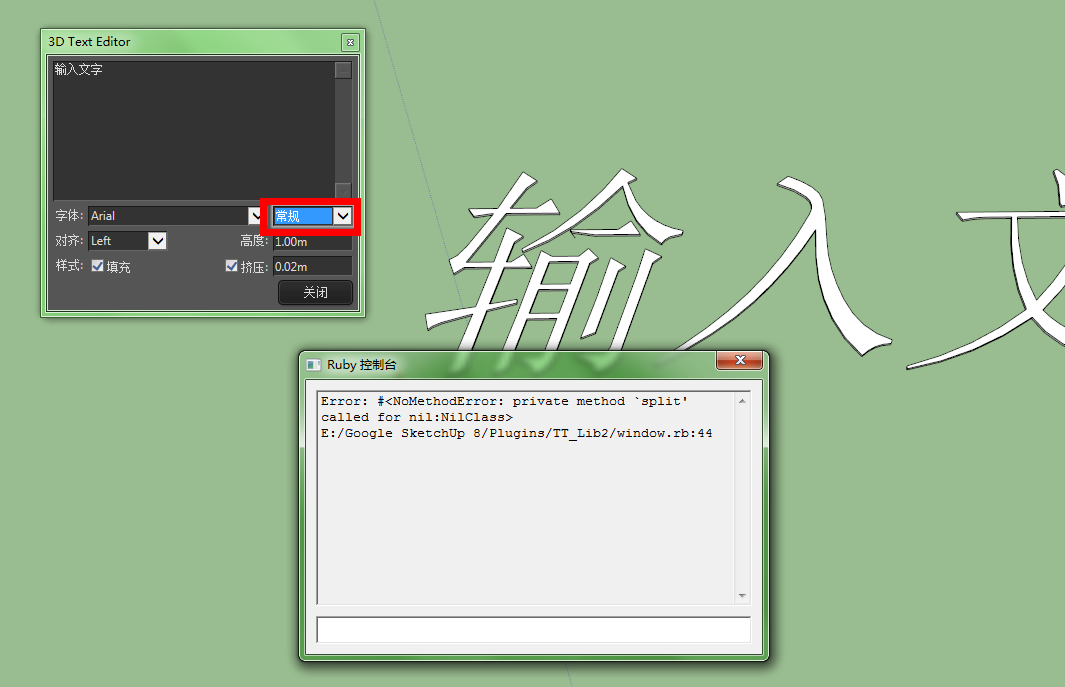
                    But when I translate into chinese
                    something wrong

                    QQ截图20130430202314.png

                    1 Reply Last reply
                    Reply Quote 0
                    • thomthomT
                      thomthom
                      last edited by

                      hmm... could be Unicode issues. Could you send me the translated version?

                      Thomas Thomassen — SketchUp Monkey & Coding addict
                      List of my plugins and link to the CookieWare fund

                      1 Reply Last reply
                      Reply Quote 0
                      • H
                        hebeijianke
                        last edited by

                        @thomthom said:

                        hmm... could be Unicode issues. Could you send me the translated version?

                        This is translated


                        tt_texteditor.rb

                        1 Reply Last reply
                        Reply Quote 0
                        • jolranJ
                          jolran
                          last edited by

                          @unknownuser said:

                          apart from my wife, no.
                          😄

                          1 Reply Last reply
                          Reply Quote 0
                          • R
                            ralph102
                            last edited by

                            ThomThom,
                            Great plugin.
                            Any chance you could make the text follow a predefined path or arch?
                            Since your plugin works with installed system fonts, would it be difficult to add other typographical controls such as kerning or line spacing?

                            1 Reply Last reply
                            Reply Quote 0
                            • thomthomT
                              thomthom
                              last edited by

                              @ralph102 said:

                              Any chance you could make the text follow a predefined path or arch?

                              I just had a request from a colleague yesterday about this. Might do a separate plugin to fit sets of meshes to a path. But no promises.

                              @ralph102 said:

                              Since your plugin works with installed system fonts, would it be difficult to add other typographical controls such as kerning or line spacing?

                              Nope. Not unless they add these features in the SketchUp Ruby API. At the moment all that I can adjust is in that dialogue.

                              Thomas Thomassen — SketchUp Monkey & Coding addict
                              List of my plugins and link to the CookieWare fund

                              1 Reply Last reply
                              Reply Quote 0
                              • jim smithJ
                                jim smith
                                last edited by

                                Thom,

                                thanks for this plug in.

                                I like the way I can change text styles, and sizes. However, once I hit close, if I want to edit further, I can't...... Am I missing something?

                                "Out of clutter find simplicity,
                                from discord find harmony,
                                In the middle of difficulty lies opportunity"
                                Albert Einstein

                                1 Reply Last reply
                                Reply Quote 0
                                • TIGT
                                  TIG Moderator
                                  last edited by

                                  Select a piece of 3d-text > right-click > context-menu ...Edit Text

                                  TIG

                                  1 Reply Last reply
                                  Reply Quote 0
                                  • jim smithJ
                                    jim smith
                                    last edited by

                                    Thanks TIG.

                                    I missed seeing the "edit text" line down on the bottom of my long list of context selection items.

                                    "Out of clutter find simplicity,
                                    from discord find harmony,
                                    In the middle of difficulty lies opportunity"
                                    Albert Einstein

                                    1 Reply Last reply
                                    Reply Quote 0
                                    • R
                                      rv1974
                                      last edited by

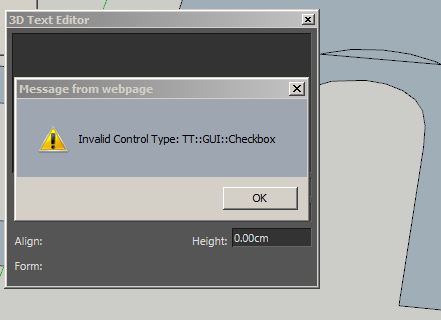
                                      😕 (SU2013 win7 x64, latest TT_lib (v.7.1)))
                                      there's nothing in combo-box, height parameter is down.
                                      Any hints?

                                      Capture.JPG

                                      1 Reply Last reply
                                      Reply Quote 0
                                      • TIGT
                                        TIG Moderator
                                        last edited by

                                        @rv1974 said:

                                        :? (SU2013 win7 x64, latest TT_lib (v.7.1)))
                                        there's nothing in combo-box, height parameter is down.
                                        Any hints?
                                        Are you doubly sure that this Lib is 'latest' and properly installed ?
                                        Screen-shot of Plugins WE window ?
                                        What can you do after closing that error-message ?

                                        TIG

                                        1 Reply Last reply
                                        Reply Quote 0
                                        • thomthomT
                                          thomthom
                                          last edited by

                                          @rv1974 said:

                                          :? (SU2013 win7 x64, latest TT_lib (v.7.1)))
                                          there's nothing in combo-box, height parameter is down.
                                          Any hints?

                                          Try these possible solutions - in order.

                                          #1: Check that you don't have an old version of TT_Lib in the VirtualStore: http://sketchucation.com/forums/viewtopic.php?t=48399

                                          #2: Manually reinstall TT_Lib - by closing all SketchUp windows and removing the TT_Lib2 lib files before reinstalling.

                                          (BTW: What is your Internet Explorer version? )

                                          (P.S. The latest version of TT_Lib is 2.8.2 - currently only available on the Extension Warehouse. Ditto for an updated version of 3D Text Editor - though the very latest revision is still in moderation. I'm still in the process in updating my plugins to comply with the EW requirements - and I'm currently awaiting some changes to the SCF PluginStore before I start updating my plugin threads here.)

                                          Thomas Thomassen — SketchUp Monkey & Coding addict
                                          List of my plugins and link to the CookieWare fund

                                          1 Reply Last reply
                                          Reply Quote 0
                                          • R
                                            rv1974
                                            last edited by

                                            Good news:
                                            I managed to make tt_text work properly.
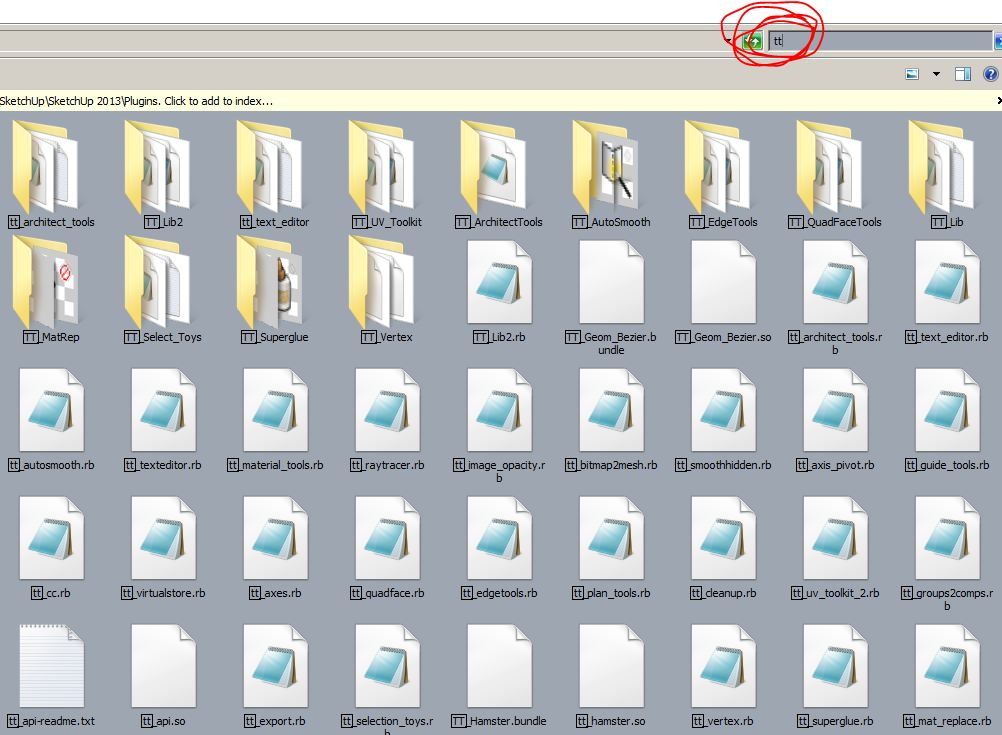
                                            Bad news: now I've got 2 the same "editable 3d text" lines in Draw menu. the same happens in the Context menu.
                                            I guess I should purge something i plugins folder. Could you look at the attached search filter (by 'tt')?
                                            BTW#1 I've got IE 9.0.8112
                                            BTW#2 I have vertigo with all those 'shops' (SU Ext wharehouse, virtualstore, sketchucation forum threads, sketchucation plugin store 😲 ). Where from I should get your goodies?
                                            Thank you for trying to sort it out.

                                            Capture.JPG

                                            1 Reply Last reply
                                            Reply Quote 0

                                            Hello! It looks like you're interested in this conversation, but you don't have an account yet.

                                            Getting fed up of having to scroll through the same posts each visit? When you register for an account, you'll always come back to exactly where you were before, and choose to be notified of new replies (either via email, or push notification). You'll also be able to save bookmarks and upvote posts to show your appreciation to other community members.

                                            With your input, this post could be even better 💗

                                            Register Login
                                            • 1
                                            • 2
                                            • 5
                                            • 6
                                            • 7
                                            • 8
                                            • 9
                                            • 10
                                            • 11
                                            • 7 / 11
                                            • First post
                                              Last post
                                            Buy SketchPlus
                                            Buy SUbD
                                            Buy WrapR
                                            Buy eBook
                                            Buy Modelur
                                            Buy Vertex Tools
                                            Buy SketchCuisine
                                            Buy FormFonts

                                            Advertisement