sketchucation logo sketchucation
    • 登入
    Oops, your profile's looking a bit empty! To help us tailor your experience, please fill in key details like your SketchUp version, skill level, operating system, and more. Update and save your info on your profile page today!
    🔌 Smart Spline | Fluid way to handle splines for furniture design and complex structures. Download

    [Plugin] 3D Text Editor

    已排程 已置頂 已鎖定 已移動 Plugins
    202 貼文 50 Posters 174.4k 瀏覽 49 Watching
    正在載入更多貼文
    • 從舊到新
    • 從新到舊
    • 最多點贊
    回覆
    • 在新貼文中回覆
    登入後回覆
    此主題已被刪除。只有擁有主題管理權限的使用者可以查看。
    • thomthomT 離線
      thomthom
      最後由 編輯

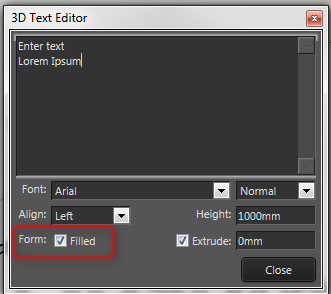
      The extension has very little control over how the text is drawn - it's all done by SketchUp.

      But there is an option to fill or not fill;

      2016-08-24_22h58_50.png

      Thomas Thomassen — SketchUp Monkey & Coding addict
      List of my plugins and link to the CookieWare fund

      1 條回覆 最後回覆 回覆 引用 0
      • C 離線
        caronte01
        最後由 編輯

        Hi Thomthom,

        thanks for the reply.

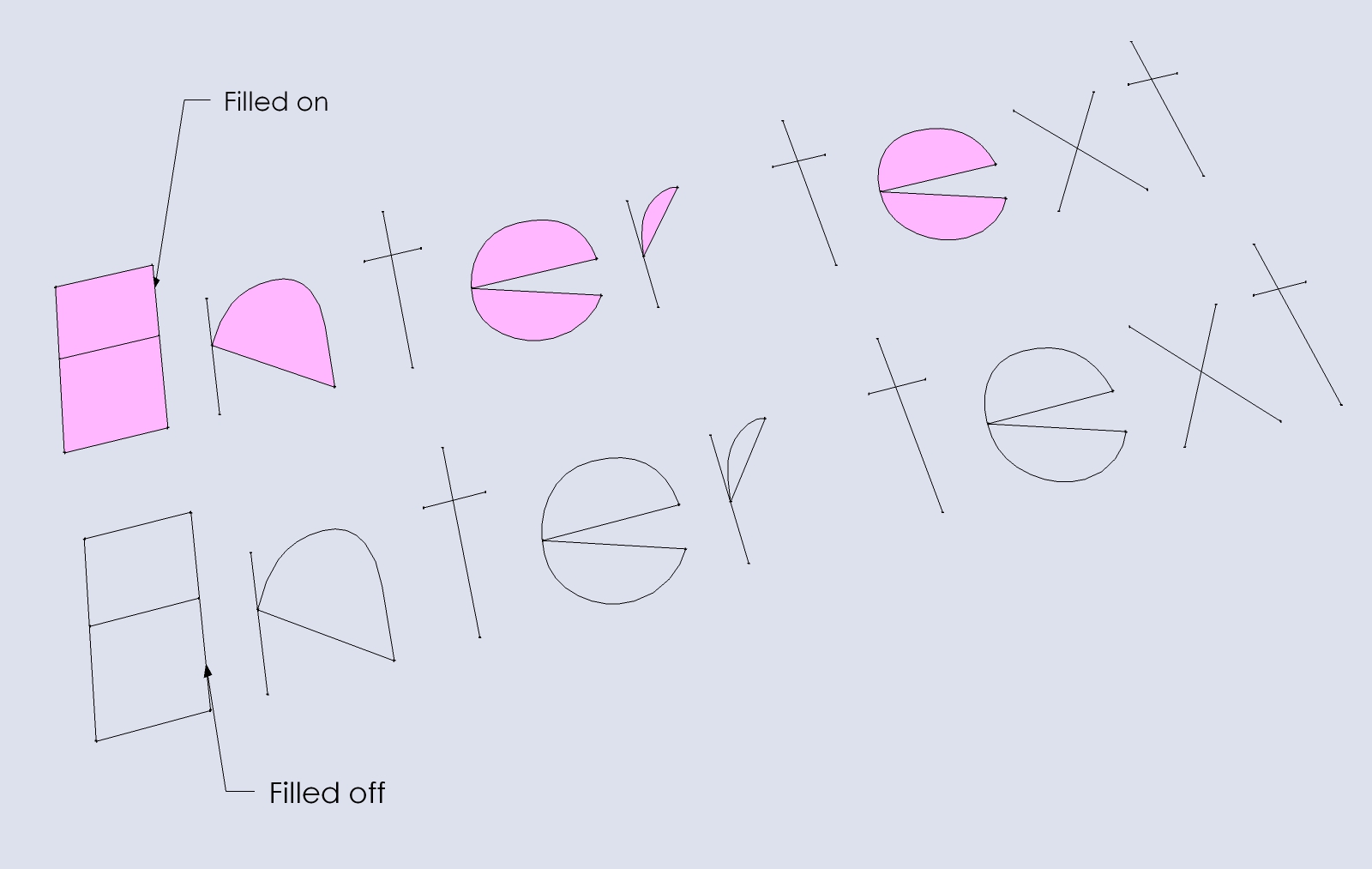
        Yes, but that option only removes the polygon, the lines are all drawn with or without filled polygon.

        So if I understand, text is created by sketchup directly, not by your plugin. What your plugin does is in a way, control the native sketchup 3d text tool, and keep a reference of the text content, so it can be changed afterwards.

        Not easy to change I guess, or, it should be changed directly in sketchup's core.
        02.jpg

        1 條回覆 最後回覆 回覆 引用 0
        • thomthomT 離線
          thomthom
          最後由 編輯

          Yes, it keeps track of the text and create it using a single API method: http://ruby.sketchup.com/Sketchup/Entities.html#add_3d_text-instance_method

          It's the UI that's the most complicated part of it - which isn't that complicated by itself.

          Thomas Thomassen — SketchUp Monkey & Coding addict
          List of my plugins and link to the CookieWare fund

          1 條回覆 最後回覆 回覆 引用 0
          • thomthomT 離線
            thomthom
            最後由 編輯

            Version 1.2.0

            This version should be more reliable in getting the list of system fonts. I require update TT_Lib, version 2.11 or newer.

            Thomas Thomassen — SketchUp Monkey & Coding addict
            List of my plugins and link to the CookieWare fund

            1 條回覆 最後回覆 回覆 引用 0
            • Bob JamesB 離線
              Bob James
              最後由 編輯

              I cannot find TT_Lib2 listed in SketchUcation Store

              i7-4930K 3.4Ghz, 2x GTX780 6GB, 32GB DDR3-1600 ECC, OCZ Vertex 4 500GB, WD Black 3TB, 32TB NAS, 4x 27" Monitors, SpaceMouse Pro, X-keys XK-60

              1 條回覆 最後回覆 回覆 引用 0
              • TIGT 線上
                TIG Moderator
                最後由 編輯

                @bob james said:

                I cannot find TT_Lib2 listed in SketchUcation Store

                Do a less rigid search [no '2']:
                https://sketchucation.com/pluginstore?pln=TT_Lib

                TIG

                1 條回覆 最後回覆 回覆 引用 0
                • J 離線
                  j_fiore
                  最後由 編輯

                  Hi Thomas,

                  I have downloaded this plugin and will be using it on a regular bases. It works great for me so far. Thanks for putting it out there.

                  I have 2 requests for a future version if you are planning on developing this further:

                  1. A dropdown (or similar) that allows users to choose the layer for the text to be placed on in the context menu. For example, if I want to keep all my text on a layer called "Labels". I know I can do it now by double clicking on the text, highlighting all lines, and putting them on the correct layer. Choosing the layer from the context menu would be a real time saver.

                  2. I don't know if it is even possible, but I was wondering if there could be a way to have the 3D text auto-fill based on a dynamic component attribute. Maybe something along the lines of the user making a custom attribute called "3D_Text_Input" at the top level of a component, and inserting a 3D text object into the dynamic component as a child component. Then the text field in the context menu for your plugin could automatically retrieve the input via a "=parent!3D_Text_Input" command (or similar). This feature could be turned on or off via a checkbox in the context menu. I would be willing to pay for this functionality because it would save me so much time, but it doesn't exist in any plugin that I am aware of.

                  1 條回覆 最後回覆 回覆 引用 0
                  • A 離線
                    Aroundthebend
                    最後由 編輯

                    Hi ThomThom, I'm having problems with 3D Text Editor. If I create some text using this Plugin then rotate it I get problems editing it! After I select 'Edit Text' the text rotates back to it's original orientation!?

                    I'm using SketchUp Pro 2016 on a Mac OS X 10.11.06.

                    1 條回覆 最後回覆 回覆 引用 0
                    • J 離線
                      Jorgensen
                      最後由 編輯

                      @aroundthebend said:

                      Hi ThomThom, I'm having problems with 3D Text Editor. If I create some text using this Plugin then rotate it I get problems editing it! After I select 'Edit Text' the text rotates back to it's original orientation!?

                      I'm using SketchUp Pro 2016 on a Mac OS X 10.11.06.

                      I'm having the same issue - not a big deal but it would be nice not to need to rotate in place after edit.

                      jorgensen

                      sketchup pro 2016 16.1.1449 64 bit | windows 10 pro | i7-3770k @3.5 GHz | 16gb ram | gtx 780 ti / gtx 980 ti | nvidia driver 368.39

                      1 條回覆 最後回覆 回覆 引用 0
                      • atelierpaarA 離線
                        atelierpaar
                        最後由 編輯

                        Hello and good morning,
                        After intalling 3D Text Editor in SU 2019 I cant find the plugin
                        Is it me or SU 2019 ??
                        thanks for looking into it
                        Uli

                        1 條回覆 最後回覆 回覆 引用 0
                        • Dave RD 離線
                          Dave R
                          最後由 編輯

                          Did you look in the Draw menu? Make sure you have installed the most recent version and also the latest TT_Lib2 installed.

                          Etaoin Shrdlu

                          %

                          (THERE'S NO PLACE LIKE)

                          G28 X0.0 Y0.0 Z0.0

                          M30

                          %

                          1 條回覆 最後回覆 回覆 引用 0
                          • atelierpaarA 離線
                            atelierpaar
                            最後由 編輯

                            ok that was it !!
                            the draw menue ist the thing to look for,
                            thanks for your advice
                            Uli

                            1 條回覆 最後回覆 回覆 引用 0
                            • Dave RD 離線
                              Dave R
                              最後由 編輯

                              @atelierpaar said:

                              ok that was it !!
                              the draw menue ist the thing to look for,
                              thanks for your advice
                              Uli

                              Happy that took care of it. 👍

                              Etaoin Shrdlu

                              %

                              (THERE'S NO PLACE LIKE)

                              G28 X0.0 Y0.0 Z0.0

                              M30

                              %

                              1 條回覆 最後回覆 回覆 引用 0
                              • P 離線
                                pierrearchi26
                                最後由 編輯

                                hello ThomThom,

                                I'm trying to use the plugin to import Sketchup dimensions lines into Sketchfab which is a well known big problem (if you don't use a picture for it)... I use the plugin to create the 2d dimension line value ... but i need the line ... maybe a possible improvement of the 3d text editor plugin ?

                                Thank you.

                                Sketchfab discussion : https://forum.sketchfab.com/t/dimensions-on-a-3d-model/5480

                                1 條回覆 最後回覆 回覆 引用 0
                                • Dave RD 離線
                                  Dave R
                                  最後由 編輯

                                  @pierrearchi26 said:

                                  I'm trying to use the plugin to import Sketchup dimensions lines into Sketchfab

                                  What version of SketchUp are you using? Please complete your profile as that information helps us help you.

                                  If you are going to the trouble of adding dimensions as 3D text, why not make a dimension line component that you can insert?

                                  Personally if I'm going to download a 3D model to use as a plan, I wouldn't want all the dimensions as 3D geometry. That would just bloat the file without providing much benefit.

                                  Etaoin Shrdlu

                                  %

                                  (THERE'S NO PLACE LIKE)

                                  G28 X0.0 Y0.0 Z0.0

                                  M30

                                  %

                                  1 條回覆 最後回覆 回覆 引用 0
                                  • E 離線
                                    Einstein
                                    最後由 編輯

                                    I noticed that SketchUp creates 3D text with very low precision. I mean, letters' curvature are made up with very low number of segments, and they look quite jaggy when you zoom in.
                                    I guess Editable 3D Text uses the same methods for text generation so it also looks jagged but I thought: maybe it would be possible to generate text with more precision?

                                    1 條回覆 最後回覆 回覆 引用 0
                                    • onidarbeO 離線
                                      onidarbe
                                      最後由 編輯

                                      For some reason it only shows a red cross where you click until selecting an other tool.

                                      So the pop-up to enter or edit the 3D text doesn't show up anymore in Sketchup 2019 😞

                                      1 條回覆 最後回覆 回覆 引用 0
                                      • TIGT 線上
                                        TIG Moderator
                                        最後由 編輯

                                        Works fine for me up to the latest SketchUp version...

                                        What's the version of its RBZ - 1.3.0 is the newest...
                                        If you have the Ruby Console open when you start the tool are there any error messages ?
                                        Have you got the latest TT Lib installed ?
                                        Have you cleared the Internet Explorer cache ?? It might be corrupted and affecting the dialog...

                                        TIG

                                        1 條回覆 最後回覆 回覆 引用 0
                                        • C 離線
                                          critz1184
                                          最後由 編輯

                                          @onidarbe said:

                                          For some reason it only shows a red cross where you click until selecting an other tool.

                                          So the pop-up to enter or edit the 3D text doesn't show up anymore in Sketchup 2019 😞

                                          '
                                          I am experiencing the same issue in Sketchup 2021. Even uninstalled/reinstalled it and TTlib2. It used to work but no longer does, no 3d text window appears, just some "align to face" dialogue that does nothing after clicking. After that I just get a red X on the screen.

                                          https://i.imgur.com/LveeLeq.png

                                          1 條回覆 最後回覆 回覆 引用 0
                                          • Dave RD 離線
                                            Dave R
                                            最後由 編輯

                                            This is what I see in SketchUp 2021.
                                            Click on the picture

                                            Make sure you installed SketchUp correctly which involves right clicking on the downloaded installer and choosing Run as administrator from the context menu.

                                            By the way, perhaps you could update your profile. Currently it says you are using SketchUp 2019 Free/Make which would be impossible anyway.


                                            Etaoin Shrdlu

                                            %

                                            (THERE'S NO PLACE LIKE)

                                            G28 X0.0 Y0.0 Z0.0

                                            M30

                                            %

                                            1 條回覆 最後回覆 回覆 引用 0
                                            • 1
                                            • 2
                                            • 3
                                            • 4
                                            • 5
                                            • 10
                                            • 11
                                            • 1 / 11
                                            • 第一個貼文
                                              最後的貼文
                                            Buy SketchPlus
                                            Buy SUbD
                                            Buy WrapR
                                            Buy eBook
                                            Buy Modelur
                                            Buy Vertex Tools
                                            Buy SketchCuisine
                                            Buy FormFonts

                                            Advertisement