[Plugin] 3D Text Editor
-
@tig said:
As far as I know the tool already uses the maximum smoothness settings available through the API.
Hi Tig, my friend told me about the "maximum", but i think there are some news about how to work around this limitation.
Dave R - yes, i use Curvizard and BZ Convert to catmull spline, but it would be a bit to simplify the process of smoothingis there any chance in the future to do more smoothing inside 3D Text Editor?
-
Hi Tig - I used Douglas Peucker Algorithms back in the early 1990's with GIS. Actually it reduces the geometry through simplicity but doesn't actually increase the smoothness. My first experience with these was with Arc GIS and Map Objects etc. The overall process is to eliminate vertex that are very close to the prior vertex but do so without overly reducing the accuracy of the GIS path.
We used it before the US eliminated military GPS selective availability in 2007. After dropping SA and with the more storage and processing power we opted to reduce our reliance upon Douglas Peucker.
-
I had a sneaking suspicion that his Douglas-Peucker was for curve-simplification...
For smoothing he'll need algorithms like...
Butterworth
Kalman
Laplacian
Savitzky-Golay
Ramer-Douglas-Peucker
Kolmogorov-Zurbenko
etcThere are lots !
I wonder what Fredo uses in his tool ?
His code is so complex I can only see what half of it does ! -
@tig said:
I had a sneaking suspicion that his Douglas-Peucker was for curve-simplification...
That's correct - I used it with the intent to simplify contour data from imported CAD drawings.
-
Hello,
I have 12 users that run this plugin on sketchup8. But sense sk8 is no longer going to work to pull in maps on June 1 I am working on getting all of the plugins that we use to be usable in sk15 with the least amount of work for my user (they like things simple). This seems to function the exact same as in SK8 my only question is there a way to have an icon on the tool bar or perhaps a custom tool bar that would bring this up instead of going to draw> 3d text editor every time?
Thanks,
Viru
Never mind I got this to work I had the correct files I just needed to change one file name to load them.

-
Hi Thomas:
1.
If a fraction (ie., 1/2) or decimal (.5) is entered for the text size, then the UI gets broken.
Would it be possible to allow size values less than an inch? If not, then can you error-trap for this?2.
When zoomed in, the screen display of the characters while you enter text in the UI may not be seen. Could there be an option to have the text centered in the SU window OR allow the user to click at a location in the SU window where the text is to be displayed? -
Hi.
Thank you for very useful plugin.I want to report a small bug in the plugin.
The bug is in "Camera facing components" (see attached example 3D Text Bug.skp)If I try to edit the text inside this component -
the new text is moved to face the camera - without the component moving.You can see very funny mistakes if try to edit while not facing the camera

P.S I am using Sketchup 2015 15.3.331 64-bit on win 7 & EI 11.
-
ThomThom,
If I may ask... is there a solution for V16 to prevent this plugin losing focus to SketchUp? If you run this plugin, start typing, at some point the webdialog will loose focus and you're firing keyboard shortcuts instead... This makes working with your plugin a far lesser experience.
I described the problem already here: http://sketchucation.com/forums/viewtopic.php?f=180%26amp;t=63669 and I found a simple fix (see the same topic - 7th post) but that fix seems to only work for simple code and not for more complex tools...
I hope you know of a better solution...
-
I'm afraid that I don't know how to handle the focus change in SU2016. I know they are looking at it internally, but I don't know what might change.
-
HI Thomthom,
I've used this plugin a lot, and really really like it. It should replace the default text tool in sketchup. Thank you!
I've been doing some 3d laser cutting lately, and have been using a lot of "engraving" fonts such as this one:
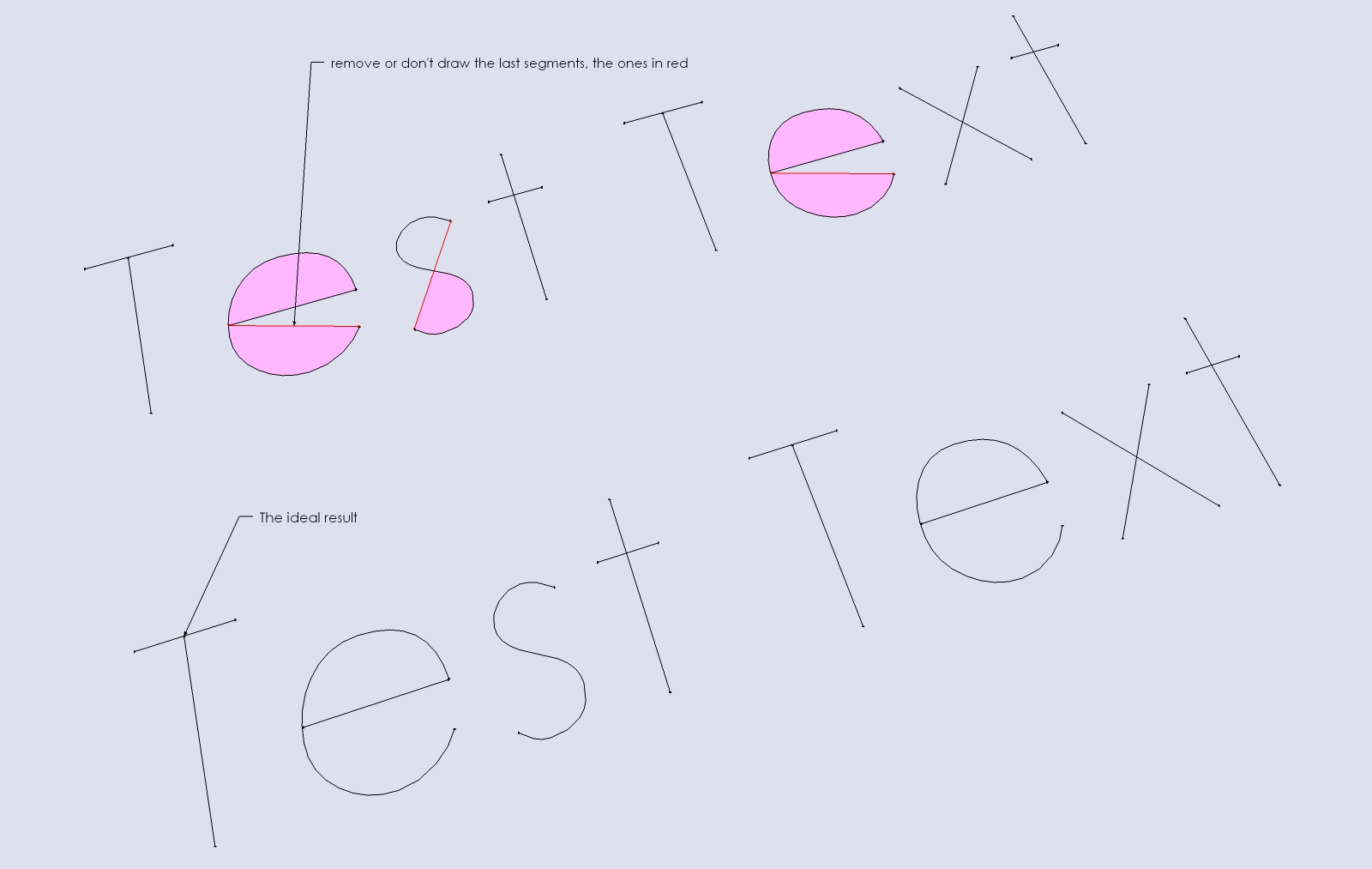
http://www.ffonts.net/Machine-Tool-Gothic.font . The preview in windows font viewer is horrible, but in sketchup they work just fine. If I understand correctly, ttf fonts have to be closed shapes, but that makes for an ineffective engraving/cutting font.I usually create the text and then explode it/edit it to remove the last segment, so I get single line fonts. This is fine, but makes the text non editable after this. Is it possible to have an option in your plugin to use these kind of fonts and not close the loops / draw the last segment.
Again, thanks a lot for all your work!
Santiago
-
The extension has very little control over how the text is drawn - it's all done by SketchUp.
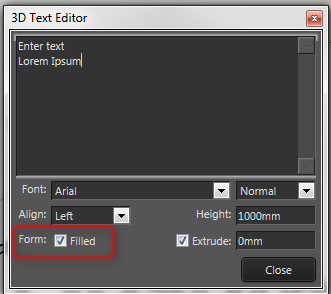
But there is an option to fill or not fill;
-
Hi Thomthom,
thanks for the reply.
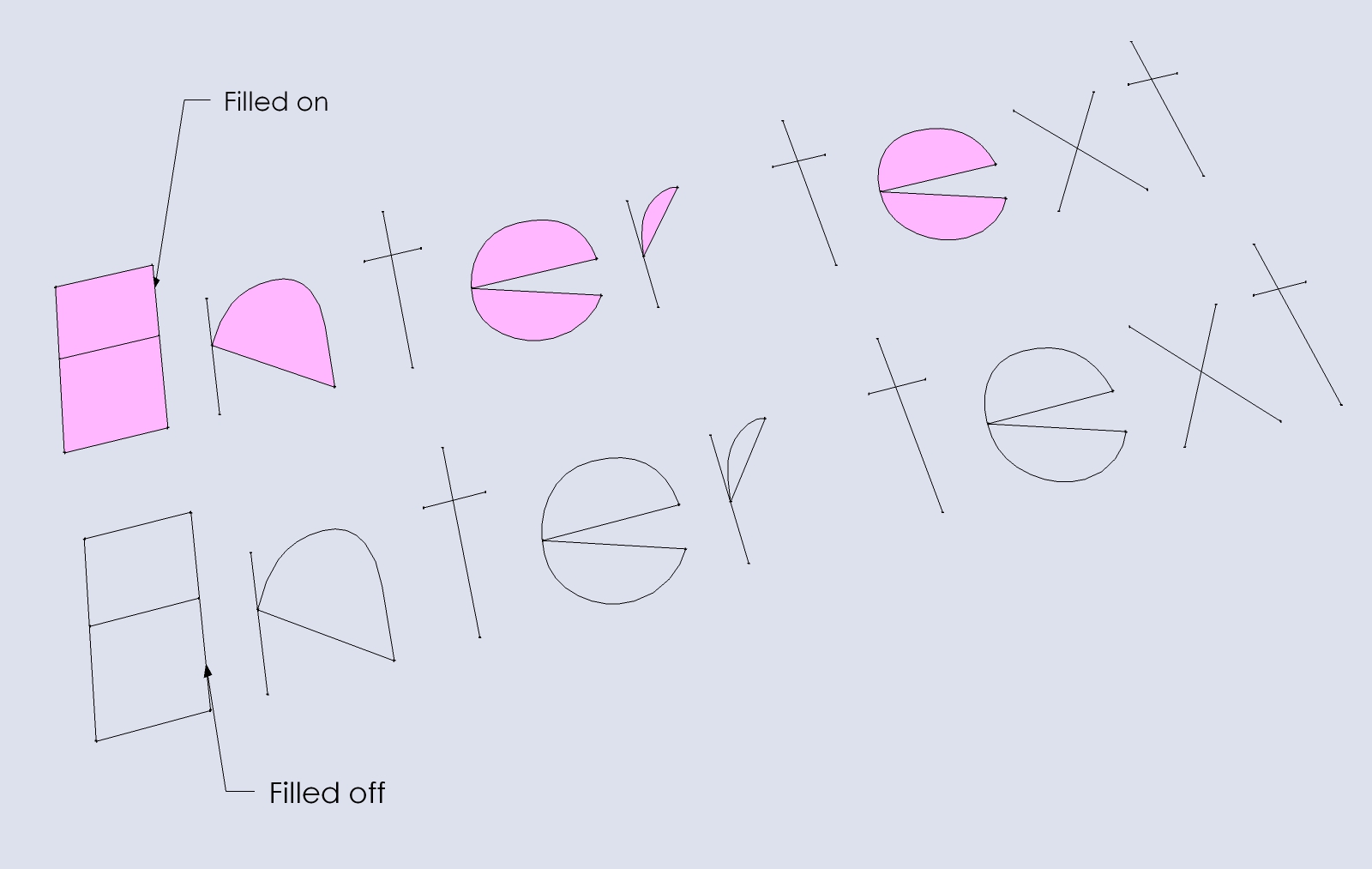
Yes, but that option only removes the polygon, the lines are all drawn with or without filled polygon.
So if I understand, text is created by sketchup directly, not by your plugin. What your plugin does is in a way, control the native sketchup 3d text tool, and keep a reference of the text content, so it can be changed afterwards.
Not easy to change I guess, or, it should be changed directly in sketchup's core.
-
Yes, it keeps track of the text and create it using a single API method: http://ruby.sketchup.com/Sketchup/Entities.html#add_3d_text-instance_method
It's the UI that's the most complicated part of it - which isn't that complicated by itself.
-
Version 1.2.0
This version should be more reliable in getting the list of system fonts. I require update TT_Lib, version 2.11 or newer.
-
I cannot find TT_Lib2 listed in SketchUcation Store
-
@bob james said:
I cannot find TT_Lib2 listed in SketchUcation Store
Do a less rigid search [no '2']:
https://sketchucation.com/pluginstore?pln=TT_Lib -
Hi Thomas,
I have downloaded this plugin and will be using it on a regular bases. It works great for me so far. Thanks for putting it out there.
I have 2 requests for a future version if you are planning on developing this further:
-
A dropdown (or similar) that allows users to choose the layer for the text to be placed on in the context menu. For example, if I want to keep all my text on a layer called "Labels". I know I can do it now by double clicking on the text, highlighting all lines, and putting them on the correct layer. Choosing the layer from the context menu would be a real time saver.
-
I don't know if it is even possible, but I was wondering if there could be a way to have the 3D text auto-fill based on a dynamic component attribute. Maybe something along the lines of the user making a custom attribute called "3D_Text_Input" at the top level of a component, and inserting a 3D text object into the dynamic component as a child component. Then the text field in the context menu for your plugin could automatically retrieve the input via a "=parent!3D_Text_Input" command (or similar). This feature could be turned on or off via a checkbox in the context menu. I would be willing to pay for this functionality because it would save me so much time, but it doesn't exist in any plugin that I am aware of.
-
-
Hi ThomThom, I'm having problems with 3D Text Editor. If I create some text using this Plugin then rotate it I get problems editing it! After I select 'Edit Text' the text rotates back to it's original orientation!?
I'm using SketchUp Pro 2016 on a Mac OS X 10.11.06.
-
@aroundthebend said:
Hi ThomThom, I'm having problems with 3D Text Editor. If I create some text using this Plugin then rotate it I get problems editing it! After I select 'Edit Text' the text rotates back to it's original orientation!?
I'm using SketchUp Pro 2016 on a Mac OS X 10.11.06.
I'm having the same issue - not a big deal but it would be nice not to need to rotate in place after edit.
jorgensen
-
Hello and good morning,
After intalling 3D Text Editor in SU 2019 I cant find the plugin
Is it me or SU 2019 ??
thanks for looking into it
Uli






Hello! It looks like you're interested in this conversation, but you don't have an account yet.
Getting fed up of having to scroll through the same posts each visit? When you register for an account, you'll always come back to exactly where you were before, and choose to be notified of new replies (either via email, or push notification). You'll also be able to save bookmarks and upvote posts to show your appreciation to other community members.
With your input, this post could be even better 💗
Register Login


Advertisement