[Plugin] 3D Text Editor
-
I really like the plugin but have a couple of things I would like for it to do (if possible):
- I would like for it to remember my selections (font, size, alignment, etc.) so that I do not have to go through the selections everytime.
- I would like to be able to specify the color (both face and outline if possible). In fact, it would be great if there was a way to eliminate the outline. I have a lot of text to enter in my model and it is a pain to go eliminate the outline all of the time.
-
"Outline"?
-
I suppose he means he's hiding the edges.
@ntxdave, how is it that you current "eliminate the outline" on 3D text?
-
@dave r said:
I suppose he means he's hiding the edges.
@ntxdave, how is it that you current "eliminate the outline" on 3D text?
Switch to wireframe style, Edit Component (the 3d text), select of the text, hide the text, then switch the style back to shaded with textures. This results with only the "face" of the text (if you colored it - which I do with the pain bucket tool).
While this works, it is a pain when you have a lot of text components in the model (which I do). Thus the desire to have the ability to do these additional things.
-
- This plugin's download needs updating on the first post. On the plugins store it's 1.1.3
-
Sorted.
-
@ntxdave said:
I really like the plugin but have a couple of things I would like for it to do (if possible):
- I would like for it to remember my selections (font, size, alignment, etc.) so that I do not have to go through the selections everytime.
- I would like to be able to specify the color (both face and outline if possible).
- It already does (at least for me)
- +1
-
@bob james said:
@ntxdave said:
I really like the plugin but have a couple of things I would like for it to do (if possible):
- I would like for it to remember my selections (font, size, alignment, etc.) so that I do not have to go through the selections everytime.
- I would like to be able to specify the color (both face and outline if possible).
- It already does (at least for me)
- +1
I just tried again on 2 different machines and #1 does not work for me. I really wish it did. I have also emailed these items to TT.
-
Hi Thom,
When I edit a rotated 3D text object, it bounces to a new position and resets it's rotation...
On the other hand if I have multiple instances, only the one I select to edit bounces and changes rotation, while the others maintain their position... -
First good job thomthom.
But I got two problem while using it.
When start the plugin, this popup come up.
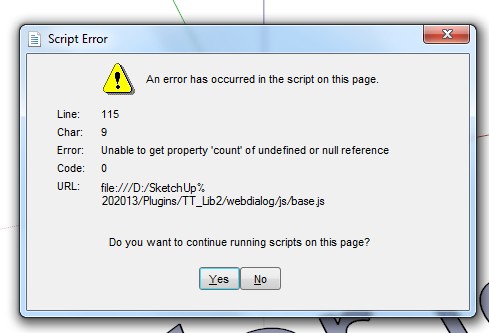
And when click the font, there is none fonts for chose.
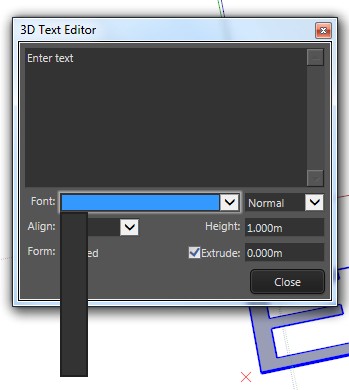
BTW, my computer system is windows 7 and IE is 11.
Hope you can help me fix it, thanks. -
What version of TT_Lib2 do you have installed?
-
-
Should the file path be .../SketchUp**%20**2013/...? Could that be a problem?
-
It is... but the string breaks at the % because it can't fit in the dialog.
The error is that the font-list is empty so the js can't work with it...
So something is stopping the font-list getting made... or at least 'displayed' in the dropdown...
Perhaps the dropdown making code is at fault - that's why the newest Lib is required as that has reused methods for that kind of thing...Assuming it is...
In tt's code if the fonts-list that the code tries to make is 'empty' it then uses a default fonts-list anyway... So there should be fonts listed ??
It does seem to be making some 3d text using Arial [?]...
So it suggests that you have somehow mis-installed the toolset's files ?
Is there any Windows Explorer > Compatibility Files / VirtualStore issues ?
Do you have FULL Security permissions to read/write files to the Plugins folder ? -
I wasn't thinking of the line break in the dialog box but rather the %20 instead of a space. Maybe it doesn't matter in this case.
-
@tig said:
It is... but the string breaks at the % because it can't fit in the dialog.
The error is that the font-list is empty so the js can't work with it...
So something is stopping the font-list getting made... or at least 'displayed' in the dropdown...
Perhaps the dropdown making code is at fault - that's why the newest Lib is required as that has reused methods for that kind of thing...Uh, seems a little complex...
- I'm login as administrator, so I think I have full security permissions to read/write files to the Plugins folder.
- All plugins are auto-installed in the sketchUcation store, so I think the "mis-installed" question doesn't exist.
- As for the "Windows Explorer > Compatibility Files / VirtualStore issue", I have no idea

-
Being logged in as administrator does not assure full permissions to the Plugins folder are granted. You need to check that and change it if permissions are not granted. Not that complex.
-
With admin powers...
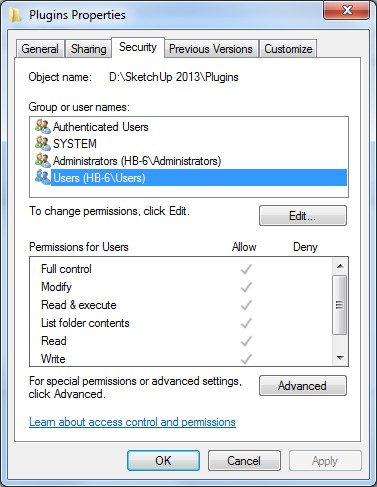
Select the Plugins folder icon.Right-click
Context-menu
Properties
Security
Edit...Ensure everyone in the list has FULL permissions ticked.
Apply/OK
The permissions to subfolders within the 'Program Files' tree, of everyone - including admins - are limited by Windows by default. You simply need to reset them to FULL, otherwise you will not be able to add/change files into that folder - although you think you have !
Also while you are at it...
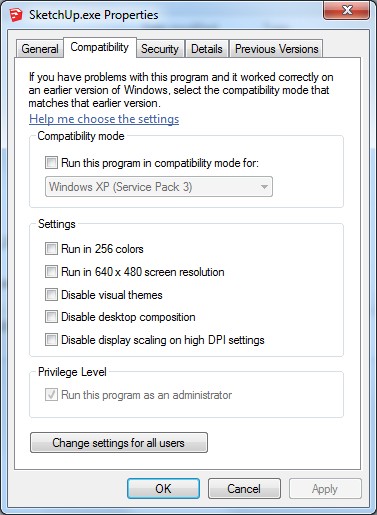
Select the SketchUp.exe file icon [in the same folder as the Plugins folder].
Right-click
Context-menu
Properties
Compatibility
Always run as administrator... should be tickedApply/OK
The 'Compatibility Files' issue arises if you have limited security permissions to a folder - like Plugins - and Windows [weirdly] lets you think you have installed actually the file[s] and subfolders etc, but in fact it has put them into a VirtualStore - so if you have a 'Compatibility Files...' link/button in the top bars of your Windows Explorer window for a folder like Plugins then that's a sign of you having insufficient permissions to add/change files; click on the link to see what you think was installed but is squirreled away by the OS

-
Hm... I've not had time to look at this yet, but TIG's comment about the font list not being populated could be a clue. Maybe IE11 had removed the MS hack I used to get the font list...
The %20 instead of a space is just IE transforming the path string into a URL string. Nothing wrong there.
-
@tig said:
With admin powers...
Select the Plugins folder icon.Right-click
Context-menu
Properties
Security
Edit...Bad news.
I'v make everyone in the list has full permissions ticked, and still, it doesn't work







Hello! It looks like you're interested in this conversation, but you don't have an account yet.
Getting fed up of having to scroll through the same posts each visit? When you register for an account, you'll always come back to exactly where you were before, and choose to be notified of new replies (either via email, or push notification). You'll also be able to save bookmarks and upvote posts to show your appreciation to other community members.
With your input, this post could be even better 💗
Register Login


Advertisement