sketchucation logo sketchucation
    • Login
    Oops, your profile's looking a bit empty! To help us tailor your experience, please fill in key details like your SketchUp version, skill level, operating system, and more. Update and save your info on your profile page today!
    Mac User? | Join the Rayscaper Beta for Mac Learn More

    Deep nest

    Scheduled Pinned Locked Moved Plugins
    27 Posts 12 Posters 7.7k Views 12 Watching
    Loading More Posts
    • Oldest to Newest
    • Newest to Oldest
    • Most Votes
    Reply
    • Reply as topic
    Log in to reply
    This topic has been deleted. Only users with topic management privileges can see it.
    • Dave RD
      Dave R
      last edited by

      Have you tried using the Outliner?

      Etaoin Shrdlu

      %

      (THERE'S NO PLACE LIKE)

      G28 X0.0 Y0.0 Z0.0

      M30

      %

      1 Reply Last reply
      Reply Quote 0
      • kachuppK
        kachupp
        last edited by

        @dave r said:

        Have you tried using the Outliner?

        Never thought of using it.. it works. I'd still prefer right click exit 👍

        1 Reply Last reply
        Reply Quote 0
        • J
          Jim
          last edited by

          Paste this into a file with the .rb extension in your plugins folder.

          
          UI.add_context_menu_handler {|menu|
            menu.add_item("Close All Contexts") {
              Sketchup.active_model.selection.clear
              while (Sketchup.active_model.close_active); end
            }
          }


          Hi

          1 Reply Last reply
          Reply Quote 0
          • kachuppK
            kachupp
            last edited by

            Perfect Jim thank you very much

            1 Reply Last reply
            Reply Quote 0
            • irwanwrI
              irwanwr
              last edited by

              [Plugin] Deep Nested Escape? 😛

              1 Reply Last reply
              Reply Quote 0
              • halroachH
                halroach
                last edited by

                Nice!
                I am unable to assign a keyboard shortcut to it. How can I do it?

                FlexTools - Super Quick Windows, Doors, Slats...

                1 Reply Last reply
                Reply Quote 0
                • massimoM
                  massimo Moderator
                  last edited by

                  You'll find it in the context menu: right click-->Close All Contexts

                  1 Reply Last reply
                  Reply Quote 0
                  • Dave RD
                    Dave R
                    last edited by

                    Since it is in the Context menu, you need to have something selected such that there'd be a Context menu entry for the plugin. Open a component or group within a nest and select an edge or face. It'll then be available for setting the shortcut.
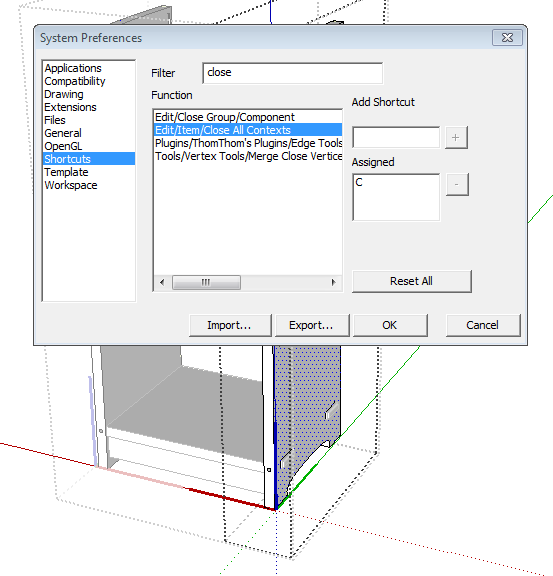
                    close.PNG

                    Etaoin Shrdlu

                    %

                    (THERE'S NO PLACE LIKE)

                    G28 X0.0 Y0.0 Z0.0

                    M30

                    %

                    1 Reply Last reply
                    Reply Quote 0
                    • halroachH
                      halroach
                      last edited by

                      @dave r said:

                      Since it is in the Context menu, you need to have something selected such that there'd be a Context menu entry for the plugin. Open a component or group within a nest and select an edge or face. It'll then be available for setting the shortcut.

                      [attachment=0:32nirxzw]<!-- ia0 -->close.PNG<!-- ia0 -->[/attachment:32nirxzw]

                      Right!! thanks!!!
                      Excellent!!! 👍 👍

                      FlexTools - Super Quick Windows, Doors, Slats...

                      1 Reply Last reply
                      Reply Quote 0
                      • massimoM
                        massimo Moderator
                        last edited by

                        Not so easy I'm afraid, but i might be wrong. It will work only depending on what you have selected when you assigned the shortcut and not in any situation and at any "level" of selection like the "normal" right click does.

                        1 Reply Last reply
                        Reply Quote 0
                        • Dave RD
                          Dave R
                          last edited by

                          Massimo, you're right. However the plugin isn't available to select from the Function list unless an entity within a component is selected. It doesn't have to be a face within an inner component. It could be a component that is selected. Unless an entity is selected, though, the keyboard shortcut won't work. Weird.

                          Etaoin Shrdlu

                          %

                          (THERE'S NO PLACE LIKE)

                          G28 X0.0 Y0.0 Z0.0

                          M30

                          %

                          1 Reply Last reply
                          Reply Quote 0
                          • Bob JamesB
                            Bob James
                            last edited by

                            @jim said:

                            Paste this into a file with the .rb extension in your plugins folder.

                            
                            > UI.add_context_menu_handler {|menu|
                            >   menu.add_item("Close All Contexts") {
                            >     Sketchup.active_model.selection.clear
                            >     while (Sketchup.active_model.close_active); end
                            >   }
                            > }
                            > 
                            

                            Called it BackOut.rb, assigned a shortcut to it, added it to a key on my P.I. Engineering x-keys keyboard and now I can back out from within any group/component with one key. Sure beats pecking at the Escape key 😄
                            Thank you very much 👍

                            i7-4930K 3.4Ghz, 2x GTX780 6GB, 32GB DDR3-1600 ECC, OCZ Vertex 4 500GB, WD Black 3TB, 32TB NAS, 4x 27" Monitors, SpaceMouse Pro, X-keys XK-60

                            1 Reply Last reply
                            Reply Quote 0
                            • J
                              Jim
                              last edited by

                              You're welcome.

                              I will be adding 2 commands to Custom Toolbars named "CloseActive" and "CloseAllActive" for those who like toolbar buttons.

                              Hi

                              1 Reply Last reply
                              Reply Quote 0
                              • J
                                Jim
                                last edited by

                                Bob, I could put "BackOut.rb" in the Plugin Store, if that would be alright with you.

                                Although I wonder if it's worth it for what is practically a one-liner; but I suppose code size isn't always related to usefulness.

                                Hi

                                1 Reply Last reply
                                Reply Quote 0
                                • K
                                  kaas
                                  last edited by

                                  @jim said:

                                  Paste this into a file with the .rb extension in your plugins folder.

                                  
                                  > UI.add_context_menu_handler {|menu|
                                  >   menu.add_item("Close All Contexts") {
                                  >     Sketchup.active_model.selection.clear
                                  >     while (Sketchup.active_model.close_active); end
                                  >   }
                                  > }
                                  > 
                                  

                                  Thanks a lot! Those few lines of code make working with more complex object trees much easier.

                                  1 Reply Last reply
                                  Reply Quote 0
                                  • tt_suT
                                    tt_su
                                    last edited by

                                    @kaas said:

                                    Thanks a lot! Those few lines of code make working with more complex object trees much easier.

                                    The Outliner will let you jump directly in and out of the model hierarchy.

                                    1 Reply Last reply
                                    Reply Quote 0
                                    • K
                                      kaas
                                      last edited by

                                      @tt_su said:

                                      The Outliner will let you jump directly in and out of the model hierarchy.

                                      I know, I use it all the time but using a keypress is a bit more quick than moving the pen to the outliner and back again.

                                      1 Reply Last reply
                                      Reply Quote 0
                                      • Bob JamesB
                                        Bob James
                                        last edited by

                                        @jim said:

                                        Bob, I could put "BackOut.rb" in the Plugin Store, if that would be alright with you.

                                        It's your plugin, all I did was give it a name 😄

                                        @jim said:

                                        Although I wonder if it's worth it for what is practically a one-liner; but I suppose code size isn't always related to usefulness.

                                        This one is worth it


                                        BackOut.rb

                                        i7-4930K 3.4Ghz, 2x GTX780 6GB, 32GB DDR3-1600 ECC, OCZ Vertex 4 500GB, WD Black 3TB, 32TB NAS, 4x 27" Monitors, SpaceMouse Pro, X-keys XK-60

                                        1 Reply Last reply
                                        Reply Quote 0
                                        • KrisidiousK
                                          Krisidious
                                          last edited by

                                          looked for this in the plugin store... didn't find it. needs to be there. doesn't seem to work in 2015?

                                          By: Kristoff Rand
                                          Home DesignerUnique House Plans

                                          1 Reply Last reply
                                          Reply Quote 0
                                          • BoxB
                                            Box
                                            last edited by

                                            Works fine for me in 2015

                                            1 Reply Last reply
                                            Reply Quote 0

                                            Hello! It looks like you're interested in this conversation, but you don't have an account yet.

                                            Getting fed up of having to scroll through the same posts each visit? When you register for an account, you'll always come back to exactly where you were before, and choose to be notified of new replies (either via email, or push notification). You'll also be able to save bookmarks and upvote posts to show your appreciation to other community members.

                                            With your input, this post could be even better 💗

                                            Register Login
                                            • 1
                                            • 2
                                            • 1 / 2
                                            • First post
                                              Last post
                                            Buy SketchPlus
                                            Buy SUbD
                                            Buy WrapR
                                            Buy eBook
                                            Buy Modelur
                                            Buy Vertex Tools
                                            Buy SketchCuisine
                                            Buy FormFonts

                                            Advertisement