sketchucation logo sketchucation
    • 登入
    Oops, your profile's looking a bit empty! To help us tailor your experience, please fill in key details like your SketchUp version, skill level, operating system, and more. Update and save your info on your profile page today!
    🔌 Smart Spline | Fluid way to handle splines for furniture design and complex structures. Download

    Something like "follow me" tool is needed

    已排程 已置頂 已鎖定 已移動 Newbie Forum
    sketchup
    29 貼文 7 Posters 3.7k 瀏覽 7 Watching
    正在載入更多貼文
    • 從舊到新
    • 從新到舊
    • 最多點贊
    回覆
    • 在新貼文中回覆
    登入後回覆
    此主題已被刪除。只有擁有主題管理權限的使用者可以查看。
    • TIGT 離線
      TIG Moderator
      最後由 編輯

      You can also use ' weld' [free script from smustard.com] on preselected connected arcs etc into one 'curve' before using a tool, to avoid separate parts getting made...

      TIG

      1 條回覆 最後回覆 回覆 引用 0
      • pilouP 離線
        pilou
        最後由 編輯

        Or Recurve by Diggsey 😉

        Frenchy Pilou
        Is beautiful that please without concept!
        My Little site :)

        1 條回覆 最後回覆 回覆 引用 0
        • mitcorbM 離線
          mitcorb
          最後由 編輯

          A little way back you said in your reply: "next line2tube I got a lot of gapes in the joints. I dont Know how to fix them, so I made second try with other shape maker," Lines2tubes is an excellent script, but it will make segments of the tubes, and sometimes you want that. TIG's TubeAlongPath, or even PipeAlongPath makes smooth results. Just a thought.

          I take the slow, deliberate approach in my aimless wandering.

          1 條回覆 最後回覆 回覆 引用 0
          • B 離線
            banan666
            最後由 編輯

            Great, thank You very much Pilou for the amazing tutorials, I will try to make it tomorrow, because today I had problem with my PC, my hard disk was broken so I have to buy new one, then install windows and all the rest stuff.
            Im thinking all the time about this panel.

            http://s1.pokazywarka.pl/i/1711679/685769/bez-nazwy.jpg

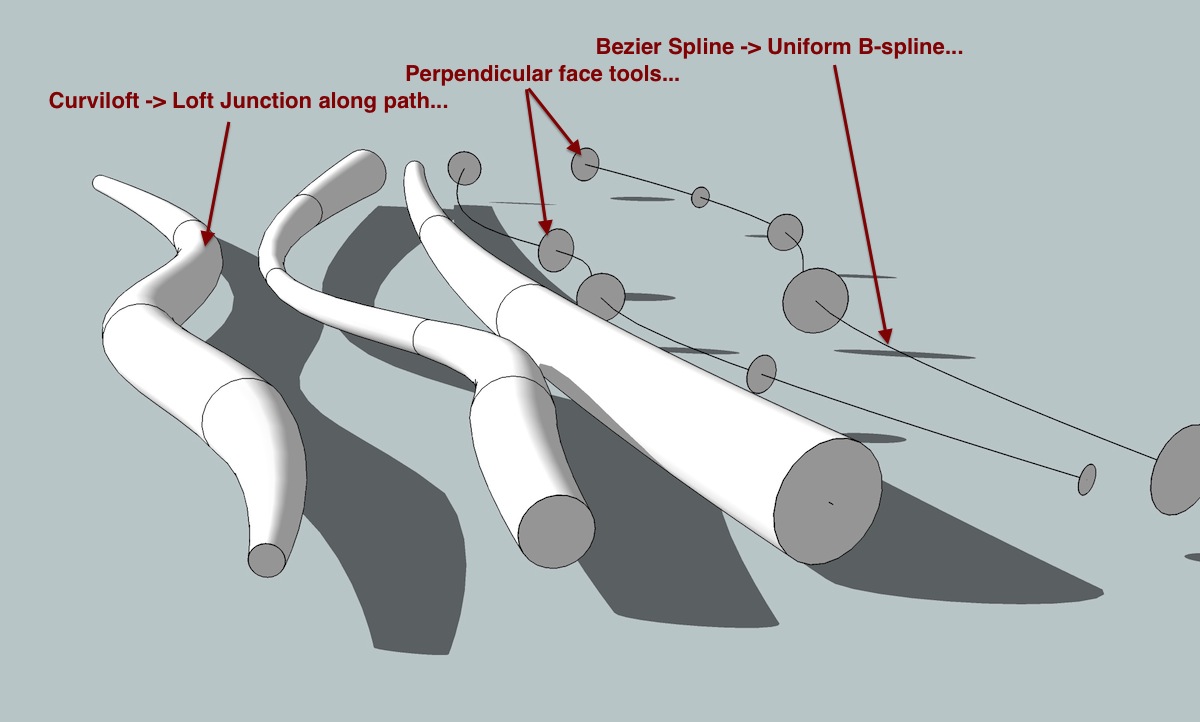
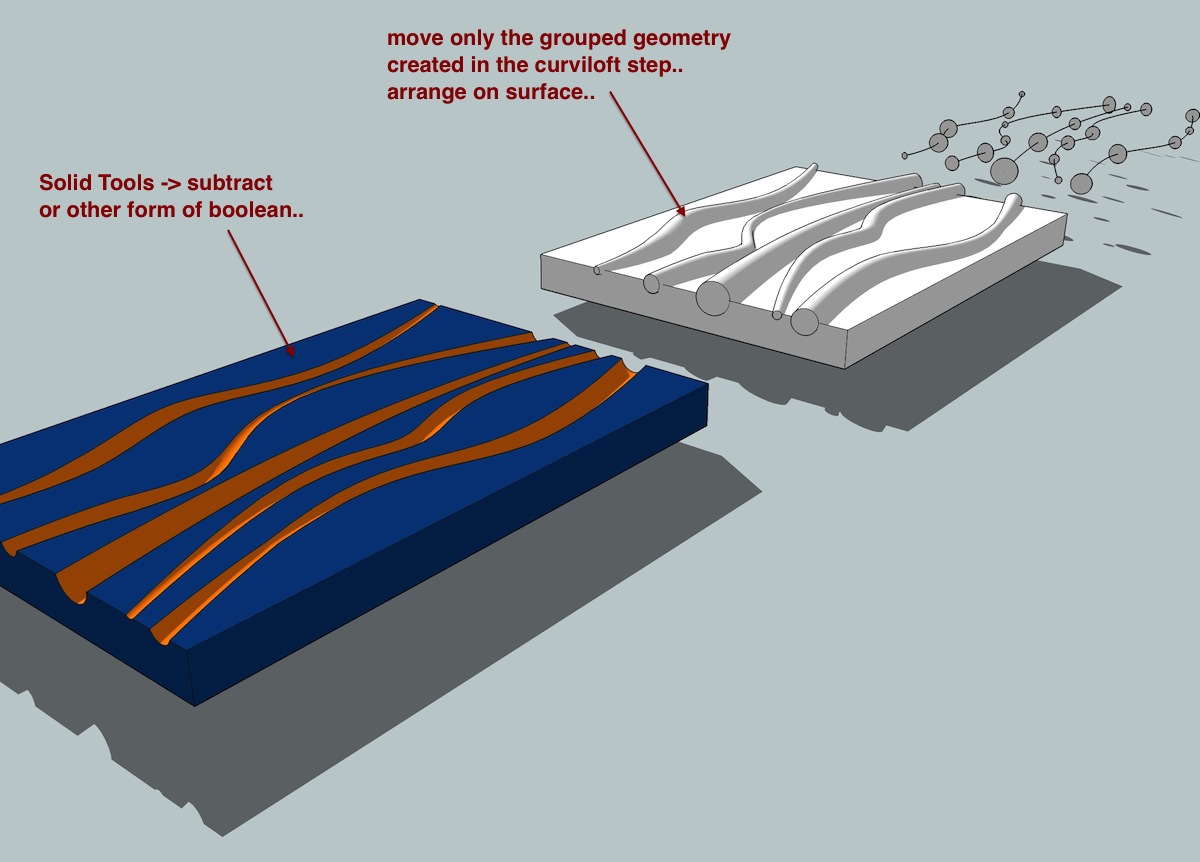
            Now I now how to make pipe witch have the same width all the way, but how to change width, and depth at the same time. Like on the picture above, for example.
            1 條回覆 最後回覆 回覆 引用 0
            • GaieusG 離線
              Gaieus
              最後由 編輯

              @banan666 said:

              Now I now how to make pipe witch have the same width all the way, but how to change width, and depth at the same time. Like on the picture above, for example.

              With Curviloft maybe? Not even just change width but also the shape of the cross section (if you wish).

              Gai...

              1 條回覆 最後回覆 回覆 引用 0
              • jeff hammondJ 離線
                jeff hammond
                最後由 編輯

                @banan666 said:

                Im thinking all the time about this panel.

                http://s1.pokazywarka.pl/i/1711679/685769/bez-nazwy.jpg

                Now I now how to make pipe witch have the same width all the way, but how to change width, and depth at the same time. Like on the picture above, for example.

                untitled.jpg

                Untitled2.jpg

                dotdotdot

                1 條回覆 最後回覆 回覆 引用 0
                • B 離線
                  banan666
                  最後由 編輯

                  Ive been try to use the OSCoolean tool and Substract from Solid tools but Ive all the time some strange errors. OSCoolean give me "erroe of the intersect with" and some numbers, 21,2 etc. Substract from Solid its the same. When I made one line its ok, but the I want to take another one its not working beacause firt use change the model, and its not SOLID.


                  OSCoolean problem.rar

                  1 條回覆 最後回覆 回覆 引用 0
                  • pilouP 離線
                    pilou
                    最後由 編輯

                    Before a dedicated plugin "Follow me Multiple" who is quasi terminated ☀
                    here a workflow for one of your image 😉

                    You will must use twice the Menu Window / Ruby console 🤓

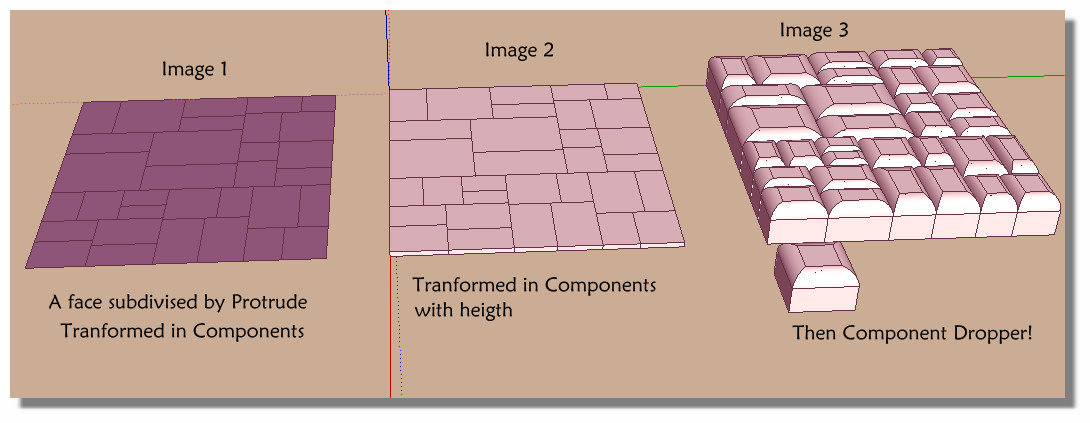
                    Image 1 : Select all the Protrude's faces : Protrude by Jim Foltz
                    and input the text folling inside the Ruby Console for transform each faces on components
                    Must be on only one line (use the Notepad for verify)
                    Press Enter (Thx TIG) - Press the Select All, Right Click and copy past on your Ruby Console

                    m=Sketchup.active_model;n=m.active_entities;m.selection.to_a.each{|e|(g=n.add_group(e);g.to_component.definition.name="Face#1")if e.class==Sketchup;;Face}
                    

                    Image 2

                    Give a thickness to the components selection
                    (again the text following must be on one line in the Ruby COnsole)
                    Press Enter (Thx Sdmitch) -Press the Select All, Right Click and copy past on your Ruby Console

                    mod=Sketchup.active_model;sel=mod.selection;sel.grep(Sketchup;;ComponentInstance).each{|c| c.definition.entities.each{|f|(f.pushpull -1;break) if f.class==Sketchup;;Face}}
                    

                    Image 3
                    Make any component volume that you want
                    Select all the "faces components"
                    And Call the Component Dropper by Thomthom
                    Just click your module made has you want 😉

                    That all! ☀

                    Ps You can scale on x,y,z before or / and after the "Components Dropper"
                    Dropper1.jpg

                    Frenchy Pilou
                    Is beautiful that please without concept!
                    My Little site :)

                    1 條回覆 最後回覆 回覆 引用 0
                    • pilouP 離線
                      pilou
                      最後由 編輯

                      And on image 2 you can put a randomly thickness! THX Sdmitch
                      Just use this line against the above
                      You replace "100" by any number you want! (rand*100)

                          mod=Sketchup.active_model;sel=mod.selection;sel.grep(Sketchup;;ComponentInstance).each{|c| c.definition.entities.each{|f|(f.pushpull -(rand*100);break) if f.class==Sketchup;;Face}}
                      

                      THX Sdmitch! ☀

                      dog.jpg

                      Frenchy Pilou
                      Is beautiful that please without concept!
                      My Little site :)

                      1 條回覆 最後回覆 回覆 引用 0
                      • 1
                      • 2
                      • 2 / 2
                      • 第一個貼文
                        最後的貼文
                      Buy SketchPlus
                      Buy SUbD
                      Buy WrapR
                      Buy eBook
                      Buy Modelur
                      Buy Vertex Tools
                      Buy SketchCuisine
                      Buy FormFonts

                      Advertisement