sketchucation logo sketchucation
    • 登入
    Oops, your profile's looking a bit empty! To help us tailor your experience, please fill in key details like your SketchUp version, skill level, operating system, and more. Update and save your info on your profile page today!
    🔌 Smart Spline | Fluid way to handle splines for furniture design and complex structures. Download

    Something like "follow me" tool is needed

    已排程 已置頂 已鎖定 已移動 Newbie Forum
    sketchup
    29 貼文 7 Posters 3.7k 瀏覽 7 Watching
    正在載入更多貼文
    • 從舊到新
    • 從新到舊
    • 最多點贊
    回覆
    • 在新貼文中回覆
    登入後回覆
    此主題已被刪除。只有擁有主題管理權限的使用者可以查看。
    • B 離線
      banan666
      最後由 編輯

      Hi, I just start work with sketchup. I watched a lot of video on YT about it. Now I want to create model of mdf panel, then transform it to gcodes and make it on cnc machine. I made simple sketch of a panel, it looks like that:

      http://s1.pokazywarka.pl/bigImages/1692991/5940739.jpg

      and I want to make 5 mm cavity in the material fallow the every line, like that:

      http://s1.pokazywarka.pl/i/1692991/198890/post5.jpg

      or like that:

      http://s1.pokazywarka.pl/i/1692991/714272/post6.jpg

      I could use "fallow me tool", but I need to make every single line separetly.

      The final panel should look like one of this three samples:

      http://s1.pokazywarka.pl/i/1692991/685729/post4.jpg

      http://s1.pokazywarka.pl/i/1692991/123255/post2.jpg

      http://s1.pokazywarka.pl/i/1692991/499647/post3.jpg

      Of course I could choose few diferent shape of the pocket, it doesnt matter actually, the problem is have to make it at once. Could any one help me?

      1 條回覆 最後回覆 回覆 引用 0
      • cottyC 離線
        cotty
        最後由 編輯

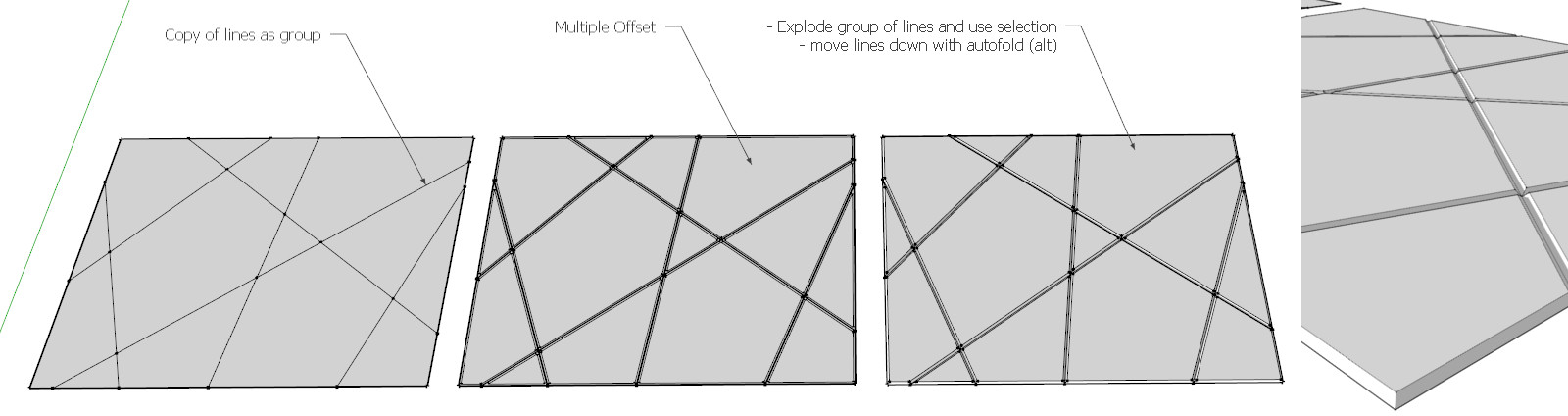
        You can use Multiple Offset for this...


        multioffset.jpg

        my SketchUp gallery

        1 條回覆 最後回覆 回覆 引用 0
        • B 離線
          banan666
          最後由 編輯

          I try to use tis multiple offset, but it doesnt work fine for me.

          Firt I select the lines, but when I make a group of them, then I couldn`t use the "multiple offset". So I select only the top lines, use the "multiple offset".

          http://s1.pokazywarka.pl/bigImages/1694076/5945251.jpg

          Then I select whole sketch, use Explode curve.

          http://s1.pokazywarka.pl/bigImages/1694076/5945248.jpg

          Then select only the midle lines and use "move tool" and it looks like that.

          http://s1.pokazywarka.pl/bigImages/1694076/5945245.jpg

          Could You explain me step by step what to do??

          1 條回覆 最後回覆 回覆 引用 0
          • pilouP 離線
            pilou
            最後由 編輯

            You must start with a simple plan, not a volume!!!

            You can find a mutiple face offset here by R.Knowles

            Another one by Remus

            Lattice-izer by Tig can help for some thing

            And a more complex Offset multiples by Sdmitch
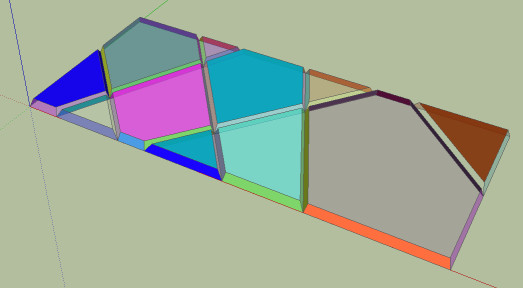
            choco.jpg

            Frenchy Pilou
            Is beautiful that please without concept!
            My Little site :)

            1 條回覆 最後回覆 回覆 引用 0
            • cottyC 離線
              cotty
              最後由 編輯

              @banan666 said:

              Firt I select the lines, but when I make a group of them, then I couldn`t use the "multiple offset".

              The group of lines is only used to make a fast selection of the lines after using multiple offset and has nothing to do with the offset process. For this, you select all faces and use the plugin.

              my SketchUp gallery

              1 條回覆 最後回覆 回覆 引用 0
              • pilouP 離線
                pilou
                最後由 編輯

                Here a simple different method 😉

                choco1.jpg


                choco1.skp

                Frenchy Pilou
                Is beautiful that please without concept!
                My Little site :)

                1 條回覆 最後回覆 回覆 引用 0
                • pilouP 離線
                  pilou
                  最後由 編輯

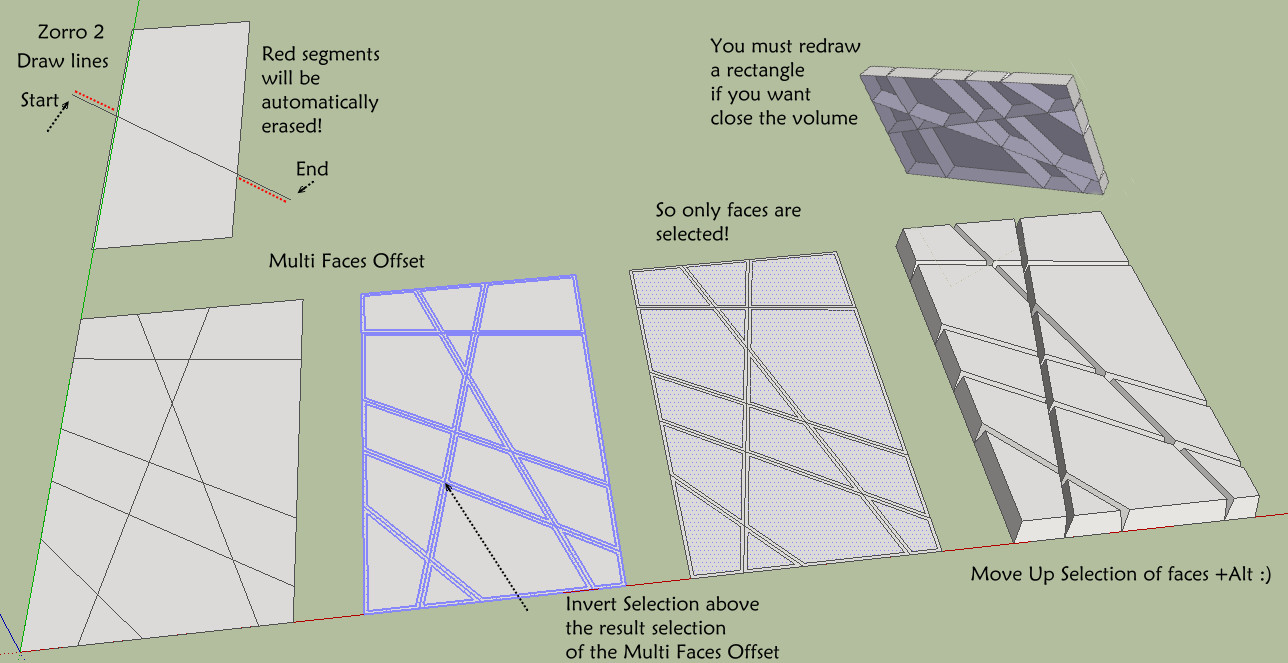
                  Ok I believe now a more easy method! ☀
                  (because the Cotty method don't work for me : all corners are disturbed ! 😮 )
                  (maybe the V6...)

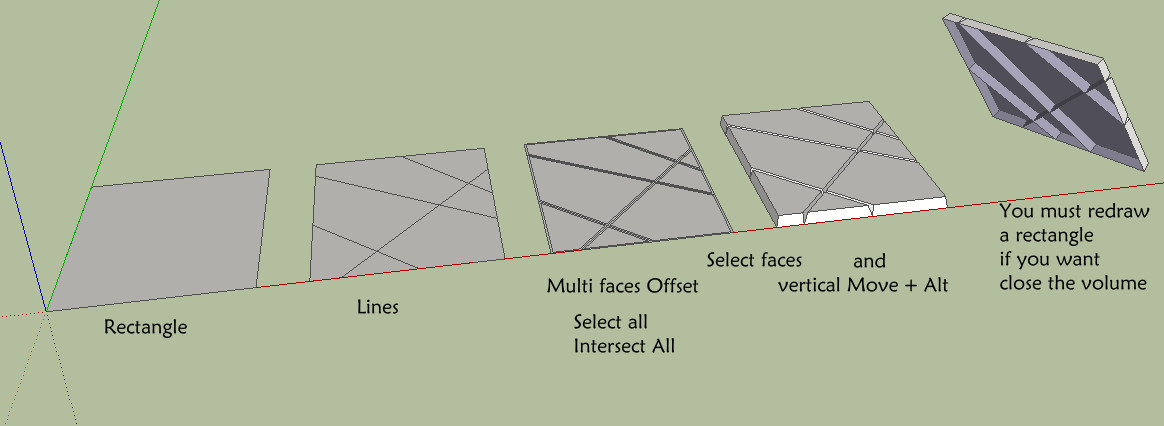
                  Draw a rectangle

                  Trace your lines with the Zorro 2 by Whaat
                  ( more easy but you can draw lines normally 😉

                  Select all

                  Multi Faces Offset (with plugins above)

                  Invert Selection by TIG so faces are selected ! The trick ! 💭

                  Move UP Faces + Alt

                  That's all 😄

                  choco2.jpg

                  Frenchy Pilou
                  Is beautiful that please without concept!
                  My Little site :)

                  1 條回覆 最後回覆 回覆 引用 0
                  • B 離線
                    banan666
                    最後由 編輯

                    Ok guys, finally I made it 😄

                    http://s1.pokazywarka.pl/bigImages/1694527/5946503.jpg

                    But how could I make other shape, for example circle, or square down there??

                    http://s1.pokazywarka.pl/bigImages/1694531/5946506.jpg

                    1 條回覆 最後回覆 回覆 引用 0
                    • pilouP 離線
                      pilou
                      最後由 編輯

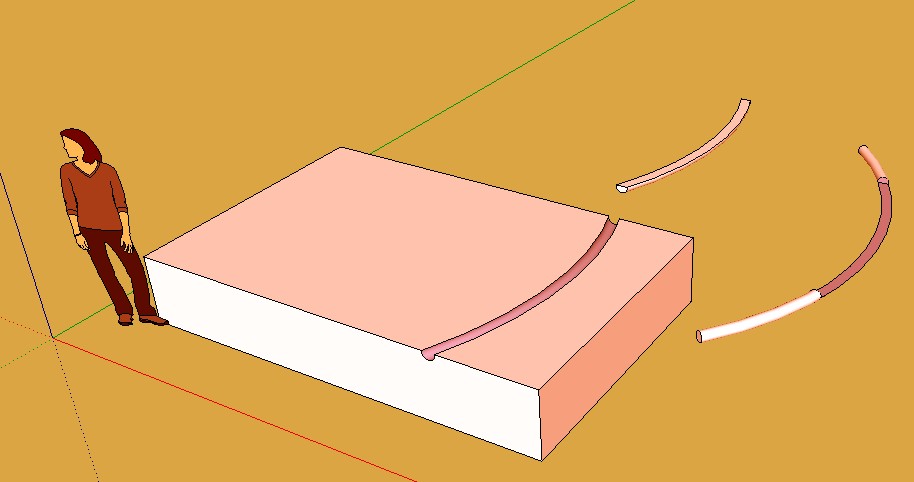
                      Maybe just draw tubes or long boxes 😄
                      A simple Push pull can do that!
                      And make intersections with a big box!

                      Lines2tubes by Didier Bur can help you 😉
                      With it you can make from 3 sides to 100 section polygons !

                      Just make lines bigger than the box for easy intersection!

                      Seems each cylinder is a volume you can Make boolean operation with the pro version
                      but you have not 😄

                      so intersection will be a solution

                      Frenchy Pilou
                      Is beautiful that please without concept!
                      My Little site :)

                      1 條回覆 最後回覆 回覆 引用 0
                      • B 離線
                        banan666
                        最後由 編輯

                        I made a try of the "line2tube" plugin and it doesnt work for me with "boolean OSCoolean".
                        Everything is ok with straight lines, but when I make some curves, then use "line2tube", and then try to use "boolean", nothing hapends. It only say: OSCoolean is processing....Nothing else.

                        http://s1.pokazywarka.pl/bigImages/1704567/5982803.jpg

                        1 條回覆 最後回覆 回覆 引用 0
                        • pilouP 離線
                          pilou
                          最後由 編輯

                          Ps Anf for your beginning post I know a ruby coder who is making a ruby one so be patient 😄

                          Frenchy Pilou
                          Is beautiful that please without concept!
                          My Little site :)

                          1 條回覆 最後回覆 回覆 引用 0
                          • pilouP 離線
                            pilou
                            最後由 編輯

                            Better if you save also the skp file 😉
                            Like that I have not to modelize something!

                            Seems works for me! ☀

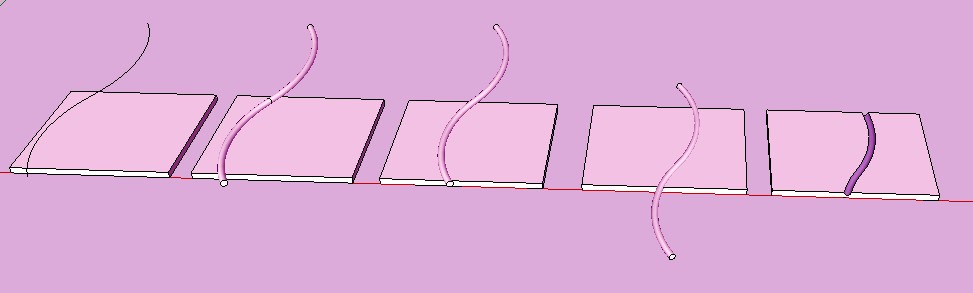
                            I make the line to tube
                            Kill the line generator
                            Explode the tube volume
                            Group it

                            and all works fine 😄

                            tube1.jpg


                            tube1.skp

                            Frenchy Pilou
                            Is beautiful that please without concept!
                            My Little site :)

                            1 條回覆 最後回覆 回覆 引用 0
                            • B 離線
                              banan666
                              最後由 編輯

                              I dont know why it doesnt work for me, please check my sketch.


                              Untitled.skp

                              1 條回覆 最後回覆 回覆 引用 0
                              • pilouP 離線
                                pilou
                                最後由 編輯

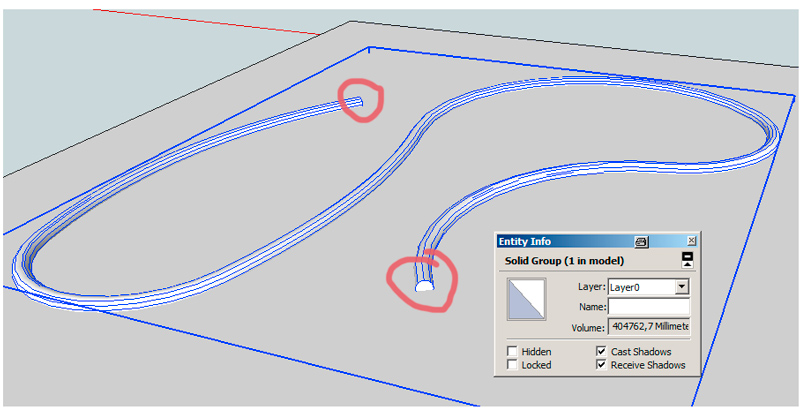
                                Ok I have found the problem 😉

                                When you click your object (the curvated volume) and call the Info box model info..., that is not a "solid"!!!
                                so that can't work!

                                So make it as solid and all will work as a charm!
                                explode all, kill the middle ring, explode curve, kill the curve generator, make a group
                                = you must have a clean solid!
                                all works fine ☀
                                tube2.jpg


                                tube2.skp

                                Frenchy Pilou
                                Is beautiful that please without concept!
                                My Little site :)

                                1 條回覆 最後回覆 回覆 引用 0
                                • TIGT 離線
                                  TIG Moderator
                                  最後由 編輯

                                  Well spotted Pilou !

                                  A 'solid' is necessary for doing boolean operations.
                                  A solid contains only faces and edges.
                                  Every edge must have two faces.
                                  No fewer and no more.

                                  The 'tube' group as made still has the curve curve snaking up its center - edges with NO faces.
                                  It also seem to have a central disk partition - edges with three faces !

                                  I prefer an even simpler way of fixing this.
                                  Edit the group, Xray mode and then pick the internal curves edges and Delete key.
                                  Similarly with the 'disk'.
                                  Now 'Entity Info' should report the selected group as being a 'solid'...

                                  TIG

                                  1 條回覆 最後回覆 回覆 引用 0
                                  • pilouP 離線
                                    pilou
                                    最後由 編輯

                                    ...and an infinite new world is opening for you! 😄
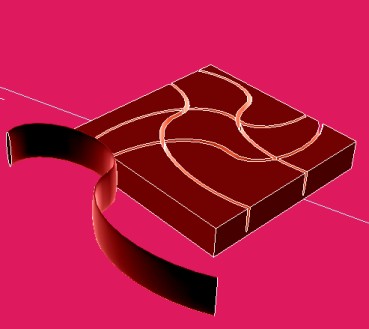
                                    tube3.jpg

                                    Frenchy Pilou
                                    Is beautiful that please without concept!
                                    My Little site :)

                                    1 條回覆 最後回覆 回覆 引用 0
                                    • B 離線
                                      banan666
                                      最後由 編輯

                                      Thx guys for Your advices, it work with low angle lines. But it start to get problems when the curve its much biger, because when I use Arc to make a shepe, next line2tube I got a lot of gapes in the joints. I dont Know how to fix them, so I made second try with other shape maker, I used Cornu Spline from Curve Maker, the line2tubes, clean all internal curves and 'disks', and 'Entity Info' report me that the selected group as being not a 'solid', just group 1 in model...

                                      http://s1.pokazywarka.pl/bigImages/1705709/5988047.jpg


                                      TUBES.skp

                                      1 條回覆 最後回覆 回覆 引用 0
                                      • pilouP 離線
                                        pilou
                                        最後由 編輯

                                        Try Profile Builder !

                                        With the free version you can't draw your own profile, but there are always tons inside! 😄

                                        Frenchy Pilou
                                        Is beautiful that please without concept!
                                        My Little site :)

                                        1 條回覆 最後回覆 回覆 引用 0
                                        • B 離線
                                          banan666
                                          最後由 編輯

                                          I have tried it before, great tool, but it doesnt work for me with OSCoolean. All the time the same problem, I couldnt make Solid form, its all the time (Group 1 in model) in Entity info and I dont know what happening...


                                          TUBES1.skp

                                          1 條回覆 最後回覆 回覆 引用 0
                                          • cottyC 離線
                                            cotty
                                            最後由 編輯

                                            @banan666 said:

                                            I have tried it before, great tool, but it doesnt work for me with OSCoolean. All the time the same problem, I couldnt make Solid form, its all the time (Group 1 in model) in Entity info and I dont know what happening...

                                            You just have to close the two ends...


                                            closedends.jpg

                                            my SketchUp gallery

                                            1 條回覆 最後回覆 回覆 引用 0
                                            • 1
                                            • 2
                                            • 1 / 2
                                            • 第一個貼文
                                              最後的貼文
                                            Buy SketchPlus
                                            Buy SUbD
                                            Buy WrapR
                                            Buy eBook
                                            Buy Modelur
                                            Buy Vertex Tools
                                            Buy SketchCuisine
                                            Buy FormFonts

                                            Advertisement